


GLSL 程式設計/GLUT/凹凸表面的光照

本教程涵蓋法線貼圖。
這是關於紋理技術的兩個教程中的第一個,這兩個教程超越了二維表面(或表面的層)。在本教程中,我們從法線貼圖開始,這是一種非常成熟的技術,可以偽造小的凹凸和凹痕的光照 - 即使在粗糙的多邊形網格上也是如此。本教程的程式碼基於平滑鏡面高光教程和紋理球體教程.
卡拉瓦喬的這幅畫描繪了多馬的懷疑,他不相信基督復活,直到他將手指放在基督的肋旁。使徒們的緊鎖眉頭不僅象徵著這種懷疑,而且透過一種常見的面部表情清晰地傳達了它。然而,為什麼我們知道他們的額頭實際上是緊鎖的,而不是用一些明暗線條畫出來的呢?畢竟,這只是一幅平面的畫作。事實上,觀眾憑直覺假設這些是緊鎖的眉頭而不是畫出來的眉頭 - 儘管這幅畫本身允許這兩種解釋。教訓是:光滑表面上的凹凸通常可以透過光照本身來令人信服地傳達,而無需任何其他線索(陰影、遮擋、視差效應、立體聲等)。
法線貼圖試圖透過根據一些虛擬凹凸更改表面法線向量來傳達光滑表面(即具有插值法線的粗糙三角形網格)上的凹凸。當使用這些修改後的法線向量計算光照時,觀看者通常會感知到虛擬凹凸 - 即使渲染的是一個完全平坦的三角形。這種錯覺當然會失效(尤其是在輪廓處),但在許多情況下它非常令人信服。
更具體地說,表示虛擬凹凸的法線向量首先被編碼到紋理影像(即法線貼圖)中。然後,片段著色器在紋理影像中查詢這些向量,並根據它們計算光照。就這樣。當然,問題在於如何將法線向量編碼到紋理影像中。存在不同的可能性,片段著色器必須適應用於生成法線貼圖的特定編碼。

我們將使用左邊的法線貼圖並編寫一個 GLSL 著色器來使用它。
法線貼圖可以使用 Blender(以及其他軟體)進行測試和建立;請參見Blender 3D: Noob to Pro wikibook 中的描述.
在本教程中,你應該使用立方體網格,而不是紋理球體教程中使用的 UV 球體。除此之外,你可以按照相同的步驟將材質和紋理影像分配給物件。請注意,你應該在屬性視窗 > 物件資料選項卡中指定一個預設的UV貼圖。此外,你應該在屬性視窗 > 紋理選項卡 > 對映中指定座標 > UV。
在解碼法線資訊時,最好知道資料是如何編碼的。但是,選擇並不多;因此,即使你不知道法線貼圖是如何編碼的,一些嘗試通常也可以獲得足夠好的結果。首先,RGB 分量是介於 0 和 1 之間的數字;但是,它們通常在區域性表面座標系中表示介於 -1 和 1 之間的座標(因為向量是歸一化的,所以任何座標都不能大於 +1 或小於 -1)。因此,從 RGB 分量到法線向量n 的對映可能是

, , 以及

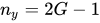

但是, 座標通常是正數(因為表面法線不允許指向內部)。這可以透過對 使用不同的對映來利用

, , and

如果有疑問,應該選擇後者解碼,因為它永遠不會生成指向內部的表面法線。此外,通常需要對結果向量進行歸一化。
在片段著色器中的實現,計算歸一化向量 n 在變數 localCoords 中,可能是
  vec4 encodedNormal = texture2D(normalmap, texCoords);
  vec3 localCoords = 2.0 * encodedNormal.rgb - vec3(1.0);

通常,使用每個表面的點的區域性表面座標系來指定法線貼圖中的法線向量。該區域性座標系的 軸由平滑的、插值的法線向量 N 給出,而 平面是表面的切平面,如左側影像所示。具體而言, 軸由 3D 引擎提供給頂點的切線屬性 T 指定。給定 和 軸, 軸可以透過頂點著色器中的叉積來計算,例如 B = T × N。(字母 B 指的是此向量的傳統名稱“副法線”。)


請注意,法線向量 N 使用模型檢視矩陣的逆矩陣的轉置從物體空間變換到檢視空間(因為它與表面正交;參見 “應用矩陣變換”),而切線向量 T 指定表面上點之間的方向,因此使用模型檢視矩陣進行變換。副法線向量 B 代表第三類向量,其變換方式不同。(如果你真的想知道:與“B×”對應的斜對稱矩陣 B 像二次形式一樣變換。)因此,最佳選擇是首先將 N 和 T 變換到檢視空間,然後使用變換後的向量的叉積在檢視空間中計算 B。
還要注意,這些軸的配置取決於所提供的切線資料、法線貼圖的編碼和紋理座標。但是,軸實際上總是正交的,法線貼圖的藍色調錶示藍色分量位於插值法線向量方向上。
有了檢視空間中的歸一化方向 T、B 和 N,我們可以輕鬆地形成一個矩陣,該矩陣將法線貼圖的任何法線向量 n 從區域性表面座標系對映到檢視空間,因為該矩陣的列只是軸向量的向量;因此,將 n 對映到檢視空間的 3×3 矩陣是
![{\displaystyle \mathrm {M} _{{\text{surface}}\to {\text{view}}}=\left[{\begin{matrix}T_{x}&B_{x}&N_{x}\\T_{y}&B_{y}&N_{y}\\T_{z}&B_{z}&N_{z}\end{matrix}}\right]}](https://wikimedia.org/api/rest_v1/media/math/render/svg/74814810be2a0e7dbde8368256effb2c5fe9bd4a)
這些計算由頂點著色器執行,例如以這種方式
attribute vec3 v_tangent;

varying mat3 localSurface2View; // mapping from
  // local surface coordinates to view coordinates
varying vec4 texCoords; // texture coordinates
varying vec4 position; // position in view coordinates

void main()
{
  mat4 mvp = p*v*m;
  position = m * v_coord;

  // the signs and whether tangent is in localSurface2View[1] or
  // localSurface2View[0] depends on the tangent attribute, texture
  // coordinates, and the encoding of the normal map
  localSurface2World[0] = normalize(vec3(m * vec4(v_tangent, 0.0)));
  localSurface2World[2] = normalize(m_3x3_inv_transp * v_normal);
  localSurface2World[1] = normalize(cross(localSurface2World[2], localSurface2World[0]));

  varyingNormal = normalize(m_3x3_inv_transp * v_normal);

  texCoords = v_texcoords;
  gl_Position = mvp * v_coord;
}
在片段著色器中,我們將該矩陣與 n(即 localCoords)相乘。例如,使用此行
vec3 normalDirection = normalize(localSurface2World * localCoords);
有了檢視空間中的新法線向量,我們就可以像 平滑鏡面反射教程 中那樣計算光照。
完整著色器程式碼
[edit | edit source]完整的片段著色器只是將所有程式碼段和 平滑鏡面反射教程 中的逐畫素光照整合在一起。
attribute vec4 v_coord;
attribute vec3 v_normal;
attribute vec2 v_texcoords;
attribute vec3 v_tangent;
uniform mat4 m, v, p;
uniform mat3 m_3x3_inv_transp;
varying vec4 position;  // position of the vertex (and fragment) in world space
varying vec2 texCoords;
varying mat3 localSurface2World; // mapping from local surface coordinates to world coordinates

void main()
{
  mat4 mvp = p*v*m;
  position = m * v_coord;

  // the signs and whether tangent is in localSurface2View[1] or
  // localSurface2View[0] depends on the tangent attribute, texture
  // coordinates, and the encoding of the normal map
  localSurface2World[0] = normalize(vec3(m * vec4(v_tangent, 0.0)));
  localSurface2World[2] = normalize(m_3x3_inv_transp * v_normal);
  localSurface2World[1] = normalize(cross(localSurface2World[2], localSurface2World[0]));

  texCoords = v_texcoords;
  gl_Position = mvp * v_coord;
}
uniform mat4 m, v, p;
uniform mat4 v_inv;
uniform sampler2D normalmap;
varying vec4 position;  // position of the vertex (and fragment) in world space
varying vec2 texCoords; // the texture coordinates
varying mat3 localSurface2World; // mapping from local surface coordinates to world coordinates

struct lightSource
{
  vec4 position;
  vec4 diffuse;
  vec4 specular;
  float constantAttenuation, linearAttenuation, quadraticAttenuation;
  float spotCutoff, spotExponent;
  vec3 spotDirection;
};
lightSource light0 = lightSource(
  vec4(0.0,  2.0, -1.0, 1.0),
  vec4(1.0,  1.0,  1.0, 1.0),
  vec4(1.0,  1.0,  1.0, 1.0),
  0.0, 1.0, 0.0,
  180.0, 0.0,
  vec3(0.0, 0.0, 0.0)
);
vec4 scene_ambient = vec4(0.2, 0.2, 0.2, 1.0);

struct material
{
  vec4 ambient;
  vec4 diffuse;
  vec4 specular;
  float shininess;
};
material frontMaterial = material(
  vec4(0.2, 0.2, 0.2, 1.0),
  vec4(0.920, 0.471, 0.439, 1.0),
  vec4(0.870, 0.801, 0.756, 0.5),
  50.0
);

void main()
{
  vec4 encodedNormal = texture2D(normalmap, texCoords);
  vec3 localCoords = 2.0 * encodedNormal.rgb - vec3(1.0);

  vec3 normalDirection = normalize(localSurface2World * localCoords);
  vec3 viewDirection = normalize(vec3(v_inv * vec4(0.0, 0.0, 0.0, 1.0) - position));
  vec3 lightDirection;
  float attenuation;

  if (0.0 == light0.position.w) // directional light?
    {
      attenuation = 1.0; // no attenuation
      lightDirection = normalize(vec3(light0.position));
    }
  else // point light or spotlight (or other kind of light)
    {
      vec3 positionToLightSource = vec3(light0.position - position);
      float distance = length(positionToLightSource);
      lightDirection = normalize(positionToLightSource);
      attenuation = 1.0 / (light0.constantAttenuation
                           + light0.linearAttenuation * distance
                           + light0.quadraticAttenuation * distance * distance);

      if (light0.spotCutoff <= 90.0) // spotlight?
        {
          float clampedCosine = max(0.0, dot(-lightDirection, light0.spotDirection));
          if (clampedCosine < cos(radians(light0.spotCutoff))) // outside of spotlight cone?
            {
              attenuation = 0.0;
            }
          else
            {
              attenuation = attenuation * pow(clampedCosine, light0.spotExponent);
            }
        }
    }

  vec3 ambientLighting = vec3(scene_ambient) * vec3(frontMaterial.ambient);

  vec3 diffuseReflection = attenuation
    * vec3(light0.diffuse) * vec3(frontMaterial.diffuse)
    * max(0.0, dot(normalDirection, lightDirection));

  vec3 specularReflection;
  if (dot(normalDirection, lightDirection) < 0.0) // light source on the wrong side?
    {
      specularReflection = vec3(0.0, 0.0, 0.0); // no specular reflection
    }
  else // light source on the right side
    {
        specularReflection = attenuation * vec3(light0.specular) * vec3(frontMaterial.specular)
        * pow(max(0.0, dot(reflect(-lightDirection, normalDirection), viewDirection)), frontMaterial.shininess);
    }

  gl_FragColor = vec4(ambientLighting + diffuseReflection + specularReflection, 1.0);
}
總結
[edit | edit source]恭喜!您完成了本教程!我們已經瞭解了
- 人類對形狀的感知如何常常依賴於光照。
- 什麼是法線貼圖。
- 如何解碼常見的法線貼圖。
- 片段著色器如何解碼法線貼圖並將其用於逐畫素光照。
進一步閱讀
[edit | edit source]如果您還想了解更多
- 關於紋理對映(包括平鋪和偏移),您應該閱讀 紋理球體教程。
- 關於使用 Phong 反射模型的逐畫素光照,您應該閱讀 平滑鏡面反射教程。
- 關於變換法線向量,您應該閱讀 “應用矩陣變換”。
- 關於法線貼圖,你可以閱讀 Mark J. Kilgard 的文章:“一種針對現代 GPU 的實用且穩健的凹凸貼圖技術”,GDC 2000:高階 OpenGL 遊戲開發,可以在 網上找到。
| 返回 OpenGL 程式設計 - 光照部分 | 返回 GLSL 程式設計 - GLUT 部分 |