


Julia 入門/列印

Julia 程式語言易於使用、快速且功能強大。 本華夏公益教科書旨在作為對不太有經驗和偶爾程式設計的人的語言入門。 想要了解更多學習資料,包括書籍、影片、文章/部落格和筆記本的連結,請參考 Julia 官方網站的 學習部分。
官方 Julia 文件 是權威指南,您在學習過程中應該儘可能多地參考它。 它是語言本身以及作為基本安裝的一部分提供的標準軟體包集(“標準庫”)的“參考”指南。
Julia 的一個特點是廣泛使用附加軟體包來新增功能和特性,以及擴充套件內建函式的語法。 查詢軟體包(大多數軟體包可以從 github.com 免費下載)的最佳位置包括 JuliaHub 和 Julia 軟體包 網站。 軟體包提供自己的文件,許多軟體包還提供詳盡的教程。
Julia 社群建立了良好的鼓勵參與語言開發的github上的道德準則。 本華夏公益教科書的優勢在於它是由 Julia 社群製作和編輯的 - 您可以在任何時候編輯任何內容。 如果你發現任何錯誤或不清楚的地方,請隨時更正或新增示例。(您的前幾次編輯會進行稽核,以防您有不良意圖。 並且,與維基百科一樣,您應該預期您的寫作會被其他人編輯!)重點應該主要放在新手使用者身上,而不是計算機科學專家身上。
- Julia 手冊 - 官方規則手冊:當前和正在開發的文件可在此處獲得。
- JuliaLang 論壇 - Julia 程式語言的主要討論論壇
- JuliaHub - Julia Computing 提供的服務,包括所有註冊的開源軟體包文件的搜尋、程式碼搜尋以及按標籤/關鍵字導航。 它由 Julia Team 提供支援。
- Julia 軟體包 - 檢視哪些軟體包很受歡迎或正在流行,按軟體包類別導航。
- Julia.jl - 手動策劃的 Julia 軟體包分類
- 一個月 Julia - 關於使用 Julia 的 38 篇部落格文章。


要在您的計算機上安裝 Julia,請訪問 http://julialang.org/downloads/ 並按照說明操作。 然後,您可以使用計算機上的終端應用程式執行 Julia 直譯器。 這被稱為使用 REPL。
或者,您可以在瀏覽器中線上使用 Julia,例如 NextJournal 和 Repl.it。
如果您更喜歡在本地工作,您也可以使用免費但更強大(也更復雜)的軟體包,例如 Juno(基於 Atom)和 VisualStudio Code。另一個流行的執行 Julia 的方法是透過 IJulia.jl 包從 Jupyter notebook 執行。 Jupyter 是一種互動式筆記本技術,允許您在瀏覽器視窗中執行 Julia、Python 和 R 程式碼。將這些設定用於 Julia 通常很簡單,但您可能需要仔細遵循一系列說明。最簡單的入門方法是啟動 REPL。
在 Mac 上,您下載 Julia DMG,雙擊開啟它,然後將圖示拖到應用程式資料夾中。要執行 Julia,您可以雙擊 /Applications 資料夾中 Julia 包的圖示。這將開啟終端應用程式,並啟動一個新視窗。這是 REPL,將在下一節介紹。
$ julia
               _
   _       _ _(_)_     |  Documentation: https://docs.julialang.org
  (_)     | (_) (_)    |
   _ _   _| |_  __ _   |  Type "?" for help, "]?" for Pkg help.
  | | | | | | |/ _` |  |
  | | |_| | | | (_| |  |  Version 1.5.2 (2020-09-23)
 _/ |\__'_|_|_|\__'_|  |  Official https://julialang.org/ release
|__/                   |

julia>
或者,您可以在終端中輸入類似以下內容
$ /Applications/Julia-1.5.app/Contents/Resources/julia/bin/julia
這裡您指定了 Julia 應用程式包中存在的 Julia 二進位制可執行檔案的路徑名。確切的版本名稱可能有所不同 - 使用以下命令檢查它,該命令顯示所有可用版本
$ ls /Applications/Julia*/Contents/Resources/julia/bin/julia
/Applications/Julia-0.4.5.app/Contents/Resources/julia/bin/julia
/Applications/Julia-0.4.7.app/Contents/Resources/julia/bin/julia
/Applications/Julia-0.5.app/Contents/Resources/julia/bin/julia
/Applications/Julia-0.6.app/Contents/Resources/julia/bin/julia
/Applications/Julia-0.7.app/Contents/Resources/julia/bin/julia
/Applications/Julia-1.0.app/Contents/Resources/julia/bin/julia
/Applications/Julia-1.2.app/Contents/Resources/julia/bin/julia
/Applications/Julia-1.3.app/Contents/Resources/julia/bin/julia
/Applications/Julia-1.4.app/Contents/Resources/julia/bin/julia
/Applications/Julia-1.5.app/Contents/Resources/julia/bin/julia
/Applications/Julia-1.6.app/Contents/Resources/julia/bin/julia
通常,Julia 安裝在/Applications中,它不包含在您的 PATH 中,因此當您在命令列中輸入 julia 時,shell 無法找到它。
但是,您可以使用路徑和配置檔案執行一些巧妙的操作,以便您可以登入到終端並輸入julia並立即成功。
例如,在您找到 Julia 二進位制可執行檔案的位置(如上所示)後,您可以定義以下別名
alias julia="/Applications/Julia-1.5.app/Contents/Resources/julia/bin/julia"
顯然,這將需要在每次版本號更改時更新。
或者,您可以新增/Applications/Julia...路徑到 PATH 變數(作業系統用於在您的系統上查詢可執行程式的機制)
PATH="/Applications/Julia-1.5.app/Contents/Resources/julia/bin/:${PATH}"
export PATH
另一種方法是建立指向可執行檔案的連結並將其放入 /usr/local/bin 目錄(該目錄應該已經在您的路徑中),這樣輸入 julia 就與輸入 /Applications/Julia/.../julia 完全等效。以下命令可以做到這一點
ln -fs "/Applications/Julia-1.5.app/Contents/Resources/julia/bin/julia" /usr/local/bin/julia
無論您選擇哪種方法,您都可以將相關命令新增到您的 ~/.bash_profile 或 ~/.zprofile 檔案中,這些檔案會在您每次啟動新 shell 時執行。
您可以在包含 Julia 程式碼的文字檔案(“指令碼”)的頂部新增“shebang”行,以便 shell 可以找到 Julia 並執行該檔案
#!/usr/bin/env julia
這在許多文字編輯器中也有效,您可以在其中選擇“執行”以執行該檔案。如果編輯器在執行檔案之前讀取使用者的環境變數,這將起作用。(但並非所有編輯器都能做到!)
如果您有一個包含 Julia 程式碼的文字檔案,您可以從命令列執行它
$ julia hello-world.jl
或從 Julia REPL 中執行它
$ julia
julia> include("hello-world.jl")
如果第一行指定了 Julia 直譯器
#!/Applications/Julia-1.2.app/Contents/Resources/julia/bin/julia
或
#!/usr/bin/env julia
您可以像這樣執行該檔案
$ ./hello-world.jl
如果您想在編輯器中編寫 Julia 程式碼並執行它,以真正的指令碼語言方式,您可以這樣做。在指令碼檔案的最頂部,新增如下所示的一行
#!/Applications/Julia-1.2.app/Contents/Resources/julia/bin/julia
其中路徑名指向您系統上的正確位置,位於相關 Julia 應用程式包中的某個位置,或
#!/usr/bin/env julia
這被稱為 shebang 行。
現在,您可以像執行其他任何指令碼(如 shell 或 Perl 指令碼)一樣,從編輯器內部執行該指令碼。
如果您是 homebrew 的粉絲,您應該可以使用以下命令安裝 Julia
$ brew install julia
在 Windows 計算機上,您下載 Julia 自解壓縮存檔(.exe)32 位或 64 位。雙擊啟動安裝過程。
預設情況下,它將安裝到您的 AppData 資料夾中。您可以保留預設設定或選擇您自己的目錄(例如 C:\Julia)。
安裝完成後,您應該建立一個名為 JULIA_HOME 的系統環境變數,並將它的值設定為安裝 Julia 的資料夾下的 \bin 目錄。
將 JULIA_HOME 指向 /bin 目錄而不是 JULIA 目錄非常重要。
然後,您可以將 ;%JULIA_HOME% 附加到您的 PATH 系統環境變數中,以便您可以從任何目錄執行指令碼。確保登錄檔項 HKEY_CURRENT_USER\Environment\Path 的型別為 REG_EXPAND_SZ,以便 %JULIA_HOME% 正確展開。
要在 FreeBSD(包括 TrueOS)或 DragonFly BSD 上安裝 Julia,您可以使用二進位制軟體包或使用 ports 系統。
安裝 Julia 軟體包非常簡單。開啟終端並輸入
$ pkg install julia
要再次刪除軟體包,您可以使用
$ pkg remove julia
如果您在系統上安裝了 ports 集合(您可以透過執行命令 portsnap auto 來安裝),以下是在您的系統上編譯和安裝 Julia 的規範方法
$ cd /usr/ports/lang/julia/ && make install clean
您可以直接從二進位制檔案使用 Julia,而無需將其安裝在您的機器上。如果您擁有舊的 Linux 發行版或您沒有對機器的管理員訪問許可權,這將非常有用。只需從網站下載二進位制檔案並解壓縮到目錄中。進入此目錄(使用cd),然後進入bin資料夾。現在輸入
$ ./julia
如果程式沒有執行許可權,請使用以下命令授予此許可權
$ chmod +x julia
原則上,此方法可以在任何 Linux 發行版上使用。
如果您希望透過在終端中輸入 julia 來執行它,您可以按照以下步驟進行設定。假設您已下載了二進位制檔案並將其解壓縮到以下資料夾中/home/user/julia13.
執行以下操作之一或全部操作
1: 將以下行新增到您的~/.bashrc檔案中
alias julia="/home/user/julia13/bin/julia"
(您需要重新執行此檔案,方法是重新啟動終端或使用~/.bashrc.
2: 新增/home/user/julia13/bin/julia到您的 PATH 環境變數中。
3: 建立一個指向 julia 可執行檔案的符號連結,指向 PATH 中的某個位置。例如
sudo ln -s /home/user/julia13/bin/julia /usr/local/bin/julia
如果您使用的是基於 RedHat、Fedora、Debian 或 Ubuntu 的 Linux 發行版,這是安裝 Julia 的最簡單方法。要安裝,請從網站(或 JuliaPro)下載相應的軟體包,並使用您喜歡的方式安裝(通常雙擊軟體包檔案即可)。完成此操作後,Julia 將可從命令列使用。在終端上,您可以執行
$ julia
               _
   _       _ _(_)_     |  Documentation: http://docs.julialang.org
  (_)     | (_) (_)    |
   _ _   _| |_  __ _   |  Type "?" for "help()", "]?" for Pkg help.
  | | | | | | |/ _` |  |
  | | |_| | | | (_| |  |  Version xxxxxxxxxxx
 _/ |\__'_|_|_|\__'_|  |  Official https://julialang.org/ release
|__/                   |

julia>
Arch Linux
[edit | edit source]在 Arch Linux 上,Julia 可從community 儲存庫獲得,可以透過執行以下命令安裝
$ sudo pacman -S julia
要刪除 Julia 軟體包及其依賴項(如果您的系統上沒有其他軟體使用這些依賴項),您可以執行
$ sudo pacman -Rsn julia
Void Linux
[edit | edit source]在 Void Linux 發行版上,Julia 可從main 儲存庫獲得,可以透過執行以下命令安裝
$ sudo dpkg-install -Sy julia
Fedora
[edit | edit source]在 Fedora 發行版上,Julia 可從updates 儲存庫(預設儲存庫)獲得,可以透過執行以下命令安裝
$ sudo dnf install julia
要刪除 Julia 軟體包及其依賴項(再次強調,如果您的系統上沒有其他軟體使用這些依賴項),您可以執行
$ sudo dnf remove julia
請注意,這僅適用於 Fedora,下游發行版(如 RHEL 或 CentOS)必須檢查其自己的儲存庫以檢視 Julia 是否可用。
使用 Julia 執行指令碼
[edit | edit source]要告訴您的作業系統它應該使用 Julia 執行指令碼,您可以使用所謂的shebang 語法。為此,只需在指令碼的最頂部使用以下行
#!/usr/bin/env julia
使用此行作為指令碼的第一行,作業系統將在路徑中搜索“julia”,並使用它來執行指令碼。
REPL
[edit | edit source]REPL
[edit | edit source]預設情況下,julia 程式啟動互動式 REPL(即 Read/Evaluate/Print/Loop)。它允許您在 Julia 程式碼中鍵入表示式,並立即在螢幕上看到評估結果。它
- Reads 您鍵入的內容;
- Evaluates 它;
- Prints 返回值;然後
- Loops 回去並重復執行所有操作。
REPL 是開始嘗試語言的好地方。但它不是進行任何規模的嚴肅程式設計工作的最佳環境——為此,文字編輯器或互動式筆記本環境(例如 IJulia/Jupyter)是更好的選擇。但是使用 REPL 也有優勢:它很簡單,應該無需任何安裝或配置即可工作。它還具有內建的幫助系統。
使用 REPL
[edit | edit source]您鍵入一些 Julia 程式碼,然後按 Return/Enter 鍵。Julia 會評估您鍵入的內容並返回結果
julia> 42 <Return/Enter>
42

julia>
如果您使用的是 Jupyter(IPython)筆記本,您可能需要鍵入 Control-Enter 或 Shift-Enter。
如果您不想看到列印的表示式結果,請在表示式末尾使用分號
julia> 42;

julia>
此外,如果您想訪問您在 REPL 上鍵入的最後一個表示式的值,它儲存在變數ans中
julia> ans
42
如果您沒有在第一行完成表示式,請繼續鍵入直到完成。例如
julia> 2 + <Return/Enter>
現在 Julia 耐心等待您完成表示式
2 <Return/Enter>
然後您將看到答案
4

julia>
幫助和搜尋幫助
[edit | edit source]鍵入問號?
julia> ?
您將立即切換到幫助模式,提示符將變為黃色(在終端中)
help?>
現在您可以鍵入某個東西的名稱(函式名稱應該不帶括號)
help?> exit
search: exit atexit textwidth process_exited method_exists indexin nextind IndexLinear TextDisplay istextmime

exit(code=0)

Stop the program with an exit code. The default exit code is zero, indicating that the
program completed successfully. In an interactive session, exit() can be called with the
keyboard shortcut ^D.

julia>
注意,幫助系統已嘗試查詢與您鍵入的字母匹配的所有單詞,並顯示它找到的內容。
如果您想搜尋文件,可以使用apropos 和搜尋字串
julia> apropos("determinant")
LinearAlgebra.det
LinearAlgebra.logabsdet
LinearAlgebra.logdet
您將看到一個函式列表,這些函式的名稱或描述包含該字串。
julia> apropos("natural log")
Base.log
Base.log1p

help?> log
search: log log2 log1p log10 logging logspace Clong Clonglong Culong Culonglong task_local_storage

log(b,x)

Compute the base b logarithm of x. Throws DomainError for negative Real arguments.
等等。
Shell 模式
[edit | edit source]如果您鍵入分號
julia> ;
您將立即切換到 Shell 模式
shell>
(提示符變為紅色)。此模式中可用的命令是您的系統命令列 Shell 使用的命令。在 Shell 模式中,您可以鍵入任何 Shell(即非 Julia)命令並檢視結果
shell> ls
file.txt   executable.exe   directory file2.txt
您如何退出 Shell 模式取決於您的 Julia 版本
- 在 Julia 1.6 及更高版本中,Shell 模式是“粘性”(持久)。按退格鍵作為第一個字元,或 CTRL+C,返回到
julia>提示符 - 在早期 Julia 版本中,提示符會立即切換回
julia>,因此您每次想要給出 Shell 命令時都必須鍵入分號。
Package 模式
[edit | edit source]如果您鍵入右括號作為第一個字元
julia> ]
您將立即切換到 Package 模式
(v1.1) pkg>
這是您執行軟體包管理任務的地方,例如新增軟體包、測試軟體包等等。
要在空白行上按退格鍵或 CTRL+C 以退出 Package 模式。
方向
[edit | edit source]以下是 REPL 提示符下可用的其他一些有用的互動式函式和宏
varinfo()– 列印有關模組中匯出的全域性變數的資訊
julia> varinfo()
name                    size summary
–––––––––––––––– ––––––––––– –––––––––––
Base                         Module
Core                         Module
InteractiveUtils 222.893 KiB Module
Main                         Module
ans                1.285 KiB Markdown.MD
@which– 告訴您將為函式和特定引數呼叫哪個方法
julia> @which sin(3)
sin(x::Real) in Base.Math at special/trig.jl:53
versioninfo()– 獲取 Julia 版本和平臺資訊
julia> versioninfo()
Julia Version 1.1.0
Commit 80516ca202 (2019-01-21 21:24 UTC)
Platform Info:
  OS: Linux (x86_64-pc-linux-gnu)
  CPU: Intel(R) Core(TM) i7-3770 CPU @ 3.40GHz
  WORD_SIZE: 64
  LIBM: libopenlibm
  LLVM: libLLVM-6.0.1 (ORCJIT, ivybridge)
還有一種快速的方法可以找出版本
julia> VERSION
v"1.1.0"
edit("pathname")– 啟動預設編輯器並開啟檔案pathname以進行編輯
@edit rand()– 啟動預設編輯器並開啟包含內建函式rand()定義的檔案
less("filename-in-current-directory")– 在分頁器中顯示檔案
clipboard("stuff")– 將“stuff”複製到系統剪貼簿
clipboard()– 將剪貼簿內容貼上到當前 REPL 行
dump(x)– 在螢幕上顯示有關 Julia 物件x的資訊
names(x)– 獲取模組x匯出的名稱陣列
fieldnames(typeof(x))– 獲取屬於型別x的符號的資料欄位陣列
<TAB> 鍵:自動完成功能
[edit | edit source]TAB 鍵通常能夠完成——或建議完成——您開始鍵入的名稱。例如,如果我鍵入w 然後按 TAB 鍵(當有多個選項時按兩次),將列出所有當前可用的以“w”開頭的函式
julia> w <TAB>
wait    walkdir  which    while    widemul  widen    withenv  write
這適用於 Julia 實體以及 Shell 和 Package 模式。例如,以下是如何從 Julia 內部導航到目錄
shell> cd ~
/Users/me

shell> cd Doc <TAB>
shell> cd Documents/

shell> ls
...
請記住,您可以使用? 並鍵入其完整名稱(或使用 TAB 完成功能)獲取有關函式的幫助。
TAB 完成功能也適用於 Unicode 符號:例如鍵入\alp 並按 TAB 鍵獲取\alpha,然後再次按 TAB 鍵獲取α。以及 Emoji:例如鍵入\:fe 並按 TAB 鍵獲取\:ferris_wheel:,然後再次按 TAB 鍵獲取🎡。
歷史記錄
[edit | edit source]您可以使用向上和向下箭頭鍵檢視以前命令的記錄(您也可以退出並重新啟動而不會刪除該歷史記錄)。因此,您不必再次鍵入一個長長的多行表示式,因為您可以從歷史記錄中調出它。如果您鍵入了大量的表示式,您可以透過按 Ctrl-R 和 Ctrl-S 在它們之間前後搜尋。
花式編輯
[edit | edit source]Julia 的 REPL 支援使命令列輸入更高效的功能,這些功能繫結到特定的鍵組合。例如,Alt+b 向後一個詞,而Alt+f 向前一個詞。完整的鍵繫結列表,以及自定義它們的說明,可以在REPL 文件中找到。請注意,某些編輯器(如 VS Code)可能會覆蓋某些鍵組合。
範圍和效能
[edit | edit source]關於REPL,需要提醒一下。REPL在Julia的全域性作用域級別執行。通常,在編寫較長的程式碼時,會將程式碼放在函式中,並將函式組織成模組和包。當代碼組織成函式時,Julia的編譯器可以更有效地工作,因此程式碼執行速度也會更快。在頂層還有一些事情不能做,例如為變數的值指定型別。
更改提示符和自定義Julia會話
[edit | edit source]每次啟動Julia時,都會執行以下Julia檔案(除非使用startup-file=no選項)。
~/.julia/config/startup.jl
這使您可以載入任何以後可能需要的包。例如,如果您想自動自定義REPL會話,可以安裝Julia包OhMyREPL.jl(https://github.com/KristofferC/OhMyREPL.jl),該包允許您自定義REPL的外觀和行為,然後在啟動檔案中
using OhMyREPL
如果您只想在每次啟動Julia會話時設定提示符,只需新增以下指令
using REPL
function myrepl(repl)
    repl.interface = REPL.setup_interface(repl)
    repl.interface.modes[1].prompt = "julia-$(VERSION.major).$(VERSION.minor)> "
    return
end

atreplinit(myrepl)
這只是將當前REPL提示符設定為顯示會話使用的Julia版本號。
Julia和數學
[edit | edit source]可以使用Julia作為功能強大的計算器,使用REPL。這也是一個好習慣。(這是互動式程式語言入門中的傳統做法,也是認識語言的一種好方法。)
julia> 1000000 / 7
142857.14285714287
輸入數字
[edit | edit source]世界上有一半人使用逗號 (,) 將長數字分成三組,另一半人使用句號 (.)。(其他人使用科學計數法……)在Julia中,可以使用下劃線 (_) 來分隔數字組
julia> 1_000_000 - 2_015
997985
雖然您不會在響應中看到它。
要使用科學計數法,只需鍵入“e”(或“E”),不要新增任何空格
julia> planck_length = 1.61619997e-34
要鍵入虛數,使用im
julia> (1 + 0.5im) * 2
2.0 + 1.0im
運算子作為函式
[edit | edit source]julia> 2 + 2 4 julia> 2 + 3 + 4 9
新增數字的等效形式是
julia> +(2, 2)
4
您通常在值之間使用的運算子是普通的Julia函式,並且可以像其他函式一樣使用。同樣地
julia> 2 + 3 + 4
9
可以寫成
julia> +(2, 3, 4)
9
和
julia> 2 * 3 * 4
24
可以寫成
julia> *(2,3,4)
24
提供了一些數學常量
julia> pi
π = 3.1415926535897...
您可以在MathConstants模組中找到其他數學常量
julia> Base.MathConstants.golden
φ = 1.6180339887498...

julia> Base.MathConstants.e
e = 2.7182818284590...
所有常用的運算子都可用
julia> 2 + 3 - 4 * 5 / 6 % 7
1.6666666666666665
注意運算子的優先順序。在本例中為
((2 + 3) - ((4 * 5) / 6) % 7)
如果您想檢查運算子的優先順序,將表示式括在:(和)中
 julia> :(2 + 3 - 4 * 5 / 6 % 7)
 :((2 + 3) - ((4 * 5) / 6) % 7)
(有關此方面的更多資訊,請參閱超程式設計)。
乘法通常寫成*,但在將變數乘以數字字面量時可以省略
julia> x = 2
2

julia> 2x + 1
5
julia> 10x + 4x - 3x/2 + 1
26.0
這使得方程更容易編寫。
有時您需要括號來控制求值順序
julia> (1 + sqrt(5)) / 2
1.618033988749895
其他一些需要注意的運算子包括
^冪%餘數
要建立有理數,使用兩個斜槓 (//)
julia> x = 666//999
2//3
從技術上講,/ 表示“右除”。還有左除“\”。對於數字,x/y = y\x。但是,對於向量和矩陣,x = A\y 求解 A*x = y,而 x = y/A 求解 x*A = y。
標準算術運算子還有一些特殊的更新版本,您可以使用這些版本快速更新變數
+=-=*=/=\=%=^=
例如,定義一個變數x後
julia> x = 5
5
您可以向其中新增2
julia> x += 2
7
然後將其乘以100
julia> x *= 100
700
然後將其縮減為其模11值
julia> x %= 11
7
有一些針對陣列的逐元素運算子。這意味著您可以逐元素地將兩個陣列相乘
julia> [2,4] .* [10, 20]
2-element Array{Int64,1}:
 20
 80
陣列是Julia的基礎,因此本書中有專門的章節介紹它們。
如果您使用/除以兩個整數,答案始終是浮點數。如果您使用過Python版本2,您會記得Python返回一個整數結果。Python(3)現在返回一個浮點數。
Julia提供了一個整數除法運算子 ÷(鍵入\div TAB,或使用函式版本div()。當您想要整數結果而不是/返回的浮點數時,應該使用此運算子。
julia> 3 ÷ 2
1

julia> div(3, 2)
1
請注意,Julia不會將答案轉換為整數型別,即使結果實際上是整數。
julia> div(3, 2.0)
1.0
這是為了避免型別不穩定問題,這些問題會降低程式碼速度。
整數溢位
[edit | edit source]如果您認為計算結果會超出64位限制,請透過將big函式應用於運算元來選擇大整數,將它們儲存為大數字
julia> 2^64 # oops
0

julia> big(2)^64 # better
18446744073709551616

julia> 2^big(64) # equally better
18446744073709551616
為了獲得Julia程式的最快執行速度,您應該瞭解如何儲存資料和變數,而不會引入“型別不穩定”。
進位制
[edit | edit source]使用REPL作為計算器時,這些方便的實用程式函式可能會有用。
bitstring()函式顯示數字的文字二進位制表示形式,如儲存所示
julia> bitstring(20.0)
"0100000000110100000000000000000000000000000000000000000000000000"

julia> bitstring(20)
"0000000000000000000000000000000000000000000000000000000000010100"
請注意,浮點數“版本”如您所料,儲存方式不同。
要從二進位制字串轉換回十進位制,可以使用parse(),它接受目標型別和進位制
julia> parse(Int, "0000011", base=2)
3
julia> parse(Int, "DecaffBad", base=16)
59805531053
要使用除預設的10進位制以外的進位制,使用string函式將整數轉換為字串
julia> string(65535, base=16)
"ffff"
julia> string(64, base=8)
"100"
而digits(number, base=b) 返回在給定進位制下number的數字陣列
julia> digits(255, base=16)
2-element Array{Int64,1}:
 15
 15
變數
[edit | edit source]在此表示式中
julia> x = 3
x 是一個變數,是資料物件的命名儲存位置。在Julia中,變數的命名方式幾乎可以隨心所欲,但不要用數字或標點符號開頭。如果需要,可以使用Unicode字元。
要分配一個值,使用單個等號。
julia> a = 1
1

julia> b = 2
2

julia> c = 3
3
要測試相等性,應該使用==運算子或isequal()函式。
在Julia中,您還可以同時分配多個變數
julia> a, b = 5, 3
(5,3)
請注意,此表示式的返回值是一個括號包圍的逗號分隔的有序元素列表:簡稱為元組。
julia> a
5

julia> b
3
數字和變數相乘
[edit | edit source]值得重複的是,您可以用數字作為字首來將變數名相乘,而無需使用星號 (*)。例如
julia> x = 42
42

julia> 2x
84

julia> .5x
21.0

julia> 2pi
6.283185307179586
特殊字元
[edit | edit source]Julia REPL提供了對特殊字元的輕鬆訪問,例如希臘字母字元、下標和特殊數學符號。如果您鍵入反斜槓,然後鍵入字串(通常是等效的LATEX字串),就可以插入相應的字元。例如,如果您鍵入
julia> \sqrt<TAB>
Julia會將\sqrt替換為平方根符號
julia> √
其他一些示例
| \pi | π |
| \Gamma | Γ |
| \mercury | ☿ |
| \degree | ° |
| \cdot | ⋅ |
| \in | ∈ |
Julia原始碼中列出了完整列表。一般來說,在Julia中,鼓勵您檢視原始碼,因此有一些有用的內建函式用於檢視Julia原始檔。例如,在macOS上,這些符號儲存在
julia> less("/Applications/Julia-1.0.app/Contents/Resources/julia/share/julia/stdlib/v1.0/REPL/src/latex_symbols.jl")
less會將檔案透過分頁器執行(即Unix中的less命令)。如果您膽大,請嘗試使用edit()而不是less()。這會啟動一個編輯器並開啟檔案。
在REPL中也可以使用Emoji和其他Unicode字元。
對於Emoji,在反斜槓之後,鍵入冒號之間的Emoji字元名稱,然後按<TAB>
julia> \:id: <TAB>
這將更改為
julia> 🆔
您可以在https://docs.julialang.org/en/latest/manual/unicode-input/#Unicode-Input-1中找到列表。
輸入此列表中沒有的Unicode符號是可能的,但更多地依賴於作業系統:在macOS上,您在鍵入Unicode十六進位制數字時“按住”Ctrl/Alt鍵(已啟用Unicode十六進位制輸入鍵盤);在Windows上,則是按Ctrl+Shift+u,然後輸入十六進位制數字。)
julia> ✎ = 3
3

julia> ✎
3
由於 Julia 特別適合科學和技術計算,因此有許多數學函式可以直接使用,而且通常不需要匯入或使用字首——它們已經可用。
三角函式期望以弧度為單位的值
julia> sin(pi / 2)
1.0
但也有基於角度的版本:sind(90) 查詢 90 度的正弦。使用 deg2rad() 和 rad2deg() 在度和弧度之間進行轉換。
還有很多對數函式
julia> log(12)
2.4849066497880004
以及精確的 hypot() 函式
julia> hypot(3, 4)
5.0
norm() 函式(透過 "using LinearAlgebra" 載入後)返回向量的 "p" 範數或矩陣的運算元範數。這是 divrem()
julia> divrem(13, 3) # returns the division and the remainder
(4,1)
還有幾十個其他函式。
有一個系統範圍的變數稱為 ans,它記住最近的結果,以便您可以在下一個表示式中使用它。
julia> 1 * 2 * 3 * 4 * 5
120

julia> ans/10
12.0
猜測,然後使用幫助系統找出 mod2pi() 和 isapprox() 的作用。
所有 Julia 標準提供的函式的描述都在這裡:[1]
rand() – 獲取 0 到 1 之間的單個隨機 Float64
julia> rand()
0.11258244478647295
rand(2, 2) – 一個維度為 2, 2 的 Float64 陣列
rand(type, 2, 2) – 一個維度為 2, 2 的特定型別值的陣列
rand(range, dims) – 指定維度範圍(包括兩端)內的數字陣列
julia> rand(0:10, 6)
6-element Array{Int64,1}:
 6
 7
 9
 6
 3
 10
(有關範圍物件的更多資訊,請參見陣列章節。)
如果傳遞 Bool 關鍵字,rand() 函式可以生成真或假值
julia> rand(Bool)
false
或者一堆真值和假值
julia> rand(Bool, 20)
20-element Array{Bool,1}:
 false
 true
 false
 false
 false
 true
 true
 false
 false
 false
 false
 false
 false
 false
 true
 true
 false
 true
 true
 false
randn() 為您提供一個均值為 0、標準差為 1 的正態分佈中的隨機數。randn(n) 為您提供 n 個這樣的數字
julia> randn()
0.8060073309441075

julia> randn(10)
10-element Array{Float64,1}:
  1.3261528248041754
  1.9203896217047232
 -0.17640138484904164
  1.0099294365771374
 -0.9060606885634369
  1.739192165935964
  1.375790854463711
 -0.6581841725500879
  0.11190904953985797
  2.798450557786332
如果您已安裝 Plots 繪圖包,則可以繪製此圖
julia> using Plots; gr()
julia> histogram(randn(10000), nbins=100)

Random 包包含更多隨機函式,例如 randperm()、shuffle() 和 seed!。
在使用隨機數之前,您可以使用特定值播種隨機數生成器。這確保後續隨機數將遵循相同的序列,如果它們從相同的種子開始。您可以使用 seed!() 或 MersenneTwister() 函式播種生成器。
新增 Random 包後,您可以執行以下操作
julia> using Random
julia> Random.seed!(10);

julia> rand(0:10, 6)
6-element Array{Int64,1}:
 6
 5
 9
 1
 1
 0
julia> rand(0:10, 6)
6-element Array{Int64,1}:
 10
 3
 6
 8
 0
 1
重新啟動 Julia 後,相同的種子保證相同的隨機數。
以下是如何編寫和執行從鍵盤讀取輸入的函式的示例
julia> function areaofcircle()
            print("What's the radius?")
            r = parse(Float64, readline(stdin))
            print("a circle with radius $r has an area of:")
            println(π * r^2)
        end
areaofcircle (generic function with 1 method)

julia> areaofcircle()
What's the radius?
42
a circle with radius 42.0 has an area of:
5541.769440932395
julia>
這在 Julia REPL 會話中有效;呼叫時,函式會等待使用者在鍵盤上鍵入字串並按回車鍵/輸入鍵。
在 Julia 中,相關專案的組通常儲存在陣列、元組或字典中。陣列可用於儲存向量和矩陣。本節重點介紹陣列和元組;有關字典的更多資訊,請參見字典和集合。
陣列是有序的元素集合。它通常用方括號和用逗號分隔的專案表示。您可以建立完整或空的陣列,以及儲存不同型別值的陣列或僅限於特定型別值的陣列。
在 Julia 中,陣列用於列表、向量、表和矩陣。
一維陣列充當向量或列表。二維陣列可以用作表或矩陣。同樣,三維和多維陣列被認為是多維矩陣。
以下是如何建立一個簡單的陣列
julia> a = [1, 2, 3, 4, 5]
5-element Array{Int64,1}:
1
2
3
4
5
Julia 通知您 ("5-element Array{Int64,1}") 您已建立了一個具有 5 個元素的一維陣列,每個元素都是一個 64 位整數,並將變數 a 繫結到它。請注意,智慧被應用於該過程:例如,如果其中一個元素看起來像一個浮點數,那麼您將獲得一個 Float64 陣列
julia> a1 = [1, 2, 3.0, 4, 5]
5-element Array{Float64,1}:
1.0
2.0
3.0
4.0
5.0
字串也是如此
julia> s = ["this", "is", "an", "array", "of", "strings"]
6-element Array{String,1}:
"this"
"is"
"an"
"array"
"of"
"strings"
返回一個字串陣列,而
julia> trigfuns = [sin, cos, tan]
3-element Array{Function,1}:
sin
cos
tan
返回一個 Julia 函式陣列。
建立陣列的方式有很多:您可以建立空陣列、未初始化陣列、完整陣列、基於序列的陣列、稀疏陣列、密集陣列等等。這取決於手頭的任務。
您可以使用 Array{type}(dims) 指定陣列的型別和維度(注意大寫字母 "A"),將型別放在花括號中,將維度放在括號中。undef 意味著陣列尚未初始化為已知值。
julia> array = Array{Int64}(undef, 5)
 5-element Array{Int64,1}:
 4520632328
 4614616448
 4520668544
 4520632328
 4615451376

julia> array3 = Array{Int64}(undef, 2, 2, 2)
2×2×2 Array{Int64,3}:
[:, :, 1] =
 4452254272  4452255728
 4452256400  4456808080

[:, :, 2] =
 4456808816  4452255728
 4456808816  4452254272
隨機數提醒您建立了一個未初始化的陣列,但沒有用任何有意義的資訊填充它。
可以建立元素型別不同的陣列
julia> [1, "2", 3.0, sin, pi]
5-element Array{Any, 1}:
 1
  "2"
 3.0
  sin
π = 3.1415926535897...
這裡,陣列有五個元素,但它們是奇特的混合:數字、字串、函式、常量——因此 Julia 建立了一個 Any 型別的陣列
julia> typeof(ans)
Array{Any,1}
要建立特定型別的陣列,您也可以使用型別定義和方括號
julia> Int64[1, 2, 3, 4]
4-element Array{Int64,1}:
1
2
3
4
如果您認為可以透過在宣告型別化陣列時偷偷潛入錯誤型別的值來愚弄 Julia,那麼您將被發現
julia> Int64[1, 2, 3, 4, 5, 6, 7, 8,  9, 10.1]
ERROR: InexactError()
您也可以這樣建立空陣列
julia> b = Int64[]
0-element Array{Int64,1}
julia> b = String[]
0-element Array{String,1}
julia> b = Float64[]
0-element Array{Float64,1}
如果在定義陣列時省略逗號,可以快速建立二維陣列。以下是一個單行多列陣列
julia> [1 2 3 4]
1x4 Array{Int64,2}:
1  2  3  4
請注意響應第一行中的1x4 {...,2}。
可以使用分號新增另一行
julia> [1 2 3 4 ; 5 6 7 8]
2x4 Array{Int64,2}:
1  2  3  4
5  6  7  8
行向量和列向量
[edit | edit source]比較這兩個:[1,2,3,4,5] 和 [1 2 3 4 5]。
使用逗號,此陣列可以稱為“列向量”,具有 5 行 1 列
julia> [1, 2, 3, 4, 5]
5-element Array{Int64,1}:
1
2
3
4
5
但使用空格,此陣列可以稱為“行向量”,具有 1 行 5 列
julia> [1 2 3 4 5]
1x5 Array{Int64,2}:
1  2  3  4  5
- 請注意這裡的{Int64,2},它告訴您這是一個 Int64 的二維陣列(具有 1 行 5 列)。在這兩種情況下,它們都是標準的 Julia 陣列。
像這樣建立的陣列可以用作矩陣
julia> [1 2 3; 4 5 6]
2x3 Array{Int64,2}:
1  2  3
4  5  6
當然,您也可以建立具有 3 個或更多維度的陣列/矩陣。
有一些函式可以讓您一步建立並填充陣列。請參閱建立和填充陣列。
注意 Julia 如何區分Array{Float64,1} 和 Array{Float64,2}
julia> x = rand(5)
5-element Array{Float64,1}:
 0.4821773161183929
 0.5811789456966778
 0.7852806713801641
 0.23626682918327369
 0.6777187748570226
julia> x = rand(5, 1)
5×1 Array{Float64,2}:
 0.0723474801859294
 0.6314375868614579
 0.21065681560040828
 0.8300724654838343
 0.42988769728089804
Julia 提供了Vector 和 Matrix 建構函式,但它們只是未初始化的一維和二維陣列的別名
julia> Vector(undef, 5)
5-element Array{Any,1}:
 #undef
 #undef
 #undef
 #undef
 #undef

julia> Matrix(undef, 5, 5)
5x5 Array{Any,2}:
 #undef  #undef  #undef  #undef  #undef
 #undef  #undef  #undef  #undef  #undef
 #undef  #undef  #undef  #undef  #undef
 #undef  #undef  #undef  #undef  #undef
 #undef  #undef  #undef  #undef  #undef
使用範圍物件建立陣列
[edit | edit source]在 Julia 中,冒號 (:) 有多種用途。其中一個用途是定義數字的範圍和序列。您可以透過直接鍵入來建立範圍物件
julia> 1:10
1:10
這種形式可能看起來不太有用,但它提供了 Julia 中任何需要數字範圍或序列的任務的原材料。
您可以在迴圈表示式中使用它
julia> for n in 1:10 print(n) end
12345678910
或者可以使用collect() 來構建一個包含這些數字的陣列
julia> collect(1:10)
10-element Array{Int64,1}:
 1
 2
 3
 4
 5
 6
 7
 8
 9
10
您也不必從整數開始和結束
julia> collect(3.5:9.5)
7-element Array{Float64,1}:
3.5
4.5
5.5
6.5
7.5
8.5
9.5
範圍物件還有一個三部分版本,start:step:stop,它允許您指定 1 以外的步長。例如,這將構建一個元素從 0 到 100 以 10 為步長的陣列
julia> collect(0:10:100)
11-element Array{Int64,1}:
  0
 10
 20
 30
 40
 50
 60
 70
 80
 90
100
要向下而不是向上,您必須使用負步長值
julia> collect(4:-1:1)
4-element Array{Int64,1}:
 4
 3
 2
 1
與其使用collect() 從範圍建立陣列,不如在最後一個元素之後使用省略號 (...) 運算子(三個點)
julia> [1:6...]
6-element Array{Int64,1}:
 1
 2
 3
 4
 5
 6
(... 省略號有時稱為splat 運算子。它代表一系列引數。)
但是,collect() 更快,是將範圍轉換為陣列的推薦方法。但是您可以在 Julia 中的許多情況下使用範圍物件,並且並不總是需要將它們擴充套件為陣列。
更多範圍物件
[edit | edit source]另一個有用的函式是range(),它構造一個從開始值到結束值並執行特定數量的特定大小步長的範圍物件。您不必計算所有資訊,因為 Julia 會透過組合關鍵字step、length 和stop 的值為您計算缺失的部分。例如,要從 1 到 100 以 12 步為單位
julia> range(1, length=12, stop=100)
1.0:9.0:100.0
或者從 1 開始執行 10 步,在 100 處或之前停止
julia> range(1, stop=100, step=10)
1:10:91
如果你真的想以陣列形式,你可以使用範圍物件來構建陣列
julia> collect(range(1, length=12, stop=100))
12-element Array{Float64,1}:
  1.0
 10.0
 19.0
 28.0
 37.0
 46.0
 55.0
 64.0
 73.0
 82.0
 91.0
100.0
請注意,它為您提供了一個 Float64 陣列,而不是一個整數陣列,即使值可能是整數。
對於對數範圍(有時稱為“對數空間”),您可以使用簡單的範圍物件,然後將exp10 函式 (10^x) 廣播到範圍的每個元素。
julia> exp10.(range(2.0, stop=3.0, length=5))
5-element Array{Float64,1}:
  100.0
  177.82794100389228
  316.22776601683796
  562.341325190349
 1000.0
請參閱廣播和點語法。
在範圍物件上使用step() 來找出步長是多少
julia> step(range(1, length=10, stop=100))
11.0
如果您知道開始和步長,但不瞭解結束,並且知道您想要多少個元素,請使用range()
julia> range(1, step=3, length=20) |> collect
20-element Array{Int64,1}:
  1
  4
  7
 10
 13
 16
 19
 22
 25
 28
 31
 34
 37
 40
 43
 46
 49
 52
 55
 58
收集範圍內的值
[edit | edit source]正如您所見,如果您不在 for 迴圈中使用範圍物件,您可以(如果您願意)使用collect() 直接從範圍物件獲取所有值
julia> collect(0:5:100)
21-element Array{Int64,1}:
  0
  5
 10
 15
 20
 25
 30
 35
 40
 45
 50
 55
 60
 65
 70
 75
 80
 85
 90
 95
100
但是,您並不總是需要在對範圍進行操作之前將其轉換為陣列——通常可以直接迭代。例如,您不必編寫以下內容
for i in collect(1:6)
    println(i)
end
 1
 2
 3
 4
 5
 6
因為它工作得一樣好(而且可能更快),如果您省略了collect()
for i in 1:6
    println(i)
end
 1
 2
 3
 4
 5
 6
使用推導和生成器建立陣列
[edit | edit source]建立陣列的一種有用方法是使用推導(在推導中描述),每個元素都可以使用一個小計算來生成。
例如,要建立一個包含 5 個數字的陣列
julia> [n^2 for n in 1:5]
5-element Array{Int64,1}:
 1
 4
 9
16
25
使用兩個迭代器,您可以輕鬆地建立一個二維陣列或矩陣
julia> [r * c for r in 1:5, c in 1:5]
5x5 Array{Int64,2}:
1   2   3   4   5
2   4   6   8  10
3   6   9  12  15
4   8  12  16  20
5  10  15  20  25
您可以在最後新增一個if 測試來過濾(保留)透過測試的值
julia> [i^2 for i=1:10  if i != 5]
9-element Array{Int64,1}:
   1
   4
   9
  16
  36
  49
  64
  81
 100
生成器表示式類似,可以以類似的方式使用
julia> collect(x^2 for x in 1:10)
10-element Array{Int64,1}:
   1
   4
   9
  16
  25
  36
  49
  64
  81
 100
julia> collect(x^2 for x in 1:10 if x != 1)
9-element Array{Int64,1}:
   4
   9
  16
  25
  36
  49
  64
  81
 100
生成器表示式的優點是它們在需要時生成值,而不是先構建一個數組來儲存它們。
建立和填充陣列
[edit | edit source]有一些函式可以讓你建立具有特定內容的陣列。當你使用二維陣列作為矩陣時,這些函式非常有用
- zeros(m, n) 建立一個具有 m 行 n 列的零陣列/矩陣
julia> zeros(2, 3)
2x3 Array{Float64,2}:
0.0  0.0  0.0
0.0  0.0  0.0
如果需要,可以指定零的型別
julia> zeros(Int64, 3, 5)
3×5 Array{Int64,2}:
 0  0  0  0  0
 0  0  0  0  0
 0  0  0  0  0
- ones(m, n) 建立一個具有 m 行 n 列的 1 陣列/矩陣
julia> ones(2, 3)
2x3 Array{Float64,2}:
 1.0  1.0  1.0
 1.0  1.0  1.0
- rand(m, n) 建立一個充滿隨機數的 m 行 n 列矩陣
julia> rand(2, 3)
2×3 Array{Float64,2}:
 0.488552   0.657078   0.895564
 0.0190633  0.0120305  0.772106
- rand(range, m, n) 建立一個充滿提供範圍內的數字的矩陣
julia> rand(1:6, 3, 3)
3x3 Array{Int64,2}:
 4  4  1
 3  2  3
 6  3  3
- randn(m, n) 建立一個充滿平均值為 0 且標準差為 1 的正態分佈隨機數的 m 行 n 列矩陣。
除了zeros()、ones() 函式外,還有trues()、falses()、fill() 和fill!() 函式。
trues() 和 falses() 函式用布林值真或假填充陣列
julia> trues(3, 4)
3x4 BitArray{2}:
true  true  true  true
true  true  true  true
true  true  true  true
注意結果是一個 BitArray。
您可以使用fill() 建立一個具有特定值的陣列,即一個包含重複副本的陣列
julia> fill(42, 9)
9-element Array{Int64,1}:
42
42
42
42
42
42
42
42
42

julia> fill("hi", 2, 2)
2x2 Array{String,2}:
"hi"  "hi"
"hi"  "hi"
對於fill!(),感嘆號 (!) 或“bang” 是為了警告您即將更改現有陣列的內容(這是 Julia 中採用的一個有用的指示)。
julia> a = zeros(10)
10-element Array{Float64,1}:
 0.0
 0.0
 0.0
 0.0
 0.0
 0.0
 0.0
 0.0
 0.0
 0.0

julia> fill!(a, 42)
10-element Array{Float64,1}:
 42.0
 42.0
 42.0
 42.0
 42.0
 42.0
 42.0
 42.0
 42.0
 42.0
讓我們將一個假的陣列更改為真的陣列
julia> trueArray = falses(3,3)
3x3 BitArray{2}:
false  false  false
false  false  false
false  false  false
julia> fill!(trueArray, true)
3x3 BitArray{2}:
true  true  true
true  true  true
true  true  true
julia> trueArray
3x3 BitArray{2}:
true  true  true
true  true  true
true  true  true
您可以使用range() 函式建立類似向量的陣列,然後使用reshape() 將它們更改為二維陣列
julia> a = reshape(range(0, stop=100, length=30), 10, 3)
10×3 reshape(::StepRangeLen{Float64,Base.TwicePrecision{Float64},Base.TwicePrecision{Float64}}, 10, 3) with eltype Float64:
  0.0      34.4828   68.9655
  3.44828  37.931    72.4138
  6.89655  41.3793   75.8621
 10.3448   44.8276   79.3103
 13.7931   48.2759   82.7586
 17.2414   51.7241   86.2069
 20.6897   55.1724   89.6552
 24.1379   58.6207   93.1034
 27.5862   62.069    96.5517
 31.0345   65.5172  100.0
結果是一個 10 行 3 列的陣列,包含 0 到 100 之間的均勻間隔的數字。
重複元素以填充陣列
[edit | edit source]用於透過重複較小的陣列來建立陣列的一個有用函式是repeat()。
其語法的第一個選項是repeat(A, n, m),源陣列在第一個維度(行)上重複n 次,在第二個維度(列)上重複m 次。
您不必提供第二個維度,只需提供您想要的行數即可
julia> repeat([1, 2, 3], 2)
6-element Array{Int64,1}:
 1
 2
 3
 1
 2
 3

julia> repeat([1 2 3], 2)
2x3 Array{Int64,2}:
 1  2  3
 1  2  3
第二個選項指定額外的列
julia> repeat([1, 2, 3], 2, 3)
6x3 Array{Int64,2}:
 1  1  1
 2  2  2
 3  3  3
 1  1  1
 2  2  2
 3  3  3

julia> repeat([1 2 3], 2, 3)
2x9 Array{Int64,2}:
 1  2  3  1  2  3  1  2  3
 1  2  3  1  2  3  1  2  3
repeat() 函式還允許您透過複製源陣列的行和列來建立陣列。inner 和 outer 選項確定是否重複行和/或列。例如,inner = [2, 3] 建立一個數組,其中每行包含兩個副本,每列包含三個副本
julia> repeat([1, 2], inner = [2, 3])
4x3 Array{Int64,2}:
 1  1  1
 1  1  1
 2  2  2
 2  2  2
相比之下,這裡有outer = [2,3]
julia> repeat([1, 2], outer = [2, 3])
4x3 Array{Int64,2}:
 1  1  1
 2  2  2
 1  1  1
 2  2  2
請注意,後者等效於repeat([1, 2], 2, 3)。outer 關鍵字更具意義的示例是與inner 結合使用時。在這裡,初始矩陣的每一行的每個元素都進行行重複,然後將得到的矩陣的每一行切片進行列三重複
 julia> repeat([1 2; 3 4], inner=(2, 1), outer=(1, 3))
 4×6 Array{Int64,2}:
  1  2  1  2  1  2
  1  2  1  2  1  2
  3  4  3  4  3  4
  3  4  3  4  3  4
我們之前見過的 Array() 函式可以為您構建特定型別的陣列。
julia> Array{Int64}(undef, 6)
6-element Array{Int64,1}:
 4454517776
 4454517808
 4454517840
 4454517872
 4454943824
 4455998977
這是未初始化的;奇怪的數字只是分配給儲存新陣列的記憶體之前的內容。
建立陣列的陣列很容易。有時您希望指定原始內容。
   julia> a = Array[[1, 2], [3,4]]
   2-element Array{Array,1}:
    [1, 2]
    [3, 4]
Array **建構函式** 也可以構建陣列的陣列。
julia> Array[1:3, 4:6]
 2-element Array{Array,1}:
 [1,2,3]
 [4,5,6]
使用 reshape() 函式,您可以建立一個簡單的陣列,然後更改其形狀。
julia> reshape([1, 2, 3, 4, 5, 6, 7, 8], 2, 4)
2x4 Array{Int64,2}:
1  3  5  7
2  4  6  8
相同的技術可用於建立 3D 陣列。這是一個字串的 3D 陣列。
julia> Array{String}(undef, 2, 3, 4)
2x3x4 Array{String,3}:
[:, :, 1] =
#undef  #undef  #undef
#undef  #undef  #undef
[:, :, 2] =
#undef  #undef  #undef
#undef  #undef  #undef
[:, :, 3] =
#undef  #undef  #undef
#undef  #undef  #undef
[:, :, 4] =
#undef  #undef  #undef
#undef  #undef  #undef
每個元素都設定為“未定義” - #undef。
push!() 函式將另一個專案推入陣列的末尾
julia> push!(a, rand(1:100, 5))
3-element Array{Array,1}:
[1, 2]
[3, 4]
[4, 71, 82, 60, 48]

julia> push!(a, rand(1:100, 5))
4-element Array{Array,1}:
[1,2]
[3,4]
[4, 71, 82, 60, 48]
[4, 22, 52, 5, 14]
或者您可能希望建立空陣列。
julia> a = Array{Int}[]
0-element Array{Array{Int64,N} where N,1}

julia> push!(a, [1, 2, 3])
1-element Array{Array{Int64,N} where N,1}:
[1, 2, 3]

julia> push!(a, [4, 5, 6])
2-element Array{Array{Int64,N} where N,1}:
[1, 2, 3]
[4, 5, 6]
您可以使用 Vector 作為 Array 的別名。
julia> a = Vector{Int}[[1, 2], [3, 4]]
2-element Array{Array{Int64,1},1}:
[1, 2]
[3, 4]

julia> push!(a,  rand(1:100, 5))
3-element Array{Array{Int64, 1},1}:
[1, 2]
[3, 4]
[12, 65, 53, 1, 82]

julia> a[2]
2-element Array{Int64,1}:
3
4

julia> a[2][1]
3
如果您有一個現有的陣列,並且想要建立一個具有相同維度的另一個數組,您可以使用 similar() 函式。
julia> a = collect(1:10); # hide the output with the semicolon
julia> b = similar(a)
10-element Array{Int64,1}:
 4482975872
 4482975792
          1
 4482975952
 4482976032
 4482976112
          3
          3
          2
 4520636161
請注意,陣列維數已複製,但值未複製,它們已從記憶體的隨機位複製。但是,您可以更改型別和維數,因此它們不必那麼相似。
julia> c = similar(b, String, (2, 2))
2x2 Array{String,2}:
#undef  #undef
#undef  #undef
在任何情況下,都有一個 copy() 函式。
在 Julia 中,二維陣列可以用作矩陣。所有可用於處理陣列的函式都可以用作矩陣(如果維度和內容允許)。
輸入矩陣的快速方法是用空格分隔元素(以建立行),並使用分號分隔行。所以
julia> [1 0 ; 0 1]
  2x2 Array{Int64,2}:
  1  0
  0  1
|
|

您也可以這樣做
julia> id  = reshape([1, 2, 3, 4], 2, 2)
2×2 Array{Int64,2}:
 1  3
 2  4
它獲取一個標準陣列並將其重新整形為兩行兩列。請注意,矩陣是按列填充的。
如果您不使用逗號或分號
julia> [1 2 3 4]
您將建立一個單行陣列/矩陣。
1x4 Array{Int64,2}:
1  2  3  4
在每種情況下,請注意型別值後面的花括號({Int64,2})中的 2。這表示二維陣列。
您可以透過將兩個陣列並排放置來建立陣列的陣列,如下所示
julia> [[1, 2, 3], [4, 5, 6]]
 2-element Array{Array{Int64,1},1}:
 [1, 2, 3]
 [4, 5, 6]
當您省略逗號時,您將把列並排放置,您將得到以下結果
julia> [[1, 2, 3] [4, 5, 6]]
3×2 Array{Int64,2}:
 1  4
 2  5
 3  6
要訪問陣列或矩陣的元素,請在陣列名稱後跟方括號內的元素編號。這是一個一維陣列。
julia> a = [10, 20, 30, 40, 50, 60, 70, 80, 90, 100]
這是第五個元素。
julia> a[5]
50
第一個元素的索引號為 1。Julia 是一種語言,它從 1 開始索引列表和陣列中的元素,而不是 0。(因此,它與 Matlab、Mathematica、Fortran、Lua 和 Smalltalk 等精英公司在一起,而大多數其他程式語言則堅定地站在 0 索引的對立面。)
最後一個元素被稱為 **end**(不是 -1,如某些其他語言)。
julia> a[end]
100
類似地,您可以使用以下方式訪問倒數第二個元素
julia> a[end-1]
90
(對倒數第三個元素等採用類似語法)。
您可以在一對方括號內提供一堆索引號
julia> a[[3,6,2]]
3-element Array{Int64,1}:
 30
 60
 20
或提供一個索引號範圍
julia> a[2:2:end]
5-element Array{Int64,1}:
  20
  40
  60
  80
 100
您甚至可以使用 true 和 false 值選擇元素
julia> a[[true, true, false, true, true, true, false, true, false, false]]
6-element Array{Int64,1}:
 10
 20
 40
 50
 60
 80
這是一個二維陣列,行用分號分隔。
julia> a2 = [1 2 3; 4 5 6; 7 8 9]
3x3 Array{Int64,2}:
1  2  3
4  5  6
7  8  9

julia> a2[1]
1
如果您只要求二維陣列的一個元素,您將收到它,就像陣列是按列展開的,即先向下,然後橫向。在這種情況下,您將得到 4,而不是 2。
julia> a2[2]
4
請求行然後列按預期工作
julia> a2[1, 2]
2
即第 1 行第 2 列。這是第 1 行第 3 列
julia> a2[1, 3]
3
但不要將行/列索引搞反
julia> a2[1, 4]
ERROR: BoundsError: attempt to access 3×3 Array{Int64,2} at index [1, 4]
Stacktrace:
 [1] getindex(::Array{Int64,2}, ::Int64, ::Int64) at ./array.jl:498
順便說一句,有一種從陣列中獲取元素的替代方法:getindex() 函式
julia> getindex(a2, 1, 3)
3

julia> getindex(a2, 1, 4)
ERROR: BoundsError: attempt to access 3×3 Array{Int64,2} at index [1, 4]
Stacktrace:
 [1] getindex(::Array{Int64,2}, ::Int64, ::Int64) at ./array.jl:498
使用冒號表示 **所有** 行或列。例如,這是“所有行,第二列”。
julia> a2[:, 2]
3-element Array{Int64,1}:
2
5
8
這是“第二行,所有列”。
julia> a2[2, :]
3-element Array{Int64,1}:
 4
 5
 6
許多 Julia 函式和運算子專門設計用於處理陣列。這意味著您不必始終遍歷陣列並單獨處理每個元素。
一個簡單的例子是基本算術運算子的使用。如果另一個引數是單個值,則這些引數可以直接用於陣列。
julia> a = collect(1:10);
julia> a * 2
10-element Array{Int64,1}:
  2
  4
  6
  8
 10
 12
 14
 16
 18
 20
新陣列的每個元素都是原始值的 2 倍。同樣地
julia> a / 100
10-element Array{Float64,1}:
0.01
0.02
0.03
0.04
0.05
0.06
0.07
0.08
0.09
0.1
新陣列的每個元素都是原始值的 100 分之一。
這些操作被稱為 **逐元素** 操作。
許多運算子可以在前面加上點 (.)。這些版本與其非點版本相同,並在陣列上逐元素工作。例如,乘法函式 (*) 可以逐元素使用,使用 .*。這使您可以逐元素將陣列或範圍相乘。
julia> n1 = 1:6;
julia> n2 = 100:100:600;
julia> n1 .* n2
6-element Array{Int64,1}:
 100
 400
 900
1600
2500
3600
結果的第一個元素是您將兩個陣列的第一個元素相乘得到的結果,依此類推。
除了算術運算子外,一些比較運算子也具有逐元素版本。例如,與其在迴圈中使用 == 來比較兩個陣列,不如使用 .==。以下有兩個包含十個數的陣列,一個按順序排列,另一個無序排列,以及逐元素比較,以檢視陣列 b 中有多少元素恰好位於與陣列 a 相同的位置。
julia> a = 1:10; b=rand(1:10, 10); a .== b
10-element BitArray{1}:
 true
false
 true
false
false
false
false
false
false
false
這種使用 **點語法** 將函式逐元素應用於陣列的技術稱為 **廣播**。在函式名稱後跟一個點/句點,然後是開括號,並提供陣列或範圍作為引數。例如,以下是一個簡單的函式,它將兩個數字相乘。
julia> f(a, b) = a * b
f (generic function with 1 method)
它按預期在兩個標量上工作。
julia> f(2, 3)
6
但很容易將此函式應用於陣列。只需使用點語法。
julia> f.([1, 4, 2, 8, 7], 10)
5-element Array{Int64,1}:
 10
 40
 20
 80
 70
julia> f.(100, 1:10)
10-element Array{Int64,1}:
  100
  200
  300
  400
  500
  600
  700
  800
  900
 1000
在第一個示例中,Julia 自動將第二個引數視為陣列,以便乘法能夠正確工作。
在組合範圍和向量化函式時要注意這一點。
julia> 0:10 .* 0.5 |> collect
6-element Array{Float64,1}:
 0.0
 1.0
 2.0
 3.0
 4.0
 5.0

julia> 0.5 .* 0:10  |> collect
11-element Array{Float64,1}:
  0.0
  1.0
  2.0
  3.0
  4.0
  5.0
  6.0
  7.0
  8.0
  9.0
 10.0
第一個示例等效於 0:(10 .* 0.5),您可能想要 (0:10) .* 0.5。
注意 max() 和 min()。您可能認為 max() 可以像這樣用於陣列,以查詢最大元素
julia> r = rand(0:10, 10)
10-element Array{Int64,1}:
 3
 8
 4
 3
 2
 5
 7
 3
10
10
但事實並非如此…
julia> max(r)
LoadError: MethodError: no method matching max(::Array{Int64,1})
...
max 函式返回其引數中最大的那個。要查詢陣列中最大的元素,您可以使用相關的函式 maximum()
julia> maximum(r)
10
您可以在兩個或多個數組上使用 max() 來執行逐元素檢查,返回包含最大值的另一個數組。
julia> r = rand(0:10, 10); s = rand(0:10, 10); t = rand(0:10,10);
julia> max(r, s, t)
10-element Array{Int64,1}:
 8
 9
 7
 5
 8
 9
 6
10
 9
 9
min() 和 minimum() 的行為類似。
一種讓 **max** 在陣列上起作用的方法是使用省略號(splat)運算子。
julia> max(r...)
9
可以使用逐元素運算子在一個操作中測試陣列的每個值並更改它。這裡有一個從 0 到 10 的隨機整數陣列。
julia> a = rand(0:10,10, 10)
10x10 Array{Int64,2}:
10   5   3   4  7   9  5   8  10   2
 6  10   3   4  6   1  2   2   5  10
 7   0   3   4  1  10  7   7   0   2
 4   9   5   2  4   2  1   6   1   9
 0   0   6   4  1   4  8  10   1   4
10   4   0   5  1   0  4   4   9   2
 9   4  10   9  6   9  4   5   1   1
 1   9  10  10  1   9  3   2   3  10
 4   6   3   2  7   7  5   4   6   8
 3   8   0   7  1   0  1   9   7   5
現在,您可以測試每個值是否等於 0,然後僅將這些元素設定為 11,如下所示。
julia> a[a .== 0] .= 11;
julia> a
10x10 Array{Int64,2}:
10   5   3   4  7   9  5   8  10   2
 6  10   3   4  6   1  2   2   5  10
 7  11   3   4  1  10  7   7  11   2
 4   9   5   2  4   2  1   6   1   9
11  11   6   4  1   4  8  10   1   4
10   4  11   5  1  11  4   4   9   2
 9   4  10   9  6   9  4   5   1   1
 1   9  10  10  1   9  3   2   3  10
 4   6   3   2  7   7  5   4   6   8
 3   8  11   7  1  11  1   9   7   5
這是因為 a .== 0 返回一個包含 true 和 false 值的陣列,然後使用這些值來選擇要設定為 11 的 a 的元素。
如果您對二維矩陣進行算術運算,您可能需要閱讀有關矩陣算術的更多資訊:矩陣算術
行和列
[edit | edit source]對於二維陣列,您可以使用方括號、冒號和逗號來提取單個行和列或行和列的範圍。
使用此表
julia> table = [r * c for r in 1:5, c in 1:5]
5x5 Array{Int64,2}:
1   2   3   4   5
2   4   6   8  10
3   6   9  12  15
4   8  12  16  20
5  10  15  20  25
您可以使用以下方法找到單行(注意逗號)
julia> table[1, :]
1x5 Array{Int64,2}:
5-element Array{Int64,1}:
 1
 2
 3
 4
 5
您可以使用範圍加逗號加冒號來獲取行範圍
julia> table[2:3,:]
2x5 Array{Int64,2}:
2  4  6   8  10
3  6  9  12  15
要選擇列,請以冒號加逗號開頭
julia> table[:, 2]
5-element Array{Int64,1}:
 2
 4
 6
 8
10
單獨使用冒號可以訪問整個陣列
julia> table[:]
25-element Array{Int64,1}:
 1
 2
 3
 4
 5
 2
 4
 6
 8
10
 3
 6
 9
12
15
 4
 8
12
16
20
 5
10
15
20
25
要提取列範圍
julia> table[:, 2:3]
5x2 Array{Int64,2}:
 2   3
 4   6
 6   9
 8  12
10  15
在陣列中查詢專案
[edit | edit source]如果您想知道陣列是否包含某個專案,請使用 in() 函式,該函式可以用兩種方式呼叫。
julia> a = 1:10
julia> 3 in a
true
或者以函式呼叫的形式表示。
julia> in(3, a) # needle ... haystack
true
有一組以 find 開頭的函式——例如 findall()、findfirst()、findnext()、findprev() 和 findlast()——您可以使用它們來獲取與特定值匹配的陣列單元格的索引或索引,或者傳遞測試。這些函式中的每一個都有兩種或多種形式。
這是一個小素數陣列。
julia> smallprimes = [2, 3, 5, 7, 11, 13, 17, 19, 23, 29];
要查詢數字的第一次出現並獲取其索引,您可以使用 findfirst() 函式的以下方法。
julia> findfirst(isequal(13), smallprimes)
6
因此,陣列中 13 的第一次出現是在第六個單元格中。
julia> smallprimes[6]
13
此函式類似於 Julia 中的許多函式,這些函式接受函式作為第一個引數。該函式應用於陣列的每個元素,如果函式返回 true,則返回該元素或其索引。此函式返回第一個元素的索引。
以下是用匿名函式的另一個例子。
julia> findfirst(x -> x == 13, smallprimes)
6
findall() 函式返回一個索引陣列,指向函式在應用時返回 true 的每個元素。
julia> findall(isinteger, smallprimes)
10-element Array{Int64,1}:
 1
 2
 3
 4
 5
 6
 7
 8
 9
10
julia> findall(iseven, smallprimes)
1-element Array{Int64,1}:
1
請記住,這些是索引數字的陣列,而不是實際的單元格值。可以使用這些索引使用標準方括號語法提取相應的值。
julia> smallprimes[findall(isodd, smallprimes)]
9-element Array{Int64,1}:
 3
 5
 7
11
13
17
19
23
29
而 findfirst() 返回一個單一數字——第一個匹配單元格的索引。
julia> findfirst(iseven, smallprimes)
1
julia> smallprimes[findfirst(iseven, smallprimes)]
2
findnext() 函式與 findall() 和 findfirst() 函式非常相似,但接受一個額外的數字,告訴函式從陣列中間的某個地方開始搜尋,而不是從開頭開始搜尋。例如,如果 findfirst(smallprimes,13) 找到陣列中數字 13 第一次出現的索引,我們可以使用此值在 findnext() 中繼續搜尋。
julia> findnext(isodd, smallprimes, 1 + findfirst(isequal(13), smallprimes))
7
julia> smallprimes[ans]
17
要返回陣列 B 中元素的索引,其中可以找到陣列 A 中的元素,請使用 findall(in(A), B)
julia> findall(in([11, 5]), smallprimes)
2-element Array{Int64,1}:
3
5

julia> smallprimes[3]
5

julia> smallprimes[5]
11
需要注意的是返回索引的順序。
瞭解陣列
[edit | edit source]使用我們的二維陣列
julia> a2 = [1 2 3; 4 5 6; 7 8 9]
3x3 Array{Int64,2}:
1  2  3
4  5  6
7  8  9
我們可以使用以下函數了解更多資訊。
ndims()size()length()count()
ndims() 返回維數,即向量為 1,表格為 2,依此類推。
julia> ndims(a2)
2
size() 返回陣列的行數和列數,以元組的形式。
julia> size(a2)
(3,3)
length() 告訴您陣列包含多少個元素。
julia> length(a2)
9
您可以使用 count() 來找出特定值出現的次數。例如,有多少個非零項?
julia> count(!iszero, a2)
9
要查詢陣列/矩陣的逆矩陣、行列式和其他方面,請參閱操作矩陣。
要轉換索引號(1 到 n)和行/列號(1:r,1:c),您可以使用
julia> CartesianIndices(a2)[6]
CartesianIndex(3, 2)
例如,找到第六個元素的行和列。
要反過來,哪個索引號對應於第 3 行,第 2 列?使用笛卡爾索引的反面,線性索引。
julia> LinearIndices(a2)[3, 2] 6
diff() 用於查詢陣列中每個元素之間的差異。
julia> [2x for x in 1:10]
10-element Array{Int64,1}:
2
4
6
8
10
12
14
16
18
20
julia> [2x for x in 1:10] |> diff
9-element Array{Int64,1}:
2
2
2
2
2
2
2
2
2
比較陣列
[edit | edit source]union() 建立一個新的陣列,該陣列是兩個或多個數組的並集或組合。該操作將刪除重複項,結果包含每個元素的單個版本。
julia> odds = collect(1:2:10)
5-element Array{Int64,1}:
1
3
5
7
9
julia> evens = collect(2:2:10)
5-element Array{Int64,1}:
2
4
6
8
10
julia> union(odds, evens)
10-element Array{Int64,1}:
1
3
5
7
9
2
4
6
8
10
請注意,新並集的排序反映了原始排序。此示例根本不排序數字。
julia> union(1:5, 1:10, 5:-1:-5)
16-element Array{Int64,1}:
1
2
3
4
5
6
7
8
9
10
0
-1
-2
-3
-4
-5
intersect() 返回一個新的陣列,該陣列是兩個或多個數組的交集。結果包含每個元素的一個出現,但只有當它出現在每個陣列中時。
julia> intersect(1:10, 5:15) 5:10
julia> intersect(5:20, 1:15, 3:12) 5:12
setdiff() 查詢兩個陣列之間的差異,即第一個陣列中存在但第二個陣列中不存在的元素。
julia> setdiff(1:15, 5:20)
4-element Array{Int64,1}:
1
2
3
4
julia> setdiff(5:20, 1:15)
5-element Array{Int64,1}:
16
17
18
19
20
過濾
[edit | edit source]有一組相關函式可以讓您在陣列的元素上工作。
filter() 查詢並保留透過測試的元素。這裡,我們使用 isodd() 函式(將其作為命名函式傳遞,沒有括號,而不是帶有括號的函式呼叫)來過濾(保留)陣列中所有奇數。
julia> filter(isodd, 1:10)
5-element Array{Int64,1}:
1
3
5
7
9
與許多 Julia 函式一樣,有一個版本會改變陣列。因此 filter() 返回原始陣列的副本,但 filter!() 會更改陣列。
我們之前遇到的 count() 函式與 filter() 類似,但只計算滿足條件的元素數量。
julia> count(isodd, 1:100) 50
此外,any() 函式只告訴您是否有任何元素滿足條件。
julia> any(isodd, 1:100) true
all() 函式告訴您所有元素是否滿足條件。這裡,all() 檢查 filter() 是否正常工作。
julia> all(isodd, filter(isodd, 1:100)) true
陣列的隨機元素
[edit | edit source]要從陣列中選擇一個隨機元素。
julia> a = collect(1:100); julia> a[rand(1:end)] 14
其他函式
[edit | edit source]因為陣列是 Julia 的基礎,所以有數十種陣列處理函式無法在這裡描述。但這裡有一些精選。
查詢陣列的極值
julia> a = rand(100:110, 10)
10-element Array{Int64,1}:
109
102
104
108
103
110
100
108
101
101
julia> extrema(a) (100,110)
findmax() 查詢最大元素並將其和其索引返回到元組中。
julia> findmax(a) (110,6)
使用 argmax() 只返回索引。
maximum() 和 minimum() 函式允許您提供函式來確定“最大值”的確定方式。如果您 的陣列不是簡單的向量,這很有用。此示例查詢最大陣列元素,其中最大值在這裡意味著“具有最大的最後一個值”。
julia> maximum(x -> last(x), [(1, 2), (2, 23), (8, 12), (7, 2)]) 23
sum()、prod()、mean()、middle() 等函式按預期執行。
(mean() 和 middle() 已移至標準庫中的 Statistics 模組;您可能需要先輸入 "using Statistics" 才能使用它們)
julia> sum(a) 1046
julia> prod(1:10) 3628800
julia> mean(a) 104.6
julia> middle(a) 105.0
sum()、mean() 和 prod() 也允許您提供函式:該函式應用於每個元素,然後對結果進行求和/求平均值/求積。
julia> sum(sqrt, 1:10) # the sum of the square roots of the first 10 integers 22.4682781862041 julia> mean(sqrt, 1:10) # the mean of the square roots of the first 10 integers 2.24682781862041
Combinatorics.jl 包中有一些函式可以讓你找到陣列的組合和排列。combinations() 找到陣列中所有可能的元素組合:您可以指定每個組合中的元素數量。
julia> ]
(v1.0) pkg> add Combinatorics # (do this just once)
julia> using Combinatorics
julia> collect(combinations(a, 3))
120-element Array{Array{Int64,1},1}:
[109,102,104]
[109,102,108]
[109,102,103]
[109,102,110]
[109,102,100]
[109,102,108]
[109,102,101]
[109,102,101]
[109,104,108]
[109,104,103]
[109,104,110]
[109,104,100]
[109,104,108]
⋮
[103,108,101]
[103,101,101]
[110,100,108]
[110,100,101]
[110,100,101]
[110,108,101]
[110,108,101]
[110,101,101]
[100,108,101]
[100,108,101]
[100,101,101]
[108,101,101]
permutations() 生成所有排列。有很多——在實踐中,您可能不需要使用 collect() 來將專案收集到陣列中。
julia> length(permutations(a)) 3628800
修改陣列內容:新增和刪除元素
[edit | edit source]要在陣列末尾新增專案,請使用 push!()
julia> a = collect(1:10); push!(a, 20)
11-element Array{Int64,1}:
1
2
3
4
5
6
7
8
9
10
20
像往常一樣,感嘆號提醒您此函式會更改陣列。您只能推送到向量的末尾。
要在前面新增專案,請使用 pushfirst!()
julia> pushfirst!(a, 0)
12-element Array{Int64,1}:
0
1
2
3
4
5
6
7
8
9
10
20
要在給定索引的陣列中插入元素,請使用 splice!() 函式。例如,這裡有一個數字列表,明顯缺少一個數字。
julia> a = [1, 2, 3, 5, 6, 7, 8, 9]
8-element Array{Int64,1}:
1
2
3
5
6
7
8
9
使用 splice!() 在特定索引值範圍內插入序列。Julia 返回被替換的值。陣列會變大以容納新元素,插入序列後的元素會被向下推。讓我們在位置 4:5 插入數字範圍 4:6
julia> splice!(a, 4:5, 4:6)
2-element Array{Int64,1}:
5
6
您可能會想檢查新值是否已正確插入。
julia> a
9-element Array{Int64,1}:
1
2
3
4
5
6
7
8
9
現在,如果您想在特定索引間位置插入一些值,則必須使用稱為空範圍的功能。在這種情況下,索引 n-1 和 n 之間的間隙表示為 n:n-1。
例如
julia> L = ['a','b','f']
3-element Array{Char,1}:
'a'
'b'
'f'
julia> splice!(L, 3:2, ['c','d','e'])
0-element Array{Char,1}
julia> L
6-element Array{Char,1}:
'a'
'b'
'c'
'd'
'e'
'f'
刪除元素
[edit | edit source]如果您沒有提供替換,您也可以使用 `splice!()` 來刪除元素並將剩餘元素移到一起。
julia> a = collect(1:10);
julia> splice!(a,5);
julia> a
9-element Array{Int64,1}:
1
2
3
4
6
7
8
9
10
要刪除最後一個專案
julia> pop!(a) 10
以及第一個
julia> popfirst!(a) 1
可以使用 `deleteat!()` 和 `splice!()` 等函式對陣列(和類似的資料結構)進行更積極的修改。您可以透過多種方式找出元素的索引。一旦您知道索引,您就可以使用 `deleteat!()` 刪除元素,前提是知道它的索引號
julia> a = collect(1:10);
julia> findfirst(isequal(6), a) 6
julia> deleteat!(a, findfirst(isequal(6), a))
9-element Array{Int64,1}:
1
2
3
4
5
7
8
9
10
`deleteat!()` 也接受一個範圍或迭代器來指定索引,因此您可以執行此操作
julia> deleteat!(a, 2:6)
4-element Array{Int64,1}:
1
8
9
10
請記住,您始終可以使用過濾器刪除一組元素:請參閱 過濾.
如果您想對陣列執行某些操作,可能存在一個函式可以執行此操作,有時會帶有感嘆號,以提醒您潛在的後果。以下是這些陣列修改函式的更多示例
- `resize!()` 更改向量的長度
- `append!()` 將第二個集合推送到第一個集合的後面
- `prepend!()` 在第一個向量的開頭插入元素
- `empty!(a)` 刪除所有元素
- `unique(a)` 從陣列 “a” 中刪除重複元素,而不覆蓋陣列。
- `unique!(a)` 從陣列 “a” 中刪除重複元素,並覆蓋陣列。
- `rotr90(a)` 複製一個數組,並將其順時針旋轉 90 度
julia> rotr90([1 2 3 ; 4 5 6])
3x2 Array{Int64,2}:
4 1
5 2
6 3
- `circshift(a)` 將元素“迴圈”移動一定步數
julia> circshift(1:6, 1)
6-element Array{Int64,1}:
6
1
2
3
4
5
此函式也可以對二維陣列執行迴圈移位。例如,以下是一個表格
julia> table = collect(r*c for r in 1:5, c in 1:5)
5×5 Array{Int64,2}:
1 2 3 4 5
2 4 6 8 10
3 6 9 12 15
4 8 12 16 20
5 10 15 20 25
透過提供元組,您可以移動行和列。例如:將列移動 0 步,將行移動 1 步,將第一維移動 0 步,將第二維移動 1 步。第一維是向下,第二維是向右
julia> circshift(table, (0, 1))
5×5 Array{Int64,2}:
5 1 2 3 4
10 2 4 6 8
15 3 6 9 12
20 4 8 12 16
25 5 10 15 20
`circshift()` 存在一個修改版本,即 `circshift!`
要設定陣列的內容,請在賦值表示式的左側指定索引
julia> a = collect(1:10); julia> a[9]= -9 -9
要檢查陣列是否真的發生了變化
julia> print(a) [1,2,3,4,5,6,7,8,-9,10]
可以使用廣播賦值運算子同時設定多個元素
julia> a[3:6] .= -5
4-element view(::Array{Int64,1}, 3:6) with eltype Int64:
-5
-5
-5
-5
julia> print(a)
[1,2,-5,-5,-5,-5,7,8,-9,10]
您可以將一系列元素設定為合適的值序列
julia> a[3:9] = collect(9:-1:3)
7-element Array{Int64,1}:
9
8
7
6
5
4
3
請注意,雖然 Julia 將 7 個元素的切片顯示為返回值,但實際上整個陣列都已修改
julia> a
10-element Array{Int64,1}:
1
2
9
8
7
6
5
4
3
10
您可以使用廣播將範圍設定為單個值,以完成一項操作
julia> a[1:5] .= 0 0
julia> a
10-element Array{Int64,1}:
0
0
0
0
0
6
7
8
9
10
julia> a[1:10] .= -1; -1
julia> print(a) [-1,-1,-1,-1,-1,-1,-1,-1,-1,-1]
作為方括號表示法的替代方案,存在一個函式呼叫版本,它可以執行相同的設定陣列內容的工作,即 `setindex!()`
julia> setindex!(a, 1:10, 10:-1:1)
10-element Array{Int64,1}:
10
9
8
7
6
5
4
3
2
1
您可以使用冒號分隔符,不使用起始和結束索引號,來引用陣列的整個內容,即 `[:]`。例如,在建立陣列 `a` 後
julia> a = collect(1:10);
我們可以使用 `a[:]` 引用此陣列 `a` 的內容
julia> b = a[:]
10-element Array{Int64,1}:
1
2
3
4
5
6
7
8
9
10
julia> b[3:6]
4-element Array{Int64,1}:
3
4
5
6
函式無法修改作為引數傳遞給它的變數,但它可以更改傳遞給它的容器的內容。
考慮以下函式,該函式將其引數更改為 5
julia> function set_to_5(x)
x = 5
end
set_to_5 (generic function with 1 method)
julia> x = 3 3
julia> set_to_5(x) 5
julia> x 3
雖然函式內部的 `x` 發生了變化,但函式外部的 `x` 卻沒有發生變化。函式中的變數名是函式區域性的。
但是,您可以修改容器(例如陣列)的內容。下一個函式使用 `[:]` 語法來訪問容器 `x` 的內容,而不是更改變數 `x` 的值
julia> function fill_with_5(x)
x[:] .= 5
end
fill_with_5 (generic function with 1 method)
julia> '''x = collect(1:10)'''
10-element Array{Int64,1}:
1
2
3
4
5
6
7
8
9
10
julia> '''fill_with_5(x)'''
5
julia> '''x'''
10-element Array{Int64,1}:
5
5
5
5
5
5
5
5
5
5
如果您嘗試更改變數本身,而不是訪問容器變數的內容,則它將不起作用。例如,以下函式定義在 `temp` 中建立一個包含 5 個元素的陣列,然後嘗試將引數 `x` 更改為 `temp`。
julia> function fail_to_fill_with_5(x)
temp = similar(x)
for i in eachindex(x)
temp[i] = 5
end
x = temp
end
fail_to_fill_with_5 (generic function with 1 method)
julia> x = collect(1:10)
10-element Array{Int64,1}:
1
2
3
4
5
6
7
8
9
10
julia> fail_to_fill_with_5(x)
10-element Array{Int64,1}:
5
5
5
5
5
5
5
5
5
5
看起來它已成功,但
julia> x
10-element Array{Int64,1}:
1
2
3
4
5
6
7
8
9
10
您可以更改陣列中的元素,但不能更改變數,使其指向另一個數組。換句話說,您的函式不允許更改引數與傳遞給它的陣列之間的繫結。
Julia 處理函式引數的方式被稱為“按共享傳遞”。將陣列傳遞給函式時,不會複製陣列(對於大型陣列,這將非常低效)。
對於矩陣與矩陣的運算,您可以
- 加 (+) 和減 (-)
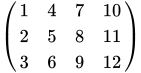
julia> A = reshape(1:12, 3, 4)
3x4 Array{Int64,2}:
1 4 7 10
2 5 8 11
3 6 9 12
|
|
julia> B = ones(3,4)
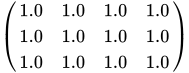
3x4 Array{Float64,2}:
1.0 1.0 1.0 1.0
1.0 1.0 1.0 1.0
1.0 1.0 1.0 1.0
|
|
julia> A + B
3x4 Array{Float64,2}:
2.0 5.0 8.0 11.0
3.0 6.0 9.0 12.0
4.0 7.0 10.0 13.0
|
|

julia> A - B
3x4 Array{Float64,2}:
0.0 3.0 6.0 9.0
1.0 4.0 7.0 10.0
2.0 5.0 8.0 11.0
|
|

- 乘法 (*),假設維度相容,因此如果 last(size(m1)) == first(size(m2)),則 m1 * m2 是可能的。注意矩陣乘法和逐元素矩陣乘法的區別。這是一個矩陣 A
julia> A = [1 2 ; 3 4]
2x2 Array{Int64,2}:
1 2
3 4
|
|

這是一個矩陣 B
julia> B = [10 11 ; 12 13]
2x2 Array{Int64,2}:
10 11
12 13
|
|

.* 廣播運算子逐元素地將它們相乘
julia> A .* B
2x2 Array{Int64,2}:
10 22
36 52
|
|

將它與矩陣乘法 A * B 進行比較
julia> A * B
2x2 Array{Int64,2}:
34 37
78 85
|
|

這是
julia> [1 * 10 + 2 * 12 1 * 11 + 2 * 13 ; 3 * 10 + 4 * 12 3 * 11 + 4 * 13]
2x2 Array{Int64,2}:
34 37
78 85
- 兩個矩陣的除法。您可以使用反斜槓 (\) 進行左除
julia> A = rand(1:9, 3, 3)
3x3 Array{Int64,2}:
5 4 3
8 7 7
9 3 7
julia> B = rand(1:9, 3, 3)
3x3 Array{Int64,2}:
6 5 5
6 7 5
7 2 7
julia> A \ B
3x3 Array{Float64,2}:
2.01961 0.411765 1.84314
0.254902 1.35294 -0.0392157
-1.70588 -0.823529 -1.35294
以及正斜槓 (/) 右除或斜除
julia> A / B
3x3 Array{Float64,2}:
4.0 -2.0 -1.0
0.285714 0.714286 0.285714
5.07143 -3.07143 -0.428571
對於矩陣和標量,您可以進行加、減、乘和除運算
julia> A + 1
3x3 Array{Int64,2}:
6 5 4
9 8 8
10 4 8
julia> [1 2 3 4 5] * 2
1x5 Array{Int64,2}:
2 4 6 8 10
julia> A .- 1
3x3 Array{Int64,2}:
4 3 2
7 6 6
8 2 6
julia> A .* 2
3x3 Array{Int64,2}:
10 8 6
16 14 14
18 6 14
julia> A ./ 2
3x3 Array{Float64,2}:
2.5 2.0 1.5
4.0 3.5 3.5
4.5 1.5 3.5
還有更多
julia> A // 2
3x4 Array{Rational{Int64},2}:
1//2 2//1 7//2 5//1
1//1 5//2 4//1 11//2
3//2 3//1 9//2 6//1
julia> A .< 6
3x3 BitArray{2}:
true true true
false false false
false true false
您可以將矩陣和向量相乘(矩陣-向量積),如果陣列具有相容的形狀。這是矩陣 A
julia> A = reshape(1:12, 3, 4)
3x4 Array{Int64,2}:
1 4 7 10
2 5 8 11
3 6 9 12
|
|
這是一個向量 V
julia> V = collect(1:4)
4-element Array{Int64,1}:
1
2
3
4
|
|

* 運算子將它們相乘
julia> A * V
3-element Array{Int64,1}:
70
80
90
|
|

可以使用 dot() 函式找到點積或內積 (aTb),但您必須首先匯入 LinearAlgebra 庫
julia> using LinearAlgebra
julia> dot([1:3...], [21:23...])
134
|
|

julia> (1 * 21) + (2 * 22) + (3 * 23) 134
兩個引數必須具有相同的長度。你也可以使用點運算子,在REPL中輸入 "\cdot" 然後按 Tab 鍵即可獲得。
julia> [1:3] ⋅ [21:23] 134
你可以使用 hcat() 和 vcat() 將矩陣連線在一起,前提是它們的維度允許。
hcat() 保持第一維,並在第二維上擴充套件(連線),vcat() 保持第二維,並在第一維上擴充套件。
這裡有兩個 3x4 矩陣
julia> A = reshape(1:12, 3, 4)
3x4 Array{Int64,2}:
1 4 7 10
2 5 8 11
3 6 9 12
julia> B = reshape(100:100:1200, 3, 4)
3x4 Array{Int64,2}:
100 400 700 1000
200 500 800 1100
300 600 900 1200
hcat(A, B) 建立一個新的陣列,它仍然有 3 行,但擴充套件/連線列,使其總共 8 列。
julia> hcat(A, B)
3x8 Array{Int64,2}:
1 4 7 10 100 400 700 1000
2 5 8 11 200 500 800 1100
3 6 9 12 300 600 900 1200
vcat(A, B) 建立一個新的陣列,它保留 4 列,但擴充套件到 6 行。
julia> vcat(A, B)
6x4 Array{Int64,2}:
1 4 7 10
2 5 8 11
3 6 9 12
100 400 700 1000
200 500 800 1100
300 600 900 1200
你可能會發現這些快捷方式很有用
- [A ; B ] 等於
vcat(A, B) - [A B ] 等於
hcat(A, B)
vec() 將矩陣扁平化為向量,將其轉換為(有些人稱之為“列”)向量。
julia> vec(ones(3, 4))
12-element Array{Float64,1}:
1.0
1.0
1.0
1.0
1.0
1.0
1.0
1.0
1.0
1.0
1.0
1.0
還有一個 hvcat() 函式([A B; C D;]),它同時執行這兩個操作。
你可以使用 hcat() 將陣列的陣列轉換為矩陣(使用 hcat 展開)。
julia> a = Array[[1, 2], [3, 4], [5, 6]]
3-element Array{Array{T,N},1}:
[1, 2]
[3, 4]
[5, 6]
julia> hcat(a...)
2x3 Array{Int64,2}:
1 3 5
2 4 6
Julia 陣列是“列優先”的。這意味著你按列讀取資料。
1 3 2 4
而“行優先”陣列則需要按行讀取,像這樣。
1 2 3 4
列優先順序在 Fortran、R、Matlab、GNU Octave 以及 BLAS 和 LAPACK 引擎(“高效能數值計算的基礎”)中使用。行優先順序在 C/C++、Mathematica、Pascal、Python、C#/CLI/.Net 等中使用。
通常你想要建立一個數組,然後向其中新增更多內容,或者“增長”它。雖然你可以使用 vcat() 和 hcat() 來做到這一點,但要注意這兩個操作都會建立新的臨時陣列並複製元素,因此它們並不總是產生最快的程式碼。更好的方法是使用 push!。這是一個高效的操作,可以擴充套件陣列。你可以在之後重新整形陣列。
julia> a = []
julia> for i = 1:80
push!(a, i)
end
julia> a
80-element Array{Any,1}:
1
2
3
4
5
6
7
8
9
⋮
75
76
77
78
79
80
reshape() 允許你更改陣列的維度。你可以提供維度,也可以使用冒號 (:) 讓 Julia 計算有效的維度。
julia> reshape(a, 10, :)
10x8 Array{Any,2}:
1 11 21 31 41 51 61 71
2 12 22 32 42 52 62 72
3 13 23 33 43 53 63 73
4 14 24 34 44 54 64 74
5 15 25 35 45 55 65 75
6 16 26 36 46 56 66 76
7 17 27 37 47 57 67 77
8 18 28 38 48 58 68 78
9 19 29 39 49 59 69 79
10 20 30 40 50 60 70 80
reshape(a, (10, div(length(a), 10))) 將具有相同的效果。
push!() 無法讓你向二維陣列或矩陣新增新行。完成此操作的最佳方法是像上面一樣,在一個一維陣列上進行操作,在末尾新增更多元素,然後使用 reshape() 將其轉換為二維。如果需要,可以使用 transpose() 翻轉矩陣。
要轉置陣列或矩陣,有一個等效的 ' 運算子可以代替 transpose() 函式,用於交換行和列。
julia> M = reshape(1:12, 3, 4)
3×4 Base.ReshapedArray{Int64,2,UnitRange{Int64},Tuple{}}:
1 4 7 10
2 5 8 11
3 6 9 12
julia> transpose(M)
4x3 Array{Int64,2}:
1 2 3
4 5 6
7 8 9
10 11 12
julia> M'
4x3 Array{Int64,2}:
1 2 3
4 5 6
7 8 9
10 11 12
要找到方陣的行列式,請使用 det(),記住要載入 LinearAlgebra 庫。
julia> using LinearAlgebra
julia> A = rand(2:10, 3, 3)
3x3 Array{Int64,2}:
8 8 2
6 9 6
9 2 10
julia> det(A) 438.00000000000006
inv()(在標準庫中)找到方陣的逆矩陣,如果它存在的話。(如果矩陣的行列式為零,它將沒有逆矩陣。)
julia> inv(A)
3x3 Array{Float64,2}:
0.178082 -0.173516 0.0684932
-0.0136986 0.141553 -0.0821918
-0.157534 0.127854 0.0547945
LinearAlgebra.rank() 找到矩陣的秩,LinearAlgebra.nullspace() 找到零空間的基。
julia> A
3x4 Array{Int64,2}:
1 4 7 10
2 5 8 11
3 6 9 12
julia> rank(A) 2
julia> nullspace(A)
4x2 Array{Float64,2}:
-0.475185 -0.272395
0.430549 0.717376
0.564458 -0.617566
-0.519821 0.172585
LinearAlgebra.tr() 求和方陣的對角線(跡)。
julia> s = reshape(1:9, 3, 3)
3x3 Array{Int64,2}:
1 4 7
2 5 8
3 6 9
julia> tr(s) 15
有許多函式可以應用於矩陣
- sum() 將所有元素加起來。
julia> A = reshape(1:9, 3, 3)
3×3 Base.ReshapedArray{Int64,2,UnitRange{Int64},Tuple{}}:
1 4 7
2 5 8
3 6 9
julia> sum(A) 45
如果你想只求和列或行,可以指定一個維度。因此,要求和列,請指定維度 1。
julia> sum(A, dims=(1))
1x3 Array{Int64,2}:
6 15 24
要求和行,請指定維度 2。
julia> sum(A, dims=(2))
3x1 Array{Int64,2}:
12
15
18
- mean() 找到矩陣中值的平均值。
julia> using Statistics; mean(A) 5.0
與 sum() 一樣,你也可以指定一個維度,這樣你就可以找到列的平均值(使用維度 1)或行的平均值(使用維度 2)。
julia> mean(A, dims=(1))
1x3 Array{Float64,2}:
2.0 5.0 8.0
julia> mean(A, dims=(2))
3x1 Array{Float64,2}:
4.0
5.0
6.0
- min.(A, B) 和 max.(A, B) 函式逐元素比較兩個(或多個)陣列,返回一個包含每個陣列中最大(或最小)值的陣列。
julia> A = rand(-1:2:1, 3, 3)
3x3 Array{Int64,2}:
-1 -1 -1
-1 1 1
1 -1 1
julia> B = rand(-2:4:2, 3, 3)
3x3 Array{Int64,2}:
2 2 2
2 -2 2
2 2 2
julia> min.(A, B)
3×3 Array{Int64,2}:
1 -2 -2
-1 -2 -1
1 1 -1
julia> max.(A, B)
3×3 Array{Int64,2}:
2 1 1
2 1 2
2 2 2
prod() 將矩陣的元素相乘。
julia> A = reshape(collect(BigInt(1):25), 5, 5)
5×5 Array{BigInt,2}:
1 6 11 16 21
2 7 12 17 22
3 8 13 18 23
4 9 14 19 24
5 10 15 20 25
julia> prod(A)
15511210043330985984000000
(注意 BigInt 的使用,乘積非常大。)
如果你想只將列或行的元素相乘,可以指定一個維度。要將列的元素相乘,請指定維度 1;對於行,請使用維度 2。
julia> prod(A, dims=1)
1x5 Array{Int64,2}:
120 30240 360360 1860480 6375600
julia> prod(A, dims=2)
5x1 Array{Int64,2}:
22176
62832
129168
229824
375000
大多數這些函式都位於 LinearAlgebra 庫中。
julia> using LinearAlgebra
歐幾里得範數,,可以透過 LinearAlgebra.norm(x) 找到。

julia> X = [2, 4, -5]
3-element Array{Int64,1}:
2
4
-5
julia> LinearAlgebra.norm(X) # Euclidean norm
6.708203932499369
julia> LinearAlgebra.norm(X, 1) # 1-norm of the vector, the sum of element magnitudes
11.0
如果 X 是一個“行”向量。
julia> X = [2 4 -5]
1x3 Array{Int64,2}:
2 4 -5
julia> LinearAlgebra.norm(X)
6.708203932499369
julia> LinearAlgebra.norm(X, 1)
11.0
向量 和 之間的歐幾里得距離,由 給出,可以透過 norm(x - y) 找到。


julia> LinearAlgebra.norm([1 2 3] - [2 4 6]) 3.741657386773941 julia> LinearAlgebra.norm([1, 2, 3] - [2, 4, 6]) 3.741657386773941
兩個向量 和 之間的夾角為


acos(dot(a,b)/(norm(a)*norm(b)))
矩陣範數
[edit | edit source]以下是矩陣的 1 範數(最大絕對列和)
julia> B = [5 -4 2 ; -1 2 3; -2 1 0]
3x3 Array{Int64,2}:
5 -4 2
-1 2 3
-2 1 0
julia> LinearAlgebra.opnorm(B, 1) 8.0
以下是無窮範數(最大絕對行和)
julia> LinearAlgebra.opnorm(B, Inf) 11.0
請注意,它們不同於向量化的 1 範數或無窮範數
julia> LinearAlgebra.norm(B, 1) 20.0
julia> LinearAlgebra.norm(B, Inf) 5.0
歐幾里德 norm() 是預設值
julia> LinearAlgebra.norm([2 3 ; 4 6]), LinearAlgebra.opnorm([2 3 ; 4 6]), sqrt(2^2 + 3^2 + 4^2 + 6^2) (8.062257748298547,8.062257748298547,8.06225774829855)
矩陣的縮放和旋轉
[edit | edit source]- rmul!(A, n) 將矩陣中每個元素原地縮放為縮放因子 n
julia> A = [1 2 3
4 5 6
7 8 9]
3×3 Array{Int64,2}:
1 2 3
4 5 6
7 8 9
julia> rmul!(A, 2)
3×3 Array{Int64,2}:
2 4 6
8 10 12
14 16 18
還有旋轉和迴圈移位函式
julia> A = [1 2 3
4 5 6
7 8 9]
3×3 Array{Int64,2}:
1 2 3
4 5 6
7 8 9
julia> rot180(A)
3×3 Array{Int64,2}:
9 8 7
6 5 4
3 2 1
julia> circshift(A, (1, 1))
3×3 Array{Int64,2}:
9 7 8
3 1 2
6 4 5
julia> A
3×3 Array{Int64,2}:
1 2 3
4 5 6
7 8 9
reverse() 建立一個矩陣副本,反轉行或列
julia> reverse(A, dims=(1))
3×3 Array{Int64,2}:
7 8 9
4 5 6
1 2 3
julia> reverse(A, dims=(2))
3×3 Array{Int64,2}:
3 2 1
6 5 4
9 8 7
squeeze() 和 reshape() 可用於更改矩陣的維度。例如,以下是如何使用 squeeze() 將行向量(1x4)壓縮為 4x1 陣列
julia> a = [1 2 3 4]
1x4 Array{Int64,2}:
1 2 3 4
julia> ndims(a) 2
julia> b = squeeze(a, dims=(1))
4-element Array{Int64,1}:
1
2
3
4
julia> ndims(b) 1
陣列排序
[edit | edit source]Julia 擁有靈活的 sort() 函式,該函式返回陣列的排序副本,以及配套的 sort!() 版本,該版本會更改陣列使其排序。
通常,您可以使用 sort() 而不帶選項,並獲得您期望的結果
julia> using Random
julia> rp = randperm(10)
10-element Array{Int64,1}:
6
4
7
3
10
5
8
1
9
2
julia> sort(rp)
10-element Array{Int64,1}:
1
2
3
4
5
6
7
8
9
10
您可以對二維陣列進行排序
julia> a = reshape(rand(1:20, 20), 4, 5)
4x5 Array{Int64,2}:
19 13 4 10 10
6 20 19 18 12
17 7 15 14 9
1 16 8 7 13
julia> sort(a, dims=(1)) # sort each column, dimension 1
4x5 Array{Int64,2}:
1 7 4 7 9
6 13 8 10 10
17 16 15 14 12
19 20 19 18 13
julia> sort(a, dims=(2)) # sort each row, dimension 2
4x5 Array{Int64,2}:
4 10 10 13 19
6 12 18 19 20
7 9 14 15 17
1 7 8 13 16
儘管在 sortrows() 和 sortcolumns() 中有更強大的替代方案——請參閱以下內容瞭解詳細資訊。
sortperm() 函式類似於 sort(),但它不返回集合的排序副本。相反,它返回一個索引列表,該列表可以應用於集合以生成排序版本
julia> r = rand(100:110, 10)
10-element Array{Int64,1}:
103
102
110
108
108
108
104
109
106
106
julia> sortperm(r)
10-element Array{Int64,1}:
2
1
7
9
10
4
5
6
8
3
julia> r[sortperm(r)]
10-element Array{Int64,1}:
102
103
104
106
106
108
108
108
109
110
排序依據和比較
[edit | edit source]如果您需要比預設 sort() 提供的功能更多,請使用 by 和 lt 關鍵字並提供您自己的函式來處理和比較排序過程中的元素。
排序依據
[edit | edit source]by 函式在比較之前處理每個元素,並提供排序的“鍵”。一個典型的例子是將以字串形式表示的一系列數字按數字順序排序的任務。以下是列表
julia> r = ["1E10", "150", "25", "3", "1.5", "1E-10", "0.5", ".999"];
如果您使用預設排序,數字將按照字元在 Unicode/ASCII 中出現的順序排列
julia> sort(r)
8-element Array{ASCIIString,1}:
".999"
"0.5"
"1.5"
"150"
"1E-10"
"1E10"
"25"
"3"
"1E-10" 位於 "0.999" 之後。
要按數值排序數字,請將 parse() 函式(來自 Meta 包)傳遞給 by
julia> sort(r, by = x -> Meta.parse(x))
8-element Array{String,1}:
"1E-10"
"0.5"
".999"
"1.5"
"3"
"25"
"150"
"1E10"
字串按“依據”其值排序。請注意,您提供的 by 函式會生成數字排序鍵,但原始字串元素會出現在最終結果中。
匿名函式 在對陣列進行排序時很有用。以下是一個包含 10 行 2 列元組的陣列
julia> table = collect(enumerate(rand(1:100, 10)))
10-element Array{(Int64,Int64),1}:
(1,86)
(2,25)
(3,3)
(4,97)
(5,89)
(6,58)
(7,27)
(8,93)
(9,98)
(10,12)
您可以透過向 by 提供一個指向每個元組的第二個元素的匿名函式,根據每個元組的第二個元素而不是第一個元素對該陣列進行排序。匿名函式表示,給定一個要排序的物件 x,根據 x 的第二個元素進行排序
julia> sort(table, by = x -> x[2])
10-element Array{(Int64,Int64),1}:
(3,3)
(10,12)
(2,25)
(7,27)
(6,58)
(1,86)
(5,89)
(8,93)
(4,97)
(9,98)
按多列排序
[edit | edit source]如果您想按多列排序,可以在 by 函式中提供一個“列”識別符號元組。
julia> a = [[2, 2, 2, 1],
[1, 1, 1, 8],
[2, 1, 2, 2],
[1, 2, 2, 5],
[2, 1, 1, 4],
[1, 1, 2, 7],
[1, 2, 1, 6],
[2, 2, 1, 3]] ;
julia> sort(a, by = col -> (col[1], col[2], col[3]))
8-element Array{Array{Int64,1},1}:
[1,1,1,8]
[1,1,2,7]
[1,2,1,6]
[1,2,2,5]
[2,1,1,4]
[2,1,2,2]
[2,2,1,3]
[2,2,2,1]
這將首先按列 1、然後按列 2、然後按列 3 對陣列進行排序。
重新定義“小於”
[edit | edit source]預設情況下,排序在比較元素時使用內建的 isless() 函式。在排序後的陣列中,第一個元素小於第二個元素。
您可以透過將不同的函式傳遞給 lt 關鍵字來更改此行為。該函式應比較兩個元素,如果它們已排序,則返回 true,即如果第一個元素“小於”第二個元素,使用某種“小於”的定義。排序過程會反覆比較元素對,直到陣列中的每個元素都位於正確的位置。
例如,假設您想根據每個單詞中母音的數量對單詞陣列進行排序;即單詞中的母音越多,它在排序結果中出現的越早。例如,單詞“orange”將被認為“小於”單詞“lemon”,因為它包含更多母音。
首先,我們需要一個計算母音數量的函式
vowelcount(string) = count(c -> (c in "aeiou"), lowercase(string))
現在,您可以將一個匿名函式傳遞給 sort(),該函式使用此函式比較兩個元素的母音數量,然後在每種情況下返回母音數量較高的元素
sentence = split("Lorem ipsum dolor sit amet, consectetur adipisicing elit, sed do eiusmod tempor incididunt ut labore et dolore magna aliqua.");
sort(sentence, lt = (x,y) -> vowelcount(x) > vowelcount(y))
結果是母音最多的單詞將排在最前面
19-element Array{SubString{String},1}:
"adipisicing"
"consectetur"
"eiusmod"
"incididunt"
"aliqua."
"labore"
"dolore"
"Lorem"
"ipsum"
"dolor"
"amet,"
"elit,"
"tempor"
"magna"
"sit"
"sed"
"do"
"ut"
"et"
sort() 函式還允許您指定反向排序——在 by 和 lt 函式(如果使用)完成其工作後,傳遞給 rev 的 true 值將反轉結果。
排序二維陣列
[edit | edit source]在 Julia 1.0 中,可以使用 sortslices() 對多維陣列進行排序。
以下是一個包含九個字串的簡單陣列(您也可以使用數字、符號、函式或任何可比較的內容)
julia> table = ["F" "B" "I"; "A" "D" "G"; "H" "C" "E"]
3×3 Array{String,2}:
"F" "B" "I"
"A" "D" "G"
"H" "C" "E"
您可以將數字或元組傳遞給 dims(“維度”)關鍵字,該關鍵字指示您要排序的內容。要對錶格進行排序,以便第一列排序,請使用 1
julia> sortslices(table, dims=1)
3×3 Array{String,2}:
"A" "D" "G"
"F" "B" "I"
"H" "C" "E"
請注意,sortslices 返回一個新的陣列。第一列按字母順序排列。
使用 dims=2 對錶格進行排序,以便第一行排序
julia>> sortslices(table, dims=2)
3×3 Array{String,2}:
"B" "F" "I"
"D" "A" "G"
"C" "H" "E"
現在第一行按字母順序排列。
如果您想按除第一項以外的內容排序,請將函式傳遞給 by。因此,要對行進行排序,以便中間列按字母順序排列,請使用
julia> sortslices(table, dims=1, by = x -> x[2])
3×3 Array{String,2}:
"F" "B" "I"
"H" "C" "E"
"A" "D" "G"
sortslices 擁有您在 sort 中找到的大多數選項,以及更多選項。您可以使用 rev 反轉順序,使用 lt 更改比較器,等等。
元組
[edit | edit source]元組是一個元素的有序序列,類似於陣列。元組由括號和逗號表示,而不是陣列使用的方括號。元組主要適用於小型固定長度的集合——它們在 Julia 中隨處可見,例如作為引數列表以及從函式返回多個值。
陣列和元組之間的重要區別是元組是不可變的。除此之外,元組的工作方式與陣列非常相似,許多陣列函式也可以用於元組
julia> t = (1, 2, 3, 4, 5, 6, 7, 8, 9, 10) (1,2,3,4,5,6,7,8,9,10)
julia> t (1,2,3,4,5,6,7,8,9,10)
julia> t[6:end] (6,7,8,9,10)
您可以擁有二維元組
julia> t = ((1, 2), (3, 4)) ((1,2),(3,4))
julia> t[1] (1,2)
julia> t[1][2] 2
但您無法更改元組
julia> t[1] = 0 LoadError: MethodError: no method matching set index!...
而且,因為您無法修改元組,所以您無法使用任何類似於 push!() 的函式,這些函式可用於陣列
julia> a = [1,2,3];
julia> push!(a,4)
4-element Array{Int64,1}:
1
2
3
4
julia> t = (1,2,3); julia> push!(t,4) LoadError: MethodError: no method matching push!
命名元組
[edit | edit source]命名元組類似於元組和字典的組合。與元組一樣,命名元組是有序且不可變的,並用括號括起來;與字典一樣,每個元素都有一個唯一的鍵,可用於訪問它。
您可以透過直接提供鍵和值來建立命名元組
julia> shape1 = (corner1 = (1, 1), corner2 = (-1, -1), center = (0, 0)) (corner1 = (1, 1), corner2 = (-1, -1), center = (0, 0))
要訪問值,請使用熟悉的點語法
julia> shape1.corner1 (1, 1) julia> shape1.center (0, 0) julia> (shape1.corner1, shape1.corner2) ((1, 1), (-1, -1))
您可以像普通元組一樣訪問所有值(解構)
julia> c1, c2, centerp = shape1; julia> c1 (1, 1) julia> c2 (-1, -1)
或只訪問其中一些
julia> c1, c2 = shape1; julia> c1 (1, 1)
julia> c2 (-1, -1)
元素可以是相同的型別,也可以是不同的型別,但鍵始終是變數名。
您可以遍歷命名元組
julia> for i in shape1
@show i
end
i = (1, 1)
i = (-1, -1)
i = (0, 0)
julia> for i in shape1
println(first(i))
end
1
-1
0
建立命名元組的另一種方法是分別提供鍵和值作為元組。
julia> ks = (:corner1, :corner2)
(:corner1, :corner2)
julia> vs = ((10, 10), (20, 20))
((10, 10), (20, 20))
julia> shape2 = NamedTuple{ks}(vs)
(corner1 = (10, 10), corner2 = (20, 20))
julia>shape2.corner1
(10, 10)
julia> shape2.corner2
(20, 20)
可以將兩個命名元組合併成一個新的命名元組。
julia> colors = (top = "red", bottom = "green") (top = "red", bottom = "green") julia> merge(shape2, colors) (corner1 = (10, 10), corner2 = (20, 20), top = "red", bottom = "green")
可以使用現有變數作為鍵。
julia> d = :density; julia> (corner1 = (10, 10), corner2 = (20, 20), d => 0.99)
(corner1 = (10, 10), corner2 = (20, 20), density = 0.99)
建立單值命名元組需要一個策略性放置的逗號。
julia> shape3 = (corner1 = (1, 1),) (corner1 = (1, 1),)
julia> typeof(shape3)
NamedTuple{(:corner1,),Tuple{Tuple{Int64,Int64}}}
如果你忘記了它,你會看到這個。
julia> (corner1 = (1, 1))
(1, 1)
julia> typeof(corner1)
Tuple{Int64,Int64}
可以透過將命名元組合並在一起建立新的命名元組。
julia> shape3 = merge(shape2, colors) (corner1 = (10, 10), corner2 = (20, 20), top = "red", bottom = "green")
在單元素命名元組後使用逗號。
julia> merge(shape2, (top = "green",)) (corner1 = (10, 10), corner2 = (20, 20), top = "green")
因為如果沒有逗號,元組將被解釋為merge()的帶括號的關鍵字引數。
要遍歷“鍵”,請使用fieldnames()和typeof()函式。
julia> fieldnames(typeof(shape3)) (:corner1, :corner2, :top, :bottom)
所以你可以做。
julia> for key in fieldnames(typeof(shape3))
@show getindex(shape3, key)
end
getindex(shape3, key) = (10, 10)
getindex(shape3, key) = (20, 20)
getindex(shape3, key) = "red"
getindex(shape3, key) = "green"
合併兩個元組的處理方式很智慧。例如,如果你有這個命名元組。
julia> shape3 (corner1 = (10, 10), corner2 = (20, 20), top = "red", bottom = "green")
並且你想新增一箇中心點並更改頂部顏色。
julia> merge(shape3, (center = (0, 0), top="green")) (corner1 = (10, 10), corner2 = (20, 20), top = "green", bottom = "green", center = (0, 0))
將插入新值,並更改現有值。
使用命名元組作為關鍵字引數
[edit | edit source]命名元組是將一組關鍵字引數傳遞給函式的便捷方式。這是一個接受三個關鍵字引數的函式。
function f(x, y, z; a=10, b=20, c=30)
println("x = $x, y = $y, z = $z; a = $a, b = $b, c = $c")
end
可以定義一個命名元組,其中包含一個或多個關鍵字的名稱和值。
options = (b = 200, c = 300)
要將命名元組傳遞給函式,在呼叫函式時使用;。
f(1, 2, 3; options...) x = 1, y = 2, z = 3; a = 10, b = 200, c = 300
如果指定關鍵字和值,則可以被後面的定義覆蓋。
f(1, 2, 3; b = 1000_000, options...) x = 1, y = 2, z = 3; a = 1000, b = 200, c = 300
f(1, 2, 3; options..., b= 1000_000) x = 1, y = 2, z = 3; a = 10, b = 1000000, c = 300
型別
[edit | edit source]型別
[edit | edit source]關於型別和函式/方法的這兩部分,最好同時閱讀,因為它們密切相關。
型別的型別
[edit | edit source]資料元素有不同的形狀和大小,稱為型別。
考慮以下數值:浮點數、有理數和整數。
0.5 1//2 1
對我們人類來說,加這三個數很容易,但計算機無法使用簡單的加法程式來加這三個數,因為它們的型別不同。用於新增有理數的程式碼必須考慮分子和分母,而用於新增整數的程式碼則不會。計算機可能需要將這兩個值轉換為與第三個值相同的型別 - 通常整數和有理數將首先轉換為浮點數 - 然後將這三個浮點數加在一起。
這種型別轉換顯然需要時間。所以,為了編寫真正快速的程式碼,你希望確保你的計算機不會因不斷地在型別之間轉換而浪費時間。當 Julia 編譯你的原始碼時(這會在你第一次評估函式時發生),你提供的任何型別指示都允許編譯器生成更有效的可執行程式碼。
型別轉換的另一個問題是,在某些情況下,你會損失精度 - 將有理數轉換為浮點數可能會損失一些精度。
Julia 設計者的官方說法是型別是可選的。換句話說,如果你不想擔心型別(如果你不介意你的程式碼執行速度比可能慢),那麼你可以忽略它們。但你將在錯誤訊息和文件中遇到它們,因此你最終將不得不處理它們…
一種折衷方案是在編寫頂層程式碼時不用擔心型別,但當你想要加快程式碼速度時,找出你的程式花費最多時間的瓶頸,並在該區域清理型別。
型別系統
[edit | edit source]關於 Julia 的型別系統,有很多內容需要了解,因此官方文件確實是應該去的地方。但這裡有一個簡要概述。
型別層次結構
[edit | edit source]在 Julia 中,型別按樹狀結構組織成層次結構。
在樹的根部,我們有一個稱為Any的特殊型別,所有其他型別都直接或間接地與它相關聯。非正式地說,我們可以說型別Any有子類。它的子類稱為Any的子型別。而子類的父型別是Any。(然而請注意,型別之間的層次關係是顯式宣告的,而不是由相容結構隱含的。)
我們可以透過檢視數字型別來了解 Julia 型別層次結構的一個很好的例子。

型別Number是Any的直接子類。要檢視Number的父型別是什麼,我們可以使用supertype()函式。
julia> supertype(Number) Any
但我們也可以嘗試找出Number的子型別(Number的子類,因此是Any的孫類)。要做到這一點,我們可以使用subtypes()函式。
julia> subtypes(Number)
2-element Array{Union{DataType, UnionAll},1}:
Complex
Real
我們可以觀察到,Number有兩個子型別:Complex和Real。對數學家來說,實數和複數都是數。作為一般規則,Julia 的型別層次結構反映了現實世界的層次結構。
舉另一個例子,如果Jaguar和Lion都是 Julia 型別,如果它們的父型別是Feline,則會很自然。我們將有
julia> abstract type Feline end
julia> mutable struct Jaguar <: Feline end
julia> mutable struct Lion <: Feline end
julia> subtypes(Feline)
2-element Array{Any,1}:
Jaguar
Lion
具體型別和抽象型別
[edit | edit source]Julia 中的每個物件(非正式地,這意味著你可以放入 Julia 變數中的所有內容)都有一個型別。但並非所有型別都可以有相應的物件(該型別的例項)。唯一可以有例項的型別稱為具體型別。這些型別不能有任何子型別。可以有子型別的型別(例如Any、Number)稱為抽象型別。因此,我們不能擁有型別為Number的物件,因為它是一個抽象型別。換句話說,只有型別樹的葉子是具體型別,可以例項化。
如果我們不能建立抽象型別的物件,它們為什麼有用?有了它們,我們就可以編寫對任何子型別都通用的程式碼。例如,假設我們編寫一個函式,該函式期望一個型別為Number的變數。
#this function gets a number, and returns the same number plus one
function plus_one(n::Number)
return n + 1
end
在這個例子中,函式期望一個變數n。n的型別必須是Number的子型別(直接或間接),如::語法所示(但現在不用擔心語法)。這意味著什麼?無論n的型別是Int(整數)還是Float64(浮點數),函式plus_one()都能正常工作。此外,plus_one()將不會與任何不是Number子型別的型別(例如文字字串、陣列)一起工作。
我們可以將具體型別分為兩類:原始(或基本)和複雜(或複合)。原始型別是構建塊,通常硬編碼到 Julia 的核心,而複合型別將許多其他型別組合在一起以表示更高階的資料結構。
你可能會看到以下原始型別
- 基本的整數和浮點型別(有符號和無符號):
Int8、UInt8、Int16、UInt16、Int32、UInt32、Int64、UInt64、Int128、UInt128、Float16、Float32和Float64 - 更高階的數字型別:
BigFloat、BigInt - 布林值和字元型別:
Bool和Char - 文字字串型別:
String
複合型別的一個簡單示例是Rational,用於表示分數。它由兩個部分組成,分子和分母,它們都是整數(型別為Int)。
調查型別
[edit | edit source]Julia 提供了兩個函式來導航型別層次結構:subtypes()和supertype()。
julia> subtypes(Integer)
4-element Array{Union{DataType, UnionAll},1}:
BigInt
Bool
Signed
Unsigned
julia> supertype(Float64)
AbstractFloat
sizeof()函式告訴你這種型別的專案佔用多少位元組。
julia> sizeof(BigFloat) 32 julia> sizeof(Char) 4
如果你想知道你可以在特定型別中容納多大的數字,這兩個函式很有用。
julia> typemax(Int64) 9223372036854775807 julia> typemin(Int32) -2147483648
基本 Julia 系統中有超過 340 種類型。你可以使用以下函式來調查型別層次結構。
function showtypetree(T, level=0)
println("\t" ^ level, T)
for t in subtypes(T)
showtypetree(t, level+1)
end
end
showtypetree(Number)
它為不同的數字型別生成類似於這樣的內容。
julia> showtypetree(Number) Number Complex Real AbstractFloat BigFloat Float16 Float32 Float64 Integer BigInt Bool Signed Int128 Int16 Int32 Int64 Int8 Unsigned UInt128 UInt16 UInt32 UInt64 UInt8 Irrational Rational
這顯示了,例如,Real數字的四個主要子型別:AbstractFloat、Integer、Rational和Irrational,如樹狀圖所示。
指定變數的型別
[edit | edit source]我們已經看到,如果你沒有指定型別,Julia 會盡力找出你程式碼中放入的東西的型別。
julia> collect(1:10)
10-element Array{Int64,1}:
1
2
3
4
5
6
7
8
9
10
julia> collect(1.0:10)
10-element Array{Float64,1}:
1.0
2.0
3.0
4.0
5.0
6.0
7.0
8.0
9.0
10.0
我們還看到,你可以為新的空陣列指定型別。
julia> fill!(Array{String}(undef, 3), "Julia")
3-element Array{String,1}:
"Julia"
"Julia"
"Julia"
對於變數,你可以指定其值必須具有的型別。由於技術原因,你不能在頂層(在 REPL 中)執行此操作 - 你只能在定義內部執行此操作。語法使用::語法,表示“型別為”。所以
function f(x::Int64)
表示函式f有一個方法,它接受一個引數x,該引數預計為 Int64。參見 函式。
型別穩定性
[edit | edit source]以下是一個示例,說明 Julia 程式碼的效能如何受到變數型別選擇的影響。這是一些探索考拉茲猜想的程式碼。
function chain_length(n, terms)
length = 0
while n != 1
if haskey(terms, n)
length += terms[n]
break
end
if n % 2 == 0 # is n even?
n /= 2
else
n = 3n + 1
end
length += 1
end
return length
end
function main()
ans = 0
limit = 1_000_000
score = 0
terms = Dict() # define a dictionary
for i in 1:limit
terms[i] = chain_length(i, terms)
if terms[i] > score
score = terms[i]
ans = i
end
end
return ans
end
我們可以使用 `@time` 宏來計時(儘管 BenchmarkTools 包提供了更好的基準測試工具)。
julia> @time main() 2.634295 seconds (17.95 M allocations: 339.074 MiB, 13.50% gc time)
有兩行程式碼阻止了函式成為“型別穩定”。 這些是編譯器無法使用最佳和最高效型別來完成手頭任務的地方。 你能發現它們嗎?
第一個是在測試 n 是否為偶數後,將 n 除以 2。 n 最初是一個整數,但 `/` 除法運算子總是返回一個浮點值。 Julia 編譯器無法生成純整數程式碼或純浮點程式碼,必須在每個階段決定使用哪一個。 因此,編譯後的程式碼不像它本可以的那樣快或簡潔。
第二個問題是這裡字典的定義。 它是在沒有型別資訊的情況下定義的,因此鍵和值都可以是任何型別的字面量。 雖然這通常沒問題,但在這種型別的任務中,迴圈內會頻繁訪問,保持可能存在不同型別鍵和值的事實的額外任務會使程式碼更復雜。
julia> Dict()
Dict{Any, Any}()
如果我們告訴 Julia 編譯器這個字典只包含整數(這是一個很好的假設),編譯後的程式碼將更有效率,並且型別穩定。
因此,在將 `n /= 2` 更改為 `n ÷= 2` 以及將 `terms = Dict()` 更改為 `terms = Dict{Int, Int}()` 後,我們預計編譯器會生成更高效的程式碼,並且實際上它確實更快了。
Julia> @time main() 0.450561 seconds (54 allocations: 65.170 MiB, 19.33% gc time)
你可以從編譯器那裡獲得一些關於程式碼中由於型別不穩定而可能出現問題的提示。 例如,對於此函式,你可以輸入 `@code_warntype main()` 並查詢以紅色突出顯示的專案或“Any”。
建立型別
[edit | edit source]在 Julia 中,程式設計師可以很容易地建立新型別,並從與本機型別(由 Julia 建立者建立的型別)相同的效能和語言整合中受益。
抽象型別
[edit | edit source]假設我們要建立一個抽象型別。 為此,我們使用 Julia 的關鍵字 `abstract` 後跟要建立的型別的名稱。
abstract type MyAbstractType end
預設情況下,您建立的型別是 `Any` 的直接子型別。
julia> supertype(MyAbstractType) Any
您可以使用 `<:` 運算子更改此設定。 例如,如果您希望新的抽象型別是 `Number` 的子型別,則可以宣告
abstract type MyAbstractType2 <: Number end
現在,我們得到
julia> supertype(MyAbstractType2) Number
請注意,在同一個 Julia 會話中(無需退出 REPL 或結束指令碼),無法重新定義型別。 這就是我們必須建立名為 `MyAbstractType2` 的型別的原因。
具體型別和複合型別
[edit | edit source]您可以建立新的複合型別。 為此,請使用 `struct` 或 `mutable struct` 關鍵字,它們與宣告超型別的語法相同。 新型別可以包含多個欄位,物件在其中儲存值。 例如,讓我們定義一個作為 `MyAbstractType` 的子型別的具體型別。
mutable struct MyType <: MyAbstractType
foo
bar::Int
end
我們剛剛建立了一個名為 `MyType` 的複合結構型別,它是 `MyAbstractType` 的子型別,具有兩個欄位:`foo` 可以是任何型別的欄位,`bar` 型別的欄位是 `Int`。
我們如何建立 `MyType` 的物件? 預設情況下,Julia 會自動建立一個 **建構函式**,一個返回該型別物件的函式。 函式與型別的名稱相同,函式的每個引數都對應於每個欄位。 在此示例中,我們可以透過鍵入以下內容來建立新物件:
julia> x = MyType("Hello World!", 10)
MyType("Hello World!", 10)
這將建立一個 `MyType` 物件,將 `Hello World!` 分配給 `foo` 欄位,將 `10` 分配給 `bar` 欄位。 我們可以使用 **點** 表示法訪問 `x` 的欄位。
julia> x.foo "Hello World!" julia> x.bar 10
此外,我們可以輕鬆地更改可變結構的欄位值
julia> x.foo = 3.0 3.0 julia> x.foo 3.0
請注意,由於我們在建立型別定義時沒有指定 `foo` 的型別,因此我們可以隨時更改其型別。 這與嘗試更改 `x.bar` 欄位的型別不同(根據 `MyType` 的定義,我們將其指定為 `Int`)。
julia> x.bar = "Hello World!" LoadError: MethodError: Cannot `convert` an object of type String to an object of type Int64 This may have arisen from a call to the constructor Int64(...), since type constructors fall back to convert methods.
錯誤訊息告訴我們 Julia 無法更改 `x.bar` 的型別。 這確保了型別穩定的程式碼,並且可以在程式設計時提供更好的效能。 作為效能提示,在定義型別時指定欄位的型別通常是一個好習慣。
預設建構函式用於簡單情況,在其中您鍵入類似 **typename(field1, field2)** 的內容來生成型別的新例項。 但有時您在構建新例項時想要做更多的事情,例如檢查傳入的值。 為此,您可以使用內部建構函式,即型別定義內部的函式。 下一節將展示一個實際示例。
示例:英鎊貨幣
[edit | edit source]這是一個關於如何建立一個簡單的複合型別來處理舊式英鎊貨幣的示例。 在英國看到光明並引入十進位制貨幣之前,貨幣系統使用英鎊、先令和便士,其中一英鎊包含 20 先令,一先令包含 12 便士。 這被稱為 £sd 或 LSD 系統(拉丁語為 Librae,Solidii,Denarii,因為該系統起源於羅馬帝國)。
要定義合適的型別,請啟動一個新的複合型別宣告
struct LSD
要包含英鎊、先令和便士的價格,這個新型別應該包含三個欄位:英鎊、先令和便士。
pounds::Int
shillings::Int
pence::Int
重要的任務是建立一個 **建構函式**。 它與型別的名稱相同,並接受三個值作為引數。 在對無效值進行一些檢查後,特殊的 `new()` 函式將使用傳入的值建立一個新物件。 請記住,我們仍在 `type` 定義內部——這是一個 *內部* 建構函式。
function LSD(a,b,c)
if a < 0 || b < 0 || c < 0
error("no negative numbers")
end
if c > 12 || b > 20
error("too many pence or shillings")
end
new(a, b, c)
end
現在我們可以完成型別定義
end
以下再次顯示完整的型別定義
struct LSD
pounds::Int
shillings::Int
pence::Int
function LSD(a, b, c)
if a < 0 || b < 0
error("no negative numbers")
end
if c > 12 || b > 20
error("too many pence or shillings")
end
new(a, b, c)
end
end
現在可以建立儲存舊式英鎊價格的新物件。 你可以使用它的名稱(呼叫建構函式)來建立一個此型別的新物件
julia> price1 = LSD(5, 10, 6) LSD(5, 10, 6) julia> price2 = LSD(1, 6, 8) LSD(1, 6, 8)
並且您無法建立錯誤的價格,因為建構函式中添加了簡單的檢查
julia> price = LSD(1, 0, 13) ERROR: too many pence or shillings Stacktrace: [1] LSD(::Int64, ::Int64, ::Int64)
如果您檢查我們建立的某個價格“物件”的欄位
julia> fieldnames(typeof(price1))
3-element Array{Symbol,1}:
:pounds
:shillings
:pence
您可以看到三個欄位,這些欄位儲存著值
julia> price1.pounds 5 julia> price1.shillings 10 julia> price1.pence 6
下一個任務是使這個新型別與其他 Julia 物件的行為相同。 例如,我們無法新增兩個價格
julia> price1 + price2 ERROR: MethodError: no method matching +(::LSD, ::LSD) Closest candidates are: +(::Any, ::Any, ::Any, ::Any...) at operators.jl:420
並且輸出絕對可以改進
julia> price2 LSD(5, 10, 6)
Julia 已經擁有加法函式(`+`),其中為許多型別的物件定義了方法。 以下程式碼添加了另一種方法,可以處理兩個 LSD 物件
function Base.:+(a::LSD, b::LSD)
newpence = a.pence + b.pence
newshillings = a.shillings + b.shillings
newpounds = a.pounds + b.pounds
subtotal = newpence + newshillings * 12 + newpounds * 240
(pounds, balance) = divrem(subtotal, 240)
(shillings, pence) = divrem(balance, 12)
LSD(pounds, shillings, pence)
end
此定義教 Julia 如何處理新的 LSD 物件,並將一種新方法新增到 `+` 函式中,該方法接受兩個 LSD 物件,將它們加在一起,並生成一個包含總和的新 LSD 物件。
現在您可以新增兩個價格
julia> price1 + price2 LSD(6,17,2)
這確實是將 LSD(5,10,6) 和 LSD(1,6,8) 相加的結果。
接下來要解決的問題是 LSD 物件的顯示不美觀。 這可以透過新增一種新方法來修復,但這次是新增到 `show()` 函式中,該函式屬於 Base 環境
function Base.show(io::IO, money::LSD)
print(io, "£$(money.pounds).$(money.shillings)s.$(money.pence)d")
end
這裡,`io` 是當前由所有 `show()` 方法使用的輸出通道。 我們添加了一個簡單的表示式,它以適當的標點符號和分隔符顯示欄位值。
julia> println(price1 + price2) £6.17s.2d
julia> show(price1 + price2 + LSD(0,19,11) + LSD(19,19,6)) £27.16s.7d
您可以新增一個或多個別名,它們是特定型別的替代名稱。 由於 `Price` 是 `LSD` 的更好的說法,因此我們將建立一個有效的替代方案
julia> const Price=LSD LSD julia> show(Price(1, 19, 11)) £1.19s.11d
到目前為止,一切都很好,但這些 LSD 物件還沒有完全開發。 如果您想進行減法、乘法和除法,則必須為這些函式定義其他方法來處理 LSD。 減法很簡單,只需要對先令和便士進行一些調整,因此我們現在先不討論減法,但是乘法呢? 將價格乘以一個數字涉及兩種型別的物件,一種是 Price/LSD 物件,另一種是——嗯,任何正實數都應該是可能的
function Base.:*(a::LSD, b::Real)
if b < 0
error("Cannot multiply by a negative number")
end
totalpence = b * (a.pence + a.shillings * 12 + a.pounds * 240)
(pounds, balance) = divrem(totalpence, 240)
(shillings, pence) = divrem(balance, 12)
LSD(pounds, shillings, pence)
end
與我們新增到 Base 的 `+` 函式中的 `+` 方法一樣,這個為 Base 的 `*` 函式新增的新的 `*` 方法專門用於將價格乘以一個數字。 對於第一次嘗試,它執行得 surprisingly well
julia> price1 * 2 £11.1s.0d julia> price1 * 3 £16.11s.6d julia> price1 * 10 £55.5s.0d julia> price1 * 1.5 £8.5s.9d julia> price3 = Price(0,6,5) £0.6s.5d julia> price3 * 1//7 £0.0s.11d
但是,應該會遇到一些失敗。 我們不允許使用便士的非常古老的幾分之一:半便士和法令
julia> price1 * 0.25
ERROR: InexactError()
Stacktrace:
[1] convert(::Type{Int64}, ::Float64) at ./float.jl:675
[2] LSD(::Float64, ::Float64, ::Float64) at ./REPL[36]:40
[3] *(::LSD, ::Float64) at ./REPL[55]:10
(答案應該是 £1.7s.7½d。 不幸的是,我們的 LSD 型別不允許便士的幾分之一。)
但是,還有一個更迫切的問題。 目前,您必須給出價格後跟乘數;反過來就會失敗
julia> 2 * price1 ERROR: MethodError: no method matching *(::Int64, ::LSD) Closest candidates are: *(::Any, ::Any, ::Any, ::Any...) at operators.jl:420 *(::Number, ::Bool) at bool.jl:106 ...
這是因為,儘管 Julia 可以找到一個匹配 `(a::LSD, b::Number)` 的方法,但它無法找到另一個匹配 `(a::Number, b::LSD)` 的方法。 但新增它非常容易
function Base.:*(a::Number, b::LSD)
b * a
end
它為 Base 的 `*` 函式添加了另一種方法。
julia> price1 * 2 £11.1s.0d
julia> 2 * price1 £11.1s.0d
julia> for i in 1:10
println(price1 * i)
end
£5.10s.6d
£11.1s.0d
£16.11s.6d
£22.2s.0d
£27.12s.6d
£33.3s.0d
£38.13s.6d
£44.4s.0d
£49.14s.6d
£55.5s.0d
現在價格看起來就像 19 世紀的一家舊的英國商店!
如果您想檢視為處理這種舊的英鎊型別添加了多少方法,請使用 `methodswith()` 函式
julia> methodswith(LSD)
4-element Array{Method,1}:
*(a::LSD, b::Real) at In[20]:4
*(a::Number, b::LSD) at In[34]:2
+(a::LSD, b::LSD) at In[13]:2
show(io::IO, money::LSD) at In[15]:2
到目前為止只有四種…… 您可以繼續新增方法,使型別更通用——這將取決於您或其他人如何設想使用它。 例如,您可能想要新增除法和模運算方法,並對負貨幣值進行智慧處理。
可變結構
[edit | edit source]用於儲存英鎊價格的此複合型別被定義為不可變型別。 您無法在建立價格物件後更改其值
julia> price1.pence 6 julia> price1.pence=10 ERROR: type LSD is immutable
要根據現有價格建立一個新價格,您需要執行以下操作
julia> price2 = Price(price1.pounds, price1.shillings, 10) £5.10s.10d
對於這個特定的示例,這不是一個大問題,但是有很多應用程式,您可能希望修改或更新型別中欄位的值,而不是建立一個具有正確值的新的欄位。
對於這些情況,您需要建立一個mutable struct。根據對型別的要求,在struct和mutable struct之間進行選擇。
有關模組和從其他模組匯入函式的更多資訊,請參見模組和包.
通常,Julia 程式的每一行都會依次進行計算。控制和修改計算流程有各種方法。這些方法對應於其他語言中使用的結構。
- 三元和複合表示式
- 布林切換表示式
- if elseif else end — 條件計算
- for end — 迭代計算
- while end — 迭代條件計算
- try catch error throw 異常處理
- do 塊
通常,您希望在某個條件為真時執行任務 A(或呼叫函式 A),或在條件為假時執行任務 B(函式 B)。使用三元運算子(“?”和“:”)是編寫此操作的最快捷方式。
julia> x = 1
1
julia> x > 3 ? "yes" : "no"
"no"
julia> x = 5
5
julia> x > 3 ? "yes" : "no"
"yes"
以下是一個示例
julia> x = 0.3
0.3
julia> x < 0.5 ? sin(x) : cos(x)
0.29552020666133955
然後 Julia 返回了sin(x)的值,因為 x 小於 0.5。cos(x)根本沒有被計算。
布林運算子允許您在條件為真時計算表示式。您可以使用&&或||組合條件和表示式。&&表示“並且”,||表示“或者”。由於 Julia 會依次計算表示式,因此您可以輕鬆地安排僅在先前的條件為真或假時才計算表示式。
以下示例使用一個 Julia 函式,該函式根據數字是奇數還是偶數返回真或假:isodd(n)。
使用&&,兩部分都必須為真,因此我們可以這樣寫
julia> isodd(1000003) && @warn("That's odd!")
WARNING: That's odd!
julia> isodd(1000004) && @warn("That's odd!")
false
如果第一個條件(數字為奇數)為真,則計算第二個表示式。如果第一個條件不為真,則不計算表示式,並且僅返回條件。
另一方面,使用||運算子
julia> isodd(1000003) || @warn("That's odd!")
true
julia> isodd(1000004) || @warn("That's odd!")
WARNING: That's odd!
如果第一個條件為真,則無需計算第二個表示式,因為我們已經獲得了“或”所需的唯一真值,並且它會返回真值。如果第一個條件為假,則計算第二個表示式,因為第二個表示式可能會變為真。
這種型別的計算也稱為“短路計算”。
對於更通用(也是更傳統)的條件執行方法,您可以使用if、elseif和else。如果您習慣使用其他語言,請勿擔心空格、大括號、縮排、方括號、分號或類似的任何東西,但請記住使用end結束條件結構。
name = "Julia"
if name == "Julia"
println("I like Julia")
elseif name == "Python"
println("I like Python.")
println("But I prefer Julia.")
else
println("I don't know what I like")
end
elseif和else部分也是可選的
name = "Julia"
if name == "Julia"
println("I like Julia")
end
只要不要忘記end!
如何使用“switch”和“case”語句?您無需學習這些語句的語法,因為它們不存在!
還有一個ifelse函式。它在實際操作中看起來像這樣
julia> s = ifelse(false, "hello", "goodbye") * " world"
ifelse是一個普通函式,它會計算所有引數,並根據第一個引數的值返回第二個或第三個引數。使用條件if或? ... :,僅計算所選路徑中的表示式。或者,您可以編寫類似以下內容
julia> x = 10 10
julia> if x > 0
"positive"
else
"negative or zero"
end
"positive"
julia> r = if x > 0
"positive"
else
"negative or zero"
end
"positive"
julia> r
"positive"
遍歷列表、一組值或從起始值到結束值,這些都是迭代的示例,for ... end結構允許您遍歷多種不同型別的物件,包括範圍、陣列、集合、字典和字串。
以下是在值範圍內進行簡單迭代的標準語法
julia> for i in 0:10:100
println(i)
end
0
10
20
30
40
50
60
70
80
90
100
變數i依次獲取陣列中的每個元素的值(該陣列由範圍物件構建) - 這裡從 0 步進到 100,步長為 10。
julia> for color in ["red", "green", "blue"] # an array
print(color, " ")
end
red green blue
julia> for letter in "julia" # a string
print(letter, " ")
end
j u l i a
julia> for element in (1, 2, 4, 8, 16, 32) # a tuple
print(element, " ")
end
1 2 4 8 16 32
julia> for i in Dict("A"=>1, "B"=>2) # a dictionary
println(i)
end
"B"=>2
"A"=>1
julia> for i in Set(["a", "e", "a", "e", "i", "o", "i", "o", "u"])
println(i)
end
e
o
u
a
i
我們還沒有介紹集合和字典,但是遍歷它們的方式完全相同。
您可以遍歷二維陣列,從上到下依次遍歷第 1 列,然後遍歷第 2 列,依此類推
julia> a = reshape(1:100, (10, 10))
10x10 Array{Int64,2}:
1 11 21 31 41 51 61 71 81 91
2 12 22 32 42 52 62 72 82 92
3 13 23 33 43 53 63 73 83 93
4 14 24 34 44 54 64 74 84 94
5 15 25 35 45 55 65 75 85 95
6 16 26 36 46 56 66 76 86 96
7 17 27 37 47 57 67 77 87 97
8 18 28 38 48 58 68 78 88 98
9 19 29 39 49 59 69 79 89 99
10 20 30 40 50 60 70 80 90 100
julia> for n in a
print(n, " ")
end
1 2 3 4 5 6 7 8 9 10 11 12 13 14 15 16 17 18 19 20 21 22 23 24 25 26 27 28 29 30 31 32 33 34 35 36 37 38 39
40 41 42 43 44 45 46 47 48 49 50 51 52 53 54 55 56 57 58 59 60 61 62 63 64 65 66 67 68 69 70 71 72 73 74 75
76 77 78 79 80 81 82 83 84 85 86 87 88 89 90 91 92 93 94 95 96 97 98 99 100
您可以使用=代替in。
當您遍歷陣列時,陣列會在每次迴圈中進行檢查,以防它發生更改。您應該避免的一個錯誤是在迴圈中間使用push!使陣列增長。仔細執行以下文字,並在看到足夠的內容後準備好Ctrl-C(否則您的計算機最終會崩潰)
julia> c = [1]
1-element Array{Int64,1}:
1
julia> for i in c
push!(c, i)
@show c
sleep(1)
end
c = [1,1]
c = [1,1,1]
c = [1,1,1,1]
...
遍歷每個專案的變數(“迴圈變數”)僅存在於迴圈內部,並在迴圈結束後消失。
julia> for i in 1:10
@show i
end
i = 1
i = 2
i = 3
i = 4
i = 5
i = 6
i = 7
i = 8
i = 9
i = 10
julia> i
ERROR: UndefVarError: i not defined
如果您想在迴圈外部記住迴圈變數的值(例如,如果您必須退出迴圈並需要知道您已到達的值),請使用global關鍵字定義一個比迴圈更持久的變數。
julia> for i in 1:10
global howfar
if i % 4 == 0
howfar = i
end
end
julia> howfar 8
這裡,howfar在迴圈之前不存在,但它在迴圈結束後倖存了下來,講述了它的故事。如果howfar在迴圈開始之前存在,則只有在迴圈中使用global時才能更改它的值。
在 REPL 中工作與在函式中編寫程式碼略有不同。在函式中,您將這樣寫
function f()
howfar = 0
for i in 1:10
if i % 4 == 0
howfar = i
end
end
return howfar
end
@show f()
8
類似地,如果您在迴圈中宣告一個新變數,那麼它在迴圈結束後將不存在。在這個例子中,k是在內部建立的
julia> for i in 1:5
k = i^2
println("$(i) squared is $(k)")
end
1 squared is 1 2 squared is 4 3 squared is 9 4 squared is 16 5 squared is 25
因此它在迴圈結束後不存在
julia> k ERROR: UndefVarError: k not defined
在迴圈的一次迭代中建立的變數在每次迭代結束時都會被遺忘。在這個迴圈中
for i in 1:10
z = i
println("z is $z")
end
z is 1 z is 2 z is 3 z is 4 z is 5 z is 6 z is 7 z is 8 z is 9 z is 10
z在每次迭代時都會重新建立。如果您希望變數在迭代之間持續存在,則它必須是全域性變數
julia> counter = 0
0
julia> for i in 1:10
global counter
counter += i
end
julia> counter
55
為了更詳細地瞭解這一點,請考慮以下程式碼。
for i in 1:10
if ! @isdefined z
println("z isn't defined")
end
z = i
println("z is $z")
end
也許您希望只有第一個迴圈才會出現“z 未定義錯誤”?實際上,即使z是在迴圈主體中建立的,它在下一輪迭代開始時也是未定義的。
z isn't defined
z is 1
z isn't defined
z is 2
z isn't defined
z is 3
z isn't defined
z is 4
z isn't defined
z is 5
z isn't defined
z is 6
z isn't defined
z is 7
z isn't defined
z is 8
z isn't defined
z is 9
z isn't defined
z is 10
同樣,使用global關鍵字強制z在建立後在迴圈外部可用
for i in 1:10
global z
if ! @isdefined z
println("z isn't defined")
else
println("z was $z")
end
z = i
println("z is $z")
end
z isn't defined z is 1 z was 1 z is 2 z was 2 ... z is 9 z was 9 z is 10
不過,如果您在全域性作用域中工作,那麼z現在在任何地方都可用,其值為 10。
出現這種行為是因為我們在 REPL 中工作。通常情況下,將程式碼放在函式中會更好,這樣您就不需要將從迴圈外部繼承的變數標記為全域性變數
function f()
counter = 0
for i in 1:10
counter += i
end
return counter
end
julia> f() 55
有時,您可能希望在特定迭代中跳過到下一個值。您可以使用continue跳過迴圈中剩餘的程式碼,並從下一個值開始重新開始迴圈。
for i in 1:10
if i % 3 == 0
continue
end
println(i) # this and subsequent lines are
# skipped if i is a multiple of 3
end
1
2
4
5
7
8
10
這個奇怪命名的概念只是一種生成和收集專案的方法。在數學界,您會這樣說
"Let S be the set of all elements n where n is greater than or equal to 1 and less than or equal to 10".
在 Julia 中,您可以這樣寫
julia> S = Set([n for n in 1:10]) Set([7,4,9,10,2,3,5,8,6,1])
[n for n in 1:10]結構稱為陣列推導或列表推導(“推導”指的是“獲取所有內容”而不是“理解”)。外部括號將for迭代之前計算的表示式的生成元素收集在一起。使用方括號代替end結束。
julia> [i^2 for i in 1:10]
10-element Array{Int64,1}:
1
4
9
16
25
36
49
64
81
100
可以指定元素型別
julia> Complex[i^2 for i in 1:10]
10-element Array{Complex,1}:
1.0+0.0im
4.0+0.0im
9.0+0.0im
16.0+0.0im
25.0+0.0im
36.0+0.0im
49.0+0.0im
64.0+0.0im
81.0+0.0im
100.0+0.0im
但是 Julia 可以推斷出您正在生成的結果的型別
julia> [(i, sqrt(i)) for i in 1:10]
10-element Array{Tuple{Int64,Float64},1}:
(1,1.0)
(2,1.41421)
(3,1.73205)
(4,2.0)
(5,2.23607)
(6,2.44949)
(7,2.64575)
(8,2.82843)
(9,3.0)
(10,3.16228)
以下是如何透過推導建立字典
julia> Dict(string(Char(i + 64)) => i for i in 1:26)
Dict{String,Int64} with 26 entries:
"Z" => 26
"Q" => 17
"W" => 23
"T" => 20
"C" => 3
"P" => 16
"V" => 22
"L" => 12
"O" => 15
"B" => 2
"M" => 13
"N" => 14
"H" => 8
"A" => 1
"X" => 24
"D" => 4
"G" => 7
"E" => 5
"Y" => 25
"I" => 9
"J" => 10
"S" => 19
"U" => 21
"K" => 11
"R" => 18
"F" => 6
接下來,推導中包含兩個迭代器,用逗號分隔,這使得生成表格變得非常容易。這裡我們正在建立一個元組表格
julia> [(r,c) for r in 1:5, c in 1:2]
5×2 Array{Tuple{Int64,Int64},2}:
(1,1) (1,2)
(2,1) (2,2)
(3,1) (3,2)
(4,1) (4,2)
(5,1) (5,2)
r會遍歷五個週期,每個c的值對應一個週期。巢狀迴圈的工作方式相反。這裡列優先順序得到尊重,如用納秒時間值填充陣列時所示
julia> [Int(time_ns()) for r in 1:5, c in 1:2]
5×2 Array{Int64,2}:
1223184391741562 1223184391742642
1223184391741885 1223184391742817
1223184391742067 1223184391743009
1223184391742256 1223184391743184
1223184391742443 1223184391743372
您也可以提供一個測試表達式來過濾生產。例如,生成 1 到 100 之間的所有可以被 7 整除的整數。
julia> [x for x in 1:100 if x % 7 == 0]
14-element Array{Int64,1}:
7
14
21
28
35
42
49
56
63
70
77
84
91
98
與推導式一樣,生成器表示式可以用於從迭代變數中生成值,但與推導式不同,這些值是按需生成的。
julia> sum(x^2 for x in 1:10) 385
julia> collect(x for x in 1:100 if x % 7 == 0)
14-element Array{Int64,1}:
7
14
21
28
35
42
49
56
63
70
77
84
91
98
通常,您希望逐個遍歷陣列元素,同時跟蹤每個元素的索引號。enumerate() 函式提供了一個可迭代版本的某些內容,它同時生成索引號和每個索引號的值。
julia> m = rand(0:9, 3, 3)
3×3 Array{Int64,2}:
6 5 3
4 0 7
1 7 4
julia> [i for i in enumerate(m)]
3×3 Array{Tuple{Int64,Int64},2}:
(1, 6) (4, 5) (7, 3)
(2, 4) (5, 0) (8, 7)
(3, 1) (6, 7) (9, 4)
在迴圈的每次迭代中,都會檢查陣列是否可能發生更改。
有時您希望同時遍歷兩個或多個數組,先取每個陣列的第一個元素,然後取第二個元素,依此類推。這可以使用名為 zip() 的函式來實現。
julia> for i in zip(0:10, 100:110, 200:210)
println(i)
end
(0,100,200) (1,101,201) (2,102,202) (3,103,203) (4,104,204) (5,105,205) (6,106,206) (7,107,207) (8,108,208) (9,109,209) (10,110,210)
您可能會認為,如果陣列大小不同,整個過程就會出錯。如果第三個陣列太大或太小怎麼辦?
julia> for i in zip(0:10, 100:110, 200:215)
println(i)
end
(0,100,200)
(1,101,201)
(2,102,202)
(3,103,203)
(4,104,204)
(5,105,205)
(6,106,206)
(7,107,207)
(8,108,208)
(9,109,209)
(10,110,210)
但 Julia 不會被愚弄——任何陣列中過剩或不足的元素都會得到優雅的處理。
julia> for i in zip(0:15, 100:110, 200:210)
println(i)
end
(0,100,200)
(1,101,201)
(2,102,202)
(3,103,203)
(4,104,204)
(5,105,205)
(6,106,206)
(7,107,207)
(8,108,208)
(9,109,209)
(10,110,210)
但是,這在陣列填充的情況下不適用,在這種情況下,維度必須匹配。
(v1.0) julia> [i for i in zip(0:4, 100:102, 200:202)]
ERROR: DimensionMismatch("dimensions must match")
Stacktrace:
[1] promote_shape at ./indices.jl:129 [inlined]
[2] axes(::Base.Iterators.Zip{UnitRange{Int64},Base.Iterators.Zip2{UnitRange{Int64},UnitRange{Int64}}}) at ./iterators.jl:371
[3] _array_for at ./array.jl:611 [inlined]
[4] collect(::Base.Generator{Base.Iterators.Zip{UnitRange{Int64},Base.Iterators.Zip2{UnitRange{Int64},UnitRange{Int64}}},getfield(Main, Symbol("##5#6"))}) at ./array.jl:624
[5] top-level scope at none:0
(v1.0) julia> [i for i in zip(0:2, 100:102, 200:202)]
3-element Array{Tuple{Int64,Int64,Int64},1}:
(0, 100, 200)
(1, 101, 201)
(2, 102, 202)
"for something in something" 結構對於您可以遍歷的所有內容都是相同的:陣列、字典、字串、集合、範圍等等。在 Julia 中,這是一個通用原則:您可以透過多種方式建立“可迭代物件”,這是一種旨在用作迭代過程一部分的物件,它一次提供一個元素。
我們已經遇到過最明顯的例子是範圍物件。當您將其輸入 REPL 時,它看起來並不起眼。
julia> ro = 0:2:100 0:2:100
但是當您開始遍歷它時,它會為您提供數字。
julia> [i for i in ro]
51-element Array{Int64,1}:
0
2
4
6
8
10
12
14
16
18
20
22
24
26
28
⋮
74
76
78
80
82
84
86
88
90
92
94
96
98
100
如果您想將來自範圍(或其他可迭代物件)的數字放入陣列中,可以使用 collect() 來收集它們。
julia> collect(0:25:100)
5-element Array{Int64,1}:
0
25
50
75
100
您不必收集可迭代物件的每個元素,您可以只遍歷它。當您有其他 Julia 函式建立的可迭代物件時,這特別有用。例如,permutations() 建立一個包含陣列所有排列的可迭代物件。您當然可以使用 collect() 來獲取它們並建立一個新陣列。
julia> collect(permutations(1:4))
24-element Array{Array{Int64,1},1}:
[1,2,3,4]
[1,2,4,3]
…
[4,3,2,1]
但對於任何大型物件,都會有數百或數千個排列。這就是為什麼迭代器物件不會同時生成迭代中的所有值的原因:記憶體和效能。範圍物件佔用的空間不大,即使遍歷它可能需要很長時間,具體取決於範圍的大小。如果您一次生成所有數字,而不是在需要時才生成它們,那麼所有數字都必須儲存在某個地方,直到您需要它們為止……
Julia 提供了用於處理其他型別資料的可迭代物件。例如,當您處理檔案時,可以將開啟的檔案視為可迭代物件。
filehandle = "/Users/me/.julia/logs/repl_history.jl"
for line in eachline(filehandle)
println(length(line), line)
end
遍歷陣列時的一種常見模式是為 i 的每個值執行某些任務,其中 i 是每個元素的索引號,而不是元素本身。
for i in eachindex(A)
# do something with i or A[i]
end
這是 Julia 的慣用程式碼,在所有情況下都是正確的,並且在某些情況下(比下面的替代程式碼)更快。在它可以工作的情況下(並非總是如此),執行相同操作的錯誤程式碼模式是
for i = 1:length(A)
# do something with i or A[i]
end
為了介紹的目的,可以認為陣列和矩陣的索引從 1 開始(對於完全通用的程式碼來說,情況並非如此,即在註冊的包中引入)。但是,您當然可以在 Julia 中使用其他索引基——例如,OffsetArrays.jl 包允許您選擇任何起始索引。當您開始使用更高階的陣列索引型別時,建議您閱讀 [2] 中的官方文件。
有一個名為 IterTools.jl 的 Julia 包提供了一些高階迭代器函式。
julia> ] (v1.0) pkg> add IterTools julia> using IterTools
例如,partition() 將迭代器中的物件分組為易於處理的塊。
julia> collect(partition(1:10, 3, 1))
8-element Array{Tuple{Int64,Int64,Int64},1}:
(1, 2, 3)
(2, 3, 4)
(3, 4, 5)
(4, 5, 6)
(5, 6, 7)
(6, 7, 8)
(7, 8, 9)
(8, 9, 10)
chain() 逐個遍歷所有迭代器。
for i in chain(1:3, ['a', 'b', 'c'])
@show i
end
i = 1
i = 2
i = 3
i = 'a'
i = 'b'
i = 'c'
subsets() 遍歷物件的子集。您可以指定大小。
for i in subsets(collect(1:6), 3)
@show i
end
i = [1,2,3]
i = [1,2,4]
i = [1,2,5]
i = [1,2,6]
i = [1,3,4]
i = [1,3,5]
i = [1,3,6]
i = [1,4,5]
i = [1,4,6]
i = [1,5,6]
i = [2,3,4]
i = [2,3,5]
i = [2,3,6]
i = [2,4,5]
i = [2,4,6]
i = [2,5,6]
i = [3,4,5]
i = [3,4,6]
i = [3,5,6]
i = [4,5,6]
如果您想將一個迴圈巢狀在另一個迴圈中,不必重複 for 和 end 關鍵字。只需使用逗號即可。
julia> for x in 1:10, y in 1:10
@show (x, y)
end
(x,y) = (1,1)
(x,y) = (1,2)
(x,y) = (1,3)
(x,y) = (1,4)
(x,y) = (1,5)
(x,y) = (1,6)
(x,y) = (1,7)
(x,y) = (1,8)
(x,y) = (1,9)
(x,y) = (1,10)
(x,y) = (2,1)
(x,y) = (2,2)
(x,y) = (2,3)
(x,y) = (2,4)
(x,y) = (2,5)
(x,y) = (2,6)
(x,y) = (2,7)
(x,y) = (2,8)
(x,y) = (2,9)
(x,y) = (2,10)
(x,y) = (3,1)
(x,y) = (3,2)
...
(x,y) = (9,9)
(x,y) = (9,10)
(x,y) = (10,1)
(x,y) = (10,2)
(x,y) = (10,3)
(x,y) = (10,4)
(x,y) = (10,5)
(x,y) = (10,6)
(x,y) = (10,7)
(x,y) = (10,8)
(x,y) = (10,9)
(x,y) = (10,10)
(有用的 @show 宏會打印出事物的名稱及其值。)
巢狀迴圈的短格式和長格式之間的一個區別是 break 的行為。
julia> for x in 1:10
for y in 1:10
@show (x, y)
if y % 3 == 0
break
end
end
end
(x,y) = (1,1)
(x,y) = (1,2)
(x,y) = (1,3)
(x,y) = (2,1)
(x,y) = (2,2)
(x,y) = (2,3)
(x,y) = (3,1)
(x,y) = (3,2)
(x,y) = (3,3)
(x,y) = (4,1)
(x,y) = (4,2)
(x,y) = (4,3)
(x,y) = (5,1)
(x,y) = (5,2)
(x,y) = (5,3)
(x,y) = (6,1)
(x,y) = (6,2)
(x,y) = (6,3)
(x,y) = (7,1)
(x,y) = (7,2)
(x,y) = (7,3)
(x,y) = (8,1)
(x,y) = (8,2)
(x,y) = (8,3)
(x,y) = (9,1)
(x,y) = (9,2)
(x,y) = (9,3)
(x,y) = (10,1)
(x,y) = (10,2)
(x,y) = (10,3)
julia> for x in 1:10, y in 1:10
@show (x, y)
if y % 3 == 0
break
end
end
(x,y) = (1,1)
(x,y) = (1,2)
(x,y) = (1,3)
請注意,在短格式中, break 會同時退出內迴圈和外迴圈,但在長格式中,它只退出內迴圈。
使用 Julia 時,內迴圈應該關注行而不是列。這是由於陣列在記憶體中的儲存方式。例如,在這個 Julia 陣列中,單元格 1、2、3 和 4 在記憶體中彼此相鄰儲存(“列優先”格式)。因此,從 1 到 2 到 3 沿列向下移動比沿行移動更快,因為從 1 到 5 到 9,從列跳到列需要額外的計算。
+-----+-----+-----+--+ | 1 | 5 | 9 | | | | | +--------------------+ | 2 | 6 | 10 | | | | | +--------------------+ | 3 | 7 | 11 | | | | | +--------------------+ | 4 | 8 | 12 | | | | | +-----+-----+-----+--+
以下示例包含簡單的迴圈,但行和列的迭代方式不同。“不良”版本沿第一行逐列檢視,然後向下移動到下一行,依此類推。
function laplacian_bad(lap_x::Array{Float64,2}, x::Array{Float64,2})
nr, nc = size(x)
for ir = 2:nr-1, ic = 2:nc-1 # bad loop nesting order
lap_x[ir, ic] =
(x[ir+1, ic] + x[ir-1, ic] +
x[ir, ic+1] + x[ir, ic-1]) - 4*x[ir, ic]
end
end
在“良好”版本中,兩個迴圈正確巢狀,因此內迴圈向下遍歷行,遵循陣列的記憶體佈局。
function laplacian_good(lap_x::Array{Float64,2}, x::Array{Float64,2})
nr,nc = size(x)
for ic = 2:nc-1, ir = 2:nr-1 # good loop nesting order
lap_x[ir,ic] =
(x[ir+1,ic] + x[ir-1,ic] +
x[ir,ic+1] + x[ir,ic-1]) - 4*x[ir,ic]
end
end
提高速度的另一種方法是使用宏 @inbounds 刪除陣列邊界檢查。
function laplacian_good_nocheck(lap_x::Array{Float64,2}, x::Array{Float64,2})
nr,nc = size(x)
for ic = 2:nc-1, ir = 2:nr-1 # good loop nesting order
@inbounds begin lap_x[ir,ic] = # no array bounds checking
(x[ir+1,ic] + x[ir-1,ic] +
x[ir,ic+1] + x[ir,ic-1]) - 4*x[ir,ic]
end
end
end
這是測試函式
function main_test(nr, nc)
field = zeros(nr, nc)
for ic = 1:nc, ir = 1:nr
if ir == 1 || ic == 1 || ir == nr || ic == nc
field[ir,ic] = 1.0
end
end
lap_field = zeros(size(field))
t = @elapsed laplacian_bad(lap_field, field)
println(rpad("laplacian_bad", 30), t)
t = @elapsed laplacian_good(lap_field, field)
println(rpad("laplacian_good", 30), t)
t = @elapsed laplacian_good_nocheck(lap_field, field)
println(rpad("laplacian_good no check", 30), t)
end
結果顯示了僅僅基於行/列掃描順序的效能差異。“無檢查”版本速度更快……
julia> main_test(10000,10000) laplacian_bad 1.947936034 laplacian_good 0.190697149 laplacian_good no check 0.092164871
您可以設計您自己的可迭代物件。當您定義型別時,您會在 Julia 的 iterate() 函式中新增幾個方法。然後,您可以使用類似 for .. end 迴圈來遍歷物件的元件,並且這些 iterate() 方法會根據需要自動呼叫。
以下示例展示瞭如何建立一個可迭代物件,該物件生成將大寫字母與 1 到 9 的數字組合的字串序列。因此,我們序列中的第一個專案是“A1”,然後是“A2”、“A3”,一直到“A9”,然後是“B1”、“B2”,依此類推,最後是“Z9”。
首先,我們將定義一個名為 SN(StringNumber)的新型別。
mutable struct SN
str::String
num::Int64
end
稍後,我們將使用類似於以下內容的內容來建立這種型別的可迭代物件。
sn = SN("A", 1)
迭代器將生成所有字串,一直到“Z9”。
我們現在必須在 iterate() 函式中新增兩個方法。此函式已存在於 Julia 中(這就是為什麼您可以遍歷所有基本資料物件的原因),因此需要 Base 字首:我們正在向現有的 iterate() 函式新增一個新方法,該方法旨在處理這些特殊物件。
第一個方法不接受任何引數,除了型別之外,並且用於啟動迭代過程。
function Base.iterate(sn::SN)
str = sn.str
num = sn.num
if num == 9
nextnum = 1
nextstr = string(Char(Int(str[1])) + 1)
else
nextnum = num + 1
nextstr = str
end
return (sn, SN(nextstr, nextnum))
end
這將返回一個元組:第一個值和迭代器的未來值,我們已經計算出來了(以防我們將來想從“A1”以外的點開始迭代器)。
iterate() 的第二個方法接受兩個引數:一個可迭代物件和當前狀態。它再次返回包含兩個值的元組,下一個專案和下一個狀態。但首先,如果沒有更多可用值,iterate() 函式應該什麼也不返回。
function Base.iterate(sn::SN, state)
# check if we've finished?
if state.str == "[" # when Z changes to [ we're done
return
end
# we haven't finished, so we'll use the incoming one immediately
str = state.str
num = state.num
# and prepare the one after that, to be saved for later
if num == 9
nextnum = 1
nextstr = string(Char(Int(str[1])) + 1)
else
nextnum = num + 1
nextstr = state.str
end
# return: the one to use next, the one after that
return (SN(str, num), SN(nextstr, nextnum))
end
告訴迭代器何時完成很容易,因為一旦傳入狀態包含“[”,我們就完成了,因為“[”的程式碼(91)緊接在“Z”的程式碼(90)之後。
添加了這兩種處理 SN 型別的方法後,現在可以迭代它們了。為其他一些基本函式新增方法也很有用,例如 show() 和 length()。length() 方法計算出從 sn 開始有多少個 SN 字串可用。
Base.show(io::IO, sn::SN) = print(io, string(sn.str, sn.num))
function Base.length(sn::SN)
cn1 = Char(Int(Char(sn.str[1]) + 1))
cnz = Char(Int(Char('Z')))
(length(cn1:cnz) * 9) + (10 - sn.num)
end
迭代器現在可以使用了。
julia> sn = SN("A", 1)
A1
julia> for i in sn
@show i
end
i = A1
i = A2
i = A3
i = A4
i = A5
i = A6
i = A7
i = A8
...
i = Z6
i = Z7
i = Z8
i = Z9
julia> for sn in SN("K", 9)
print(sn, " ")
end
K9 L1 L2 L3 L4 L5 L6 L7 L8 L9 M1 M2 M3 M4 M5 M6 M7 M8 M9 N1 N2 N3 N4 N5 N6 N7 N8 N9 O1 O2 O3 O4 O5 O6 O7 O8 O9 P1 P2 P3 P4 P5 P6 P7 P8 P9 Q1 Q2 Q3 Q4 Q5 Q6 Q7 Q8 Q9 R1 R2 R3 R4 R5 R6 R7 R8 R9 S1 S2 S3 S4 S5 S6 S7 S8 S9 T1 T2 T3 T4 T5 T6 T7 T8 T9 U1 U2 U3 U4 U5 U6 U7 U8 U9 V1 V2 V3 V4 V5 V6 V7 V8 V9 W1 W2 W3 W4 W5 W6 W7 W8 W9 X1 X2 X3 X4 X5 X6 X7 X8 X9 Y1 Y2 Y3 Y4 Y5 Y6 Y7 Y8 Y9 Z1 Z2 Z3 Z4 Z5 Z6 Z7 Z8 Z9
julia> collect(SN("Q", 7)),
(Any[Q7, Q8, Q9, R1, R2, R3, R4, R5, R6, R7 … Y9, Z1, Z2, Z3, Z4, Z5, Z6, Z7, Z8, Z9],)
迴圈
[edit | edit source]要重複某些表示式,直到條件為真,請使用 while ... end 結構。
julia> x = 0
0
julia> while x < 4
println(x)
global x += 1
end
0
1
2
3
如果您在函式外部工作,則需要在更改 x 的值之前進行 global 宣告。在函式內部,您不需要 global。
如果您希望在語句之後而不是之前測試條件,從而產生“do .. until”形式,請使用以下結構。
while true
println(x)
x += 1
x >= 4 && break
end
0
1
2
3
這裡我們使用布林開關而不是 if ... end 語句。
迴圈模板
[edit | edit source]這是一個基本的 while 迴圈模板,它將重複執行函式 find_value,直到它返回的值不大於 0。
function find_value(n) # find next value if current value is n
return n - 0.5
end
function main(start=10)
attempts = 0
value = start # starting value
while value > 0.0
value = find_value(value) # next value given this value
attempts += 1
println("value: $value after $attempts attempts" )
end
return value, attempts
end
final_value, number_of_attempts = main(0)
println("The final value was $final_value, and it took $number_of_attempts attempts.")例如,稍微改動一下,這段程式碼就可以探索著名的 Collatz 猜想。
function find_value(n)
ifelse(iseven(n), n ÷ 2, 3n + 1) # Collatz calculation
end
function main(start=10)
attempts = 0
value = start # starting value
while value > 1 # while greater than 1
value = find_value(value)
attempts += 1
println("value: $value after $attempts attempts" )
end
return value, attempts
end
final_value, number_of_attempts = main(27)
println("The final value was $final_value, and it took $number_of_attempts attempts.")main(12) 需要 9 次嘗試,而 main(27) 需要 111 次嘗試。
使用 Julia 的宏,您可以建立自己的控制結構。請參閱 超程式設計。
異常
[edit | edit source]如果您想要編寫程式碼來檢查錯誤並優雅地處理它們,請使用 try ... catch 結構。
使用 catch 短語,您可以處理程式碼中出現的錯誤,可能允許程式繼續執行,而不是突然停止。
在下一個示例中,我們的程式碼嘗試直接更改字串的第一個字元(這是不允許的,因為 Julia 中的字串不能就地修改)。
julia> s = "string";
julia> try
s[1] = "p"
catch e
println("caught an error: $e")
println("but we can continue with execution...")
end
caught an error: MethodError(setindex!,("string","p",1)) but we can continue with execution...
error() 函式用給定的訊息引發錯誤異常。
do 塊
[edit | edit source]最後,讓我們看看 do 塊,它是一種語法形式,就像列表推導一樣,乍一看有點倒退(即,也許可以透過從末尾開始,逐步向前理解)。
還記得 前面 中的 find() 示例嗎?
julia> smallprimes = [2,3,5,7,11,13,17,19,23];
julia> findall(x -> isequal(13, x), smallprimes)
1-element Array{Int64,1}:
6
匿名函式 (x -> isequal(13, x)) 是 find() 的第一個引數,它作用於第二個引數。但使用 do 塊,您可以將函式提出來,放在 do ... end 塊結構之間。
julia> findall(smallprimes) do x
isequal(x, 13)
end
1-element Array{Int64,1}:
6
您只需要去掉箭頭,並改變順序,將 find() 函式及其目標引數放在前面,然後在 do 之後新增匿名函式的引數和主體。
這樣做的目的是,在形式的末尾而不是作為第一個引數夾在中間,用多行編寫更長的匿名函式更容易。
函式
[edit | edit source]函式
[edit | edit source]函式是 Julia 程式碼的構建塊,充當其他程式語言中找到的子例程、過程、塊和類似結構概念。
函式是一組收集的指令,可以返回一個或多個值,可能基於輸入引數。如果引數包含可變的值(如陣列),則可以在函式內部修改陣列。按照慣例,函式名稱末尾的感嘆號 (!) 表示該函式可能會修改其引數。
定義函式有不同的語法。
- 當函式包含單個表示式時。
- 當函式包含多個表示式時。
- 當函式不需要名稱時。
單表示式函式
[edit | edit source]要定義一個簡單的函式,您只需要在等號的左側提供函式名稱和任何引數(括號內),在右側提供表示式即可。這些就像數學函式一樣。
julia> f(x) = x * x
f (generic function with 1 method)
julia> f(2)
4
julia> g(x, y) = sqrt(x^2 + y^2)
g (generic function with 1 method)
julia> g(3, 4)
5.0
包含多個表示式的函式
[edit | edit source]定義包含多個表示式的函式的語法如下所示。
function functionname(args)
expression
expression
expression
...
expression
end
這是一個典型的函式,它呼叫了另外兩個函式,然後結束。
function breakfast()
maketoast()
brewcoffee()
end
breakfast (generic function with 1 method)
最終表示式(這裡指 brewcoffee() 函式)返回的值也是 breakfast() 函式返回的值。
您可以使用 return 關鍵字來指示要返回的特定值。
julia> function canpaybills(bankbalance)
if bankbalance < 0
return false
else
return true
end
end
canpaybills (generic function with 1 method)
julia> canpaybills(20) true julia> canpaybills(-10) false
有些人認為始終使用 return 語句是良好的風格,即使它不是嚴格必要的。稍後我們將看到如何確保函式在使用錯誤型別的引數呼叫它時不會偏離。
從函式中返回多個值
[edit | edit source]要從函式中返回多個值,請使用元組(在 後面一章 中將更詳細地介紹)。
function doublesix()
return (6, 6)
end
doublesix (generic function with 1 method)
julia> doublesix() (6, 6)
這裡您可以寫 6, 6,不需要括號。
可選引數和可變引數
[edit | edit source]您可以定義具有可選引數的函式,這樣如果未提供特定值,則該函式可以使用合理的預設值。您在引數列表中提供預設符號和值。
function xyzpos(x, y, z=0)
println("$x, $y, $z")
end
xyzpos (generic function with 2 methods)
當您呼叫此函式時,如果您沒有提供第三個值,則變數 z 將預設為 0,並在函式內部使用該值。
julia> xyzpos(1,2) 1, 2, 0 julia> xyzpos(1,2,3) 1, 2, 3
關鍵字引數和位置引數
[edit | edit source]當您編寫一個像這樣包含很長引數列表的函式時。
function f(p, q, r, s, t, u)
...
end
遲早您會忘記必須以什麼順序提供引數。例如,它可以是。
f("42", -2.123, atan2, "obliquity", 42, 'x')
或
f(-2.123, 42, 'x', "42", "obliquity", atan2)
您可以使用關鍵字對引數進行標記,從而避免此問題。在函式的無標記引數之後使用分號,並在其後加上一個或多個 keyword=value 對。
function f(p, q ; r = 4, s = "hello")
println("p is $p")
println("q is $q")
return "r => $r, s => $s"
end
f (generic function with 1 method)
呼叫時,此函式需要兩個引數,並且還接受一個數字和一個字串,分別標記為 r 和 s。如果您沒有提供關鍵字引數,則使用它們的預設值。
julia> f(1,2)
p is 1
q is 2
"r => 4, s => hello"
julia> f("a", "b", r=pi, s=22//7)
p is a
q is b
"r => π = 3.1415926535897..., s => 22//7"
如果您提供了關鍵字引數,它可以出現在引數列表中的任何位置,而不僅僅是在末尾或匹配的位置。
julia> f(r=999, 1, 2) p is 1 q is 2 "r => 999, s => hello" julia> f(s="hello world", r=999, 1, 2) p is 1 q is 2 "r => 999, s => hello world" julia>
在定義具有關鍵字引數的函式時,請記住在關鍵字/值對之前插入分號。
下面是 Julia 手冊中的另一個示例。rtol 關鍵字可以出現在引數列表中的任何位置,也可以省略。
julia> isapprox(3.0, 3.01, rtol=0.1) true julia> isapprox(rtol=0.1, 3.0, 3.01) true julia> isapprox(3.0, 3.00001) true
函式定義可以組合所有不同型別的引數。這裡有一個包含普通引數、可選引數和關鍵字引數的函式。
function f(a1, opta2=2; key="foo")
println("normal argument: $a1")
println("optional argument: $opta2")
println("keyword argument: $key")
end
f (generic function with 2 methods)
julia> f(1) normal argument: 1 optional argument: 2 keyword argument: foo julia> f(key=3, 1) normal argument: 1 optional argument: 2 keyword argument: 3 julia> f(key=3, 2, 1) normal argument: 2 optional argument: 1 keyword argument: 3
函式可以被定義為接受任意數量的引數
function fvar(args...)
println("you supplied $(length(args)) arguments")
for arg in args
println(" argument ", arg)
end
end
三個點表示著名的**splat**。這裡它代表“任何”,包括“無”。您可以使用任意數量的引數呼叫此函式
julia> fvar() you supplied 0 arguments julia> fvar(64) you supplied 1 arguments argument 64 julia> fvar(64,65) you supplied 2 arguments argument 64 argument 65 julia> fvar(64,65,66) you supplied 3 arguments argument 64 argument 65 argument 66
等等。
這裡還有一個例子。假設您定義一個接受兩個引數的函式
function test(x, y)
println("x $x y $y")
end
您可以像往常一樣呼叫它
julia> test(12, 34) x 12 y 34
如果您有兩個數字,但它們在一個元組中,那麼如何將單個數字元組提供給這個兩個引數的函式呢?答案還是使用省略號(splat)。
julia> test((12, 34) ...) x 12 y 34
**省略號**或“splat”的使用也被稱為“拼接”引數
julia> test([3,4]...) x 3 y 4
你也可以這樣做
julia> map(test, [3, 4]...) x 3 y 4
您在函式內部定義的任何變數在函式結束後都會被遺忘。
function test(a,b,c)
subtotal = a + b + c
end
julia> test(1,2,3) 6 julia> subtotal LoadError: UndefVarError: subtotal not defined
如果您想在函式呼叫之間保留值,那麼您可以考慮使用全域性變數。
函式不能修改作為引數傳遞給它的現有變數,但它可以更改傳遞給它的容器的內容。例如,這裡有一個將引數更改為 5 的函式
function set_to_5(x)
x = 5
end
julia> x = 3 3 julia> set_to_5(x) 5 julia> x 3
雖然函式內部的 `x` 發生了變化,但函式外部的 `x` 卻沒有發生變化。函式中的變數名是函式區域性的。
但是函式可以修改容器的內容,例如陣列。此函式使用[:]語法訪問容器x的**內容**,而不是改變變數x的值
function fill_with_5(x)
x[:] .= 5
end
julia> x = collect(1:10);
julia> fill_with_5(x)
5
julia> x
10-element Array{Int64,1}:
5
5
5
5
5
5
5
5
5
5
您可以更改陣列的元素,但您不能更改變數以使它指向不同的陣列。換句話說,您的函式不允許更改引數的**繫結**。
有時您不想費心為函式想一個酷炫的名字。匿名函式——沒有名字的函式——可以在 Julia 中的許多地方使用,例如與map()一起,以及在列表推導中。
語法使用->,像這樣
x -> x^2 + 2x - 1
它定義了一個無名函式,它接收一個引數,將其稱為x,並返回x^2 + 2x - 1。
例如,map()函式的第一個引數是一個函式,您可以定義一個僅用於特定map()操作的一次性函式
julia> map(x -> x^2 + 2x - 1, [1,3,-1])
3-element Array{Int64,1}:
2
14
-2
map()完成後,函式和引數x都消失了
julia> x ERROR: x not defined
如果您想要一個接受多個引數的匿名函式,請將引數作為元組提供
julia> map((x,y,z) -> x + y + z, [1,2,3], [4, 5, 6], [7, 8, 9])
3-element Array{Int64,1}:
12
15
18
注意結果是 12、15、18,而不是 6、15 和 24。匿名函式獲取三個陣列中每個陣列的第一個值並將其相加,然後是第二個,然後是第三個。
此外,如果您使用“空”元組(),匿名函式可以沒有引數
julia> random = () -> rand(0:10) #3 (generic function with 1 method) julia> random() 3
julia> random() 1
如果您已經有了一個函式和一個數組,可以使用map()為陣列的每個元素呼叫該函式。這會依次對每個元素呼叫函式,收集結果,並將它們返回到陣列中。此過程稱為*對映*
julia> a=1:10;
julia> map(sin, a)
10-element Array{Float64,1}:
0.841471
0.909297
0.14112
-0.756802
-0.958924
-0.279415
0.656987
0.989358
0.412118
-0.544021
map()返回一個新陣列,但如果您呼叫map!(),您會修改原始陣列的內容。
通常,您不必使用map()將像sin()這樣的函式應用於陣列的每個成員,因為許多函式會自動執行“按元素”操作。兩個不同版本的計時類似(sin.()可能略有優勢,具體取決於元素的數量)
julia> @time map(sin, 1:10000); 0.149156 seconds (568.96 k allocations: 29.084 MiB, 2.01% gc time) julia> @time sin.(1:10000); 0.074661 seconds (258.76 k allocations: 13.086 MiB, 5.86% gc time)
map()將每次應用的結果收集到陣列中並返回陣列。有時您可能想要“對映”操作,但您不希望結果作為陣列返回。對於此任務,請使用foreach()
julia> foreach(println, 1:20) 1 2 3 4 5 6 7 8 9 10 11 12 13 14 15 16 17 18 19 20
而ans是空的(ans == nothing 為true)。
您可以使用map()使用多個數組。該函式將應用於每個陣列的第一個元素,然後應用於第二個元素,以此類推。陣列的長度必須相同(不像zip()函式,它更寬容)。
這裡有一個示例,它生成一個英制(非公制)扳手/套筒尺寸的陣列。第二個陣列只是許多重複的 32,以匹配第一個陣列中的 5 到 24 的整數。Julia 為我們簡化了有理數
julia> map(//, 5:24, fill(32,20))
20-element Array{Rational{Int64},1}:
5//32
3//16
7//32
1//4
9//32
5//16
11//32
3//8
13//32
7//16
15//32
1//2
17//32
9//16
19//32
5//8
21//32
11//16
23//32
3//4
(實際上,一套英制扳手不會包含一些奇怪的尺寸——我從未見過 17/32” 的舊扳手,但您可以在網上購買。)
除了map()之外,還可以將函式直接應用於作為陣列的引數。請參閱關於點語法以向量化函式的部分。
map()函式收集某個函式對可迭代物件(例如數字陣列)的每個元素進行操作的結果。reduce()函式執行類似的工作,但所有元素都被函式看到並處理後,只剩下一個元素。該函式應該接受兩個引數並返回一個。陣列透過持續應用被**減少**,以便只剩下一個。
一個簡單的例子是使用reduce()對可迭代物件中的數字求和(它類似於內建函式sum())
julia> reduce(+, 1:10) 55
在內部,它執行類似於以下操作
((((((((1 + 2) + 3) + 4) + 6) + 7) + 8) + 9) + 10)
在每次對兩個數字進行加法操作後,一個數字會傳遞到下一個迭代。此過程將所有數字減少到一個最終結果。
一個更有用的例子是,當您想要應用一個函式來處理可迭代物件中的每個連續對時。例如,這裡有一個函式,它比較兩個字串的長度並返回較長的字串
julia> l(a, b) = length(a) > length(b) ? a : b l (generic function with 1 method)
這可以用於透過逐對處理字串來找到句子中最長的單詞
julia> reduce(l, split("This is a sentence containing some very long strings"))
"containing"
“This”持續了幾輪,然後被“sentence”打敗,但最終“containing”取得了領先,之後沒有其他挑戰者。如果您想看到魔法發生,請重新定義l如下
julia> l(a, b) = (println("comparing \"$a\" and \"$b\""); length(a) > length(b) ? a : b)
l (generic function with 1 method)
julia> reduce(l, split("This is a sentence containing some very long strings"))
comparing "This" and "is"
comparing "This" and "a"
comparing "This" and "sentence"
comparing "sentence" and "containing"
comparing "containing" and "some"
comparing "containing" and "very"
comparing "containing" and "long"
comparing "containing" and "strings"
"containing"
您可以使用匿名函式來對陣列進行逐對處理。訣竅是讓函式留下一個將在下次迭代中使用的值。此程式碼獲取一個數組(例如[1, 2, 3, 4, 5, 6...])並返回[1 * 2, 2 * 3, 3 * 4, 4 * 5...],將相鄰元素相乘。
store = Int[];
reduce((x,y) -> (push!(store, x * y); y), 1:10)
julia> store
9-element Array{Int64,1}:
2
6
12
20
30
42
56
72
90
Julia 還提供了兩個相關的函式,foldl() 和 foldr()。它們提供與reduce()相同的基本功能。區別在於遍歷的方向。在上面的簡單求和示例中,我們對reduce()內部發生的操作的最佳猜測是假設第一對元素首先被加在一起,然後是第二對,等等。但是,reduce()也可以從末尾開始,向前面工作。如果很重要,請使用foldl()表示從左到右,使用foldr()表示從右到左。在許多情況下,結果是相同的,但這裡有一個示例,您將獲得不同的結果,具體取決於您使用哪個版本
julia> reduce(-, 1:10) -53 julia> foldl(-, 1:10) -53 julia> foldr(-, 1:10) -5
Julia 在此組中提供了其他函式:檢視mapreduce()、mapfoldl() 和 mapfoldr()。
如果您想使用reduce() 和 fold-() 函式來處理僅接受一個引數的函式,請使用一個虛擬的第二個引數
julia> reduce((x, y) -> sqrt(x), 1:4, init=256) 1.4142135623730951
這相當於呼叫sqrt()函式四次
julia> sqrt(sqrt(sqrt(sqrt(256)))) 1.4142135623730951
您可以將 Julia 函式與任何其他 Julia 物件一樣對待,尤其是在將它們作為其他函式的結果返回時。
例如,讓我們建立一個函式製作函式。在這個函式內部,建立了一個名為newfunction的函式,它會將其引數 (y) 提高到最初作為引數 x 傳入的數字。此新函式將作為create_exponent_function()函式的值返回。
function create_exponent_function(x)
newfunction = function (y) return y^x end
return newfunction
end
現在我們可以構建許多指數製作函式。首先,讓我們構建一個squarer()函式
julia> squarer = create_exponent_function(2) #8 (generic function with 1 method)
以及一個cuber()函式
julia> cuber = create_exponent_function(3) #9 (generic function with 1 method)
趁著這個機會,讓我們來做一個“四次方”函式(叫做 quader,雖然我開始對拉丁語和希臘語的命名感到吃力了)。
julia> quader = create_exponent_function(4) #10 (generic function with 1 method)
這些是普通的 Julia 函式。
julia> squarer(4) 16 julia> cuber(5) 125 julia> quader(6) 1296
上面 create_exponent_function() 的定義是完全有效的 Julia 程式碼,但它不符合慣例。一方面,返回值並不總是需要顯式提供——如果未使用 return,則返回最終的計算結果。此外,在本例中,函式定義的完整形式可以用更短的單行版本替換。這將給出簡潔的版本
function create_exponent_function(x)
y -> y^x
end
其作用相同。
make_counter = function()
so_far = 0
function()
so_far += 1
end
end
julia> a = make_counter(); julia> b = make_counter(); julia> a() 1 julia> a() 2 julia> a() 3 julia> a() 4 julia> b() 1 julia> b() 2
以下是如何建立函式的另一個示例。為了更清楚地瞭解程式碼的作用,以下是用稍微不同的方式編寫的 make_counter() 函式
function make_counter()
so_far = 0
counter = function()
so_far += 1
return so_far
end
return counter
end
julia> a = make_counter()
#15 (generic function with 1 method)
julia> a()
1
julia> a()
2
julia> a()
3
julia> for i in 1:10
a()
end
julia> a()
14
Julia 中的函式可以組合使用。
函式組合是指將兩個或多個函式應用於引數。使用函式組合運算子 (∘) 來組合函式。(您可以在 REPL 中使用 \circ 輸入組合運算子)。例如,sqrt() 和 + 函式可以像這樣組合
julia> (sqrt ∘ +)(3, 5) 2.8284271247461903
它先將數字相加,然後求平方根。
此示例組合了三個函式。
julia> map(first ∘ reverse ∘ uppercase, split("you can compose functions like this"))
6-element Array{Char,1}:
'U'
'N'
'E'
'S'
'E'
'S'
函式連結(有時稱為“管道”或“使用管道將資料傳送到後續函式”)是指將函式應用於先前函式的輸出
julia> 1:10 |> sum |> sqrt 7.416198487095663
其中,sum() 生成的總數將傳遞給 sqrt() 函式。等效的組合是
julia> (sqrt ∘ sum)(1:10) 7.416198487095663
管道可以將資料傳送到接受單個引數的函式。如果函式需要多個引數,您可能可以使用匿名函式
julia> collect(1:9) |> n -> filter(isodd, n)
5-element Array{Int64,1}:
1
3
5
7
9
一個函式可以有多個不同的方法來完成類似的工作。每個方法通常專注於為特定型別完成工作。
以下是一個函式,用於在您輸入位置時檢查經度
function check_longitude_1(loc)
if -180 < loc < 180
println("longitude $loc is a valid longitude")
else
println("longitude $loc should be between -180 and 180 degrees")
end
end
check_longitude_1 (generic function with 1 method)
如果您在 REPL 中定義了它,您會看到的訊息(“具有 1 個方法的通用函式”)告訴您,目前您只有一個方法可以呼叫 check_longitude_1() 函式。如果您呼叫此函式並提供一個數字,它將正常工作。
julia> check_longitude_1(-182) longitude -182 should be between -180 and 180 degrees julia> check_longitude_1(22) longitude 22 is a valid longitude
但是,當您在 Google 地圖上輸入經度時會發生什麼呢?
julia> check_longitude_1("1°24'54.6\"W")
ERROR: MethodError: `isless` has no method matching isless(::Int64, ::UTF8String)
錯誤告訴我們,該函式已停止,因為當一個引數是字串,另一個引數是數字時,小於(<)的概念毫無意義。字串不小於或大於整數,因為它們是兩個不同的東西,因此函式在該點失敗。
請注意,check_longitude_1() 函式確實開始執行了。loc 引數可以是任何東西 - 字串、浮點數、整數、符號,甚至陣列。該函式有許多方法會導致失敗。這不是編寫程式碼的最佳方式!
為了解決這個問題,我們可能很想新增一些程式碼來測試傳入的值,以便對字串進行不同的處理。但 Julia 提出了一種更好的選擇:方法和多重排程。
在經度作為數值提供的情況下,loc 引數被定義為“屬於 Real 型別”。讓我們重新開始,定義一個新的函式,並正確地執行它
function check_longitude(loc::Real)
if -180 < loc < 180
println("longitude $loc is a valid longitude")
else
println("longitude $loc should be between -180 and 180 degrees")
end
end
現在,如果 loc 中的值不是實數,則 check_longitude 函式甚至不會執行。如果值是字串,則避免瞭如何處理的問題。對於 Real 型別,此特定方法可以使用任何引數呼叫,只要它是一種數字即可。
我們可以使用 applicable() 函式來測試這一點。applicable() 讓您知道您是否可以將函式應用於引數——即函式是否有可用的方法來處理具有該型別引數的引數
julia> applicable(check_longitude, -30) true julia> applicable(check_longitude, pi) true julia> applicable(check_longitude, 22/7) true julia> applicable(check_longitude, 22//7) true julia> applicable(check_longitude, "1°24'54.6\"W") false
false 表明您無法將字串值傳遞給 check_longitude() 函式,因為沒有用於該函式的方法可以接受字串。
julia> check_longitude("1°24'54.6\"W")
ERROR: MethodError: `check_longitude` has no method matching check_longitude(::UTF8String)
現在,甚至不會檢視函式的主體——Julia 不知道如何使用字串引數呼叫 check_longitude() 函式。
接下來的明顯步驟是為 check_longitude() 函式新增另一個方法,只是這一次該方法接受字串引數。透過這種方式,可以為函式提供多個備選方法:一個用於數值引數,一個用於字串引數,等等。Julia 根據您提供給函式的引數型別選擇並執行可用的方法之一。
這就是多重排程。
function check_longitude(loc::String)
# not real code, obviously!
if endswith(loc, "W")
println("longitude $loc is West of Greenwich")
else
println("longitude $loc is East of Greenwich")
end
end
check_longitude (generic function with 2 methods)
現在,check_longitude() 函式有兩個方法。要執行的程式碼取決於您提供給函式的引數型別。而且您可以避免在該函式的開頭測試引數型別,因為只有在 loc 是字串時,Julia 才會將流程排程到字串處理方法。
您可以使用內建的 methods() 函式來了解為特定函式定義了多少方法。
julia> methods(check_longitude) # 2 methods for generic function "check_longitude": check_longitude(loc::Real) at none:2 check_longitude(loc::String) at none:3
一個有啟發性的示例是檢視 + 函式有多少種不同的方法
julia> methods(+)
# 176 methods for generic function "+":
[1] +(x::Bool, z::Complex{Bool}) in Base at complex.jl:276
[2] +(x::Bool, y::Bool) in Base at bool.jl:104
...
[174] +(J::LinearAlgebra.UniformScaling, B::BitArray{2}) in LinearAlgebra at /Users/osx/buildbot/slave/package_osx64/build/usr/share/julia/stdlib/v0.7/LinearAlgebra/src/uniformscaling.jl:90
[175] +(J::LinearAlgebra.UniformScaling, A::AbstractArray{T,2} where T) in LinearAlgebra at /Users/osx/buildbot/slave/package_osx64/build/usr/share/julia/stdlib/v0.7/LinearAlgebra/src/uniformscaling.jl:91
[176] +(a, b, c, xs...) in Base at operators.jl:466
這是一個很長的列表,包含當前為 + 函式定義的每種方法;您可以將許多不同型別的事物加在一起,包括陣列、矩陣和日期。如果您設計自己的型別,您很可能需要編寫一個函式來將兩個型別加在一起。
Julia 選擇“最具體的方法”來處理引數型別。在 check_longitude() 的情況下,我們有兩個具體的方法,但我們可以定義一個更通用的方法
function check_longitude(loc::Any)
println("longitude $loc should be a string or a number")
end
check_longitude (generic function with 3 methods)
當 loc 引數既不是 Real 數字也不是字串時,就會呼叫這種 check_longitude() 方法。它是最通用的方法,如果存在更具體的方法,則它根本不會被呼叫。
可以在方法定義中使用型別資訊。以下是一個簡單的示例
julia>function test(a::T) where T <: Real
println("$a is a $T")
end
test (generic function with 1 methods)
julia> test(2.3)
2.3 is a Float64
julia> test(2)
2 is a Int64
julia> test(.02)
0.02 is a Float64
julia> test(pi)
π = 3.1415926535897... is a Irrational{:π}
julia> test(22//7)
22//7 is a Rational{Int64}
julia> test(0xff) 255 is a UInt8
test() 方法會自動提取傳遞給它的單個引數 a 的型別,並將其儲存在“變數”T 中。對於此函式,T 的定義是其中 T 是 Real 的子型別,因此 T 的型別必須是 Real 型別的子型別(它可以是任何實數,但不能是複數)。“T”可以用作任何其他變數——在本方法中,它只是使用字串插值打印出來。(它不一定是 T,但幾乎總是這樣!)
當您想要將特定方法定義的引數限制為特定型別時,此機制很有用。例如,引數 a 的型別必須屬於 Real 數字超型別,因此此 test() 方法在 a 不是數字時不適用,因為在這種情況下,引數的型別不是 Real 的子型別
julia> test("str")
ERROR: MethodError: no method matching test(::ASCIIString)
julia> test(1:3)
ERROR: MethodError: no method matching test(::UnitRange{Int64})
以下是一個示例,您可能希望編寫一個適用於所有一維整數陣列的方法定義。它會在陣列中查詢所有奇數
function findodds(a::Array{T,1}) where T <: Integer
filter(isodd, a)
end
findodds (generic function with 1 method)
julia> findodds(collect(1:20))
10-element Array{Int64,1}:
1
3
5
7
9
11
13
15
17
19
但不能用於實數陣列
julia> findodds([1, 2, 3, 4, 5, 6, 7, 8, 9, 10.0])
ERROR: MethodError: no method matching findodds(::Array{Float64,1})
Closest candidates are:
findodds(::Array{T<:Integer,1}) where T<:Integer at REPL[13]:2
請注意,在此簡單示例中,由於您沒有在方法定義中使用型別資訊,因此您最好堅持使用更簡單的方法定義方式,即在引數中新增型別資訊
function findodds(a::Array{Int64,1})
findall(isodd, a)
end
但是,如果您想在方法中執行依賴於引數型別的事情,那麼型別引數方法將很有用。
到目前為止介紹的許多函式都已在陣列(和元組)上顯示執行。但陣列只是集合的一種型別。Julia 還有其他型別。
一個簡單的查詢表是組織多種型別資料的一種有用方法:給定一個資訊片段,例如數字、字串或符號,稱為鍵,對應的值資料是什麼?為此,Julia 提供了 Dictionary 物件,簡稱 Dict。它是一種“關聯集合”,因為它將鍵與值關聯起來。
您可以使用以下語法建立一個簡單的字典
julia> dict = Dict("a" => 1, "b" => 2, "c" => 3)
Dict{String,Int64} with 3 entries:
"c" => 3
"b" => 2
"a" => 1
dict 現在是一個字典。鍵是“a”、“b”和“c”,對應值是 1、2 和 3。=> 運算子稱為 Pair() 函式。在字典中,鍵始終是唯一的——您不能使用相同的名稱擁有兩個鍵。
如果您提前知道鍵和值的型別,則可以在 Dict 關鍵字之後(用大括號括起來)指定它們
julia> dict = Dict{String,Integer}("a"=>1, "b" => 2)
Dict{String,Integer} with 2 entries:
"b" => 2
"a" => 1
您還可以使用生成器/ 推導 語法建立字典
julia> dict = Dict(string(i) => sind(i) for i = 0:5:360)
Dict{String,Float64} with 73 entries:
"320" => -0.642788
"65" => 0.906308
"155" => 0.422618
⋮ => ⋮
使用以下語法建立型別化的空字典
julia> dict = Dict{String,Int64}()
Dict{String,Int64} with 0 entries
或者您可以省略型別,並獲得一個非型別化的字典
julia> dict = Dict()
Dict{Any,Any} with 0 entries
有時使用 for 迴圈建立字典條目很有用
files = ["a.txt", "b.txt", "c.txt"]
fvars = Dict()
for (n, f) in enumerate(files)
fvars["x_$(n)"] = f
end
這是一種建立儲存在字典中的“變數”集的方法
julia> fvars
Dict{Any,Any} with 3 entries:
"x_1" => "a.txt"
"x_2" => "b.txt"
"x_3" => "c.txt"
要獲取值,如果您有鍵
julia> dict = Dict("a" => 1, "b" => 2, "c" => 3, "d" => 4, "e" => 5)
julia> dict["a"]
1
如果鍵是字串。或者,如果鍵是符號
julia> symdict = Dict(:x => 1, :y => 3, :z => 6)
Dict{Symbol,Int64} with 3 entries:
:z => 6
:x => 1
:y => 3
julia> symdict[:x] 1
或者如果鍵是整數
julia> intdict = Dict(1 => "one", 2 => "two", 3 => "three")
Dict{Int64,String} with 3 entries:
2 => "two"
3 => "three"
1 => "one"
julia> intdict[2] "two"
您可以使用get()函式,並在沒有特定鍵的值時提供一個預設值。
julia> dict = Dict("a" => 1, "b" => 2, "c" => 3, "d" => 4, "e" => 5)
julia> get(dict, "a", 0) 1 julia> get(dict, "Z", 0) 0
如果您不希望get()提供預設值,請使用try...catch塊。
try
dict["Z"]
catch error
if isa(error, KeyError)
println("sorry, I couldn't find anything")
end
end
sorry, I couldn't find anything
要更改分配給現有鍵的值(或將值分配給以前從未見過的鍵)
julia> dict["a"] = 10 10
對於字典,鍵必須是唯一的。在這個字典中,始終只有一個名為a的鍵,因此,當您將值分配給已經存在的鍵時,您不是建立新鍵,而只是修改現有的鍵。
要檢視字典是否包含鍵,請使用haskey()
julia> haskey(dict, "Z") false
檢查鍵值對是否存在
julia> in(("b" => 2), dict)
true
要向字典新增新的鍵值對,請使用以下方法
julia> dict["d"] = 4 4
您可以使用delete!()從字典中刪除鍵。
julia> delete!(dict, "d")
Dict{String,Int64} with 4 entries:
"c" => 3
"e" => 5
"b" => 2
"a" => 1
您會注意到,字典似乎沒有任何排序 - 至少,鍵沒有按特定順序排列。這是由於它們儲存的方式,並且您無法就地對它們進行排序。(但請參閱下面的排序。)
要獲取所有鍵,請使用keys()函式
julia> dict = Dict("a" => 1, "b" => 2, "c" => 3, "d" => 4, "e" => 5);
julia> keys(dict)
Base.KeySet for a Dict{String,Int64} with 5 entries. Keys:
"c"
"e"
"b"
"a"
"d"
結果是一個迭代器,它只有一個作用:逐個迭代字典鍵
julia> collect(keys(dict))
5-element Array{String,1}:
"c"
"e"
"b"
"a"
"d"
julia> [uppercase(key) for key in keys(dict)]
5-element Array{Any,1}:
"C"
"E"
"B"
"A"
"D"
這使用了列表推導形式([ 新元素 for 迴圈變數 in 迭代器 ]),並且每個新元素都被收集到一個數組中。另一種選擇是
julia> map(uppercase, collect(keys(dict)))
5-element Array{String,1}:
"C"
"E"
"B"
"A"
"D"
要檢索所有值,請使用values()函式
julia> values(dict)
Base.ValueIterator for a Dict{String,Int64} with 5 entries. Values:
3
5
2
1
4
如果您想遍歷字典並處理每個鍵值對,您可以利用字典本身是可迭代物件的事實
julia> for kv in dict println(kv) end "c"=>3 "e"=>5 "b"=>2 "a"=>1 "d"=>4
其中kv是依次包含每個鍵值對的元組。
或者,您可以執行以下操作
julia> for k in keys(dict)
println(k, " ==> ", dict[k])
end
c ==> 3
e ==> 5
b ==> 2
a ==> 1
d ==> 4
更好的是,您可以使用鍵值元組來進一步簡化迭代
julia> for (key, value) in dict
println(key, " ==> ", value)
end
c ==> 3
e ==> 5
b ==> 2
a ==> 1
d ==> 4
以下是一個示例
for tuple in Dict("1"=>"Hydrogen", "2"=>"Helium", "3"=>"Lithium")
println("Element $(tuple[1]) is $(tuple[2])")
end
Element 1 is Hydrogen
Element 2 is Helium
Element 3 is Lithium
(注意字串插值運算子$。這使您可以在字串中使用變數名並在列印字串時獲取變數的值。您可以使用$()在字串中包含任何 Julia 表示式。)
由於字典不會按特定順序儲存鍵,因此您可能希望將字典輸出到排序陣列以按順序獲取專案
julia> dict = Dict("a" => 1, "b" => 2, "c" => 3, "d" => 4, "e" => 5, "f" => 6)
Dict{String,Int64} with 6 entries:
"f" => 6
"c" => 3
"e" => 5
"b" => 2
"a" => 1
"d" => 4
julia> for key in sort(collect(keys(dict)))
println("$key => $(dict[key])")
end
a => 1
b => 2
c => 3
d => 4
e => 5
f => 6
如果您確實需要一個始終保持排序的字典,您可以使用來自DataStructures.jl包的SortedDict資料型別(在安裝它之後)。
julia> import DataStructures
julia> dict = DataStructures.SortedDict("b" => 2, "c" => 3, "d" => 4, "e" => 5, "f" => 6)
DataStructures.SortedDict{String,Int64,Base.Order.ForwardOrdering} with 5 entries:
"b" => 2
"c" => 3
"d" => 4
"e" => 5
"f" => 6
julia> dict["a"] = 1 1
julia> dict
DataStructures.SortedDict{String,Int64,Base.Order.ForwardOrdering} with 6 entries:
"a" => 1
"b" => 2
"c" => 3
"d" => 4
"e" => 5
"f" => 6
Julia 的最新版本會為您對字典進行排序
julia> dict = Dict("a" => 1, "b" => 2, "c" => 3, "d" => 4, "e" => 5, "f" => 6)
Dict{String,Int64} with 6 entries:
"f" => 6
"c" => 3
"e" => 5
"b" => 2
"a" => 1
"d" => 4
julia> sort(dict)
OrderedCollections.OrderedDict{String,Int64} with 6 entries:
"a" => 1
"b" => 2
"c" => 3
"d" => 4
"e" => 5
"f" => 6
字典的一個簡單應用是計算每個單詞在一塊文字中出現的次數。每個單詞都是一個鍵,鍵的值是該單詞在文字中出現的次數。
讓我們計算一下福爾摩斯故事中的單詞數量。我已經從出色的 Project Gutenberg 下載了文字並將其儲存在檔案“sherlock-holmes-canon.txt”中。為了從canon中載入的文字中建立一個單詞列表,我們將使用正則表示式拆分文字,並將每個單詞轉換為小寫。(可能還有更快的辦法。)
julia> f = open("sherlock-holmes-canon.txt")
julia> wordlist = String[]
julia> for line in eachline(f)
words = split(line, r"\W")
map(w -> push!(wordlist, lowercase(w)), words)
end
julia> filter!(!isempty, wordlist)
julia> close(f)
wordlist現在是一個包含近 700,000 個單詞的陣列
julia> wordlist[1:20]
20-element Array{String,1}:
"THE"
"COMPLETE"
"SHERLOCK"
"HOLMES"
"Arthur"
"Conan"
"Doyle"
"Table"
"of"
"contents"
"A"
"Study"
"In"
"Scarlet"
"The"
"Sign"
"of"
"the"
"Four"
"The"
為了儲存單詞和單詞計數,我們將建立一個字典
julia> wordcounts = Dict{String,Int64}()
Dict{String,Int64} with 0 entries
為了構建字典,請遍歷單詞列表,並使用get()查詢當前計數(如果有)。如果該單詞已經見過,則可以增加計數。如果該單詞以前從未見過,則get()的回退第三個引數確保不會出現錯誤,並且會改為儲存 1。
for word in wordlist
wordcounts[word]=get(wordcounts, word, 0) + 1
end
現在,您可以在wordcounts字典中查詢單詞,並找出它們出現的次數
julia> wordcounts["watson"] 1040 julia> wordcounts["holmes"] 3057 julia> wordcounts["sherlock"] 415 julia> wordcounts["lestrade"] 244
字典沒有排序,但您可以使用collect()和keys()函式在字典上收集鍵,然後對它們進行排序。在迴圈中,您可以按字母順序遍歷字典
for i in sort(collect(keys(wordcounts)))
println("$i, $(wordcounts[i])")
end
000, 5
1, 8
10, 7
100, 4
1000, 9
104, 1
109, 1
10s, 2
10th, 1
11, 9
1100, 1
117, 2
117th, 2
11th, 1
12, 2
120, 2
126b, 3
⋮
zamba, 2
zeal, 5
zealand, 3
zealous, 3
zenith, 1
zeppelin, 1
zero, 2
zest, 3
zig, 1
zigzag, 3
zigzagged, 1
zinc, 3
zion, 2
zoo, 1
zoology, 2
zu, 1
zum, 2
â, 41
ã, 4
但是,如何找出最常見的單詞呢?一種方法是使用collect()將字典轉換為元組陣列,然後透過檢視每個元組的最後一個值來對陣列進行排序
julia> sort(collect(wordcounts), by = tuple -> last(tuple), rev=true)
19171-element Array{Pair{String,Int64},1}:
("the",36244)
("and",17593)
("i",17357)
("of",16779)
("to",16041)
("a",15848)
("that",11506)
⋮
("enrage",1)
("smuggled",1)
("lounges",1)
("devotes",1)
("reverberated",1)
("munitions",1)
("graybeard",1)
要檢視前 20 個單詞
julia> sort(collect(wordcounts), by = tuple -> last(tuple), rev=true)[1:20]
20-element Array{Pair{String,Int64},1}:
("the",36244)
("and",17593)
("i",17357)
("of",16779)
("to",16041)
("a",15848)
("that",11506)
("it",11101)
("in",10766)
("he",10366)
("was",9844)
("you",9688)
("his",7836)
("is",6650)
("had",6057)
("have",5532)
("my",5293)
("with",5256)
("as",4755)
("for",4713)
以類似的方式,您可以使用filter()函式找到例如所有以“k”開頭的單詞且出現次數少於四次的單詞
julia> filter(tuple -> startswith(first(tuple), "k") && last(tuple) < 4, collect(wordcounts))
73-element Array{Pair{String,Int64},1}:
("keg",1)
("klux",2)
("knifing",1)
("keening",1)
("kansas",3)
⋮
("kaiser",1)
("kidnap",2)
("keswick",1)
("kings",2)
("kratides",3)
("ken",2)
("kindliness",2)
("klan",2)
("keepsake",1)
("kindled",2)
("kit",2)
("kicking",1)
("kramm",2)
("knob",1)
字典可以儲存多種型別的值。例如,這是一個字典,其中鍵是字串,值是點陣列的陣列(假設 Point 型別已經定義)。例如,這可以用來儲存描述字母圖形的圖形形狀(其中一些有兩個或更多個迴圈)
julia> p = Dict{String, Array{Array}}()
Dict{String,Array{Array{T,N},N}}
julia> p["a"] = Array[[Point(0,0), Point(1,1)], [Point(34, 23), Point(5,6)]]
2-element Array{Array{T,N},1}:
[Point(0.0,0.0), Point(1.0,1.0)]
[Point(34.0,23.0), Point(5.0,6.0)]
julia> push!(p["a"], [Point(34.0,23.0), Point(5.0,6.0)])
3-element Array{Array{T,N},1}:
[Point(0.0,0.0), Point(1.0,1.0)]
[Point(34.0,23.0), Point(5.0,6.0)]
[Point(34.0,23.0), Point(5.0,6.0)]
或者建立一個包含一些已知值的字典
julia> d = Dict("shape1" => Array [ [ Point(0,0), Point(-20,57)], [Point(34, -23), Point(-10,12) ] ])
Dict{String,Array{Array{T,N},1}} with 1 entry:
"shape1" => Array [ [ Point(0.0,0.0), Point(-20.0,57.0)], [Point(34.0,-23.0), Point(-10.0,12.0) ] ]
在第一個陣列中新增另一個數組
julia> push!(d["shape1"], [Point(-124.0, 37.0), Point(25.0,32.0)])
3-element Array{Array{T,N},1}:
[Point(0.0,0.0), Point(-20.0,57.0)]
[Point(34.0,-23.0), Point(-10.0,12.0)]
[Point(-124.0,37.0), Point(25.0,32.0)]
集合是元素的集合,就像陣列或字典一樣,但沒有重複的元素。
集合與其他型別集合的兩個重要區別是,在集合中,您只能包含每個元素的一個,並且在集合中,元素的順序並不重要(而陣列可以包含元素的多個副本,並且它們的順序會被記住)。
您可以使用Set建構函式建立空集合
julia> colors = Set()
Set{Any}({})
與 Julia 中的其他地方一樣,您可以指定型別
julia> primes = Set{Int64}()
Set(Int64)[]
您可以一次建立並填充集合
julia> colors = Set{String}(["red","green","blue","yellow"])
Set(String["yellow","blue","green","red"])
或者您可以讓 Julia“猜測型別”
julia> colors = Set(["red","green","blue","yellow"])
Set{String}({"yellow","blue","green","red"})
許多適用於陣列的函式也適用於集合。例如,向集合新增元素有點像向陣列新增元素。您可以使用push!()
julia> push!(colors, "black")
Set{String}({"yellow","blue","green","black","red"})
但是,您不能使用pushfirst!(),因為它只適用於具有“第一個”概念的東西,例如陣列。
如果您嘗試向集合中新增已經存在的元素會發生什麼?什麼也不會發生。您不會得到新增的副本,因為它是一個集合,而不是陣列,並且集合不會儲存重複的元素。
要檢視集合中是否包含某個元素,您可以使用in()
julia> in("green", colors)
true
您可以在集合上執行一些標準操作,即找到它們的並集、交集和差集,分別使用函式union()、intersect()和setdiff()
julia> rainbow = Set(["red","orange","yellow","green","blue","indigo","violet"]) Set(String["indigo","yellow","orange","blue","violet","green","red"])
兩個集合的並集是包含一個或另一個集合中所有元素的集合。結果是另一個集合 - 因此,即使我們每個集合中都有一個“黃色”,您也不能在這裡有兩個“黃色”。
julia> union(colors, rainbow) Set(String["indigo","yellow","orange","blue","violet","green","black","red"])
兩個集合的交集是包含屬於兩個集合中所有元素的集合
julia> intersect(colors, rainbow) Set(String["yellow","blue","green","red"])
兩個集合之間的差集是包含第一個集合中所有元素的集合,但不在第二個集合中。這次,您提供集合的順序很重要。setdiff()函式查詢第一個集合colors中但不在第二個集合rainbow中的元素
julia> setdiff(colors, rainbow) Set(String["black"])
作用於陣列和集合的函式有時也作用於字典和其他集合。例如,一些集合操作可以應用於字典,而不僅僅是集合和陣列
julia> d1 = Dict(1=>"a", 2 => "b")
Dict{Int64,String} with 2 entries:
2 => "b"
1 => "a"
julia> d2 = Dict(2 => "b", 3 =>"c", 4 => "d")
Dict{Int64,String} with 3 entries:
4 => "d"
2 => "b"
3 => "c"
julia> union(d1, d2)
4-element Array{Pair{Int64,String},1}:
2=>"b"
1=>"a"
4=>"d"
3=>"c"
julia> intersect(d1, d2)
1-element Array{Pair{Int64,String},1}:
2=>"b"
julia> setdiff(d1, d2)
1-element Array{Pair{Int64,String},1}:
1=>"a"
請注意,結果以 Pair 陣列的形式返回,而不是字典的形式。
我們已經看到filter()、map()和collect()等函式用於陣列,它們也適用於字典
julia> filter((k, v) -> k == 1, d1)
Dict{Int64,String} with 1 entry:
1 => "a"
存在一個可以合併兩個字典的merge()函式
julia> merge(d1, d2)
Dict{Int64,String} with 4 entries:
4 => "d"
2 => "b"
3 => "c"
1 => "a"
findmin()函式可以在字典中找到最小值,並返回該值及其鍵。
julia> d1 = Dict(:a => 1, :b => 2, :c => 0)
Dict{Symbol,Int64} with 3 entries:
:a => 1
:b => 2
:c => 0
julia> findmin(d1)
(0, :c)
字串
[edit | edit source]字串是由一個或多個字元組成的序列,通常用雙引號括起來
"this is a string"
關於字串,你需要知道兩件重要的事情。
首先,它們是不可變的。一旦建立,你就無法改變它們。但從現有字串的一部分建立新的字串很容易。
其次,在使用兩個特定字元時要小心:雙引號 (") 和美元符號 ($)。如果你想在字串中包含雙引號字元,它必須以反斜槓開頭,否則字串的其餘部分將被解釋為 Julia 程式碼,可能會產生有趣的結果。如果你想在字串中包含美元符號 ($),它也應該以反斜槓開頭,因為它用於字串插值.
julia> demand = "You owe me \$50!" "You owe me \$50!" julia> println(demand) You owe me $50!
julia> demandquote = "He said, \"You owe me \$50!\"" "He said, \"You owe me \$50!\""
字串也可以用三個雙引號括起來。這很有用,因為你可以在字串中使用普通的雙引號,而無需在它們前面加上反斜槓
julia> """this is "a" string""" "this is \"a\" string"
你還會遇到一些專門型別的字串,它們由一個或多個字元緊隨其後的開頭雙引號組成
r" "表示正則表示式v" "表示版本字串b" "表示位元組字面量raw" "表示不進行插值的原始字串
字串插值
[edit | edit source]你經常希望在字串中使用 Julia 表示式的結果。例如,假設你想說
"The value of x is n."
其中 n 是 x 的當前值。任何 Julia 表示式都可以使用 $() 結構插入字串
julia> x = 42 42 julia> "The value of x is $(x)." "The value of x is 42."
如果你只是使用變數的名稱,則無需使用括號
julia> "The value of x is $x." "The value of x is 42."
要在字串中包含 Julia 表示式的結果,請先將表示式括在括號中,然後在其前面加上美元符號
julia> "The value of 2 + 2 is $(2 + 2)." "The value of 2 + 2 is 4."
子字串
[edit | edit source]要從字串中提取較小的字串,請使用 getindex(s, range) 或 s[range] 語法。對於基本 ASCII 字串,你可以使用與從陣列中提取元素相同的技術
julia> s ="a load of characters" "a load of characters" julia> s[1:end] "a load of characters" julia> s[3:6] "load"
julia> s[3:end-6] "load of char"
它等效於
julia> s[begin+2:end-6] "load of char"
你可以輕鬆地遍歷字串
for char in s
print(char, "_")
end
a_ _l_o_a_d_ _o_f_ _c_h_a_r_a_c_t_e_r_s_
如果你從字串中取一個元素,而不是長度為 1 的字串(即具有相同的開始和結束位置),請注意
julia> s[1:1] "a" julia> s[1] 'a'
第二個結果不是字串,而是一個字元(在單引號內)。
Unicode 字串
[edit | edit source]並非所有字串都是 ASCII。要訪問 Unicode 字串中的單個字元,你不能總是使用簡單的索引,因為某些字元佔據多個索引位置。不要僅僅因為某些索引號似乎有效而被欺騙
julia> su = "AéB𐅍CD"
"AéB𐅍CD"
julia> su[1]
'A'
julia> su[2]
'é'
julia> su[3]
ERROR: UnicodeError: invalid character index
in slow_utf8_next(::Array{UInt8,1}, ::UInt8, ::Int64) at ./strings/string.jl:67
in next at ./strings/string.jl:92 [inlined]
in getindex(::String, ::Int64) at ./strings/basic.jl:70
不要使用 length(str) 來查詢字串的長度,而要使用 lastindex(str)
julia> length(su) 6
julia> lastindex(su) 10
isascii() 函式測試字串是否為 ASCII 或包含 Unicode 字元
julia> isascii(su) false
在這個字串中,'第二個'字元 é 有 2 個位元組,'第四個'字元 𐅍 有 4 個位元組。
for i in eachindex(su)
println(i, " -> ", su[i])
end
1 -> A 2 -> é 4 -> B 5 -> 𐅍 9 -> C 10 -> D
‘第三’個字元 B 從字串中的第 4 個元素開始。
你也可以使用 pairs() 函式更輕鬆地做到這一點
for pair in pairs(su)
println(pair)
end
1 => A 2 => é 4 => B 5 => 𐅍 9 => C 10 => D
或者,使用 eachindex 迭代器
for charindex in eachindex(su)
@show su[charindex]
end
su[charindex] = 'A'
su[charindex] = 'é'
su[charindex] = 'B'
su[charindex] = '𐅍'
su[charindex] = 'C'
su[charindex] = 'D'
還有其他用於處理此類字串的有用函式,包括 collect()、thisind()、nextind() 和 prevind()
julia> collect(su)
6-element Array{Char,1}:
'A'
'é'
'B'
'𐅍'
'C'
'D'
for i in 1:10
print(thisind(su, i), " ")
end
1 2 2 4 5 5 5 5 9 10
拆分和連線字串
[edit | edit source]你可以使用乘法 (*) 運算子將字串粘在一起(這個過程通常稱為連線)
julia> "s" * "t" "st"
如果你使用過其他程式語言,你可能希望使用加法 (+) 運算子
julia> "s" + "t" LoadError: MethodError: `+` has no method matching +(::String, ::String)
- 所以使用 *。
如果你可以'乘'字串,你也可以將它們提升到冪
julia> "s" ^ 18 "ssssssssssssssssss"
你也可以使用 string()
julia> string("s", "t")
"st"
但如果你想進行大量的連線,可能是在迴圈中,那麼使用字串緩衝區方法可能更好(見下文)。
要拆分字串,請使用 split() 函式。給定這個簡單的字串
julia> s = "You know my methods, Watson." "You know my methods, Watson."
對 split() 函式的簡單呼叫在空格處分割字串,返回一個五部分的陣列
julia> split(s)
5-element Array{SubString{String},1}:
"You"
"know"
"my"
"methods,"
"Watson."
或者,你可以指定要分割的 1 個或多個字元的字串
julia> split(s, "e")
2-element Array{SubString{String},1}:
"You know my m"
"thods, Watson."
julia> split(s, " m")
3-element Array{SubString{String},1}:
"You know"
"y"
"ethods, Watson."
你用於分割的字元不會出現在最終結果中
julia> split(s, "hod")
2-element Array{SubString{String},1}:
"You know my met"
"s, Watson."
如果你想將字串拆分為單獨的單字元字串,請使用空字串 (""),它將在字元之間分割字串
julia> split(s,"")
28-element Array{SubString{String},1}:
"Y"
"o"
"u"
" "
"k"
"n"
"o"
"w"
" "
"m"
"y"
" "
"m"
"e"
"t"
"h"
"o"
"d"
"s"
","
" "
"W"
"a"
"t"
"s"
"o"
"n"
"."
你也可以使用正則表示式來定義分割點,來分割字串。使用特殊的正則表示式字串結構 r" "。在這個結構中,你可以使用具有特殊含義的正則表示式字元
julia> split(s, r"a|e|i|o|u")
8-element Array{SubString{String},1}:
"Y"
""
" kn"
"w my m"
"th"
"ds, W"
"ts"
"n."
在這裡,r"a|e|i|o|u" 是一個正則表示式字串,並且——如果你喜歡正則表示式,你就會知道——它匹配任何母音。因此,生成的陣列由在每個母音處分割的字串組成。請注意結果中的空字串——如果你不想要它們,請在最後新增一個false 標誌
julia> split(s, r"a|e|i|o|u", false)
7-element Array{SubString{String},1}:
"Y"
" kn"
"w my m"
"th"
"ds, W"
"ts"
"n."
如果你想保留母音,而不是使用它們進行分割工作,你必須更深入地研究正則表示式字面量字串的世界。繼續閱讀。
你可以使用 join() 將陣列形式的分割字串的元素連線起來
julia> join(split(s, r"a|e|i|o|u", false), "aiou") "Yaiou knaiouw my maiouthaiouds, Waioutsaioun."
使用函式分割
[edit | edit source]Julia 中的許多函式都允許你將函式用作函式呼叫的一部分。匿名函式很有用,因為你可以進行內建智慧選擇的函式呼叫。例如,split() 允許你提供一個函式來代替分隔符字元。在下面的示例中,分隔符(奇怪的是)被指定為任何 ASCII 碼為 8 的倍數的大寫字元
julia> split(join(Char.(65:90)), c -> Int(c) % 8 == 0)
4-element Array{SubString{String},1}:
"ABCDEFG"
"IJKLMNO"
"QRSTUVW"
"YZ"
字元物件
[edit | edit source]上面我們從較大的字串中提取了較小的字串
julia> s[1:1] "a"
但當我們從字串中提取單個元素時
julia> s[1] 'a'
請注意單引號。在 Julia 中,它們用於標記字元物件,因此 'a' 是一個字元物件,但 "a" 是長度為 1 的字串。它們並不等效。
你可以輕鬆地將字元物件轉換為字串
julia> string('s') * string('d')
"sd"
或
julia> string('s', 'd')
"sd"
使用 \U 轉義序列可以輕鬆輸入 32 位 Unicode 字元(大寫表示 32 位)。小寫轉義序列 \u 可用於 16 位和 8 位字元
julia> ('\U1014d', '\u2640', '\u26')
('𐅍','♀','&')
對於字串,\Uxxxxxxxx 和 \uxxxx 語法更加嚴格。
julia> "\U0001014d2\U000026402\u26402\U000000a52\u00a52\U000000352\u00352\x352" "𐅍2♀2♀2¥2¥2525252"
在數字和字串之間轉換
[edit | edit source]將整數轉換為字串是 string() 函式的工作。關鍵字 base 允許你指定轉換的數字基數,你可以使用它將十進位制數字轉換為二進位制、八進位制或十六進位制字串
julia> string(11, base=2) "1011"
julia> string(11, base=8) "13" julia> string(11, base=16) "b" julia> string(11) "11"
julia> a = BigInt(2)^200 1606938044258990275541962092341162602522202993782792835301376
julia> string(a) "1606938044258990275541962092341162602522202993782792835301376"
julia> string(a, base=16) "1000000000000000000000000000000000000000000000000"
要將字串轉換為數字,請使用 parse(),你還可以指定數字基數(例如二進位制或十六進位制),如果你希望字串被解釋為使用數字基數
julia> parse(Int, "100")
100
julia> parse(Int, "100", base=2)
4
julia> parse(Int, "100", base=16)
256
julia> parse(Float64, "100.32")
100.32
julia> parse(Complex{Float64}, "0 + 1im")
0.0 + 1.0im
在字元和整數之間轉換
[edit | edit source]Int() 將字元轉換為整數,而 Char() 將整數轉換為字元。
julia> Char(8253)
'‽': Unicode U+203d (category Po: Punctuation, other)
julia> Char(0x203d) # the Interrobang is Unicode U+203d in hexadecimal
'‽': Unicode U+203d (category Po: Punctuation, other)
julia> Int('‽')
8253
julia> string(Int('‽'), base=16)
"203d"
要從單個字元字串轉到程式碼編號(例如其 ASCII 或 UTF 程式碼編號),請嘗試以下操作
julia> Int("S"[1])
83
對於快速字母表
julia> string.(Char.("A"[1]:"Z"[1])) |> collect
26-element Array{String,1}:
"A"
"B"
...
"Y"
"Z"
如果您非常依賴 C 語言風格的 printf() 功能,您可以使用 Julia 的宏(透過在宏名前加 @ 符號來呼叫)。該宏位於 Printf 包中,需要先載入該包
julia> using Printf
julia> @printf("pi = %0.20f", float(pi))
pi = 3.14159265358979311600
或者您可以使用 sprintf() 宏建立另一個字串,該宏也位於 Printf 包中
julia> @sprintf("pi = %0.20f", float(pi))
"pi = 3.14159265358979311600"
要從字串中讀取到陣列,您可以使用 IOBuffer() 函式。該函式可用於多個 Julia 函式(包括 printf())。這是一個數據字串(它可能來自檔案讀取)
data="1 2 3 4
5 6 7 8
9 0 1 2"
"1 2 3 4\n5 6 7 8\n9 0 1 2"
現在您可以使用諸如 readdlm() 之類的函式來“讀取”此字串,該函式是“帶分隔符讀取”函式。該函式位於 DelimitedFiles 包中。
julia> using DelimitedFiles
julia> readdlm(IOBuffer(data))
3x4 Array{Float64,2}:
1.0 2.0 3.0 4.0
5.0 6.0 7.0 8.0
9.0 0.0 1.0 2.0
您可以新增可選的型別規範
julia> readdlm(IOBuffer(data), Int)
3x4 Array{Int64,2}:
1 2 3 4
5 6 7 8
9 0 1 2
有時您想對字串進行某些操作,而這些操作用陣列可以做得更好。這是一個例子。
julia> s = "/Users/me/Music/iTunes/iTunes Media/Mobile Applications";
您可以使用 collect() 將路徑名字串分解為一個字元物件陣列,collect() 函式將集合或字串中的項收集到陣列中
julia> collect(s)
55-element Array{Char,1}:
'/'
'U'
's'
'e'
'r'
's'
'/'
...
類似地,您可以使用 split() 分割字串並計算結果
julia> split(s, "")
55-element Array{Char,1}:
'/'
'U'
's'
'e'
'r'
's'
'/'
...
要計算特定字元物件的出現次數,您可以使用匿名函式
julia> count(c -> c == '/', collect(s)) 6
不過在這裡轉換為陣列是沒有必要的,而且效率低下。這裡有一個更好的方法
julia> count(c -> c == '/', s) 6
如果您想知道一個字串是否包含特定的字元,請使用通用的 in() 函式。
julia> s = "Elementary, my dear Watson";
julia> in('m', s)
true
但 occursin() 函式接受兩個字串,它更通用,因為您可以使用一個或多個字元的子字串。請注意,您要先放置搜尋詞,然後放置要搜尋的字串——occursin(needle, haystack)
julia> occursin("Wat", s)
true
julia> occursin("m", s)
true
julia> occursin("mi", s)
false
julia> occursin("me", s)
true
您可以使用 findfirst(needle, haystack) 獲取子字串第一次出現的的位置。第一個引數可以是單個字元、字串或正則表示式
julia> s ="You know my methods, Watson.";
julia> findfirst("meth", s)
13:16
julia> findfirst(r"[aeiou]", s) # first vowel 2
julia> findfirst(isequal('a'), s) # first occurrence of character 'a'
23
在每種情況下,結果都包含字元的索引(如果存在)。
replace() 函式返回一個新字串,其中將字元的子字串替換為其他內容
julia> replace("Sherlock Holmes", "e" => "ee")
"Sheerlock Holmees"
您使用 => 運算子指定要查詢的模式及其替換內容。通常第三個引數是另一個字串,如這裡所示。但您也可以提供一個函式來處理結果
julia> replace("Sherlock Holmes", "e" => uppercase)
"ShErlock HolmEs"
其中函式(這裡為內建的 uppercase() 函式)應用於匹配的子字串。
沒有 replace! 函式,其中“!”表示修改其引數的函式。這是因為您無法修改字串——它們是不可變的。
Julia 中的許多函式允許您在函式呼叫中提供函式,並且您可以很好地利用匿名函式來實現這一點。例如,以下是如何使用函式在 replace() 函式中提供隨機替換。
julia> t = "You can never foretell what any one man will do, but you can say with precision what an average number will be up to. Individuals vary, but percentages remain constant.";
julia> replace(t, r"a|e|i|o|u" => (c) -> rand(Bool) ? "0" : "1") "Y00 c1n n0v0r f1r0t1ll wh1t 0ny 0n0 m0n w1ll d0, b0t y01 c1n s1y w0th pr1c1s10n wh0t 1n 1v0r0g0 n1mb0r w0ll b0 0p t1. Ind1v0d11ls v0ry, b0t p1rc0nt0g0s r0m01n c1nst0nt."
julia> replace(t, r"a|e|i|o|u" => (c) -> rand(Bool) ? "0" : "1") "Y11 c0n...n1v0r f0r1t0ll wh1t 1ny 0n1 m0n w1ll d1, b1t y10 c1n s1y w1th pr0c1s01n wh0t 0n 0v1r0g0 n1mb1r w0ll b0 1p t1. Ind1v0d01ls v0ry, b1t p0rc1nt1g0s r0m01n c1nst0nt."
您可以使用正則表示式來查詢子字串的匹配項。一些接受正則表示式的函式有
replace()更改正則表示式的出現次數match()返回第一個匹配項或無匹配項eachmatch()返回一個迭代器,允許您搜尋所有匹配項split()在每個匹配項處分割字串
使用 replace() 將每個子音替換為下劃線
julia> replace("Elementary, my dear Watson!", r"[^aeiou]" => "_")
"__e_e__a________ea___a__o__"
以下程式碼將每個母音替換為對每個匹配項執行函式的結果
julia> replace("Elementary, my dear Watson!", r"[aeiou]" => uppercase)
"ElEmEntAry, my dEAr WAtsOn!"
使用 replace(),您可以訪問匹配項,前提是您提供了一個特殊的替換字串 s"",其中 \1 指的是第一個匹配項,\2 指的是第二個匹配項,依此類推。使用此正則表示式操作,每個前導空格的小寫字母都會重複三次
julia> replace("Elementary, my dear Watson!", r"(\s)([a-z])" => s"\1\2\2\2")
"Elementary, mmmy dddear Watson!"
對於更多正則表示式的樂趣,可以使用 -match- 函式。
在這裡,我已將“福爾摩斯探案集”的完整文字從檔案中載入到名為 text 的字串中
julia> f = "/tmp/adventures-of-sherlock-holmes.txt" julia> text = read(f, String);
要使用匹配可能性作為布林條件(例如,適合用在 if 語句中),請使用 occursin()。
julia> occursin(r"Opium", text) false
這很奇怪。我們希望找到這位偉大的偵探奇特藥理娛樂的證據。事實上,單詞“鴉片”確實出現在文字中,但只出現在小寫形式,因此產生了這個 false 結果——正則表示式區分大小寫。
julia> occursin(r"(?i)Opium", text) true
這是一個不區分大小寫的搜尋,由標誌 (?i) 設定,它返回 true。
您可以使用簡單的迴圈檢查每一行是否包含該詞
for l in split(text, "\n")
occursin(r"opium", l) && println(l)
end
opium. The habit grew upon him, as I understand, from some
he had, when the fit was on him, made use of an opium den in the
brown opium smoke, and terraced with wooden berths, like the
wrinkled, bent with age, an opium pipe dangling down from between
very short time a decrepit figure had emerged from the opium den,
opium-smoking to cocaine injections, and all the other little
steps - for the house was none other than the opium den in which
lives upon the second floor of the opium den, and who was
learn to have been the lodger at the opium den, and to have been
doing in the opium den, what happened to him when there, where is
"Had he ever showed any signs of having taken opium?"
room above the opium den when I looked out of my window and saw,為了獲得更易用的輸出(在 REPL 中),請新增 enumerate() 和一些突出顯示
red = Base.text_colors[:red]; default = Base.text_colors[:default];
for (n, l) in enumerate(split(text, "\n"))
occursin(r"opium", l) && println("$n $(replace(l, "opium" => "$(red)opium$(default)"))")
end
5087 opium. The habit grew upon him, as I understand, from some 5140 he had, when the fit was on him, made use of an opium den in the 5173 brown opium smoke, and terraced with wooden berths, like the 5237 wrinkled, bent with age, an opium pipe dangling down from between 5273 very short time a decrepit figure had emerged from the opium den, 5280 opium-smoking to cocaine injections, and all the other little 5429 steps - for the house was none other than the opium den in which 5486 lives upon the second floor of the opium den, and who was 5510 learn to have been the lodger at the opium den, and to have been 5593 doing in the opium den, what happened to him when there, where is 5846 "Had he ever showed any signs of having taken opium?" 6129 room above the opium den when I looked out of my window and saw,
新增正則表示式修飾符(例如不區分大小寫的匹配)還有另一種語法。請注意,在第二個示例中,正則表示式字串後面緊跟一個“i”
julia> occursin(r"Opium", text) false julia> occursin(r"Opium"i, text) true
使用 eachmatch() 函式,您可以將正則表示式應用於字串以生成一個迭代器。例如,要查詢文字中匹配字母“L”,後面跟著其他一些字元,以“ed”結尾的子字串
julia> lmatch = eachmatch(r"L.*?ed", text)
lmatch 中的結果是一個可迭代物件,包含所有匹配項,作為 RegexMatch 物件
julia> collect(lmatch)[1:10]
10-element Array{RegexMatch,1}:
RegexMatch("London, and proceed")
RegexMatch("London is a pleasant thing indeed")
RegexMatch("Looking for lodgings,\" I answered")
RegexMatch("London he had received")
RegexMatch("Lied")
RegexMatch("Life,\" and it attempted")
RegexMatch("Lauriston Gardens wore an ill-omened")
RegexMatch("Let\" card had developed")
RegexMatch("Lestrade, is here. I had relied")
RegexMatch("Lestrade grabbed")
我們可以遍歷迭代器並依次檢視每個匹配項。您可以訪問 RegexMatch 的多個欄位,以提取有關匹配項的資訊。這些欄位包括 captures、match、offset、offsets 和 regex。例如,match 欄位包含匹配的子字串
for i in lmatch
println(i.match)
end
London - quite so! Your Majesty, as I understand, became entangled
Lodge. As it pulled
Lord, Mr. Wilson, that I was a red
League of the Red
League was founded
London when he was young, and he wanted
LSON" in white letters, upon a corner house, announced
League, and the copying of the 'Encyclopaed
Leadenhall Street Post Office, to be left till called
Let the whole incident be a sealed
Lestrade, being rather puzzled
Lestrade would have noted
...
Lestrade," drawled
Lestrade looked
Lord St. Simon has not already arrived
Lord St. Simon sank into a chair and passed
Lord St. Simon had by no means relaxed
Lordship. "I may be forced
London. What could have happened
London, and I had placed其他欄位包括 captures(作為字串陣列的捕獲的子字串)、offset(整個匹配項開始的字串中的偏移量)和 offsets(捕獲的子字串的偏移量)。
要獲取匹配字串陣列,請使用類似以下程式碼
julia> collect(m.match for m in eachmatch(r"L.*?ed", text))
58-element Array{SubString{String},1}:
"London - quite so! Your Majesty, as I understand, became entangled"
"Lodge. As it pulled"
"Lord, Mr. Wilson, that I was a red"
"League of the Red"
"League was founded"
"London when he was young, and he wanted"
"Leadenhall Street Post Office, to be left till called"
"Let the whole incident be a sealed"
"Lestrade, being rather puzzled"
"Lestrade would have noted"
"Lestrade looked"
"Lestrade laughed"
"Lestrade shrugged"
"Lestrade called"
...
"Lord St. Simon shrugged"
"Lady St. Simon was decoyed"
"Lestrade,\" drawled"
"Lestrade looked"
"Lord St. Simon has not already arrived"
"Lord St. Simon sank into a chair and passed"
"Lord St. Simon had by no means relaxed"
"Lordship. \"I may be forced"
"London. What could have happened"
"London, and I had placed"
基本的 match() 函式查詢正則表示式的第一個匹配項。使用 match 欄位從 RegexMatch 物件中提取資訊
julia> match(r"She.*",text).match "Sherlock Holmes she is always THE woman. I have seldom heard\r"
從檔案中獲取匹配行的更簡化的方式是
julia> f = "adventures of sherlock holmes.txt"
julia> filter(s -> occursin(r"(?i)Opium", s), map(chomp, readlines(open(f))))
12-element Array{SubString{String},1}:
"opium. The habit grew upon him, as I understand, from some"
"he had, when the fit was on him, made use of an opium den in the"
"brown opium smoke, and terraced with wooden berths, like the"
"wrinkled, bent with age, an opium pipe dangling down from between"
"very short time a decrepit figure had emerged from the opium den,"
"opium-smoking to cocaine injections, and all the other little"
"steps - for the house was none other than the opium den in which"
"lives upon the second floor of the opium den, and who was"
"learn to have been the lodger at the opium den, and to have been"
"doing in the opium den, what happened to him when there, where is"
"\"Had he ever showed any signs of having taken opium?\""
"room above the opium den when I looked out of my window and saw,"
有時您想從程式碼中建立正則表示式。您可以透過建立 Regex 物件來實現。以下是如何計算文字中母音數量的一種方法
f = open("sherlock-holmes.txt")
text = read(f, String)
for vowel in "aeiou"
r = Regex(string(vowel))
l = [m.match for m = eachmatch(r, text)]
println("there are $(length(l)) letter \"$vowel\"s in the text.")
end
there are 219626 letter "a"s in the text. there are 337212 letter "e"s in the text. there are 167552 letter "i"s in the text. there are 212834 letter "o"s in the text. there are 82924 letter "u"s in the text.
有時您需要組裝替換字串。為此,您可以使用 SubstitutionString() 而不是 s"..."。
例如,假設您想在替換字串中進行一些字串插值。也許您有一個檔案列表,您想對它們重新編號,以便“file2.png”變為“file1.png”
files = ["file2.png", "file3.png", "file4.png", "file5.png", "file6.png", "file7.png"]
for (n, f) in enumerate(files)
newfilename = replace(f, r"(.*)\d\.png" => SubstitutionString("\\g<1>$(n).png"))
# now to do the renaming...
請注意,您不能簡單地在 SubstitutionString 中使用 \1 來引用第一個捕獲的表示式,您必須將其轉義為 \\1,並使用 \g(轉義為 \\g)來引用命名的捕獲組。
有許多函式用於測試和更改字串
length(str)字串長度sizeof(str)長度/大小startswith(strA, strB)strA 是否以 strB 開頭?endswith(strA, strB)strA 是否以 strB 結尾?occursin(strA, strB)strA 是否出現在 strB 中?all(isletter, str)str 是否全部是字母?all(isnumeric, str)str 是否全部是數字字元?isascii(str)str 是否是 ASCII?all(iscntrl, str)str 是否全部是控制字元?all(isdigit, str)str 是否是 0-9?all(ispunct, str)str 是否由標點符號組成?all(isspace, str)str 是否是空白字元?all(isuppercase, str)str 是否全部是大寫字母?all(islowercase, str)str 是否全部是小寫字母?all(isxdigit, str)str 是否全部是十六進位制數字?uppercase(str)返回 str 的副本,轉換為大寫lowercase(str)返回 str 的副本,轉換為小寫titlecase(str)返回 str 的副本,每個詞的首字母都轉換為大寫uppercasefirst(str)返回 str 的副本,首字母轉換為大寫lowercasefirst(str)返回將第一個字元轉換為小寫字母的 str 的副本。chop(str)返回刪除最後一個字元的副本。chomp(str)返回刪除最後一個字元的副本,但前提是它是換行符。
要寫入字串,可以使用 Julia 流。sprint()(字串列印)函式允許使用函式作為第一個引數,並使用該函式和其餘引數將資訊傳送到流,並將結果作為字串返回。
例如,考慮以下函式 f。函式的主體將匿名“列印”函式對映到引數,並在它們周圍用尖括號括起來。當 sprint 使用該函式時,函式 f 會處理其餘引數並將它們傳送到流。
function f(io::IO, args...)
map((a) -> print(io,"<",a, ">"), args)
end
f (generic function with 1 method)
julia> sprint(f, "fred", "jim", "bill", "fred blogs") "<fred><jim><bill><fred blogs>"
像 println() 這樣的函式可以接受 IOBuffer 或流作為它們的第一個引數。這使您可以將列印內容輸出到流而不是標準輸出裝置。
julia> iobuffer = IOBuffer() IOBuffer(data=Uint8[...], readable=true, writable=true, seekable=true, append=false, size=0, maxsize=Inf, ptr=1, mark=-1)
julia> for i in 1:100
println(iobuffer, string(i))
end
此後,名為 iobuffer 的記憶體流將充滿數字和換行符,即使終端上沒有列印任何內容。要將 iobuffer 的內容從流複製到字串或陣列,可以使用 take!()
julia> String(take!(iobuffer)) "1\n2\n3\n4\n5\n6\n7\n8\n9\n10\n11\n12\n13\n14 ... \n98\n99\n100\n"
以下使用 printstyled 以各自的顏色打印出訊息。
julia> for color in [:red, :green, :blue, :magenta]
printstyled("Hello in $(color)\n"; color = color)
end
Hello in red
Hello in green
Hello in blue
Hello in magenta
在 try catch 語句的中間,以下程式碼將列印導致異常的原始回溯。
try
# some code that can fail, but you want to continue even after a failure
catch e
# show the error, but with its backtrace
showerror(stderr, e, catch_backtrace())
end
如果您不在 try-catch 之外,並且希望列印堆疊跟蹤而不停止執行,請使用此方法。
showerror(stderr, ErrorException("show stacktrace"), stacktrace())
從文字檔案獲取資訊的標準方法是使用 open()、read() 和 close() 函式。
要從檔案讀取文字,首先獲取檔案控制代碼。
f = open("sherlock-holmes.txt")
f 現在是 Julia 與磁碟上檔案的連線。完成後,您應該使用以下方法關閉連線:`
close(f)
通常,在 Julia 中使用檔案的推薦方法是將所有檔案處理函式包裝在 do 塊中
open("sherlock-holmes.txt") do file
# do stuff with the open file
end
當該塊完成時,開啟的檔案會自動關閉。有關 do 塊的更多資訊,請參見 控制流程。
由於塊中區域性變數的範圍,您可能想要保留一些已處理的資訊。
totaltime, totallines = open("sherlock-holmes.txt") do f
linecounter = 0
timetaken = @elapsed for l in eachline(f)
linecounter += 1
end
(timetaken, linecounter)
end
julia> totaltime, totallines (0.004484679, 76803)
您可以使用 read() 一次讀取開啟檔案的全部內容。
julia> s = read(f, String)
這會將檔案的內容儲存在 s 中。
s = open("sherlock-holmes.txt") do file
read(file, String)
end
您可以使用 readlines() 將整個檔案讀入陣列,每行是一個元素。
julia> f = open("sherlock-holmes.txt");
julia> lines = readlines(f)
76803-element Array{String,1}:
"THE ADVENTURES OF SHERLOCK HOLMES by SIR ARTHUR CONAN DOYLE\r\n"
"\r\n"
" I. A Scandal in Bohemia\r\n"
" II. The Red-headed League\r\n"
...
"Holmes, rather to my disappointment, manifested no further\r\n"
"interest in her when once she had ceased to be the centre of one\r\n"
"of his problems, and she is now the head of a private school at\r\n"
"Walsall, where I believe that she has met with considerable success.\r\n"
julia> close(f)
現在您可以遍歷這些行。
counter = 1
for l in lines
println("$counter $l")
counter += 1
end
1 THE ADVENTURES OF SHERLOCK HOLMES by SIR ARTHUR CONAN DOYLE
2
3 I. A Scandal in Bohemia
4 II. The Red-headed League
5 III. A Case of Identity
6 IV. The Boscombe Valley Mystery
...
12638 interest in her when once she had ceased to be the centre of one
12639 of his problems, and she is now the head of a private school at
12640 Walsall, where I believe that she has met with considerable success.
有一種更好的方法可以做到這一點——請參見下面的 enumerate()。
您可能會發現 chomp() 函式很有用——它會從字串中刪除尾隨換行符。
eachline() 函式將原始碼轉換為迭代器。這使您可以一次處理一行檔案。
open("sherlock-holmes.txt") do file
for ln in eachline(file)
println("$(length(ln)), $(ln)")
end
end
1, THE ADVENTURES OF SHERLOCK HOLMES by SIR ARTHUR CONAN DOYLE
2,
28, I. A Scandal in Bohemia
29, II. The Red-headed League
26, III. A Case of Identity
35, IV. The Boscombe Valley Mystery
…
62, the island of Mauritius. As to Miss Violet Hunter, my friend
60, Holmes, rather to my disappointment, manifested no further
66, interest in her when once she had ceased to be the centre of one
65, of his problems, and she is now the head of a private school at
70, Walsall, where I believe that she has met with considerable success.另一種方法是讀取直到到達檔案末尾。您可能想要跟蹤當前的行號。
open("sherlock-holmes.txt") do f
line = 1
while !eof(f)
x = readline(f)
println("$line $x")
line += 1
end
end
更好的方法是在可迭代物件上使用 enumerate()——您將“免費”獲得行號。
open("sherlock-holmes.txt") do f
for i in enumerate(eachline(f))
println(i[1], ": ", i[2])
end
end
如果您需要在檔案上呼叫特定函式,可以使用這種替代語法。
function shout(f::IOStream)
return uppercase(read(f, String))
end
julia> shoutversion = open(shout, "sherlock-holmes.txt");
julia> shoutversion[30237:30400] "ELEMENTARY PROBLEMS. LET HIM, ON MEETING A\nFELLOW-MORTAL, LEARN AT A GLANCE TO DISTINGUISH THE HISTORY OF THE\nMAN, AND THE TRADE OR PROFESSION TO WHICH HE BELONGS. "
這將開啟檔案,對它執行 shout() 函式,然後再次關閉它,並將處理後的內容分配給變數。
您可以使用 CSV.jl 讀取和寫入逗號分隔值 (.csv) 檔案,建議您使用它(比使用 DelimitedFiles.readdlm() 函式處理更多邊緣情況,並且可以更快,尤其是對於大型檔案),以便讀取以特定字元分隔的行,例如資料檔案、儲存為文字檔案的陣列和表格。如果您使用 DataFrames 包,還有一個專門用於將資料讀入表格的 readtable()。
這些函式對於使用檔名非常有用。
cd(path)更改當前目錄。pwd()獲取當前工作目錄。readdir(path)返回命名目錄或當前目錄的內容列表。abspath(path)將當前目錄的路徑新增到檔名以建立絕對路徑名。joinpath(str, str, ...)從多個部分組裝路徑名。isdir(path)告訴您路徑是否為目錄。splitdir(path)– 將路徑拆分為目錄名稱和檔名元組。splitdrive(path)– 在 Windows 上,將路徑拆分為驅動器號部分和路徑部分。在 Unix 系統上,第一個元件始終為空字串。splitext(path)– 如果路徑的最後一個元件包含點,則將路徑拆分為點之前的部分和包括點之後的部分。否則,返回元組,其中包含未修改的引數和空字串。expanduser(path)– 將路徑開頭的波浪號替換為當前使用者的家目錄。normpath(path)– 規範化路徑,刪除“.”和“..”條目。realpath(path)– 透過擴充套件符號連結並刪除“.”和“..”條目來規範化路徑。homedir()– 獲取當前使用者的家目錄。dirname(path)– 獲取路徑的目錄部分。basename(path)– 獲取路徑的檔名部分。
要處理目錄中選定的檔案,可以使用 filter() 和匿名函式來過濾檔名,只保留想要的檔案。(filter() 更像是一個漁網或篩子,而不是咖啡過濾器,因為它會捕捉想要保留的內容。)
for f in filter(x -> endswith(x, "jl"), readdir())
println(f)
end
Astro.jl
calendar.jl
constants.jl
coordinates.jl
...
pseudoscience.jl
riseset.jl
sidereal.jl
sun.jl
utils.jl
vsop87d.jl
如果您想使用正則表示式匹配一組檔案,請使用 occursin()。讓我們查詢具有“.jpg”或“.png”字尾的檔案(記住要轉義“.”)。
for f in filter(x -> occursin(r"(?i)\.jpg|\.png", x), readdir())
println(f)
end
034571172750.jpg 034571172750.png 51ZN2sCNfVL._SS400_.jpg 51bU7lucOJL._SL500_AA300_.jpg Voronoy.jpg kblue.png korange.png penrose.jpg r-home-id-r4.png wave.jpg
要檢查檔案層次結構,可以使用 walkdir(),它使您能夠遍歷目錄,並依次檢查每個目錄中的檔案。
如果您需要有關特定檔案的資訊,請使用 stat("pathname"),然後使用其中一個欄位來查詢資訊。以下是如何獲取所有資訊以及列出檔案“i”的欄位名稱。
for n in fieldnames(typeof(stat("i")))
println(n, ": ", getfield(stat("i"),n))
end
device: 16777219
inode: 2955324
mode: 16877
nlink: 943
uid: 502
gid: 20
rdev: 0
size: 32062
blksize: 4096
blocks: 0
mtime:1.409769933e9
ctime:1.409769933e9您可以透過“stat”結構訪問這些欄位
julia> s = stat("Untitled1.ipynb")
StatStruct(mode=100644, size=64424)
julia> s.ctime 1.446649269e9
您也可以直接使用其中一些欄位
julia> ctime("Untitled2.ipynb")
1.446649269e9
雖然不包括 size
julia> s.size 64424
要處理符合條件的特定檔案——例如,所有 Jupyter 檔案(即副檔名為“ipynb”的檔案)在特定日期之後修改——您可以使用類似以下程式碼。
using Dates
function output_file(path)
println(stat(path).size, ": ", path)
end
for afile in filter!(f -> endswith(f, "ipynb") && (mtime(f) > Dates.datetime2unix(DateTime("2015-11-03T09:00"))),
readdir())
output_file(realpath(afile))
end
cp()、mv()、rm() 和 touch() 函式與其 Unix shell 對應函式具有相同的名稱和功能。
要將檔名轉換為路徑名,請使用 abspath()。您可以將此方法應用於目錄中的檔案列表。
julia> map(abspath, readdir())
67-element Array{String,1}:
"/Users/me/.CFUserTextEncoding"
"/Users/me/.DS_Store"
"/Users/me/.Trash"
"/Users/me/.Xauthority"
"/Users/me/.ahbbighrc"
"/Users/me/.apdisk"
"/Users/me/.atom"
...
要將列表限制為包含特定子字串的檔名,請在 filter() 中使用匿名函式 - 例如:
julia> filter(x -> occursin("re", x), map(abspath, readdir()))
4-element Array{String,1}:
"/Users/me/.DS_Store"
"/Users/me/.gitignore"
"/Users/me/.hgignore_global"
"/Users/me/Pictures"
...
要將列表限制為正則表示式匹配項,請嘗試以下操作:
julia> filter(x -> occursin(r"recur.*\.jl", x), map(abspath, readdir()))
2-element Array{String,1}:
"/Users/me/julia/recursive-directory-scan.jl"
"/Users/me/julia/recursive-text.jl"
要寫入文字檔案,請使用 "w" 標誌開啟它,並確保您有權在指定目錄中建立檔案。
open("/tmp/t.txt", "w") do f
write(f, "A, B, C, D\n")
end
以下是如何寫入 20 行,每行包含 4 個介於 1 到 10 之間的隨機數,用逗號分隔。
function fourrandom()
return rand(1:10,4)
end
open("/tmp/t.txt", "w") do f
for i in 1:20
n1, n2, n3, n4 = fourrandom()
write(f, "$n1, $n2, $n3, $n4 \n")
end
end
另一種更快的選擇是使用 DelimitedFiles.writedlm() 函式,將在下面介紹。
using DelimitedFiles
writedlm("/tmp/test.txt", rand(1:10, 20, 4), ", ")
在 DelimitedFiles 包中,有兩個方便的函式,writedlm() 和 readdlm()。這些函式允許您將陣列或集合從檔案讀取/寫入檔案。
writedlm() 將物件的內容寫入文字檔案,readdlm() 將資料從檔案讀取到陣列。
julia> numbers = rand(5,5)
5x5 Array{Float64,2}:
0.913583 0.312291 0.0855798 0.0592331 0.371789
0.13747 0.422435 0.295057 0.736044 0.763928
0.360894 0.434373 0.870768 0.469624 0.268495
0.620462 0.456771 0.258094 0.646355 0.275826
0.497492 0.854383 0.171938 0.870345 0.783558
julia> writedlm("/tmp/test.txt", numbers)
您可以使用 shell 檢視檔案(鍵入分號 ";" 切換)。
<shell> cat "/tmp/test.txt" .9135833328830523 .3122905420350348 .08557977218948465 .0592330821115965 .3717889559226475 .13747015238054083 .42243494637594203 .29505701073304524 .7360443978397753 .7639280496847236 .36089432672073607 .43437288984307787 .870767989032692 .4696243851552686 .26849468736154325 .6204624598015906 .4567706404666232 .25809436255988105 .6463554854347682 .27582613759302377 .4974916625466639 .8543829989347014 .17193814498701587 .8703447748713236 .783557793485824
元素用製表符分隔,除非您指定其他分隔符。這裡,用冒號分隔數字。
julia> writedlm("/tmp/test.txt", rand(1:6, 10, 10), ":")
shell> cat "/tmp/test.txt" 3:3:3:2:3:2:6:2:3:5 3:1:2:1:5:6:6:1:3:6 5:2:3:1:4:4:4:3:4:1 3:2:1:3:3:1:1:1:5:6 4:2:4:4:4:2:3:5:1:6 6:6:4:1:6:6:3:4:5:4 2:1:3:1:4:1:5:4:6:6 4:4:6:4:6:6:1:4:2:3 1:4:4:1:1:1:5:6:5:6 2:4:4:3:6:6:1:1:5:5
要從文字檔案讀取資料,可以使用 readdlm()。
julia> numbers = rand(5,5)
5x5 Array{Float64,2}:
0.862955 0.00827944 0.811526 0.854526 0.747977
0.661742 0.535057 0.186404 0.592903 0.758013
0.800939 0.949748 0.86552 0.113001 0.0849006
0.691113 0.0184901 0.170052 0.421047 0.374274
0.536154 0.48647 0.926233 0.683502 0.116988
julia> writedlm("/tmp/test.txt", numbers)
julia> numbers = readdlm("/tmp/test.txt")
5x5 Array{Float64,2}:
0.862955 0.00827944 0.811526 0.854526 0.747977
0.661742 0.535057 0.186404 0.592903 0.758013
0.800939 0.949748 0.86552 0.113001 0.0849006
0.691113 0.0184901 0.170052 0.421047 0.374274
0.536154 0.48647 0.926233 0.683502 0.116988
還有一些專門用於讀取和寫入檔案資料的 Julia 包,包括 DataFrames.jl 和 CSV.jl。在 JuliaHub 或 JuliaPackages 中搜索這些包和其他包。許多這些包都位於 JuliaData 組織的主頁。
標準包 Dates 中提供了用於處理日期和時間的函式。要使用任何時間和日期函式,您必須執行以下操作之一:
using Dates
import Dates
如果您使用 import Dates 函式,您需要在每個函式前面加上顯式的 Dates.,例如 Dates.dayofweek(dt),如本章所示。但是,如果您在程式碼中新增 using Dates 行,則會將所有匯出的 Dates 函式引入 Main,並且可以使用這些函式而不帶 Dates. 字首。
此圖顯示了用於儲存時間、日期和日期時間的各種型別之間的關係。

有三個主要的資料型別可用。
- Dates.Time 物件表示一天中一個精確的時間點。它沒有說明星期幾或年份。它精確到納秒。
- Dates.Date 物件僅表示日期:沒有時區,沒有夏令時問題等等... 它精確到,好吧,一天。
- Dates.DateTime 物件是日期和時間點的組合,因此它指定了一個確切的時間點。它精確到毫秒左右。
使用以下建構函式之一建立您想要的型別物件。
julia> rightnow = Dates.Time(Dates.now()) # a Dates.Time object 16:51:56.374
julia> birthday = Dates.Date(1997,3,15) # a Dates.Date object 1997-03-15 julia> armistice = Dates.DateTime(1918,11,11,11,11,11) # a Dates.DateTime object 1918-11-11T11:11:11
Dates.today() 函式返回當前日期的 Date 物件。
julia> datetoday = Dates.today() 2014-09-02
Dates.now() 函式返回當前時間點的 DateTime 物件。
julia> datetimenow = Dates.now() 2014-09-02T08:20:07.437
(我們之前使用 Dates.now() 來定義 rightnow,然後使用 Dates.Time() 將其轉換為 Dates.Time。)
有時您需要 UTC(世界參考時間,沒有夏令時等本地調整)。
julia> Dates.now(Dates.UTC) 2014-09-02T08:27:54.14
要從格式化字串建立物件,請在 Dates 中使用 DateTime() 函式,並提供一個與格式匹配的適當格式字串。
julia> Dates.DateTime("20140529 120000", "yyyymmdd HHMMSS")
2014-05-29T12:00:00
julia> Dates.DateTime("18/05/2009 16:12", "dd/mm/yyyy HH:MM")
2009-05-18T16:12:00
julia> vacation = Dates.DateTime("2014-09-02T08:20:07") # defaults to expecting ISO8601 format
2014-09-02T08:20:07
有關更多示例,請參閱下面的 日期格式化。
獲得日期/時間或日期物件後,您可以使用以下函式從中提取資訊。對於日期和日期時間物件,您可以獲得年份、月份、日期等等。
julia> Dates.year(birthday) 1997 julia> Dates.year(datetoday) 2014 julia> Dates.month(birthday) 3 julia> Dates.month(datetoday) 9 julia> Dates.day(birthday) 15 julia> Dates.day(datetoday) 2
以及,對於日期/時間物件:
julia> Dates.minute(now()) 37 julia> Dates.hour(now()) 16 julia> Dates.second(now()) 8
julia> Dates.minute(rightnow) 37 julia> Dates.hour(rightnow) 16 julia> Dates.second(rightnow) 8
還有一些其他有用的函式:
julia> Dates.dayofweek(birthday) 6 julia> Dates.dayname(birthday) "Saturday" julia> Dates.yearmonth(now()) (2014,9) julia> Dates.yearmonthday(birthday) (1997,3,15) julia> Dates.isleapyear(birthday) false julia> Dates.daysofweekinmonth(datetoday) 5 julia> Dates.monthname(birthday) "March" julia> Dates.monthday(now()) (9,2) julia> Dates.dayofweekofmonth(birthday) 3
其中兩個函式的名稱非常相似:Dates.daysofweekinmonth()(星期幾在月份內)函式告訴您一個月中與指定日期同一天名稱的日期有多少天 - 當前月份(在撰寫本文時)有五個星期二。最後一個函式 dayofweekofmonth(birthday)(星期幾在月份內),告訴我們 1997 年 3 月 15 日是星期六,是那個月的第三個星期六。
您還可以找到相對於日期的日期,例如包含該日期的星期的第一天,使用調整函式,將在下面介紹。
您可以對日期和日期/時間物件進行運算。減去兩個日期或日期時間以找到差值是最明顯的運算之一。
julia> datetoday - birthday 6380 days julia> datetimenow - armistice 3023472252000 milliseconds
您可以將其轉換為 Dates.Day、Dates.Millisecond 或其他單位。
julia> Dates.Period(datetoday - birthday) 7357 days julia> Dates.canonicalize(Dates.CompoundPeriod(datetimenow - armistice)) 5138 weeks, 5 days, 5 hours, 46 minutes, 1 second, 541 milliseconds julia> convert(Dates.Day, Dates.Period(Dates.today() - Dates.Date(2016, 1, 1))) 491 days julia> convert(Dates.Millisecond, Dates.Period(Dates.today() - Dates.Date(2016, 1, 1))) 42422400000 milliseconds
要將時間段加到或減去日期和日期/時間物件,請使用 Dates. 建構函式來指定時間段。例如,Dates.Year(20) 定義一個 20 年的時間段,Dates.Month(6) 定義一個 6 個月的時間段。因此,要將 20 年和 6 個月新增到生日日期:
julia> birthday + Dates.Year(20) + Dates.Month(6) 2017-09-15
以下是現在 6 個月前:
julia> Dates.now() - Dates.Month(6) 2014-03-02T16:43:08
同樣適用於月、周:
julia> Dates.now() - Dates.Year(2) - Dates.Month(6) 2012-03-02T16:44:03
同樣適用於周和小時。以下是現在兩週 12 小時的日期和時間:
julia> Dates.now() + Dates.Week(2) + Dates.Hour(12) 2015-09-18T20:49:16
並且有:
julia> daystoxmas = Dates.Date(Dates.year(Dates.now()), 12, 25) - Dates.today() 148 days
或到聖誕節還有 148 天(在撰寫本文時)。
要檢索數字值,請使用函式 Dates.value()。
julia> Dates.value(daystoxmas) 148
這同樣適用於不同的日期/時間物件型別。
julia> lastchristmas = Dates.now() - Dates.DateTime(2017, 12, 25, 0, 0, 0) 25464746504 milliseconds julia> Dates.value(lastchristmas) 25464746504
您可以建立可迭代的範圍物件,這些物件定義了日期範圍。
julia> d = Dates.Date(1980,1,1):Dates.Month(3):Dates.Date(2019,1,1) 1980-01-01:3 months:2019-01-01
此迭代器會產生每三個月的第一天。要找出其中哪些是工作日,您可以提供一個匿名函式到 filter(),該函式會將工作日名稱與給定工作日名稱進行比較。
julia> weekdays = filter(dy -> Dates.dayname(dy) != "Saturday" && Dates.dayname(dy) != "Sunday" , d)
104 元素的 Array{Date,1}
1980-01-01 1980-04-01 1980-07-01 ⋮ 2014-07-01 2014-10-01 2016-04-01 2016-07-01 2018-01-01 2018-10-01 2019-01-01
同樣地,以下是現在起,一年後,每隔 3 小時的時間範圍。
julia> d = collect(Dates.DateTime(Dates.now()):Dates.Hour(3):Dates.DateTime(Dates.now() + Dates.Year(1)))
2929-element Array{DateTime,1}:
2015-09-04T08:30:59
2015-09-04T11:30:59
2015-09-04T14:30:59
⋮
2016-09-03T20:30:59
2016-09-03T23:30:59
2016-09-04T02:30:59
2016-09-04T05:30:59
2016-09-04T08:30:59
如果您必須每 30 天支付一次賬單,從 2018 年 1 月 1 日開始,以下程式碼展示了到期日期如何在每個月向前推移。
julia> foreach(d -> println(Dates.format(d, "d u yyyy")), Dates.Date("2018-01-01"):Dates.Day(30):Dates.Date("2019-01-01"))
1 Jan 2018
31 Jan 2018
2 Mar 2018
1 Apr 2018
1 May 2018
31 May 2018
30 Jun 2018
30 Jul 2018
29 Aug 2018
28 Sep 2018
28 Oct 2018
27 Nov 2018
27 Dec 2018
要指定日期格式,請在格式字串中使用日期格式程式碼。每個字元都對應一個日期/時間元素。
y Year digit eg yyyy => 2015, yy => 15 m Month digit eg m => 3 or 03 u Month name eg Jan U Month name eg January e Day of week eg Tue E Day of week eg Tuesday d Day eg 3 or 03 H Hour digit eg HH => 00 M Minute digit eg MM => 00 S Second digit eg S => 00 s Millisecond digit eg .000
您可以將這些格式字串與 DateTime() 和 Dates.format() 等函式一起使用。例如,您可以透過識別傳入字串中的不同元素,從字串建立 DateTime 物件。
julia> Dates.Date("Fri, 15 Jun 2018", "e, d u y")
2018-06-15
julia> Dates.DateTime("Fri, 15 Jun 2018 11:43:14", "e, d u y H:M:S")
2018-06-15T11:43:14
其他字元將按字面意義使用。在第二個示例中,格式化字元匹配如下:
Fri, 15 Jun 2018 11:43:14 e , d u y H: M: S
您可以將格式字串提供給 Dates.format 以格式化日期物件。在格式字串中,您可以重複字元以控制輸出年份和日期的方式。
julia> timenow = Dates.now() 2015-07-28T11:43:14
julia> Dates.format(timenow, "e, dd u yyyy HH:MM:SS") "Tue, 28 Jul 2015 11:43:14"
在建立格式化日期時,您可以將格式字串中的某些元件加倍,為一位數日期元素產生前導零。
julia> anothertime = Dates.DateTime("Tue, 8 Jul 2015 2:3:7", "e, d u y H:M:S")
2015-07-08T02:03:07
julia> Dates.format(anothertime, "e: dd u yy, HH.MM.SS") # with leading zeros
"Wed: 08 Jul 15, 02.03.07"
julia> Dates.format(anothertime, "e: d u yy, H.M.S")
"Wed: 8 Jul 15, 2.3.7"
要將日期字串從一種格式轉換為另一種格式,您可以使用 DateTime() 和格式字串將字串轉換為 DateTime 物件,然後使用 DateFormat() 以不同格式輸出物件。
julia> formatted_date = "Tue, 28 Jul 2015 11:43:14" "Tue, 28 Jul 2015 11:43:14" julia> temp = Dates.DateTime(formatted_date, "e, dd u yyyy HH:MM:SS") 2015-07-28T11:43:14 julia> Dates.format(temp, "dd, U, yyyy HH:MM, e") "28, July, 2015 11:43, Tue"
如果您要進行大量日期格式化(您可以將日期函式應用於字串陣列),最好預先定義一個 DateFormat 物件,然後將其用於批次轉換(這樣更快)。
julia> dformat = Dates.DateFormat("y-m-d");
julia> Dates.Date.([ # broadcast
"2010-01-01",
"2011-03-23",
"2012-11-3",
"2013-4-13",
"2014-9-20",
"2015-3-1"
], dformat)
6-element Array{Date,1}:
2010-01-01
2011-03-23
2012-11-03
2013-04-13
2014-09-20
2015-03-01
您可以使用一些內建格式。例如,您可以使用 Dates.ISODateTimeFormat 來獲得 ISO8601 格式。
julia> Dates.DateTime.([
"2010-01-01",
"2011-03-23",
"2012-11-3",
"2013-4-13",
"2014-9-20",
"2015-3-1"
], Dates.ISODateTimeFormat)
6-element Array{DateTime,1}:
2010-01-01T00:00:00
2011-03-23T00:00:00
2012-11-03T00:00:00
2013-04-13T00:00:00
2014-09-20T00:00:00
2015-03-01T00:00:00
這裡還有古老的 RFC1123。
julia> Dates.format(Dates.now(), Dates.RFC1123Format) "Sat, 30 Jul 2016 16:36:09"
日期調整
[edit | edit source]有時您需要找到最接近另一個日期的日期 - 例如,該周的第一天,或包含該日期的月的最後一天。您可以使用Dates.firstdayofweek()和Dates.lastdayofmonth()之類的函式來執行此操作。因此,如果我們目前處於本週中旬
julia> Dates.dayname(now()) "Wednesday"
本週的第一天由以下程式碼返回
julia> Dates.firstdayofweek(now()) 2014-09-01T00:00:00
您也可以使用函式鏈運算子編寫此程式碼
julia> Dates.now() |> Dates.firstdayofweek |> Dates.dayname "Monday"
tofirst()、tolast()、tonext()和toprev()方法提供了更通用的解決方案。
使用tonext()和toprev(),您可以提供一個(可能是匿名的)函式,該函式在日期正確調整後返回 true。例如,函式
d->Dates.dayofweek(d) == Dates.Tuesday
如果日期d是星期二,則返回 true。將此與tonext()方法一起使用
julia> Dates.tonext(d->Dates.dayofweek(d) == Dates.Tuesday, birthday) 1997-03-18 # the first Tuesday after the birthday
或者您可以找到生日日期後的下一個星期日
julia> Dates.tonext(d->Dates.dayname(d) == "Sunday", birthday) 1997-03-16 # the first Sunday after the birthday
使用tofirst()和tolast(),您可以找到一個月的第一個星期日,或者星期四,或者任何其他星期。星期一是 1,星期二是 2,依此類推。
julia> Dates.tofirst(birthday, 1) # the first Monday (1) of that month 1997-03-03
提供關鍵字引數of=Year以獲取當年第一個匹配的星期幾。
julia> Dates.tofirst(birthday, 1, of=Year) # the first Monday (1) of 1997 1997-01-06
四捨五入日期和時間
[edit | edit source]您可以使用round()、floor()和ceil()(通常用於將數字四捨五入到最近的首選值)來調整日期,使其在時間上向前或向後移動,從而使其具有更“圓整”的值。
julia> Dates.now() 2016-09-12T17:55:11.378 julia> Dates.format(round(Dates.DateTime(Dates.now()), Dates.Minute(15)), Dates.RFC1123Format) "Mon, 12 Sep 2016 18:00:00"
ceil()將日期或時間向前調整
julia> ceil(birthday, Dates.Month) 1997-04-01 julia> ceil(birthday, Dates.Year) 1998-01-01 julia> ceil(birthday, Dates.Week) 1997-03-17
重複日期
[edit | edit source]能夠在日期範圍內找到滿足特定條件的所有日期非常有用。例如,您可以使用Dates.dayofweekofmonth()和Dates.dayname()函式來計算一個月的第二個星期日。
例如,讓我們建立一個從 2014 年 9 月 1 日到 2014 年聖誕節的日期範圍
julia> dr = Dates.Date(2014,9,1):Dates.Day(1):Dates.Date(2014,12,25) 2014-09-01:1 day:2014-12-25
現在,一個類似於我們之前在tonext()中使用的匿名函式會找到該範圍內滿足該函式的選定日期
julia> filter(d -> Dates.dayname(d) == "Sunday", dr)
16-element Array{Date,1}:
2014-09-07
2014-09-14
2014-09-21
2014-09-28
2014-10-05
2014-10-12
2014-10-19
2014-10-26
2014-11-02
2014-11-09
2014-11-16
2014-11-23
2014-11-30
2014-12-07
2014-12-14
2014-12-21
這些是 2014 年 9 月 1 日到 2014 年聖誕節之間的每個星期日的日期。
透過在匿名函式中組合條件,您可以構建更復雜的重複事件。以下是在該期間內所有位於奇數天且大於 20 的星期二的列表
julia> filter(d->Dates.dayname(d) == "Tuesday" && isodd(Dates.day(d)) && Dates.day(d) > 20, dr)
4-element Array{Date,1}:
2014-09-23
2014-10-21
2014-11-25
2014-12-23
以下是在 2016 年 4 月至 11 月之間的每個第二個星期二
dr = Dates.Date(2015):Dates.Day(1):Dates.Date(2016);
filter(dr) do x
Dates.dayofweek(x) == Dates.Tue &&
Dates.April <= Dates.month(x) <= Dates.Nov &&
Dates.dayofweekofmonth(x) == 2
end
8-element Array{Base.Dates.Date,1}:
2015-04-14
2015-05-12
2015-06-09
2015-07-14
2015-08-11
2015-09-08
2015-10-13
2015-11-10Unix 時間
[edit | edit source]有時您必須處理另一種時間記錄方式:Unix 時間。Unix 時間是從 1970 年(Unix 的誕生)開始以來的秒數。在 Julia 中,計數儲存在 64 位整數中,我們永遠不會看到 Unix 時間的結束。(宇宙將在 64 位 Unix 時間達到最大可能值之前很久結束,該值將在距今約 2920 億年後,即 292,277,026,596 年 12 月 4 日星期日 15:30:08。)
在 Julia 中,time()函式(不帶引數使用)返回當前秒的 Unix 時間值
julia> time() 1.414141581230945e9
strftime()(“字串格式時間”)函式(位於 Libc 模組中)將 Unix 時間中的秒數轉換為更易讀的格式
julia> Libc.strftime(86400 * 365.25 * 4) # 4 years worth of Unix seconds "Tue 1 Jan 00:00:00 1974"
您可以透過提供格式字串來選擇不同的格式,其中日期和時間的不同元件由“%”字母程式碼定義
julia> Libc.strftime("%A, %B %e at %T, %Y", 86400 * 365.25 * 4)
"Tuesday, January 1 at 00:00:00, 1974"
strptime()函式接受格式字串和日期字串,並返回 TmStruct 表示式。然後可以透過將其傳遞給time()將其轉換為 Unix 時間值
julia> Libc.strptime("%A, %B %e at %T, %Y", "Tuesday, January 1 at 00:00:00, 1974")
Base.Libc.TmStruct(0,0,0,1,0,74,2,0,0,0,0,0,0,0)
julia> time(ans)
1.262304e8
julia> time(Libc.strptime("%Y-%m-%d","2014-10-1"))
1.4121216e9
Dates 模組還提供unix2datetime()函式,該函式將 Unix 時間值轉換為日期/時間物件
julia> Dates.unix2datetime(time()) 2014-10-24T09:26:29.305
時間的瞬間
[edit | edit source]DateTime儲存為毫秒,在欄位instant中。使用Dates.value獲取值。
julia> moment=Dates.now() 2017-02-01T12:45:46.326 julia> Dates.value(moment) 63621636346326
julia> moment.instant
Base.Dates.UTInstant{Base.Dates.Millisecond}(63621636346326 milliseconds)
如果您使用更精確的Dates.Time型別,則可以訪問納秒。
julia> moment = Dates.Time(Dates.now()) 17:38:44.33
julia> Dates.value(moment) 63524330000000 julia> moment.instant 63524330000000 nanoseconds
計時和監控
[edit | edit source]@elapsed宏返回表示式評估所需的時間(以秒為單位)
function test(n)
for i in 1:n
x = sin(rand())
end
end
julia> @elapsed test(100000000) 1.309819509
@time宏會告訴您表示式評估所需的時間以及記憶體分配情況。
julia> @time test(100000000) 2.532941 seconds (4 allocations: 160 bytes)
繪圖
[edit | edit source]繪圖
[edit | edit source]Julia 中有許多不同的繪圖包,其中可能有一個適合您的需求和喜好。本節簡要介紹了其中一個,Plots.jl,它很有趣,因為它與許多其他繪圖包進行了對話。在使用 Julia 進行繪圖之前,請下載並安裝第一個繪圖包或任何您選擇的繪圖包(要獲取提示,請按])
(v1.0) pkg> add Plots PyPlot GR UnicodePlots # See also Gnuplot.jl (and Gaston.jl alternative for)
第一個包 Plots 是一個高階繪圖包,它與其他繪圖包(這裡稱為“後端”)進行互動。它們充當生成圖形的圖形“引擎”。這些中的每一個也是一個獨立的繪圖包,可以單獨使用,但是使用 Plots 作為介面的優勢在於,正如您將看到的,它具有更簡單、更一致的介面。
另請參閱功能強大的Makie.jl,它與 Plots.jl 無關,並且有自己的後端,例如 GLMakie.jl,以及許多擴充套件,例如 AlgebraOfGraphics.jl(這些擴充套件在本文中沒有更多解釋,除了這個安裝示例)
(v1.6) pkg> add GLMakie AlgebraOfGraphics
您可以在 Julia 會話中以通常的方式開始使用 Plots.jl 包
julia> using Plots
您通常希望繪製一個或多個**系列**,即數值陣列。或者,您可以提供一個或多個函式來生成數值。
在此示例中,我們將繪製 2022 年 5 月份的月相(照亮部分)。
julia> using AstroLib # add if necessary with ] add AstroLib julia> using Dates
julia> points = DateTime(2022,05,01):Dates.Hour(1):DateTime(2022,05,31,23,59,59) julia> moonphases = mphase.(jdcnv.(points))
現在我們有了一個 Float64 值陣列,每個小時對應一個值,表示月球圓盤的照亮程度
julia> moonphases
744-element Vector{Float64}:
0.0002806471321559201
0.00041259024384365794
0.0005791256946680035
0.0007801698949687075
0.0010156372084771381
0.0012854399754271273
⋮
0.015263669925646928
0.016249662554591593
0.017266056993952783
0.018312770267986556
0.019389718259650524
0.020496815690093984
要繪製這些系列,只需將它們傳遞給 Plots 的plot()函式。
julia> plot(points, moonphases)
這使用了第一個可用的繪圖引擎(GR.jl)。Plots 添加了其他繪圖“傢俱”,然後為您繪製了所有內容。

如果您想切換到不同的引擎,請使用提供的函式之一:gr()、unicodeplots()、plotly()等等。例如,要切換到使用 Unicodeplots 繪圖包(它使用 Unicode 字元來製作繪圖,非常適合在 REPL/終端中使用),請執行以下操作
julia> '''unicodeplots()'''
julia> '''plot(moonphases)'''
┌────────────────────────────────────────┐
1 │ .:''':. │
│ .: '. │
│ :' ': │
│ :' '. │
│ .' :. │
│ .: : │
│ .: : │
│ .: ': │
│ : :. │
│ : :. │
│ :' :. │
│ :' :. │
│ .: :. │
│ .: :. │
0 │..:' ':....│
└────────────────────────────────────────┘
自定義繪圖
[edit | edit source]Plots.jl 包有大量文件,研究完它後,您將能夠花費數小時調整和自定義繪圖以滿足您的需求。以下只是一個一年中每一天的時間方程的繪圖示例。
x 軸上的刻度是 1:365 中的數字。最好能看到日期本身。首先,建立字串
julia> days = Dates.DateTime(2018, 1, 1, 0, 0, 0):Dates.Day(1):Dates.DateTime(2018, 12, 31, 0, 0, 0) julia> datestrings = Dates.format.(days, "u dd")
xticks選項提供的值為一個元組,它包含兩個陣列/範圍
(xticks = (1:14:366, datestrings[1:14:366])
第一個提供數值,第二個提供刻度的匹配文字標籤。
額外的標籤和圖例很容易新增。您可以從 Colors.jl 包中訪問顏色
julia> plot!(
eq_values,
label = "equation of time (calculated)",
line=(:black, 0.5, 6, :solid),
size=(800, 600),
xticks = (1:14:366, datestrings[1:14:366]),
yticks = -20:2.5:20,
ylabel = "Minutes faster or slower than GMT",
xlabel = "day in year",
title = "The Equation of Time",
xrotation = rad2deg(pi/3),
fillrange = 0,
fillalpha = 0.25,
fillcolor = :lightgoldenrod,
background_color = :ivory
)

其他包
[edit | edit source]UnicodePlots
[edit | edit source]如果你經常使用 REPL,你可能想要一種快速簡便的方法來繪製使用文字而不是圖形作為輸出的繪圖?UnicodePlots.jl 包使用 Unicode 字元來繪製各種繪圖,避免了載入各種圖形庫的需要。它可以生成
- 散點圖
- 線圖
- 條形圖(水平)
- 階梯圖
- 直方圖(水平)
- 稀疏模式
- 密度圖
下載並將其新增到你的 Julia 安裝中,如果你還沒有這樣做
pkg> add UnicodePlots
你只需要做一次。現在你載入模組並匯入函式
julia> using UnicodePlots
以下是一個線圖的簡單示例
julia> myPlot = lineplot([1, 2, 3, 7], [1, 2, -5, 7], title="My Plot", border=:dotted)
My Plot
⡤⠤⠤⠤⠤⠤⠤⠤⠤⠤⠤⠤⠤⠤⠤⠤⠤⠤⠤⠤⠤⠤⠤⠤⠤⠤⠤⠤⠤⠤⠤⠤⠤⠤⠤⠤⠤⠤⠤⠤⠤⢤
10 ⡇⠀⠀⠀⠀⠀⠀⠀⠀⠀⠀⠀⠀⠀⠀⠀⠀⠀⠀⠀⠀⠀⠀⠀⠀⠀⠀⠀⠀⠀⠀⠀⠀⠀⠀⠀⠀⠀⠀⠀⠀⢸
⡇⠀⠀⠀⠀⠀⠀⠀⠀⠀⠀⠀⠀⠀⠀⠀⠀⠀⠀⠀⠀⠀⠀⠀⠀⠀⠀⠀⡠⠄⠀⠀⠀⠀⠀⠀⠀⠀⠀⠀⠀⢸
⡇⠀⠀⠀⠀⠀⠀⠀⠀⠀⠀⠀⠀⠀⠀⠀⠀⠀⠀⠀⠀⠀⠀⠀⠀⢀⠔⠊⠀⠀⠀⠀⠀⠀⠀⠀⠀⠀⠀⠀⠀⢸
⡇⠀⠀⠀⠀⠀⠀⠀⠀⠀⠀⠀⠀⠀⠀⠀⠀⠀⠀⠀⠀⠀⢀⡠⠊⠁⠀⠀⠀⠀⠀⠀⠀⠀⠀⠀⠀⠀⠀⠀⠀⢸
⡇⠀⠀⠀⠀⠔⠒⠊⠉⢣⠀⠀⠀⠀⠀⠀⠀⠀⠀⠀⡠⠔⠁⠀⠀⠀⠀⠀⠀⠀⠀⠀⠀⠀⠀⠀⠀⠀⠀⠀⠀⢸
⡇⠉⠉⠉⠉⠉⠉⠉⠉⠉⠫⡉⠉⠉⠉⠉⠉⢉⠝⠋⠉⠉⠉⠉⠉⠉⠉⠉⠉⠉⠉⠉⠉⠉⠉⠉⠉⠉⠉⠉⠁⢸
⡇⠀⠀⠀⠀⠀⠀⠀⠀⠀⠀⠱⡀⠀⢀⡠⠊⠁⠀⠀⠀⠀⠀⠀⠀⠀⠀⠀⠀⠀⠀⠀⠀⠀⠀⠀⠀⠀⠀⠀⠀⢸
⡇⠀⠀⠀⠀⠀⠀⠀⠀⠀⠀⠀⠑⠔⠁⠀⠀⠀⠀⠀⠀⠀⠀⠀⠀⠀⠀⠀⠀⠀⠀⠀⠀⠀⠀⠀⠀⠀⠀⠀⠀⢸
⡇⠀⠀⠀⠀⠀⠀⠀⠀⠀⠀⠀⠀⠀⠀⠀⠀⠀⠀⠀⠀⠀⠀⠀⠀⠀⠀⠀⠀⠀⠀⠀⠀⠀⠀⠀⠀⠀⠀⠀⠀⢸
-10 ⡇⠀⠀⠀⠀⠀⠀⠀⠀⠀⠀⠀⠀⠀⠀⠀⠀⠀⠀⠀⠀⠀⠀⠀⠀⠀⠀⠀⠀⠀⠀⠀⠀⠀⠀⠀⠀⠀⠀⠀⠀⢸
⠓⠒⠒⠒⠒⠒⠒⠒⠒⠒⠒⠒⠒⠒⠒⠒⠒⠒⠒⠒⠒⠒⠒⠒⠒⠒⠒⠒⠒⠒⠒⠒⠒⠒⠒⠒⠒⠒⠒⠒⠒⠚
0 10
這是一個密度圖
julia> myPlot = densityplot(collect(1:100), randn(100), border=:dotted)
⡤⠤⠤⠤⠤⠤⠤⠤⠤⠤⠤⠤⠤⠤⠤⠤⠤⠤⠤⠤⠤⠤⠤⠤⠤⠤⠤⠤⠤⠤⠤⠤⠤⠤⠤⠤⠤⠤⠤⠤⠤⢤
10 ⡇ ⢸
⡇ ⢸
⡇ ⢸
⡇ ⢸
⡇ ⢸
⡇ ⢸
⡇ ⢸
⡇ ░ ⢸
⡇ ░░░ ░ ▒░ ▒░ ░ ░ ░ ░ ░ ░ ⢸
⡇░░ ░▒░░▓▒▒ ▒░░ ▓░░ ░░░▒░ ░ ░ ▒ ░ ░▒░░⢸
⡇▓▒█▓▓▒█▓▒▒▒█▒▓▒▓▒▓▒▓▓▒▓▒▓▓▓█▒▒█▓▒▓▓▓▓▒▒▒⢸
⡇ ░ ░ ░░░ ░ ▒ ░ ░ ░░ ░ ⢸
⡇ ░ ⢸
⡇ ⢸
⡇ ⢸
⡇ ⢸
⡇ ⢸
⡇ ⢸
⡇ ⢸
-10 ⡇ ⢸
⠓⠒⠒⠒⠒⠒⠒⠒⠒⠒⠒⠒⠒⠒⠒⠒⠒⠒⠒⠒⠒⠒⠒⠒⠒⠒⠒⠒⠒⠒⠒⠒⠒⠒⠒⠒⠒⠒⠒⠒⠒⠚
0 100
(請注意,它需要終端環境才能使顯示的圖形 100% 成功 - 當你複製貼上時,一些魔法會消失。)
VegaLite
[edit | edit source]允許你建立網頁瀏覽器視窗中的視覺化。VegaLite 是一種視覺化語法,一種用於建立和儲存視覺化設計的宣告性格式。使用 VegaLite,你可以用 JSON 格式描述資料視覺化,並使用 HTML5 Canvas 或 SVG 生成互動式檢視。你可以生成
- 面積圖
- 條形圖/直方圖
- 線圖
- 散點圖
- 餅圖/圓環圖
- 瀑布圖
- 詞雲
要使用 VegaLite,首先將包新增到你的 Julia 安裝中。你只需要做一次
pkg> add VegaLite
以下是建立堆疊面積圖的方法。
julia> using VegaLite julia> x = [0,1,2,3,4,5,6,7,8,9,0,1,2,3,4,5,6,7,8,9] julia> y = [28, 43, 81, 19, 52, 24, 87, 17, 68, 49, 55, 91, 53, 87, 48, 49, 66, 27, 16, 15] julia> g = [0,0,0,0,0,0,0,0,0,0,1,1,1,1,1,1,1,1,1,1] julia> a = areaplot(x = x, y = y, group = g, stacked = true)

VegaLite 的一個通用功能是,你可以在建立視覺化後修改它。因此,讓我們使用一個函式來更改配色方案(注意“!”表示引數被修改)
julia> colorscheme!(a, ("Reds", 3))

你可以透過提供兩個陣列輕鬆地建立餅圖(和圓環圖)。x 陣列提供標籤,y 陣列提供數量
julia> fruit = ["peaches", "plums", "blueberries", "strawberries", "bananas"]; julia> bushels = [100, 32, 180, 46, 21]; julia> piechart(x = fruit, y = bushels, holesize = 125)

超程式設計
[edit | edit source]什麼是超程式設計?
[edit | edit source]超程式設計是指你編寫 Julia 程式碼來處理和修改 Julia 程式碼。使用超程式設計工具,你可以編寫 Julia 程式碼來修改原始檔中的其他部分,甚至控制修改後的程式碼何時以及是否執行。
在 Julia 中,原始原始碼的執行分為兩個階段。(實際上階段不止兩個,但在這裡我們將重點關注這兩個。)
階段 1 是當你解析原始 Julia 程式碼時 - 將其轉換為適合評估的格式。你應該熟悉這個階段,因為這是所有語法錯誤被發現的時候...... 這個階段的結果是抽象語法樹或 AST (抽象語法樹),它是一個包含所有程式碼的結構,但它以一種比人類友好語法更容易操作的格式表示。
階段 2 是解析後的程式碼被執行的時候。通常,當你將程式碼輸入 REPL 並按下回車鍵,或者從命令列執行 Julia 檔案時,你不會注意到這兩個階段,因為它們發生得太快了。但是,使用 Julia 的超程式設計功能,你可以在程式碼解析後但執行前訪問它。
這讓你可以做一些你平時無法做到的事情。例如,你可以將簡單的表示式轉換為更復雜的表示式,或者在程式碼執行之前檢查程式碼並更改它以使其執行得更快。任何你使用這些超程式設計工具截獲和修改的程式碼最終都會以通常的方式進行評估,並像普通 Julia 程式碼一樣快速執行。
你可能已經在 Julia 中使用了兩個現有的超程式設計示例
- @time 宏
julia> @time [sin(cos(i)) for i in 1:100000]; 0.102967 seconds (208.65 k allocations: 9.838 MiB)
@time 宏在程式碼開頭插入一個“啟動秒錶”命令,並在結尾新增一些程式碼來“停止秒錶”並計算經過的時間和記憶體使用情況。然後,修改後的程式碼將被傳遞以進行評估。
- @which 宏
julia> @which 2 + 2
+(x::T, y::T) where T<:Union{Int128, Int16, Int32, Int64, Int8, UInt128, UInt16, UInt32, UInt64, UInt8} in Base at int.jl:53
此宏不允許表示式 2 + 2 評估。相反,它報告將使用哪些方法來處理這些特定的引數。它還會告訴你包含該方法定義的原始檔以及行號。
超程式設計的其他用途包括透過編寫生成較長程式碼的短程式碼片段來自動執行繁瑣的編碼工作,以及透過生成可能你不想手動編寫的更快的程式碼來提高“標準”程式碼的效能。
引用的表示式
[edit | edit source]為了使超程式設計成為可能,Julia 必須有一種方法來儲存未評估但已解析的表示式,一旦解析階段完成。這就是“:”(冒號)字首運算子
julia> x = 3 3 julia> :x :x
對於 Julia,:x 是一個未評估或引用的符號。
(如果你不熟悉計算機程式設計中引用符號的使用,想想在寫作中如何使用引號來區分普通用法和特殊用法。例如,在句子
'Copper' 包含六個字母。
中的引號表示單詞 'Copper' 不是對金屬的引用,而是對單詞本身的引用。同樣,在 :x 中,符號前的冒號是為了讓你和 Julia 將“x”視為一個未評估的符號,而不是作為值 3。)
要引用整個表示式而不是單個符號,請以冒號開頭,然後將 Julia 表示式括在括號中
julia> :(2 + 2) :(2 + 2)
:( ) 結構有一個替代形式,它使用 quote ... end 關鍵字來包含和引用一個表示式
quote
2 + 2
end
它返回
quote
#= REPL[123]:2 =#
2 + 2
end
而這個表示式
expression = quote
for i = 1:10
println(i)
end
end
返回
quote
#= REPL[124]:2 =#
for i = 1:10
#= REPL[124]:3 =#
println(i)
end
end
expression 物件的型別為 Expr
julia> typeof(expression)
Expr
它已解析、準備就緒,可以隨時使用。
評估表示式
[edit | edit source]還有一個用於評估未評估表示式的函式。它稱為 eval()
julia> eval(:x)
3
julia> eval(:(2 + 2))
4
julia> eval(expression)
1
2
3
4
5
6
7
8
9
10
使用這些工具,可以建立任何表示式並存儲它,而不會讓它進行評估
e = :(
for i in 1:10
println(i)
end
)
返回
:(for i = 1:10 # line 2:
println(i)
end)
然後在以後將其呼叫並評估
julia> eval(e) 1 2 3 4 5 6 7 8 9 10
更有用的是,可以在表示式評估之前修改它的內容。
表示式內部
[edit | edit source]一旦你將 Julia 程式碼儲存在未評估的表示式中,而不是作為字串中的文字,你就可以對它進行操作。
這是一個表示式
P = quote
a = 2
b = 3
c = 4
d = 5
e = sum([a,b,c,d])
end
它返回
quote
#= REPL[125]:2 =#
a = 2
#= REPL[125]:3 =#
b = 3
#= REPL[125]:4 =#
c = 4
#= REPL[125]:5 =#
d = 5
#= REPL[125]:6 =#
e = sum([a, b, c, d])
end
請注意為引用的表示式中的每一行新增的有用的行號。(每行的標籤都新增到前一行的末尾。)
我們可以使用 fieldnames() 函式來檢視此表示式內部的內容
julia> fieldnames(typeof(P)) (:head, :args, :typ)
head 欄位為 :block。args 欄位是一個數組,包含表示式(包括註釋)。我們可以使用通常的 Julia 技術來檢查它們。例如,第二個子表示式是什麼
julia> P.args[2] :(a = 2)
將它們打印出來
for (n, expr) in enumerate(P.args)
println(n, ": ", expr)
end
1: #= REPL[125]:2 =# 2: a = 2 3: #= REPL[125]:3 =# 4: b = 3 5: #= REPL[125]:4 =# 6: c = 4 7: #= REPL[125]:5 =# 8: d = 5 9: #= REPL[125]:6 =# 10: e = sum([a, b, c, d])
如你所見,表示式 P 包含許多子表示式。我們可以非常輕鬆地修改此表示式;例如,我們可以將表示式的最後一行更改為使用 prod() 而不是 sum(),以便在評估 P 時,它將返回變數的乘積而不是和。
julia> eval(P) 14 julia> P.args[end] = quote prod([a,b,c,d]) end quote #= REPL[133]:1 =# prod([a, b, c, d]) end julia> eval(P) 120
或者,你可以透過深入表示式來直接定位 sum() 符號
julia> P.args[end].args[end].args[1] :sum julia> P.args[end].args[end].args[1] = :prod :prod julia> eval(P) 120
抽象語法樹
[edit | edit source]這種在解析程式碼後表示程式碼的方式稱為 AST(抽象語法樹)。它是一個巢狀的層次結構,旨在讓你和 Julia 都可以輕鬆地處理和修改程式碼。
非常有用的 dump 函式可以讓你輕鬆地視覺化表示式的層次結構。例如,表示式 :(1 * sin(pi/2)) 以這種方式表示
julia> dump(:(1 * sin(pi/2)))
Expr
head: Symbol call
args: Array{Any}((3,))
1: Symbol *
2: Int64 1
3: Expr
head: Symbol call
args: Array{Any}((2,))
1: Symbol sin
2: Expr
head: Symbol call
args: Array{Any}((3,))
1: Symbol /
2: Symbol pi
3: Int64 2
typ: Any
typ: Any
typ: Any
你可以看到 AST 完全由 Expr 和原子(例如符號和數字)組成。
表示式插值
[edit | edit source]在某種程度上,字串和表示式是相似的 - 它們可能包含的任何 Julia 程式碼通常都是未評估的,但你可以使用插值來評估其中的一部分程式碼。我們已經遇到了字串插值運算子,即美元符號($)。當它用於字串內部時,可能還會使用括號將表示式括起來,它會評估 Julia 程式碼並將結果值插入到字串中的那個位置
julia> "the sine of 1 is $(sin(1))" "the sine of 1 is 0.8414709848078965"
同樣,你也可以使用美元符號將執行 Julia 程式碼的結果插入到表示式中(該表示式本身未被評估)
julia> quote s = $(sin(1) + cos(1)); end
quote # none, line 1:
s = 1.3817732906760363
end
儘管這是一個引用的表示式,因此沒有被求值,但 sin(1) + cos(1) 的值已被計算並插入到表示式中,替換了原始程式碼。此操作稱為“拼接”。
與字串插值類似,只有在您想包含表示式值時才需要括號 - 僅使用一個美元符號即可插值單個符號。
一旦您知道如何建立和處理未求值的 Julia 表示式,您就會想知道如何修改它們。一個 macro 是一種根據未求值的輸入表示式生成新輸出表達式的方法。當您的 Julia 程式執行時,它首先解析並評估宏,然後由宏生成的處理後的程式碼最終像普通表示式一樣被評估。
這是一個簡單宏的定義,它打印出您傳遞給它的內容,然後將表示式返回給呼叫環境(此處為 REPL)。語法與定義函式的方式非常相似
macro p(n)
if typeof(n) == Expr
println(n.args)
end
return n
end
透過在名稱前新增 @ 字首來執行宏。此宏需要一個引數。您提供的是未求值的 Julia 程式碼,您無需用括號將其括起來,就像您對函式引數那樣。
首先,讓我們用單個數值引數呼叫它
julia> @p 3 3
數字不是表示式,因此宏中的 if 條件不適用。宏所做的只是返回 n。但是,如果您傳遞表示式,則宏中的程式碼有機會在表示式被求值之前檢查和/或處理表達式的內容,使用 .args 欄位
julia> @p 3 + 4 - 5 * 6 / 7 % 8 Any[:-,:(3 + 4),:(((5 * 6) / 7) % 8)] 2.7142857142857144
在這種情況下,if 條件被觸發,傳入表示式的引數以未求值的形式打印出來。因此,您可以看到引數作為表示式陣列,在被 Julia 解析後但尚未被求值之前。您還可以看到算術運算子的不同優先順序是如何在解析操作中被考慮的。注意頂級運算子和子表示式是如何用冒號 (:) 引用。
另外請注意,宏 p 返回了引數,然後對引數進行了求值,因此結果為 2.7142857142857144。但它不必這樣做 - 它可以返回一個引用表示式。
例如,內建的 @time 宏返回一個引用表示式,而不是使用 eval() 來評估宏中的表示式。@time 返回的引用表示式在宏完成工作時在 呼叫上下文中 被評估。以下是定義
macro time(ex)
quote
local t0 = time()
local val = $(esc(ex))
local t1 = time()
println("elapsed time: ", t1-t0, " seconds")
val
end
end
注意 $(esc(ex)) 表示式。這就是您“轉義”要計時程式碼的方式,該程式碼位於 ex 中,因此它不會在宏中被評估,而是保持完好無損,直到整個引用表示式被返回到呼叫上下文並在那裡執行。如果這只是 $ex,那麼表示式將被插值並立即評估。
如果要將多行表示式傳遞給宏,請使用 begin ... end 形式
@p begin
2 + 2 - 3
end
Any[:( # none, line 2:),:((2 + 2) - 3)] 1
(您也可以用類似於呼叫函式時使用的括號來呼叫宏,使用括號將引數括起來
julia> @p(2 + 3 + 4 - 5) Any[:-,:(2 + 3 + 4),5] 4
這將允許您定義接受多個表示式作為引數的宏。)
有一個 eval() 函式和一個 @eval 宏。您可能想知道兩者之間有什麼區別?
julia> ex = :(2 + 2) :(2 + 2) julia> eval(ex) 4 julia> @eval ex :(2 + 2)
函式版本 (eval()) 展開表示式並進行評估。宏版本不會自動展開您提供的表示式,但您可以使用插值語法來評估表示式並將表示式傳遞給宏。
julia> @eval $(ex) 4
換句話說
julia> @eval $(ex) == eval(ex) true
這是一個可能需要使用某些自動化來建立一些變數的示例。我們將使用 eval() 建立前十個平方和十個立方
for i in 1:10
symbolname = Symbol("var_squares_$(i)")
eval(quote $symbolname = $(i^2) end)
end
這將建立一個名為 var_squares_n 的變數,例如
julia> var_squares_5 25
然後使用 @eval
for i in 1:10
symbolname = Symbol("var_cubes_$(i)")
@eval $symbolname = $(i^3)
end
類似地,這將建立一個名為 var_cubes_n 的變數,例如
julia> var_cubes_5 125
一旦您有信心,您可能更喜歡這樣寫
julia> [@eval $(Symbol("var_squares_$(i)")) = ($i^2) for i in 1:10]
使用宏時,您必須注意範圍問題。在前面的示例中,$(esc(ex)) 語法用於防止表示式在錯誤的上下文中被評估。這是一個說明這一點的另一個人為的例子。
macro f(x)
quote
s = 4
(s, $(esc(s)))
end
end
此宏宣告一個變數 s,並返回一個引用表示式,其中包含 s 和一個轉義版本的 s。
現在,在宏外部,宣告一個符號 s
julia> s = 0
執行宏
julia> @f 2 (4,0)
您可以看到宏為符號 s 返回了不同的值:第一個是在宏上下文中,值為 4,第二個是 s 的轉義版本,在呼叫上下文中被評估,在呼叫上下文中 s 的值為 0。從某種意義上說,esc() 保護了 s 的值,因為它不受任何傷害地透過宏。對於更現實的 @time 示例,重要的是,您要計時的表示式不會以任何方式被宏修改。
要檢視宏在最終執行之前擴充套件的內容,請使用 macroexpand() 函式。它需要一個引用表示式,其中包含一個或多個宏呼叫,然後將其擴充套件為適當的 Julia 程式碼,以便您可以看到宏在呼叫時的執行情況。
julia> macroexpand(Main, quote @p 3 + 4 - 5 * 6 / 7 % 8 end) Any[:-,:(3 + 4),:(((5 * 6) / 7) % 8)] quote #= REPL[158]:1 =# (3 + 4) - ((5 * 6) / 7) % 8 end
(#none, line 1: 是一個檔名和行號引用,在原始檔中使用比在使用 REPL 時更有用。)
以下是一個示例。此宏將 dotimes 結構新增到語言中。
macro dotimes(n, body)
quote
for i = 1:$(esc(n))
$(esc(body))
end
end
end
使用方法如下
julia> @dotimes 3 println("hi there")
hi there
hi there
hi there
或者,不太可能,像這樣
julia> @dotimes 3 begin
for i in 4:6
println("i is $i")
end
end
i is 4 i is 5 i is 6 i is 4 i is 5 i is 6 i is 4 i is 5 i is 6
如果您對它使用 macroexpand(),您可以看到符號名稱發生了什麼變化
macroexpand(Main, # we're working in the Main module
quote
@dotimes 3 begin
for i in 4:6
println("i is $i")
end
end
end
)
輸出如下
quote
#= REPL[160]:3 =#
begin
#= REPL[159]:3 =#
for #101#i = 1:3
#= REPL[159]:4 =#
begin
#= REPL[160]:4 =#
for i = 4:6
#= REPL[160]:5 =#
println("i is $(i)")
end
end
end
end
end
宏本身的 i 被重新命名為 #101#i,以避免與我們傳遞給它的程式碼中的原始 i 衝突。
以下是如何定義一個宏,該宏更有可能在您的程式碼中發揮作用。
Julia 沒有 until condition ... do some stuff ... end 語句。也許您想輸入類似以下內容
until x > 100
println(x)
end
您將能夠使用新的 until 宏編寫程式碼,如下所示
until <condition>
<block_of_stuff>
end
但是,在幕後,實際程式碼將使用以下結構完成工作
while true
<block_of_stuff>
if <condition>
break
end
end
這構成了新宏的主體,它將被包含在 quote ... end 塊中,如下所示,以便它在評估時執行,但不會在此之前執行
quote
while true
<block_of_stuff>
if <condition>
break
end
end
end
因此,幾乎完成的宏程式碼是這樣的
macro until(<condition>, <block_of_stuff>)
quote
while true
<block_of_stuff>
if <condition>
break
end
end
end
end
剩下的就是弄清楚如何傳入我們用於 <block_of_stuff> 和 <condition> 部分的程式碼。請記住,$(esc(...)) 允許程式碼以“轉義”(即未求值)的方式傳遞。我們將保護條件和塊程式碼,使其在宏程式碼執行之前不被評估。
因此,最終的宏定義是這樣的
macro until(condition, block)
quote
while true
$(esc(block))
if $(esc(condition))
break
end
end
end
end
新的宏使用方法如下
julia> i = 0
0
julia> @until i == 10 begin
global i += 1
println(i)
end
1 2 3 4 5 6 7 8 9 10
或
julia> x = 5 5 julia> @until x < 1 (println(x); global x -= 1) 5 4 3 2 1
如果您想了解比這裡提供的更完整的編譯過程解釋,請訪問“進一步閱讀”部分中的連結。
Julia 執行多個“傳遞”來將您的程式碼轉換為本機彙編程式碼。如上所述,第一個傳遞 解析 Julia 程式碼並構建“表面語法”AST,適合宏操作。第二個傳遞 降低 這個高階 AST 到一箇中間表示形式,該形式由型別推斷和程式碼生成使用。在此中間 AST 格式中,所有宏都已擴充套件,所有控制流都已轉換為顯式分支和語句序列。在此階段,Julia 編譯器嘗試確定所有變數的型別,以便選擇通用函式(可以具有多種方法)的最合適方法。
- https://docs.julialang.org/en/v1/devdocs/reflection/ 關於抽象語法樹的更多內容,請參閱官方 Julia 文件
- http://blog.leahhanson.us/post/julia/julia-introspects.html Julia 自省,Leah Hanson 於 2013 年撰寫的有用文章