


學習 Python 3 與 Linkbot/定義函式
為了開始本章節,我將給你一個示例,它展示了你可能做什麼,但你不應該這樣做(所以不要輸入它)
a = 23
b = -23

if a < 0:
    a = -a
if b < 0:
    b = -b
if a == b:
    print("The absolute values of", a, "and", b, "are equal.")
else:
    print("The absolute values of", a, "and", b, "are different.")
輸出為
The absolute values of 23 and 23 are equal.
程式看起來有點重複。程式設計師討厭重複事物——畢竟,這就是計算機存在的意義!(還要注意,求絕對值改變了變數的值,這就是為什麼輸出中列印的是 23,而不是 -23。)幸運的是,Python 允許你建立函式來消除重複。以下是重寫的示例
a = 23
b = -23

def absolute_value(n):
    if n < 0:
        n = -n
    return n

if absolute_value(a) == absolute_value(b):
    print("The absolute values of", a, "and", b, "are equal.")
else:
    print("The absolute values of", a, "and", b, "are different.")
輸出為
The absolute values of 23 and -23 are equal.
此程式的關鍵特徵是 def 語句。def(define 的縮寫)開始一個函式定義。def 後面跟著函式名 absolute_value。接下來是一個 '(',後面跟著引數 n(n 在函式被呼叫時從程式傳遞到函式中)。冒號 ':' 後面的語句在函式被使用時執行。這些語句一直持續到縮排的語句結束或遇到 return。return 語句將一個值返回到函式被呼叫的地方。我們已經在我們的第一個程式中遇到了一個函式,即 print 函式。現在我們可以建立新的函式。
注意 a 和 b 的值沒有改變。函式可以用來重複不需要返回值的任務。以下是一些示例
def hello():
    print("Hello")

def area(width, height):
    return width * height

def print_welcome(name):
    print("Welcome", name)

hello()
hello()

print_welcome("Fred")
w = 4
h = 5
print("width =", w, " height =", h, " area =", area(w, h))
輸出為
Hello
Hello
Welcome Fred
width = 4  height = 5  area = 20
該示例展示了你可以用函式做的一些事情。注意你可以使用零個引數或兩個或多個引數。還要注意,當函式不需要返回一個值時,return 是可選的。
在消除重複程式碼時,你經常會在重複程式碼中使用變數。在 Python 中,這些變數以特殊的方式處理。到目前為止,我們看到的所有變數都是全域性變數。函式具有稱為區域性變數的特殊型別變數。這些變數僅在函式執行期間存在。當一個區域性變數與另一個變數(如全域性變數)具有相同的名稱時,區域性變數會隱藏另一個變數。聽起來很混亂?好吧,以下這些例子(有點牽強)應該有助於澄清。
a = 4

def print_func():
    a = 17
    print("in print_func a = ", a)

print_func()
print("a = ", a)
執行後,我們將收到以下輸出
in print_func a = 17
a = 4
函式內部的變數賦值不會覆蓋全域性變數,它們只存在於函式內部。即使 a 在函式內部被賦予了一個新值,這個新賦予的值也只與 print_func 有關,當函式執行結束,a 的值再次被打印出來時,我們看到的是最初賦予的值。
以下是一個更復雜的示例。
a_var = 10
b_var = 15
e_var = 25

def a_func(a_var):
    print("in a_func a_var = ", a_var)
    b_var = 100 + a_var
    d_var = 2 * a_var
    print("in a_func b_var = ", b_var)
    print("in a_func d_var = ", d_var)
    print("in a_func e_var = ", e_var)
    return b_var + 10

c_var = a_func(b_var)

print("a_var = ", a_var)
print("b_var = ", b_var)
print("c_var = ", c_var)
print("d_var = ", d_var)
 in a_func a_var =  15
 in a_func b_var =  115
 in a_func d_var =  30
 in a_func e_var =  25
 a_var =  10
 b_var =  15
 c_var =  125
 d_var =

 Traceback (most recent call last):
  File "C:\def2.py", line 19, in <module>
    print("d_var = ", d_var)
NameError: name 'd_var' is not defined
在這個示例中,變數 a_var、b_var 和 d_var 在它們位於函式 a_func 內部時都是區域性變數。在語句 return b_var + 10 執行之後,它們都將不再存在。變數 a_var 自動成為區域性變數,因為它是一個引數名。變數 b_var 和 d_var 是區域性變數,因為它們出現在函式中語句 b_var = 100 + a_var 和 d_var = 2 * a_var 中等號的左側。
在函式內部,a_var 沒有被賦予任何值。當用 c_var = a_func(b_var) 呼叫函式時,15 被賦予 a_var,因為此時 b_var 是 15,使對函式的呼叫變為 a_func(15)。最終在 a_func 內部將 a_var 設定為 15。
如你所見,一旦函式執行結束,隱藏了同名全域性變數的區域性變數 a_var 和 b_var 就消失了。然後語句 print("a_var = ", a_var) 列印值 10 而不是值 15,因為隱藏全域性變數的區域性變數已經消失。
另一件需要注意的是末尾出現的 NameError。這是因為變數 d_var 不再存在,因為 a_func 已結束。所有區域性變數在函式退出時都會被刪除。如果你想從函式中獲取一些東西,那麼你必須使用 return something。
最後要提醒的一點是,e_var 的值在 a_func 內部保持不變,因為它不是一個引數,而且它從未出現在函式 a_func 內部等號的左側。當一個全域性變數在函式內部被訪問時,它是來自外部的全域性變數。
函式允許區域性變數只存在於函式內部,並且可以隱藏函式外部的其他變數。
我們現在已經瞭解了可以將數字和變數傳遞給函式引數。事實證明,你可以將幾乎任何東西傳遞給函式,包括 Linkbot 物件。在“決策”這一章中,我們編寫了一些可以使雙輪 Linkbot 四處移動的程式碼。在程式碼中,我們指定了輪子的旋轉角度,但如果我們能夠告訴 Linkbot 在地面上移動一定的距離,那就酷多了。當你編寫新函式時,在實際編寫之前,通常需要對函式的使用方式進行原型設計,所以現在就讓我們嘗試一下。我們希望我們的函式可以用類似於以下方式使用
driveDistance(myLinkbot, 10) # Drive a wheeled Linkbot 10 inches forward
現在我們已經對如何使用我們的函式感到滿意,現在我們要擔心如何實際編寫它,使它能完成我們想要它做的事情。首先,讓我們列出我們知道的事情和我們擁有的東西。到目前為止,我們知道可以用兩個函式來移動 Linkbot 上的電機:moveJoint() 和 move()。在這兩個函式中,我們發現 move() 可能更適合驅動雙輪 Linkbot。但是,move() 函式採用角度作為引數。這留下了問題:如何將距離轉換為角度?
事實證明,有一個公式可以用來計算車輪需要轉多少度才能行駛一定距離。公式是:
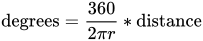
如果你想看看這個公式的推導過程,請點選下面的“推導”連結。
為了解決這個問題,我們可以考慮車輪在表面上的滾動方式。讓我們考慮一個在表面上不打滑的輪子,因為這將使我們的計算更容易。讓我們考慮一下輪子的“周長”。如果你拿一根繩子,把它繞著圓圈纏繞一圈,繩子的長度就是“周長”。半徑為“r”的圓的周長是

下圖顯示了一個藍色車輪,上面纏繞著一條綠色繩子。當車輪滾動時,繩子從車輪上展開。

從圖中我們可以看出,如果車輪滾動一圈,它就會行駛一個周長的距離。知道一圈是 360 度,我們可以寫出比率
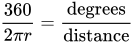
所以,如果我們想要行駛一段距離 "distance",我們可以做
使用這個公式,如果我們知道輪子的半徑,也知道我們想要行駛的距離,我們就可以計算出輪子需要轉動的角度!現在我們可以編寫我們的函數了。
 | 注意! 對於數學愛好者,你可能也知道圓的 "弧長" 是
其中 以弧度表示。解出 得到
將 轉換為度數,我們得到 這與我們之前的結果完全相同! |


現在,我們可以將該方程式包含在我們的函式中。這使我們能夠對任何距離重複使用該函式,而不必一遍又一遍地輸入方程式。
import barobo
import math # So that we can use math.pi
dongle = barobo.Dongle()
dongle.connect()
myLinkbot = dongle.getLinkbot('abcd') # Change abcd to your Linkbot's serial ID

def driveDistance(linkbot, distance):
    r = 3.5 / 2 # If you have a wheel that's not 3.5 inches in diameter, change "3.5" to the diameter of your wheel
    degrees = (360) / (2 * math.pi * r) * distance
    linkbot.move(degrees, 0, -degrees)

driveDistance(myLinkbot, 10) # Drives the Linkbot 10 inches forward
driveDistance(myLinkbot, -5) # Drives the Linkbot 5 inches backward
上面顯示的程式使用 driveDistance() 函式將機器人向前移動 10 英寸,然後向後移動 5 英寸。你可能想知道為什麼我們要費心定義一個函式(它佔用 4 行程式碼),而我們可以不使用函式完成相同的任務。
- 想象一下,如果任務比僅僅兩個動作複雜得多。如果你需要讓機器人前後移動超過 4 次,那麼使用函式實際上可以節省時間和程式碼。
- 透過複製/貼上編寫重複程式碼可能非常難以除錯。想象一下,如果你為 20 個機器人動作複製貼上了 20 次方程式,然後你在複製貼上的程式碼中發現了一個錯誤。你需要在所有 20 個貼上的程式碼塊中糾正這個錯誤。如果你編寫了一個有錯誤的函式,你只需要修復函式內部的方程式。
- 如果你正在為其他人編寫程式碼,那麼將程式碼封裝在函式中是有意義的。想象一下,你正在與一個團隊合作,你的工作是編寫一個函式來使機器人前後移動,另一個人的工作是編寫一個函式來使機器人轉彎,而第三個人必須編寫一個函式來更改 LED 顏色。然後,你可以將這三個函式放在同一個程式中,並擁有一個能夠準確地行駛一定距離、轉彎並更改 LED 顏色的機器人。
例子
[edit | edit source]temperature2.py
#! /usr/bin/python
#-*-coding: utf-8 -*-
# converts temperature to Fahrenheit or Celsius

def print_options():
    print("Options:")
    print(" 'p' print options")
    print(" 'c' convert from Celsius")
    print(" 'f' convert from Fahrenheit")
    print(" 'q' quit the program")

def celsius_to_fahrenheit(c_temp):
    return 9.0 / 5.0 * c_temp + 32

def fahrenheit_to_celsius(f_temp):
    return (f_temp - 32.0) * 5.0 / 9.0

choice = "p"
while choice != "q":
    if choice == "c":
        c_temp = float(input("Celsius temperature: "))
        print("Fahrenheit:", celsius_to_fahrenheit(c_temp))
        choice = input("option: ")
    elif choice == "f":
        f_temp = float(input("Fahrenheit temperature: "))
        print("Celsius:", fahrenheit_to_celsius(f_temp))
        choice = input("option: ")
    elif choice == "p": #Alternatively choice != "q": so that print when anything unexpected inputed
        print_options()
        choice = input("option: ")
示例執行
Options:
 'p' print options
 'c' convert from Celsius
 'f' convert from Fahrenheit
 'q' quit the program
option: c
Celsius temperature: 30
Fahrenheit: 86.0
option: f
Fahrenheit temperature: 60
Celsius: 15.5555555556
option: q
area2.py
#! /usr/bin/python
#-*-coding: utf-8 -*-
# calculates a given rectangle area

def hello():
    print('Hello!')

def area(width, height):
    return width * height

def print_welcome(name):
    print('Welcome,', name)

def positive_input(prompt):
    number = float(input(prompt))
    while number <= 0:
        print('Must be a positive number')
        number = float(input(prompt))
    return number

name = input('Your Name: ')
hello()
print_welcome(name)
print()
print('To find the area of a rectangle,')
print('enter the width and height below.')
print()
w = positive_input('Width: ')
h = positive_input('Height: ')

print('Width =', w, ' Height =', h, ' so Area =', area(w, h))
示例執行
Your Name: Josh
Hello!
Welcome, Josh

To find the area of a rectangle,
enter the width and height below.

Width: -4
Must be a positive number
Width: 4
Height: 3
Width = 4  Height = 3  so Area = 12
練習
[edit | edit source]將上面示例中的 area2.py 程式改寫為分別使用函式計算正方形面積、矩形面積和圓形面積(3.14 * radius**2)。此程式應包含一個選單介面。
def square(side):
    return side * side

def rectangle(width , height):
    return width * height

def circle(radius):
    return 3.14159 * radius ** 2

def options():
    print()
    print("Options:")
    print("s = calculate the area of a square.")
    print("c = calculate the area of a circle.")
    print("r = calculate the area of a rectangle.")
    print("q = quit")
    print()

print("This program will calculate the area of a square, circle or rectangle.")
choice = "x"
options()
while choice != "q":
    choice = input("Please enter your choice: ")
    if choice == "s":
        side = float(input("Length of square side: "))
        print("The area of this square is", square(side))
        options()
    elif choice == "c":
        radius = float(input("Radius of the circle: "))
        print("The area of the circle is", circle(radius))
        options()
    elif choice == "r":
        width = float(input("Width of the rectangle: "))
        height = float(input("Height of the rectangle: "))
        print("The area of the rectangle is", rectangle(width, height))
        options()
    elif choice == "q":
        print(" ",end="")
    else:
        print("Unrecognized option.")
        options()