


OpenSCAD 使用者手冊/CSG 建模

-
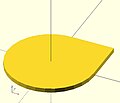 並集(或)
並集(或)
圓 + 正方形 -
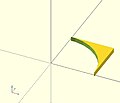 差集(且非)
正方形 - 圓 -
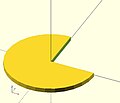 差集(且非)
圓 - 正方形 -
 交集(且)
交集(且)
圓 - (圓 - 正方形)


 union()       {square(10);circle(10);} // square or  circle
 difference()  {square(10);circle(10);} // square and not circle
 difference()  {circle(10);square(10);} // circle and not square
 intersection(){square(10);circle(10);} // square and circle
-
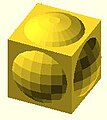 並集(或)
並集(或)
球體 + 立方體 -
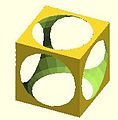 差集(且非)
立方體 - 球體 -
 差集(且非)
球體 - 立方體 -
 交集(且)
交集(且)
球體 - (球體 - 立方體)


 union()       {cube(12, center=true); sphere(8);} // cube or  sphere
 difference()  {cube(12, center=true); sphere(8);} // cube and not sphere
 difference()  {sphere(8); cube(12, center=true);} // sphere and not cube
 intersection(){cube(12, center=true); sphere(8);} // cube and sphere
建立其所有子節點的並集。這是所有子節點的總和(邏輯或)。
可以與二維或三維物件一起使用,但不要混合使用。

 //Usage example:
 union() {
 	cylinder (h = 4, r=1, center = true, $fn=100);
 	rotate ([90,0,0]) cylinder (h = 4, r=0.9, center = true, $fn=100);
 }
注意:當不使用時,並集是隱式的。但是,例如,在差集中,它必須存在以將第一個子節點分組為一個。
注意:對於所有並集,無論是顯式還是隱式,都必須保證要合併的外部面不重合。如果不遵循此規則,會導致設計行為不確定,並且可能導致渲染結果不是流形(具有零體積部分或部分朝內),通常會導致警告,有時會從渲染輸出中刪除設計的一部分。(這也可能導致 預覽期間的閃爍效應。)此要求不是錯誤,而是浮點數比較的固有屬性,以及無法精確表示諸如大多數旋轉產生的無理數之類的基本屬性。例如,這是一個無效的 OpenSCAD 程式,至少會導致大多數平臺上的警告
 // Invalid!
 size = 10;
 rotation = 17;
 union() {
    rotate([rotation, 0, 0])
       cube(size);
    rotate([rotation, 0, 0])
       translate([0, 0, size])
       cube([2, 3, 4]);
 }
解決方案是在合併相鄰面時始終使用一個小值,稱為 epsilon,以保證重疊。請注意,在兩個位置使用的 0.01 eps 值,因此外部結果等效於預期結果
 // Correct!
 size = 10;
 rotation = 17;
 eps = 0.01;
 union() {
    rotate([rotation, 0, 0])
       cube(size);
    rotate([rotation, 0, 0])
       translate([0, 0, size-eps])
       cube([2, 3, 4+eps]);
 }
從第一個子節點中減去第二個(以及所有後續)子節點(邏輯且非)。
可以與二維或三維物件一起使用,但不要混合使用。

Usage example:
difference() {
	cylinder (h = 4, r=1, center = true, $fn=100);
	rotate ([90,0,0]) cylinder (h = 4, r=0.9, center = true, $fn=100);
}
注意:差集操作中要刪除的表面必須重疊,並且要刪除的負面部分必須完全延伸到要刪除該表面的體積之外。如果不遵循此規則,可能會導致 預覽偽影,並且可能導致非流形渲染警告或從渲染輸出中刪除部分。有關此要求的原因以及如何透過使用一個小 epsilon 值來實現此要求的示例,請參閱上述並集部分中的描述。
注意,在第二個示例中,新增第一個和第二個子節點的並集的結果。

// Usage example for difference of multiple children:
$fn=90;
difference(){
                                            cylinder(r=5,h=20,center=true);
    rotate([00,140,-45]) color("LightBlue") cylinder(r=2,h=25,center=true);
    rotate([00,40,-50])                     cylinder(r=2,h=30,center=true);
    translate([0,0,-10])rotate([00,40,-50]) cylinder(r=1.4,h=30,center=true);
}

// second instance with added union
translate([10,10,0]){
    difference(){
      union(){        // combine 1st and 2nd children
                                                cylinder(r=5,h=20,center=true);
        rotate([00,140,-45]) color("LightBlue") cylinder(r=2,h=25,center=true);
      }
      rotate([00,40,-50])                       cylinder(r=2,h=30,center=true);
      translate([0,0,-10])rotate([00,40,-50])   cylinder(r=1.4,h=30,center=true);
    }
}
建立所有子節點的交集。這保留了重疊部分(邏輯且)。
只有所有子節點共有的或共享的區域被保留。
可以與二維或三維物件一起使用,但不要混合使用。

//Usage example:
intersection() {
	cylinder (h = 4, r=1, center = true, $fn=100);
	rotate ([90,0,0]) cylinder (h = 4, r=0.9, center = true, $fn=100);
}
警告:使用渲染,始終計算此樹的 CSG 模型(即使在 OpenCSG 預覽模式下)。這會使預覽速度非常慢,並且 OpenSCAD 似乎會掛起/凍結。
Usage example:
render(convexity = 1) { ... }
| 凸性 | 整數。凸性引數指定與物件相交的光線可能穿過的前後面的最大數量。此引數僅用於在 OpenCSG 預覽模式下正確顯示物件,對多面體渲染沒有影響。 |

此影像顯示了一個凸性為 4 的二維形狀,因為以紅色表示的光線最多與二維形狀相交 4 次。三維形狀的凸性將以類似的方式確定。將其設定為 10 對於大多數情況應該可以正常工作。