


RAC 攻擊 - Oracle 叢集資料庫實戰 / 安裝 Grid 基礎架構(共享檔案系統)
在大型叢集資料庫部署中,幾個 NFS 裝置和大型機叢集檔案系統非常常見。我們將在這裡使用 OCFS2 來練習使用檔案系統的 11gR2 RAC。
- 作為oracle使用者,啟動網格安裝程式。在第一個螢幕上,選擇安裝和配置叢集的 Grid 基礎架構,然後單擊下一步。 [oracle@collabn1 ~]$ /mnt/cdrom*/grid/runInstaller

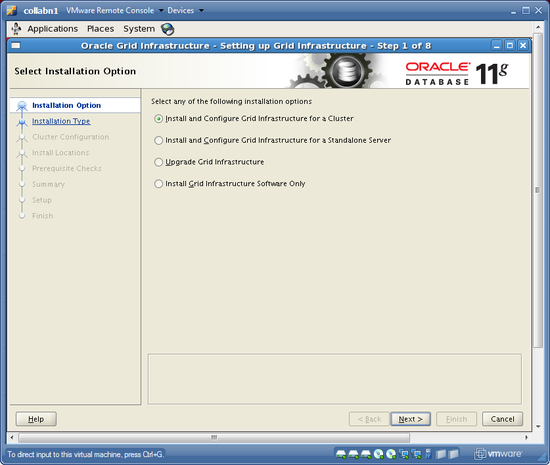
- 選擇高階安裝,然後單擊下一步。

- 接受預設語言(英語),然後選擇下一步。
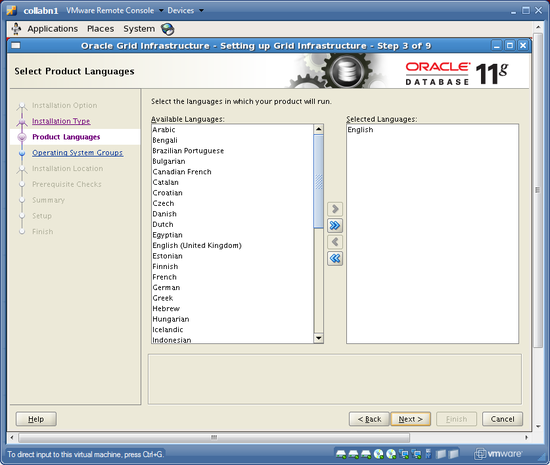
- 將叢集命名為collab,並確保 SCAN 名稱是collab-scan,埠為1521,然後單擊下一步。

- 新增節點collabn2,其 VIP 為collabn2-vip,然後選擇下一步以驗證叢集配置。

- 驗證 192.168.78.0 子網上的 eth0 是公共的,而 172.16.100.0 子網上的 eth1 是私有的,然後單擊下一步。

- 選擇將叢集軟體檔案儲存在共享檔案系統中,然後選擇下一步。

- 對於 OCR,選擇外部冗餘,並鍵入路徑 /u61/cluster/ocr。(這是來自錯誤解決方法的 NFS 位置。)單擊下一步以繼續。

- 對於投票磁碟,執行相同的操作 - 選擇外部冗餘,並鍵入路徑 /u61/cluster/vdsk。(同樣,這是來自錯誤解決方法的 NFS 位置。)單擊下一步以繼續。

- 不要使用 IPMI。單擊下一步。
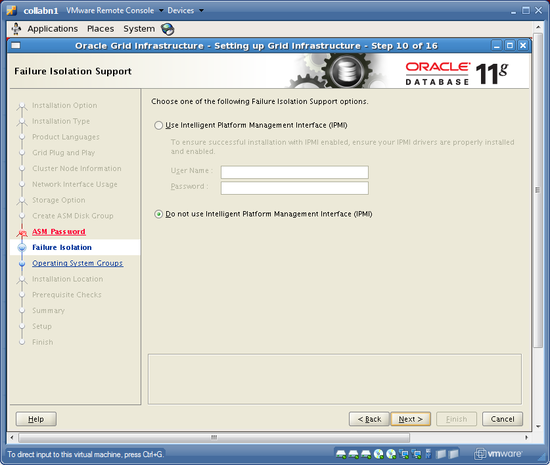
- 將 OSDBA 組設定為 asmdba,將 OSOPER 組設定為 asmoper,將 OSASM 組設定為 asmadmin。然後單擊下一步。

- 接受 ORACLE_BASE 位置 /u01/app/oracle,並使用 ORACLE_HOME 位置 /u01/grid/oracle/product/11.2.0/grid_1。然後單擊下一步。

- 接受預設的清單位置,然後選擇下一步

- 先決條件檢查將執行。將發出警告,提示三個檢查失敗:物理記憶體、交換空間和網路時間協議。單擊複選框以忽略全部,然後單擊下一步。

-
在 oracle 使用者的主目錄中儲存一個名為 grid.rsp 的響應檔案。然後單擊完成以安裝網格基礎架構。


- 出現提示時,以root使用者身份開啟終端並執行兩個root.sh指令碼。確保在兩個節點上都執行兩個指令碼!
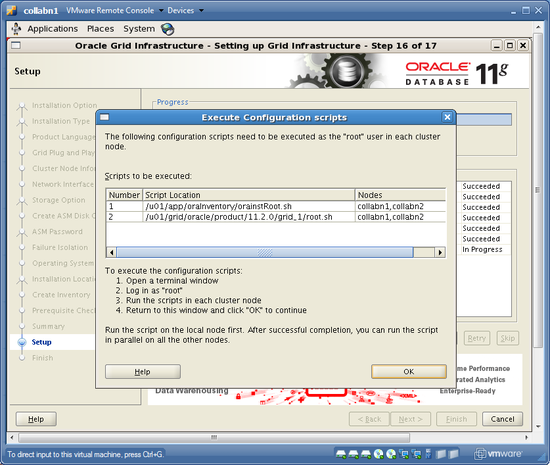
[oracle@collabn1 ~]$ su -
Password: racattack

[root@collabn1 ~]# /u01/app/oraInventory/orainstRoot.sh
Changing permissions of /u01/app/oraInventory.
Adding read, write permissions for group.
Removing read,write,execute permissions for world.

Changing groupname of /u01/app/oraInventory to oinstall.
The execution of the script is complete.

[root@collabn1 ~]# /u01/grid/oracle/product/11.2.0/grid_1/root.sh
Running Oracle 11g root.sh script...

The following environment variables are set as:
    ORACLE_OWNER= oracle
    ORACLE_HOME=  /u01/grid/oracle/product/11.2.0/grid_1

Enter the full pathname of the local bin directory: [/usr/local/bin]: /usr/bin
   Copying dbhome to /usr/bin ...
   Copying oraenv to /usr/bin ...
   Copying coraenv to /usr/bin ...

Entries will be added to the /etc/oratab file as needed by
Database Configuration Assistant when a database is created
Finished running generic part of root.sh script.
Now product-specific root actions will be performed.
2011-03-30 16:49:13: Parsing the host name
2011-03-30 16:49:13: Checking for super user privileges
2011-03-30 16:49:13: User has super user privileges
Using configuration parameter file: /u01/grid/oracle/product/11.2.0/grid_1/crs/install/crsconfig_params
Creating trace directory
LOCAL ADD MODE
Creating OCR keys for user 'root', privgrp 'root'..
Operation successful.
  root wallet
  root wallet cert
  root cert export
  peer wallet
  profile reader wallet
  pa wallet
  peer wallet keys
  pa wallet keys
  peer cert request
  pa cert request
  peer cert
  pa cert
  peer root cert TP
  profile reader root cert TP
  pa root cert TP
  peer pa cert TP
  pa peer cert TP
  profile reader pa cert TP
  profile reader peer cert TP
  peer user cert
  pa user cert
Adding daemon to inittab
CRS-4123: Oracle High Availability Services has been started.
ohasd is starting
CRS-2672: Attempting to start 'ora.gipcd' on 'collabn1'
CRS-2672: Attempting to start 'ora.mdnsd' on 'collabn1'
CRS-2676: Start of 'ora.mdnsd' on 'collabn1' succeeded
CRS-2676: Start of 'ora.gipcd' on 'collabn1' succeeded
CRS-2672: Attempting to start 'ora.gpnpd' on 'collabn1'
CRS-2676: Start of 'ora.gpnpd' on 'collabn1' succeeded
CRS-2672: Attempting to start 'ora.cssdmonitor' on 'collabn1'
CRS-2676: Start of 'ora.cssdmonitor' on 'collabn1' succeeded
CRS-2672: Attempting to start 'ora.cssd' on 'collabn1'
CRS-2672: Attempting to start 'ora.diskmon' on 'collabn1'
CRS-2676: Start of 'ora.diskmon' on 'collabn1' succeeded
CRS-2676: Start of 'ora.cssd' on 'collabn1' succeeded
CRS-2672: Attempting to start 'ora.ctssd' on 'collabn1'
CRS-2676: Start of 'ora.ctssd' on 'collabn1' succeeded
clscfg: -install mode specified
Successfully accumulated necessary OCR keys.
Creating OCR keys for user 'root', privgrp 'root'..
Operation successful.
CRS-2672: Attempting to start 'ora.crsd' on 'collabn1'
CRS-2676: Start of 'ora.crsd' on 'collabn1' succeeded
Now formatting voting disk: /u61/cluster/vdsk.
CRS-4603: Successful addition of voting disk /u61/cluster/vdsk.
##  STATE    File Universal Id                File Name Disk group
--  -----    -----------------                --------- ---------
 1. ONLINE   59f9f62cc0f44f35bff552ced06e35ee (/u61/cluster/vdsk) []
Located 1 voting disk(s).
CRS-2673: Attempting to stop 'ora.crsd' on 'collabn1'
CRS-2677: Stop of 'ora.crsd' on 'collabn1' succeeded
CRS-2673: Attempting to stop 'ora.asm' on 'collabn1'
CRS-2677: Stop of 'ora.asm' on 'collabn1' succeeded
CRS-2673: Attempting to stop 'ora.ctssd' on 'collabn1'
CRS-2677: Stop of 'ora.ctssd' on 'collabn1' succeeded
CRS-2673: Attempting to stop 'ora.cssdmonitor' on 'collabn1'
CRS-2677: Stop of 'ora.cssdmonitor' on 'collabn1' succeeded
CRS-2673: Attempting to stop 'ora.cssd' on 'collabn1'
CRS-2677: Stop of 'ora.cssd' on 'collabn1' succeeded
CRS-2673: Attempting to stop 'ora.gpnpd' on 'collabn1'
CRS-2677: Stop of 'ora.gpnpd' on 'collabn1' succeeded
CRS-2673: Attempting to stop 'ora.gipcd' on 'collabn1'
CRS-2677: Stop of 'ora.gipcd' on 'collabn1' succeeded
CRS-2673: Attempting to stop 'ora.mdnsd' on 'collabn1'
CRS-2677: Stop of 'ora.mdnsd' on 'collabn1' succeeded
CRS-2672: Attempting to start 'ora.mdnsd' on 'collabn1'
CRS-2676: Start of 'ora.mdnsd' on 'collabn1' succeeded
CRS-2672: Attempting to start 'ora.gipcd' on 'collabn1'
CRS-2676: Start of 'ora.gipcd' on 'collabn1' succeeded
CRS-2672: Attempting to start 'ora.gpnpd' on 'collabn1'
CRS-2676: Start of 'ora.gpnpd' on 'collabn1' succeeded
CRS-2672: Attempting to start 'ora.cssdmonitor' on 'collabn1'
CRS-2676: Start of 'ora.cssdmonitor' on 'collabn1' succeeded
CRS-2672: Attempting to start 'ora.cssd' on 'collabn1'
CRS-2672: Attempting to start 'ora.diskmon' on 'collabn1'
CRS-2676: Start of 'ora.diskmon' on 'collabn1' succeeded
CRS-2676: Start of 'ora.cssd' on 'collabn1' succeeded
CRS-2672: Attempting to start 'ora.ctssd' on 'collabn1'
CRS-2676: Start of 'ora.ctssd' on 'collabn1' succeeded
CRS-2672: Attempting to start 'ora.asm' on 'collabn1'
CRS-2676: Start of 'ora.asm' on 'collabn1' succeeded
CRS-2672: Attempting to start 'ora.crsd' on 'collabn1'
CRS-2676: Start of 'ora.crsd' on 'collabn1' succeeded
CRS-2672: Attempting to start 'ora.evmd' on 'collabn1'
CRS-2676: Start of 'ora.evmd' on 'collabn1' succeeded
CRS-2672: Attempting to start 'ora.asm' on 'collabn1'
CRS-2676: Start of 'ora.asm' on 'collabn1' succeeded
CRS-2672: Attempting to start 'ora.DATA.dg' on 'collabn1'
CRS-2676: Start of 'ora.DATA.dg' on 'collabn1' succeeded
CRS-2672: Attempting to start 'ora.registry.acfs' on 'collabn1'
CRS-2676: Start of 'ora.registry.acfs' on 'collabn1' succeeded

collabn1     2011/03/30 16:59:35     /u01/grid/oracle/product/11.2.0/grid_1/cdata/collabn1/backup_20110330_165935.olr
Preparing packages for installation...
cvuqdisk-1.0.7-1
Configure Oracle Grid Infrastructure for a Cluster ... succeeded
Updating inventory properties for clusterware
Starting Oracle Universal Installer...

Checking swap space: must be greater than 500 MB.   Actual 968 MB    Passed
The inventory pointer is located at /etc/oraInst.loc
The inventory is located at /u01/app/oraInventory
'UpdateNodeList' was successful.
[root@collabn1 ~]# ssh collabn2
root@collabn2's password: racattack
-bash: oraenv: No such file or directory
[root@collabn2 ~]# /u01/app/oraInventory/orainstRoot.sh
Changing permissions of /u01/app/oraInventory.
Adding read, write permissions for group.
Removing read,write,execute permissions for world.

Changing groupname of /u01/app/oraInventory to oinstall.
The execution of the script is complete.

[root@collabn2 ~]# /u01/grid/oracle/product/11.2.0/grid_1/root.sh
Running Oracle 11g root.sh script...

The following environment variables are set as:
    ORACLE_OWNER= oracle
    ORACLE_HOME=  /u01/grid/oracle/product/11.2.0/grid_1

Enter the full pathname of the local bin directory: [/usr/local/bin]: /usr/bin
   Copying dbhome to /usr/bin ...
   Copying oraenv to /usr/bin ...
   Copying coraenv to /usr/bin ...

Entries will be added to the /etc/oratab file as needed by
Database Configuration Assistant when a database is created
Finished running generic part of root.sh script.
Now product-specific root actions will be performed.
2011-03-30 17:04:26: Parsing the host name
2011-03-30 17:04:26: Checking for super user privileges
2011-03-30 17:04:26: User has super user privileges
Using configuration parameter file: /u01/grid/oracle/product/11.2.0/grid_1/crs/install/crsconfig_params
Creating trace directory
LOCAL ADD MODE
Creating OCR keys for user 'root', privgrp 'root'..
Operation successful.
Adding daemon to inittab
CRS-4123: Oracle High Availability Services has been started.
ohasd is starting
CRS-4402: The CSS daemon was started in exclusive mode but found an active CSS daemon on node collabn1, number 1, and is terminating
An active cluster was found during exclusive startup, restarting to join the cluster
CRS-2672: Attempting to start 'ora.mdnsd' on 'collabn2'
CRS-2676: Start of 'ora.mdnsd' on 'collabn2' succeeded
CRS-2672: Attempting to start 'ora.gipcd' on 'collabn2'
CRS-2676: Start of 'ora.gipcd' on 'collabn2' succeeded
CRS-2672: Attempting to start 'ora.gpnpd' on 'collabn2'
CRS-2676: Start of 'ora.gpnpd' on 'collabn2' succeeded
CRS-2672: Attempting to start 'ora.cssdmonitor' on 'collabn2'
CRS-2676: Start of 'ora.cssdmonitor' on 'collabn2' succeeded
CRS-2672: Attempting to start 'ora.cssd' on 'collabn2'
CRS-2672: Attempting to start 'ora.diskmon' on 'collabn2'
CRS-2676: Start of 'ora.diskmon' on 'collabn2' succeeded
CRS-2676: Start of 'ora.cssd' on 'collabn2' succeeded
CRS-2672: Attempting to start 'ora.ctssd' on 'collabn2'
CRS-2676: Start of 'ora.ctssd' on 'collabn2' succeeded
CRS-2672: Attempting to start 'ora.drivers.acfs' on 'collabn2'
CRS-2676: Start of 'ora.drivers.acfs' on 'collabn2' succeeded
CRS-2672: Attempting to start 'ora.asm' on 'collabn2'
CRS-2676: Start of 'ora.asm' on 'collabn2' succeeded
CRS-2672: Attempting to start 'ora.crsd' on 'collabn2'
CRS-2676: Start of 'ora.crsd' on 'collabn2' succeeded
CRS-2672: Attempting to start 'ora.evmd' on 'collabn2'
CRS-2676: Start of 'ora.evmd' on 'collabn2' succeeded

collabn2     2011/03/30 17:12:32     /u01/grid/oracle/product/11.2.0/grid_1/cdata/collabn2/backup_20110330_171232.olr
Preparing packages for installation...
cvuqdisk-1.0.7-1
Configure Oracle Grid Infrastructure for a Cluster ... succeeded
Updating inventory properties for clusterware
Starting Oracle Universal Installer...

Checking swap space: must be greater than 500 MB.   Actual 1205 MB    Passed
The inventory pointer is located at /etc/oraInst.loc
The inventory is located at /u01/app/oraInventory
'UpdateNodeList' was successful.
- 執行完兩個指令碼後,返回安裝程式視窗並單擊確定以繼續執行配置助手。

- 叢集驗證實用程式將失敗,因為 NTP 未執行。如果你想,可以在日誌檔案的最後檢視錯誤訊息。然後單擊確定以關閉訊息框,並單擊下一步以繼續。

- 你現在應該看到最終螢幕!單擊關閉退出安裝程式。


