


Cg 程式設計/Unity/凹凸表面的投影

本教程涵蓋(單步)視差貼圖。
它擴充套件並基於“凹凸表面的光照”部分。請注意,本教程旨在教您此技術的工作原理。如果您想在 Unity 中實際使用視差貼圖,您應該使用支援它的內建著色器。
在“凹凸表面的光照”部分中介紹的法線貼圖技術只改變平面的光照,以建立凹凸和凹陷的錯覺。如果一個人直視表面(即在表面法線向量方向),這將非常有效。但是,如果一個人從其他角度(如左側影像所示)看向表面,凹凸也應該從表面突出,而凹陷則應該凹進表面。當然,這可以通過幾何建模凹凸和凹陷來實現;但是,這將需要處理更多頂點。另一方面,單步視差貼圖是一種非常有效的技術,類似於法線貼圖,它不需要額外的三角形,但仍然可以將虛擬凹凸移動幾個畫素,使其從平面上突出。但是,該技術僅限於高度較小的凹凸和凹陷,並且需要一些微調才能獲得最佳效果。

視差貼圖由 Tomomichi Kaneko 等人在 2001 年的論文“使用視差貼圖的詳細形狀表示”(ICAT 2001)中提出。基本思想是偏移用於表面紋理對映(尤其是法線貼圖)的紋理座標。如果以適當的方式計算紋理座標的這個偏移,就可以移動紋理的一部分(例如凹凸),就好像它們從表面突出一樣。
左側的插圖顯示了指向觀察者的視向量 V 和在片段著色器中光柵化的表面的點處的表面法線向量 N。視差貼圖分 3 步進行
- 在光柵化點處的 高度在高度圖中的查詢,該高度圖由插圖底部直線上方的波浪線表示。
- 計算方向為 V 的視射線與平行於渲染表面的 高度的表面的交點。距離 是在方向為 N 的方向上移動 的光柵化表面點和這個交點之間的距離。如果將這兩個點投影到渲染的表面上, 也是光柵化點和表面上的一個新點(在插圖中用十字標記)之間的距離。如果表面被高度圖位移,這個新的表面點更接近實際在方向為 V 的視射線中可見的點。
- 將偏移 轉換為紋理座標空間,以便為所有後續紋理查詢計算紋理座標的偏移。


為了計算,我們需要在光柵化點處的高度圖中的 高度,這在示例中透過紋理屬性 _ParallaxMap 的 A 分量的紋理查詢來實現,它應該是一個灰度影像,表示“凹凸表面的光照”部分中討論的高度。我們還需要區域性表面座標系中的視方向 V,該座標系由法線向量 ( 軸)、切線向量 ( 軸)和副法線向量 ( 軸)組成,它們也在“凹凸表面的光照”部分中介紹。為此,我們使用以下公式計算從區域性表面座標到物體空間的變換:


![{\displaystyle \mathrm {M} _{{\text{surface}}\to {\text{object}}}=\left[{\begin{matrix}T_{x}&B_{x}&N_{x}\\T_{y}&B_{y}&N_{y}\\T_{z}&B_{z}&N_{z}\end{matrix}}\right]}](https://wikimedia.org/api/rest_v1/media/math/render/svg/242e02fde6767d2ead326f94be91251497b69a21)
其中 **T**、**B** 和 **N** 以物體座標給出。(在 “Lighting of Bumpy Surfaces” 部分,我們有一個類似的矩陣,但向量在世界座標中。)
我們計算物體空間中的檢視方向 **V**(作為柵格化位置與從世界空間變換到物體空間的攝像機位置之差),然後使用矩陣 將其變換到區域性表面空間,該矩陣可以計算為
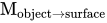

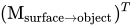
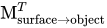
這是可能的,因為 **T**、**B** 和 **N** 是正交且歸一化的。(實際上,情況稍微複雜一些,因為我們不會對這些向量進行歸一化,而是使用它們的長度進行另一種變換;見下文。)因此,為了將 **V** 從物體空間變換到區域性表面空間,我們必須用轉置矩陣 相乘。這實際上很好,因為在 Cg 中,更容易構建轉置矩陣,因為 **T**、**B** 和 **N** 是轉置矩陣的行向量。
一旦我們在區域性表面座標系中獲得了 **V**,其中 軸指向法向量 **N** 的方向,我們就可以使用相似三角形計算偏移量 (在 方向)和 (在 方向)(與插圖比較)


以及 .


因此
以及 .


請注意,沒有必要對 **V** 進行歸一化,因為我們只使用其分量的比率,這些比率不受歸一化的影響。
最後,我們需要將 和 轉換到紋理空間。如果 Unity 不幫助我們,這將非常困難:切線屬性 tangent 實際上是按比例縮放的,並且有一個第四個分量 tangent.w 用於縮放副法線向量,這樣檢視方向 V 的變換就可以按比例縮放 和 ,以便在紋理座標空間中獲得 和 ,無需進一步計算。


實現
[edit | edit source]實現與 “凹凸表面的光照” 部分的大部分程式碼相同。特別是,為了考慮從區域性表面空間到紋理空間的偏移對映,使用了 tangent 屬性的第四個分量對副法線向量進行相同比例縮放。
           float3 binormal = cross(input.normal, input.tangent.xyz)
              * input.tangent.w;
我們需要在區域性表面座標系中新增一個檢視向量 V 的輸出引數(軸比例縮放以考慮對映到紋理空間)。此引數名為 viewDirInScaledSurfaceCoords。它是透過使用矩陣 (localSurface2ScaledObjectT)變換物件座標中的檢視向量 (viewDirInObjectCoords) 來計算的,如上所述。
            float3 viewDirInObjectCoords = mul(
               modelMatrixInverse, float4(_WorldSpaceCameraPos, 1.0)).xyz
               - input.vertex.xyz;
            float3x3 localSurface2ScaledObjectT =
               float3x3(input.tangent.xyz, binormal, input.normal);
               // vectors are orthogonal
            output.viewDirInScaledSurfaceCoords =
               mul(localSurface2ScaledObjectT, viewDirInObjectCoords);
               // we multiply with the transpose to multiply with
               // the "inverse" (apart from the scaling)
除了將世界座標中的檢視方向在頂點著色器中計算而不是在片段著色器中計算之外,其餘頂點著色器與法線對映相同,請參閱 “凹凸表面的光照” 部分。這樣做是為了保持片段著色器中的算術運算數量足夠少,以適應某些 GPU。
在片段著色器中,我們首先查詢高度圖以獲取光柵化點的海拔高度。此高度由紋理 _ParallaxMap 的 A 分量指定。將 0 到 1 之間的數值透過著色器屬性 _Parallax 轉換為 -_Parallax/2 到 +_Parallax 的範圍,以提供一些使用者對效果強度的控制(並且與回退著色器相容)。
           float height = _Parallax
               * (-0.5 + tex2D(_ParallaxMap, _ParallaxMap_ST.xy
               * input.tex.xy + _ParallaxMap_ST.zw).x);
然後根據上述描述計算偏移量 和 。但是,我們還將每個偏移量限制在使用者指定的 -_MaxTexCoordOffset 和 _MaxTexCoordOffset 區間內,以確保偏移量保持在合理的範圍內。(如果高度圖由更多或更少的高度恆定的平坦高原組成,這些高原之間存在平滑過渡,則 _MaxTexCoordOffset 應小於這些過渡區域的厚度;否則,取樣點可能位於具有不同高度的不同高原中,這意味著對交點近似的精度將任意地差。)程式碼如下:
           float2 texCoordOffsets =
              clamp(height * input.viewDirInScaledSurfaceCoords.xy
              / input.viewDirInScaledSurfaceCoords.z,
              -_MaxTexCoordOffset, +_MaxTexCoordOffset);
在以下程式碼中,我們需要將偏移量應用到所有紋理查詢中的紋理座標;即,我們需要將 float2(input.tex)(或等效地 input.tex.xy)替換為 (input.tex.xy + texCoordOffsets),例如:
            float4 encodedNormal = tex2D(_BumpMap,
               _BumpMap_ST.xy * (input.tex.xy + texCoordOffsets)
               + _BumpMap_ST.zw);
片段著色器程式碼的其餘部分與 “凹凸表面的光照” 部分相同。
完整著色器程式碼
[edit | edit source]如上一節所述,此程式碼的大部分內容來自 “凹凸表面的光照” 部分。請注意,如果您想在使用 OpenGL ES 的移動裝置上使用該程式碼,請確保更改法線圖的解碼方式,如該教程中所述。
關於視差貼圖的部分實際上只有幾行。大多數著色器屬性的名稱都是根據回退著色器選擇的;使用者介面標籤更具描述性。
Shader "Cg parallax mapping" {
   Properties {
      _BumpMap ("Normal Map", 2D) = "bump" {}
      _ParallaxMap ("Heightmap (in A)", 2D) = "black" {}
      _Parallax ("Max Height", Float) = 0.01
      _MaxTexCoordOffset ("Max Texture Coordinate Offset", Float) =
         0.01
      _Color ("Diffuse Material Color", Color) = (1,1,1,1)
      _SpecColor ("Specular Material Color", Color) = (1,1,1,1)
      _Shininess ("Shininess", Float) = 10
   }
   CGINCLUDE // common code for all passes of all subshaders
      #include "UnityCG.cginc"
      uniform float4 _LightColor0;
         // color of light source (from "Lighting.cginc")

      // User-specified properties
      uniform sampler2D _BumpMap;
      uniform float4 _BumpMap_ST;
      uniform sampler2D _ParallaxMap;
      uniform float4 _ParallaxMap_ST;
      uniform float _Parallax;
      uniform float _MaxTexCoordOffset;
      uniform float4 _Color;
      uniform float4 _SpecColor;
      uniform float _Shininess;

      struct vertexInput {
         float4 vertex : POSITION;
         float4 texcoord : TEXCOORD0;
         float3 normal : NORMAL;
         float4 tangent : TANGENT;
      };
      struct vertexOutput {
         float4 pos : SV_POSITION;
         float4 posWorld : TEXCOORD0;
            // position of the vertex (and fragment) in world space
         float4 tex : TEXCOORD1;
         float3 tangentWorld : TEXCOORD2;
         float3 normalWorld : TEXCOORD3;
         float3 binormalWorld : TEXCOORD4;
         float3 viewDirWorld : TEXCOORD5;
         float3 viewDirInScaledSurfaceCoords : TEXCOORD6;
      };

      vertexOutput vert(vertexInput input)
      {
         vertexOutput output;

         float4x4 modelMatrix = unity_ObjectToWorld;
         float4x4 modelMatrixInverse = unity_WorldToObject;

         output.tangentWorld = normalize(
            mul(modelMatrix, float4(input.tangent.xyz, 0.0)).xyz);
         output.normalWorld = normalize(
            mul(float4(input.normal, 0.0), modelMatrixInverse).xyz);
         output.binormalWorld = normalize(
            cross(output.normalWorld, output.tangentWorld)
            * input.tangent.w); // tangent.w is specific to Unity


         float3 binormal = cross(input.normal, input.tangent.xyz)
            * input.tangent.w;
            // appropriately scaled tangent and binormal
            // to map distances from object space to texture space

            float3 viewDirInObjectCoords = mul(
            modelMatrixInverse, float4(_WorldSpaceCameraPos, 1.0)).xyz
            - input.vertex.xyz;
         float3x3 localSurface2ScaledObjectT =
            float3x3(input.tangent.xyz, binormal, input.normal);
            // vectors are orthogonal
         output.viewDirInScaledSurfaceCoords =
            mul(localSurface2ScaledObjectT, viewDirInObjectCoords);
            // we multiply with the transpose to multiply with
            // the "inverse" (apart from the scaling)

         output.posWorld = mul(modelMatrix, input.vertex);
         output.viewDirWorld = normalize(
            _WorldSpaceCameraPos - output.posWorld.xyz);
         output.tex = input.texcoord;
         output.pos = UnityObjectToClipPos(input.vertex);
         return output;
      }

      // fragment shader with ambient lighting
      float4 fragWithAmbient(vertexOutput input) : COLOR
      {
         // parallax mapping: compute height and
         // find offset in texture coordinates
         // for the intersection of the view ray
         // with the surface at this height

         float height = _Parallax
            * (-0.5 + tex2D(_ParallaxMap, _ParallaxMap_ST.xy
            * input.tex.xy + _ParallaxMap_ST.zw).x);

         float2 texCoordOffsets =
            clamp(height * input.viewDirInScaledSurfaceCoords.xy
            / input.viewDirInScaledSurfaceCoords.z,
            -_MaxTexCoordOffset, +_MaxTexCoordOffset);

         // normal mapping: lookup and decode normal from bump map

         // in principle we have to normalize tangentWorld,
         // binormalWorld, and normalWorld again; however, the
         // potential problems are small since we use this
         // matrix only to compute "normalDirection",
         // which we normalize anyways

         float4 encodedNormal = tex2D(_BumpMap,
            _BumpMap_ST.xy * (input.tex.xy + texCoordOffsets)
            + _BumpMap_ST.zw);
         float3 localCoords = float3(2.0 * encodedNormal.a - 1.0,
               2.0 * encodedNormal.g - 1.0, 0.0);
         localCoords.z = sqrt(1.0 - dot(localCoords, localCoords));
            // approximation without sqrt:  localCoords.z =
            // 1.0 - 0.5 * dot(localCoords, localCoords);

         float3x3 local2WorldTranspose = float3x3(
            input.tangentWorld,
            input.binormalWorld,
            input.normalWorld);
         float3 normalDirection =
            normalize(mul(localCoords, local2WorldTranspose));

         float3 lightDirection;
         float attenuation;

         if (0.0 == _WorldSpaceLightPos0.w) // directional light?
         {
            attenuation = 1.0; // no attenuation
            lightDirection = normalize(_WorldSpaceLightPos0.xyz);
         }
         else // point or spot light
         {
            float3 vertexToLightSource =
               _WorldSpaceLightPos0.xyz - input.posWorld.xyz;
            float distance = length(vertexToLightSource);
            attenuation = 1.0 / distance; // linear attenuation
            lightDirection = normalize(vertexToLightSource);
         }

         float3 ambientLighting =
            UNITY_LIGHTMODEL_AMBIENT.rgb * _Color.rgb;

         float3 diffuseReflection =
            attenuation * _LightColor0.rgb * _Color.rgb
            * max(0.0, dot(normalDirection, lightDirection));

         float3 specularReflection;
         if (dot(normalDirection, lightDirection) < 0.0)
            // light source on the wrong side?
         {
            specularReflection = float3(0.0, 0.0, 0.0);
               // no specular reflection
         }
         else // light source on the right side
         {
            specularReflection = attenuation * _LightColor0.rgb
               * _SpecColor.rgb * pow(max(0.0, dot(
               reflect(-lightDirection, normalDirection),
               input.viewDirWorld)), _Shininess);
         }
         return float4(ambientLighting + diffuseReflection
            + specularReflection, 1.0);
      }

      // fragement shader for pass 2 without ambient lighting
      float4 fragWithoutAmbient(vertexOutput input) : COLOR
      {
         // parallax mapping: compute height and
         // find offset in texture coordinates
         // for the intersection of the view ray
         // with the surface at this height

         float height = _Parallax
            * (-0.5 + tex2D(_ParallaxMap, _ParallaxMap_ST.xy
            * input.tex.xy + _ParallaxMap_ST.zw).x);

         float2 texCoordOffsets =
            clamp(height * input.viewDirInScaledSurfaceCoords.xy
            / input.viewDirInScaledSurfaceCoords.z,
            -_MaxTexCoordOffset, +_MaxTexCoordOffset);

         // normal mapping: lookup and decode normal from bump map

         // in principle we have to normalize tangentWorld,
         // binormalWorld, and normalWorld again; however, the
         // potential problems are small since we use this
         // matrix only to compute "normalDirection",
         // which we normalize anyways

         float4 encodedNormal = tex2D(_BumpMap,
            _BumpMap_ST.xy * (input.tex.xy + texCoordOffsets)
            + _BumpMap_ST.zw);
         float3 localCoords = float3(2.0 * encodedNormal.a - 1.0,
               2.0 * encodedNormal.g - 1.0, 0.0);
         localCoords.z = sqrt(1.0 - dot(localCoords, localCoords));
            // approximation without sqrt:  localCoords.z =
            // 1.0 - 0.5 * dot(localCoords, localCoords);

         float3x3 local2WorldTranspose = float3x3(
            input.tangentWorld,
            input.binormalWorld,
            input.normalWorld);
         float3 normalDirection =
            normalize(mul(localCoords, local2WorldTranspose));

         float3 lightDirection;
         float attenuation;

         if (0.0 == _WorldSpaceLightPos0.w) // directional light?
         {
            attenuation = 1.0; // no attenuation
            lightDirection = normalize(_WorldSpaceLightPos0.xyz);
         }
         else // point or spot light
         {
            float3 vertexToLightSource =
               _WorldSpaceLightPos0.xyz - input.posWorld.xyz;
            float distance = length(vertexToLightSource);
            attenuation = 1.0 / distance; // linear attenuation
            lightDirection = normalize(vertexToLightSource);
         }

         float3 diffuseReflection =
            attenuation * _LightColor0.rgb * _Color.rgb
            * max(0.0, dot(normalDirection, lightDirection));

         float3 specularReflection;
         if (dot(normalDirection, lightDirection) < 0.0)
            // light source on the wrong side?
         {
            specularReflection = float3(0.0, 0.0, 0.0);
               // no specular reflection
         }
         else // light source on the right side
         {
            specularReflection = attenuation * _LightColor0.rgb
               * _SpecColor.rgb * pow(max(0.0, dot(
               reflect(-lightDirection, normalDirection),
               input.viewDirWorld)), _Shininess);
         }
         return float4(diffuseReflection + specularReflection,
            1.0);
      }
   ENDCG
   SubShader {
      Pass {
         Tags { "LightMode" = "ForwardBase" }
            // pass for ambient light and first light source

         CGPROGRAM
            #pragma vertex vert
            #pragma fragment fragWithAmbient

            // the functions are defined in the CGINCLUDE part
         ENDCG
      }

      Pass {
         Tags { "LightMode" = "ForwardAdd" }
            // pass for additional light sources
         Blend One One // additive blending

         CGPROGRAM
            #pragma vertex vert
            #pragma fragment fragWithoutAmbient

            // the functions are defined in the CGINCLUDE part
         ENDCG
      }
   }
}
總結
[edit | edit source]恭喜!如果您真正理解整個著色器,那麼您已經走了很長一段路。事實上,著色器包含許多概念(座標系之間的轉換、Phong 反射模型、法線貼圖、視差貼圖等)。更具體地說,我們已經看到了以下內容:
- 視差貼圖如何改進法線貼圖。
- 視差貼圖的數學描述。
- 視差貼圖的實現方式。
進一步閱讀
[edit | edit source]如果您還想了解更多
- 關於著色器程式碼的詳細資訊,請閱讀 “凹凸表面的光照” 部分。
- 關於視差貼圖,您可以閱讀 Kaneko Tomomichi 等人發表的原始論文:“帶有視差貼圖的詳細形狀表示”,ICAT 2001,第 205-208 頁,該論文可在 網上 獲取。