


Cg 程式設計/Unity/凹凸表面的光照

本教程涵蓋法線貼圖。
它是關於紋理技術的教程系列中的第一個,這些技術超越了二維表面(或表面層)。請注意,這些教程旨在教您這些技術的工作原理。如果您想在 Unity 中實際使用其中一項技術,您應該使用內建著色器或表面著色器。
在本教程中,我們從法線貼圖開始,這是一種非常成熟的技術,可以模擬小凹凸和凹陷的光照,即使在粗糙的多邊形網格上也是如此。本教程的程式碼基於“平滑鏡面高光”部分和“紋理球體”部分.
左側描繪的卡拉瓦喬的畫作是關於多馬的懷疑,他直到將手指放在基督的肋旁才相信基督的復活。使徒們的皺眉不僅象徵著這種懷疑,而且透過常見的面部表情清楚地傳達了這一點。然而,為什麼我們知道他們的額頭實際上是皺著的,而不是用一些明暗線條畫出來的呢?畢竟,這只是一幅平面的畫。事實上,觀眾直觀地假設這些是皺眉而不是畫出來的眉毛,即使畫作本身允許兩種解釋。教訓是:光滑表面的凹凸通常可以透過光照本身以令人信服的方式傳達,而無需任何其他線索(陰影、遮擋、視差效果、立體聲等)。
法線貼圖試圖透過根據一些虛擬凹凸改變表面法線向量來傳達光滑表面(即具有插值法線粗糙三角形網格)上的凹凸。當用這些修改後的法線向量計算光照時,觀眾通常會感知到虛擬凹凸,即使渲染了一個完全平坦的三角形。這種錯覺當然會失效(特別是在輪廓處),但在許多情況下它非常令人信服。
更具體地說,表示虛擬凹凸的法線向量首先被編碼到紋理影像中(即法線貼圖)。然後,片段著色器在紋理影像中查詢這些向量,並根據它們計算光照。就是這樣。當然,問題在於紋理影像中法線向量的編碼。有不同的可能性,片段著色器必須適應用於生成法線貼圖的特定編碼。

好訊息是,您可以使用 Unity 從灰度影像輕鬆建立法線貼圖:在您喜歡的繪圖程式中建立灰度影像,並使用特定灰色表示表面的常規高度,使用更淺的灰色表示凹凸,使用更深的灰色表示凹陷。確保不同灰度之間的過渡是平滑的,例如透過模糊影像。當您使用資產 > 匯入新資產匯入影像時,在檢查器視窗中將紋理型別更改為法線貼圖,並選中從灰度建立。單擊應用後,預覽應該顯示一個帶有紅色和綠色邊緣的藍色影像。除了生成法線貼圖外,還可以匯入左側的編碼法線貼圖。(在這種情況下,不要忘記取消選中從灰度建立框)。
不太好的訊息是,片段著色器必須進行一些計算來解碼法線。首先,紋理顏色儲存在雙元件紋理影像中,即只有一個 alpha 元件和一個可用的顏色元件。顏色元件可以作為紅色、綠色或藍色元件訪問,所有情況下都會返回相同的值。這裡,我們使用綠色元件,因為 Unity 也使用它。兩個元件和,儲存為 0 到 1 之間的數字;但是,它們表示 -1 到 1 之間的座標和。對映是


以及

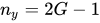
從這兩個元件,三維法線向量 n的第三個元件可以計算出來,因為歸一化到單位長度




如果我們選擇 軸沿著光滑法向量(從頂點著色器中設定的法向量插值)的軸線,則只需要“+”解,因為我們無法渲染具有向內指向法向量的表面。片段著色器的程式碼片段可能如下所示

            float4 encodedNormal = tex2D(_BumpMap,
               _BumpMap_ST.xy * input.tex.xy + _BumpMap_ST.zw);
            float3 localCoords = float3(2.0 * encodedNormal.a - 1.0,
                2.0 * encodedNormal.g - 1.0, 0.0);
            localCoords.z = sqrt(1.0 - dot(localCoords, localCoords));
               // approximation without sqrt:  localCoords.z =
               // 1.0 - 0.5 * dot(localCoords, localCoords);
對於使用 OpenGL ES 的裝置,解碼實際上更簡單,因為 Unity 在這種情況下不使用雙元件紋理。因此,對於移動平臺,解碼變為
            float4 encodedNormal = tex2D(_BumpMap,
               _BumpMap_ST.xy * input.tex.xy + _BumpMap_ST.zw);
            float3 localCoords =
               2.0 * encodedNormal.rgb - float3(1.0, 1.0, 1.0);
但是,本教程的其餘部分(以及 “凹凸表面的投影”部分)將僅涵蓋桌面平臺。

Unity 為表面的每個點使用區域性表面座標系來指定法線貼圖中的法向量。此區域性座標系的 軸由世界空間中的光滑插值法向量 N 給出,並且 平面是表面的切平面,如左側影像所示。具體來說, 軸由 Unity 提供給頂點的切線引數 T 指定(參見 “著色器的除錯”部分 中關於頂點輸入引數的討論)。給定 和 軸, 軸可以透過頂點著色器中的叉積計算,例如 B = N × T。(字母 B 指的是此向量的傳統名稱“副法線”。)


請注意,法向量 N 使用模型矩陣的逆矩陣的轉置從物件空間轉換到世界空間(因為它與表面正交;參見 “應用矩陣變換”部分),而切向量 T 指定表面上點之間的方向,因此使用模型矩陣進行轉換。副法線向量 B 代表第三類向量,它們以不同的方式進行變換。(如果你真的想知道:對應於“B×”的 反對稱矩陣 像 三元二次型 一樣進行變換。)因此,最佳選擇是首先將 N 和 T 轉換到世界空間,然後使用轉換後的向量的叉積在世界空間中計算 B。
這些計算由頂點著色器執行,例如以下方式
         struct vertexInput {
            float4 vertex : POSITION;
            float4 texcoord : TEXCOORD0;
            float3 normal : NORMAL;
            float4 tangent : TANGENT;
         };
         struct vertexOutput {
            float4 pos : SV_POSITION;
            float4 posWorld : TEXCOORD0;
               // position of the vertex (and fragment) in world space
            float4 tex : TEXCOORD1;
            float3 tangentWorld : TEXCOORD2;
            float3 normalWorld : TEXCOORD3;
            float3 binormalWorld : TEXCOORD4;
         };

         vertexOutput vert(vertexInput input)
         {
            vertexOutput output;

            float4x4 modelMatrix = unity_ObjectToWorld;
            float4x4 modelMatrixInverse = unity_WorldToObject;

            output.tangentWorld = normalize(
               mul(modelMatrix, float4(input.tangent.xyz, 0.0)).xyz);
            output.normalWorld = normalize(
               mul(float4(input.normal, 0.0), modelMatrixInverse).xyz);
            output.binormalWorld = normalize(
               cross(output.normalWorld, output.tangentWorld)
               * input.tangent.w); // tangent.w is specific to Unity

            output.posWorld = mul(modelMatrix, input.vertex);
            output.tex = input.texcoord;
            output.pos = UnityObjectToClipPos(input.vertex);
            return output;
         }
binormalWorld 計算中的因子 input.tangent.w 專門針對 Unity,即 Unity 提供切向量和法線貼圖,因此我們必須進行此乘法。
使用世界空間中的歸一化方向 T、B 和 N,我們可以輕鬆地形成一個矩陣,該矩陣將法線貼圖中的任何法向量 n 從區域性表面座標系對映到世界空間,因為該矩陣的列只是軸向量的向量;因此,將 n 對映到世界空間的 3×3 矩陣為
![{\displaystyle \mathrm {M} _{{\text{surface}}\to {\text{world}}}=\left[{\begin{matrix}T_{x}&B_{x}&N_{x}\\T_{y}&B_{y}&N_{y}\\T_{z}&B_{z}&N_{z}\end{matrix}}\right]}](https://wikimedia.org/api/rest_v1/media/math/render/svg/dcbbe6f98b198dcccb4813c8859bce07721b98a5)
在 Cg 中,構建轉置矩陣實際上更容易,因為矩陣是逐行構建的
![{\displaystyle \mathrm {M} _{{\text{surface}}\to {\text{world}}}^{T}=\left[{\begin{matrix}T_{x}&T_{y}&T_{z}\\B_{x}&B_{y}&B_{z}\\N_{x}&N_{y}&N_{z}\end{matrix}}\right]}](https://wikimedia.org/api/rest_v1/media/math/render/svg/549bcf48838ea78eeb7767629495bd773164632e)
該構造在片段著色器中完成,例如:
            float3x3 local2WorldTranspose = float3x3(input.tangentWorld,
               input.binormalWorld, input.normalWorld);
我們希望使用 local2WorldTranspose 的轉置(即未轉置的原始矩陣)變換 **n**; 因此,我們從左側用矩陣乘以 **n**。 例如,使用以下程式碼行
            float3 normalDirection =
               normalize(mul(localCoords, local2WorldTranspose));
使用世界空間中的新法線向量,我們可以像在 “平滑鏡面高光” 部分 中那樣計算光照。
完整的著色器程式碼
[edit | edit source]此著色器程式碼只是集成了所有程式碼片段,並使用我們的標準兩遍方法來處理畫素光。 它還演示了 CGINCLUDE ... ENDCG 塊的使用,該塊隱式地由所有子著色器的所有遍共享。
Shader "Cg normal mapping" {
   Properties {
      _BumpMap ("Normal Map", 2D) = "bump" {}
      _Color ("Diffuse Material Color", Color) = (1,1,1,1)
      _SpecColor ("Specular Material Color", Color) = (1,1,1,1)
      _Shininess ("Shininess", Float) = 10
   }

   CGINCLUDE // common code for all passes of all subshaders

      #include "UnityCG.cginc"
      uniform float4 _LightColor0;
      // color of light source (from "Lighting.cginc")

      // User-specified properties
      uniform sampler2D _BumpMap;
      uniform float4 _BumpMap_ST;
      uniform float4 _Color;
      uniform float4 _SpecColor;
      uniform float _Shininess;

      struct vertexInput {
         float4 vertex : POSITION;
         float4 texcoord : TEXCOORD0;
         float3 normal : NORMAL;
         float4 tangent : TANGENT;
      };
      struct vertexOutput {
         float4 pos : SV_POSITION;
         float4 posWorld : TEXCOORD0;
         // position of the vertex (and fragment) in world space
         float4 tex : TEXCOORD1;
         float3 tangentWorld : TEXCOORD2;
         float3 normalWorld : TEXCOORD3;
         float3 binormalWorld : TEXCOORD4;
      };

      vertexOutput vert(vertexInput input)
      {
         vertexOutput output;

         float4x4 modelMatrix = unity_ObjectToWorld;
         float4x4 modelMatrixInverse = unity_WorldToObject;

         output.tangentWorld = normalize(
            mul(modelMatrix, float4(input.tangent.xyz, 0.0)).xyz);
         output.normalWorld = normalize(
            mul(float4(input.normal, 0.0), modelMatrixInverse).xyz);
         output.binormalWorld = normalize(
            cross(output.normalWorld, output.tangentWorld)
            * input.tangent.w); // tangent.w is specific to Unity

         output.posWorld = mul(modelMatrix, input.vertex);
         output.tex = input.texcoord;
         output.pos = UnityObjectToClipPos(input.vertex);
         return output;
      }

      // fragment shader with ambient lighting
      float4 fragWithAmbient(vertexOutput input) : COLOR
      {
         // in principle we have to normalize tangentWorld,
         // binormalWorld, and normalWorld again; however, the
         // potential problems are small since we use this
         // matrix only to compute "normalDirection",
         // which we normalize anyways

         float4 encodedNormal = tex2D(_BumpMap,
            _BumpMap_ST.xy * input.tex.xy + _BumpMap_ST.zw);
         float3 localCoords = float3(2.0 * encodedNormal.a - 1.0,
             2.0 * encodedNormal.g - 1.0, 0.0);
         localCoords.z = sqrt(1.0 - dot(localCoords, localCoords));
         // approximation without sqrt:  localCoords.z =
         // 1.0 - 0.5 * dot(localCoords, localCoords);

         float3x3 local2WorldTranspose = float3x3(
            input.tangentWorld,
            input.binormalWorld,
            input.normalWorld);
         float3 normalDirection =
            normalize(mul(localCoords, local2WorldTranspose));

         float3 viewDirection = normalize(
            _WorldSpaceCameraPos - input.posWorld.xyz);
         float3 lightDirection;
         float attenuation;

         if (0.0 == _WorldSpaceLightPos0.w) // directional light?
         {
            attenuation = 1.0; // no attenuation
            lightDirection = normalize(_WorldSpaceLightPos0.xyz);
         }
         else // point or spot light
         {
            float3 vertexToLightSource =
               _WorldSpaceLightPos0.xyz - input.posWorld.xyz;
            float distance = length(vertexToLightSource);
            attenuation = 1.0 / distance; // linear attenuation
            lightDirection = normalize(vertexToLightSource);
         }

         float3 ambientLighting =
            UNITY_LIGHTMODEL_AMBIENT.rgb * _Color.rgb;

         float3 diffuseReflection =
            attenuation * _LightColor0.rgb * _Color.rgb
            * max(0.0, dot(normalDirection, lightDirection));

         float3 specularReflection;
         if (dot(normalDirection, lightDirection) < 0.0)
            // light source on the wrong side?
         {
            specularReflection = float3(0.0, 0.0, 0.0);
            // no specular reflection
         }
         else // light source on the right side
         {
            specularReflection = attenuation * _LightColor0.rgb
               * _SpecColor.rgb * pow(max(0.0, dot(
               reflect(-lightDirection, normalDirection),
               viewDirection)), _Shininess);
         }
         return float4(ambientLighting + diffuseReflection
            + specularReflection, 1.0);
      }

      // fragment shader for pass 2 without ambient lighting
      float4 fragWithoutAmbient(vertexOutput input) : COLOR
      {
        // in principle we have to normalize tangentWorld,
        // binormalWorld, and normalWorld again; however, the
        // potential problems are small since we use this
        // matrix only to compute "normalDirection",
        // which we normalize anyways

        float4 encodedNormal = tex2D(_BumpMap,
           _BumpMap_ST.xy * input.tex.xy + _BumpMap_ST.zw);
        float3 localCoords = float3(2.0 * encodedNormal.a - 1.0,
            2.0 * encodedNormal.g - 1.0, 0.0);
        localCoords.z = sqrt(1.0 - dot(localCoords, localCoords));
           // approximation without sqrt:  localCoords.z =
           // 1.0 - 0.5 * dot(localCoords, localCoords);

        float3x3 local2WorldTranspose = float3x3(
           input.tangentWorld,
           input.binormalWorld,
           input.normalWorld);
        float3 normalDirection =
           normalize(mul(localCoords, local2WorldTranspose));

        float3 viewDirection = normalize(
           _WorldSpaceCameraPos - input.posWorld.xyz);
        float3 lightDirection;
        float attenuation;

        if (0.0 == _WorldSpaceLightPos0.w) // directional light?
        {
           attenuation = 1.0; // no attenuation
           lightDirection = normalize(_WorldSpaceLightPos0.xyz);
        }
        else // point or spot light
        {
           float3 vertexToLightSource =
              _WorldSpaceLightPos0.xyz - input.posWorld.xyz;
           float distance = length(vertexToLightSource);
           attenuation = 1.0 / distance; // linear attenuation
           lightDirection = normalize(vertexToLightSource);
        }

        float3 diffuseReflection =
           attenuation * _LightColor0.rgb * _Color.rgb
           * max(0.0, dot(normalDirection, lightDirection));

        float3 specularReflection;
        if (dot(normalDirection, lightDirection) < 0.0)
           // light source on the wrong side?
        {
           specularReflection = float3(0.0, 0.0, 0.0);
              // no specular reflection
        }
        else // light source on the right side
        {
           specularReflection = attenuation * _LightColor0.rgb
              * _SpecColor.rgb * pow(max(0.0, dot(
              reflect(-lightDirection, normalDirection),
              viewDirection)), _Shininess);
        }
        return float4(diffuseReflection + specularReflection, 1.0);
      }
   ENDCG

   SubShader {
      Pass {
         Tags { "LightMode" = "ForwardBase" }
            // pass for ambient light and first light source

         CGPROGRAM
            #pragma vertex vert
            #pragma fragment fragWithAmbient
            // the functions are defined in the CGINCLUDE part
         ENDCG
      }

      Pass {
         Tags { "LightMode" = "ForwardAdd" }
            // pass for additional light sources
         Blend One One // additive blending

         CGPROGRAM
            #pragma vertex vert
            #pragma fragment fragWithoutAmbient
            // the functions are defined in the CGINCLUDE part
         ENDCG
      }
   }
}
請注意,我們使用瞭如 “紋理球體” 部分 中所述的平鋪和偏移一致性 _BumpMap_ST,因為此選項通常對凹凸貼圖特別有用。
摘要
[edit | edit source]恭喜你! 你完成了本教程! 我們已經瞭解了
- 人類對形狀的感知通常依賴於光照。
- 什麼是法線貼圖。
- Unity 如何編碼法線貼圖。
- 片段著色器如何解碼 Unity 的法線貼圖並將其用於逐畫素光照。
進一步閱讀
[edit | edit source]如果你還想了解更多
- 關於紋理對映(包括平鋪和偏移),你應該閱讀 “紋理球體” 部分。
- 關於使用 Phong 反射模型進行逐畫素光照,你應該閱讀 “平滑鏡面高光” 部分。
- 關於變換法線向量,你應該閱讀 “應用矩陣變換” 部分。
- 關於法線貼圖,你可以閱讀 Mark J. Kilgard 的文章:“A Practical and Robust Bump-mapping Technique for Today’s GPUs”,GDC 2000:Advanced OpenGL Game Development,該文章可以在 網上 獲取。