


控制系統/開源工具/Scilab
< 控制系統
Scilab是一個開源、跨平臺的數值計算包和高階的、面向數值的程式語言。它的功能類似於MATLAB。
Scilab很好地實現了許多必需的控制系統函式,並具有一個名為XCos的動態模型模擬器,這使其成為控制工程師使用的良好工具。
本文將概述實現本華夏公益教科書主要部分中描述的函式所需的 Scilab 方法。
考慮以下二階傳遞函式
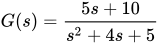
這在 Scilab 控制檯中透過以下方式建立
s = poly(0,'s');                                  // Define the complex number frequency parameter. Alternatively you can use s = %s.
TF = syslin("c", (5*s + 10) / (s^2 +4*s +5))      // Define the linear continuous transfer function
TF  =

    10 + 5s
   ---------
             2
   5 + 4s + s
此傳遞函式將在本頁後續演示中使用。
Scilab 具有執行必要的轉換的函式。
轉換為狀態空間是透過以下方式實現的
SS = tf2ss(TF)                    // TF -> SS
SS  =
      SS(1)   (state-space system:)
!lss  A  B  C  D  X0  dt  !

      SS(2) = A matrix =
 - 2.25  - 0.25
   4.25  - 1.75

      SS(3) = B matrix =
 - 2.7386128
   2.7386128

      SS(4) = C matrix =
 - 1.8257419    1.110D-16

      SS(5) = D matrix =
   0.

      SS(6) = X0 (initial state) =
   0.
   0.

      SS(7) = Time domain =
c
要轉換回傳遞函式,您可以使用
TFx = clean(ss2tf(SS))            // SS -> TF conversion. Clean removes rounding errors and is recommended.
TFx  =

    10 + 5s
   ---------
             2
   5 + 4s + s
階躍響應是表示動態系統和視覺化函式的標準方法。如果我們對示例傳遞函式進行單位階躍測試,我們將得到

這是使用以下 Scilab 程式碼生成的;
t=0:0.01:3;                         // Define a time range for the step test
plot2d(t, csim('step',t,TF));       // csim applies the step test and plot2d produces the graphical output
xlabel("Time [s]");                 // Add a title and label axis
ylabel("y1");
title("Step Response");
xgrid(1, 1, 10);                    // Define a nice grid for the plot to make it easier to read
'csim' 執行通用目的連續模擬函式,可以以各種方式使用。
csim 函式中的第一個引數是應用於傳遞函式的模擬函式。此引數的選項可以是;
- 階躍
- 脈衝
- 函式 : [輸入]=u(t)
- 列表 : list(ut,parameter1,....,parametern) 使得:輸入=ut(t,parameter1,....,parametern) (ut 是一個函式)
- 一個向量,給出對應於每個 t 值的 u 的值
第三個引數(示例中的“TF”)是應用模擬的 SIMO 線性系統。狀態空間表示可以代替拉普拉斯表示。
還提供了一個離散時間模擬函式,稱為 'dsimul',它可以應用於狀態空間方程。
有一個內建命令用於生成伯德圖,例如本例;

要生成上面的內容,請使用以下 Scilab 程式碼
clf();                              // Clears the plotting window
f = 0.1:100;                        // Set-up the frequency range we want
bode(TF, f);                        // Generate the Bode plot
title("Bode Plot Example");         // Add a title
有一個內建命令用於生成奈奎斯特圖,例如本例;

要生成上面的內容,請使用以下 Scilab 程式碼
clf();                              // Clears the plotting window
nyquist(TF);                        // Generate the Bode plot
title("Nyquist Plot Example");      // Add a title and label axis
xlabel("Real Axis");
ylabel("yImaginary Axis");
傳遞到 nyquist 命令的傳遞函式可以是連續或離散時間 SIMO 線性動力系統。
奈奎斯特圖需要分析穩定性準則。
- Scilab 官方網站
- Scilab Ninja 的控制工程基礎演示了 Scilab 在控制系統工作中的使用資源。