


分形/彩色曼德勃羅集
除了繪製集合本身,還開發了一系列演算法來
- 以美觀的方式有效地為集合著色
- 顯示資料的結構(科學視覺化)
通用著色演算法: ( 畫素特徵 -> 顏色 )
- 離散梯度
- 最後一次迭代(整數值)= 水平集方法 = LSM
- 連續梯度:將歸一化位置([0.0, 1.0] 範圍內的浮點數)作為輸入,並給出顏色作為輸出,與分形無關,但在通用計算機圖形中使用;

我們可能想要考慮的一件事是避免完全處理調色盤或顏色混合。實際上,我們可以利用一些方法通過當場構建顏色來生成平滑、一致的著色。
這裡
- v 指的是歸一化的指數對映迴圈迭代計數
- f(v) 指的是 sRGB 傳輸函式
一種生成這種顏色天真方法是透過直接將 v 縮放至 255 並將其傳遞到 RGB 中
rgb = [v * 255, v * 255, v * 255]
這樣做的一個缺陷是 RGB 由於伽馬而是非線性的;考慮使用線性的 sRGB。從 RGB 到 sRGB 使用通道上的逆壓縮函式。這使伽馬線性化,並允許我們對顏色進行正確取樣。
srgb = [v * 255, v * 255, v * 255]


逃逸時間演算法因其簡單性而受歡迎。然而,它會產生顏色條帶,作為一種型別的 混疊,可能會降低影像的美觀性。這可以透過使用一種稱為“歸一化迭代次數”的演算法來改進,[1][2] 該演算法提供迭代之間顏色的平滑過渡。該演算法透過使用迭代次數與 勢函式的聯絡,將一個實數 與每個 z 值相關聯。該函式由下式給出


其中 zn 是經過 n 次迭代後的值,而 P 是 z 在曼德勃羅集方程中被提升的冪(zn+1 = znP + c,P 通常為 2)。
如果我們選擇一個較大的逃逸半徑 N(例如,10100),我們有

對於某個實數 ,這是


並且由於 n 是第一個使得 |zn| > N 的迭代次數,我們從 n 中減去的數字在 [0, 1) 區間內。
為了著色,我們必須具有迴圈顏色範圍(以數學方式構建,例如)並且包含 H 種顏色,編號從 0 到 H − 1(例如,H = 500)。我們將實數 乘以一個固定的實數,該實數確定影像中顏色的密度,取此數字對 H 模的整數部分,並用它來在顏色表中查詢相應的顏色。
例如,修改上面的虛擬碼並使用 w:線性插值 的概念將產生
for each pixel (Px, Py) on the screen do
    x0:= scaled x coordinate of pixel (scaled to lie in the Mandelbrot X scale (-2.5, 1))
    y0:= scaled y coordinate of pixel (scaled to lie in the Mandelbrot Y scale (-1, 1))
    x:= 0.0
    y:= 0.0
    iteration:= 0
    max_iteration:= 1000
    // Here N = 2^8 is chosen as a reasonable bailout radius.

    while x*x + y*y ≤ (1 << 16) and iteration < max_iteration do
        xtemp:= x*x - y*y + x0
        y:= 2*x*y + y0
        x:= xtemp
        iteration:= iteration + 1

    // Used to avoid floating point issues with points inside the set.
    if iteration < max_iteration then
        // sqrt of inner term removed using log simplification rules.
        log_zn:= log(x*x + y*y) / 2
        nu:= log(log_zn / log(2)) / log(2)
        // Rearranging the potential function.
        // Dividing log_zn by log(2) instead of log(N = 1<<8)
        // because we want the entire palette to range from the
        // center to radius 2, NOT our bailout radius.
        iteration:= iteration + 1 - nu

    color1:= palette[floor(iteration)]
    color2:= palette[floor(iteration) + 1]
    // iteration % 1 = fractional part of iteration.
    color:= linear_interpolate(color1, color2, iteration % 1)
    plot(Px, Py, color)
通常,當我們渲染分形時,給定調色盤中的顏色在分形上出現的範圍是靜態的。如果我們希望從分形的邊界偏移位置,或調整它們的調色盤以特定方式迴圈,我們可以在將最終迭代次數傳遞給從調色盤中選擇專案之前,進行一些簡單的更改。
當我們獲得迭代次數後,我們可以使顏色範圍非線性。將歸一化為範圍 [0,1] 的值提高到 n 次冪,將線性範圍對映到指數範圍,在本例中,這可以微調顏色在分形外部的出現方式,並讓我們可以顯示其他顏色,或將整個調色盤推向邊界。

其中
- i 是我們迭代次數,迭代結束後的次數
- max_i 是我們的迭代限制
- S 是我們迭代次數所要提升的指數
- N 是調色盤中專案的數量。
這將以非線性方式縮放迭代次數,並縮放調色盤以近似地與縮放成比例地迴圈。
然後我們可以將 v 插入我們想要的任何用於生成顏色的演算法中。
HSV 著色
[edit | edit source]HSV 著色可以透過將迭代次數從 [0,max_iter) 對映到 [0,360),將其提高到 1.5 次冪,然後對 360 取模來實現。
然後我們可以簡單地將指數對映的迭代次數帶入值並返回
hsv = [powf((i / max) * 360, 1.5) % 360, 100, (i / max) * 100]
此方法也適用於 HSL,只是我們將飽和度設定為 50% 而不是 100%。
hsl = [powf((i / max) * 360, 1.5) % 360, 50, (i / max) * 100]
其中

LCH 著色
[edit | edit source]最具感知均勻性的著色方法之一是將處理過的迭代次數傳遞給 LCH。如果我們使用上面提到的指數對映和迴圈方法,我們可以將結果帶入亮度和色度通道。我們也可以對迭代次數進行指數對映並將其縮放到 360,並將此結果對 360 取模傳遞到色相中。
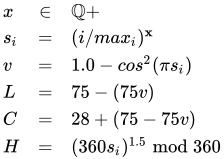
我們希望避免這裡出現的一個問題是超出色域的顏色。這可以透過基於色域內顏色相對於亮度和色度的變化的小技巧來實現。隨著亮度的增加,我們需要降低色度以保持在色域內。
s = iters/max_i;
v = 1.0 - powf(cos(pi * s), 2.0);
LCH = [75 - (75 * v), 28 + (75 - (75 * v)), powf(360 * s, 1.5) % 360];
-
 LCH 梯度
 -
 指數對映迴圈 LCH 著色的示例,不含陰影
 -
 LCH 顏色空間中的指數迴圈著色,帶有陰影


直方圖著色
[edit | edit source]一種更復雜的著色方法涉及使用 直方圖,該直方圖將每個畫素與其逃逸/退出之前的最大迭代次數配對。這種方法將顏色均勻地分佈到相同的總區域,重要的是,它獨立於選擇的最大迭代次數。[3]
此演算法有四個步驟。第一步涉及計算與每個畫素相關的迭代次數(但沒有繪製任何畫素)。這些儲存在一個數組中:IterationCounts[x][y],其中 x 和 y 分別表示螢幕上該畫素的 x 和 y 座標。
 |
 |
 |
 |
 |
 |
| 頂行是一系列使用逃逸時間演算法繪製的影像,每個畫素分別進行 10000 次、1000 次和 100 次最大迭代。底行使用相同的最大迭代值,但使用直方圖著色方法。請注意,直方圖著色方法繪製的影像中,著色如何隨最大迭代次數的變化而變化很小。 | ||
第二步的第一步是建立一個大小為 n 的陣列,即最大迭代次數:NumIterationsPerPixel。接下來,必須遍歷畫素迭代次數對陣列 IterationCounts[][],並透過例如 i = IterationCounts[x][y] 檢索每個畫素的儲存迭代次數 i。檢索到每個畫素的迭代次數 i 後,需要按 i 對 NumIterationsPerPixel 進行索引,並遞增索引值(最初為零)-- 例如 NumIterationsPerPixel[i] = NumIterationsPerPixel[i] + 1。
for (x = 0; x < width; x++) do
    for (y = 0; y < height; y++) do
        i:= IterationCounts[x][y]
        NumIterationsPerPixel[i]++
第三步遍歷 NumIterationsPerPixel 陣列,並將所有儲存的值加起來,並將它們儲存在 total 中。陣列索引表示達到該迭代次數後逃逸的畫素數量。
total: = 0
for (i = 0; i < max_iterations; i++) do
    total += NumIterationsPerPixel[i]
在此之後,第四步開始,對 IterationCounts 陣列中的所有值進行索引,並針對與每個畫素相關的每個迭代次數 i,將該計數新增到 NumIterationsPerPixel 陣列中從 1 到 i 的所有迭代計數的全域性總和中。然後將該值透過將總和除以前面計算的 total 值進行歸一化。
hue[][]:= 0.0
for (x = 0; x < width; x++) do
    for (y = 0; y < height; y++) do
        iteration:= IterationCounts[x][y]
        for (i = 0; i <= iteration; i++) do
            hue[x][y] += NumIterationsPerPixel[i] / total /* Must be floating-point division. */

...

color = palette[hue[m, n]]

...
最後,使用計算出的值,例如作為調色盤的索引。
此方法可以與下面的平滑著色方法結合使用,以獲得更美觀的影像。
Muency
[edit | edit source]來自曼德爾布羅特集的詞彙表和百科全書,作者 Robert Munafo,(c) 1987-2023
由 Albert Lobo 編寫的 JavaScript 版本
// https://github.com/llop/mandelbrot-viewer-js/blob/master/mandelbrot-viewer.js
// http://axonflux.com/handy-rgb-to-hsl-and-rgb-to-hsv-color-model-c
  _hsvToRgb(h, s, v) {
    let r, g, b;
    const i = Math.floor(h * 6);
    const f = h * 6 - i;
    const p = v * (1 - s);
    const q = v * (1 - f * s);
    const t = v * (1 - (1 - f) * s);
    switch (i % 6) {
      case 0: r = v, g = t, b = p; break;
      case 1: r = q, g = v, b = p; break;
      case 2: r = p, g = v, b = t; break;
      case 3: r = p, g = q, b = v; break;
      case 4: r = t, g = p, b = v; break;
      case 5: r = v, g = p, b = q; break;
    }
    return [ r * 255, g * 255, b * 255 ];
  }


  // https://mrob.com/pub/muency/color.html
  _colorCheckered(k) {
    if (this.ns[k] >= this.maxN) return [ 255, 255, 255 ];

    const dwell = Math.floor(this.dwell[k]);
    const finalrad = this.dwell[k] - Math.floor(this.dwell[k]);
    const dscale = Math.log2(this.dist[k] / this.inc);

    let value = 0.0;
    if (dscale > 0.0) value = 1.0;
    else if (dscale > -10.0) value = (10.0 + dscale) / 10.0;

    let p = Math.log(dwell) / Mandelbrot.LOG_BIG_NUM;
    let angle = 0.0;
    let radius = 0.0;
    if (p < 0.5) {
      p = 1.0 - 1.5 * p;
      angle = 1.0 - p;
      radius = Math.sqrt(p);
    } else {
      p = 1.5 * p - 0.5;
      angle = p;
      radius = Math.sqrt(p);
    }

    if (dwell % 2) {
      value *= 0.85;
      radius *= 0.667;
    }

    if (this.finalang[k] > 0.0) {
      angle += 0.02;
    }
    angle += 0.0001 * finalrad;

    let hue = angle * 10.0;
    hue -= Math.floor(hue);
    let saturation = radius - Math.floor(radius);

    return this._hsvToRgb(hue, saturation, value);
  }

  // b&w version of checkerboard
  _colorCheckeredBlackAndWhite(k) {
    const color = this._colorCheckered(k);
    const gray = Math.round(color[0] * 0.299 + color[1] * 0.587 + color[2] * 0.114);
    return [ gray, gray, gray ];
  }


  // color pixel k
  _color(k) {
    if (this.ns[k] == 0) return [ 0, 0, 0 ];  // C not yet processed: color black
    this.pix[k] = 0;                          // mark pixel as colored
    return this.colorFunc(k);                 // return color for pixel
  }


  // paint what we have on the canvas
  render() {
    if (!this.scanDone) {
      let offset = 0;
      for (let k = 0; k < this.imgSize; ++k, offset += 4) {
        if (this.pix[k]) {
          const color = this._color(k);
          this.image.data[offset] = color[0];
          this.image.data[offset + 1] = color[1];
          this.image.data[offset + 2] = color[2];
          this.image.data[offset + 3] = 255;
        }
      }
      if (!this.scanning) this.scanDone = true;
    }
    this.context.clearRect(0, 0, this.imgWidth, this.imgHeight);
    this.context.putImageData(this.image, 0, 0);
  }


  // sleep function. use 'await this.sleep()' in async functions
  _sleep() { return new Promise(requestAnimationFrame); }

}
另請參閱
[edit | edit source]- 計算曼德爾布羅集外部
- 對動態平面、Julia 集和 Fatou 集進行著色
- 通用著色演算法:(畫素特徵 -> 顏色):
- ↑ García, Francisco; Ángel Fernández; Javier Barrallo; Luis Martín. "在複平面上對動力系統進行著色" (PDF). 已存檔 (PDF) from the original on 30 November 2019. Retrieved 2008-01-21.
{{cite journal}}: Cite journal requires|journal=(help) - ↑ Linas Vepstas. "對曼德布羅特逃逸進行重歸一化". 已存檔 from the original on 14 February 2020. Retrieved 11 February 2020.
- ↑ "新手:如何在曼德布羅特集合中對映顏色?". www.fractalforums.com. May 2007. 已存檔 from the original on 9 September 2022. Retrieved February 11, 2020.