


分形/fractint
Fractint 是一個免費軟體計算機程式,可以渲染和顯示許多種分形。原始碼可用
Fractint 19.5 的主要作者是
- Bert Tyler
- Timothy Wegner
- Jonathan Osuch
- Wesley Loewer
commons:Category:Fractals created with Fractint

CORNERS=[xmin/xmax/ymin/ymax[/x3rd/y3rd]]
"例如:corners=-0.739/-0.736/0.288/0.291 從這些座標開始作為 x 和 y 座標的範圍,而不是預設值(對於 type=mandel) -2.0/2.0/-1.5/1.5。當您指定四個值(通常情況)時,這定義了一個矩形:x 座標對映到螢幕,從左到右,從 xmin 到 xmax,y 座標對映到螢幕,從下到上,從 ymin 到 ymax。六個引數可以用來描述任何旋轉或拉伸的平行四邊形:(xmin,ymax)是用於螢幕左上角的座標,(xmax,ymin)是用於右下角的座標,以及(x3rd,y3rd)是用於左下角的座標。只輸入“CORNERS=”告訴 Fractint 使用這種形式(預設模式),而不是 CENTER-MAG(見下文)當使用 [B] 命令儲存引數時。"[1]
CENTER-MAG=[Xctr/Yctr/Mag[/Xmagfactor/Rotation/Skew]]
"這是輸入角落作為中心點和放大倍數的另一種方法,這種方法在一些分形程式和出版物中很流行。只輸入“CENTER-MAG=”告訴 Fractint 使用這種形式,而不是 CORNERS(見上文)當使用 [B] 命令儲存引數時。[TAB] 狀態顯示以兩種形式顯示“角落”。當您指定三個值(通常情況)時,這定義了一個矩形:(Xctr,Yctr)指定影像中心的座標,而 Mag 指示要使用的放大倍數。六個引數可以用來描述任何旋轉或拉伸的平行四邊形:Xmagfactor 指示 x 放大倍數是 y 放大倍數的多少倍,Rotation 指示影像旋轉了多少度,Skew 指示影像傾斜了多少度。正角度將逆時針旋轉和傾斜影像。"
Mag 指示要使用的放大倍數。初始值(無縮放)為 6.66666667e-01。 "如果將放大倍數設定為 1,則 Y 軸上的範圍為 +1 到 -1 - 這縮放得太大了,會切斷曼德勃羅集的一些頂部和底部球體。如果將放大倍數設定為 .666666667,則 Y 軸上的範圍為 +1.5 到 -1.5,這將提供完整曼德勃羅集的檢視。" (Ryan Davenport)[2]
/*
frames.c - frames for endless zoom
http://www.nahee.com/spanky/www/fractint/loewer/frames.c
Results of Wesley Loewer's Study :
"The C program, frames.c, was used to generate the batch file, using "frames > tmp.bat" at the command line prompt.   I put the following in my sstools.ini and then ran tmp.bat.

      batch=y
      video=f3
      sound=off
      float=y
      passes=b
      viewwindows=///128/128
      maxiter=1000
      colors=000_HcaDhc9n<2>YGkD_HEdH76H<2>50GTWJ<2>YLZA7F<73>YQo\
      000<75>IdU111<36>igu102<14>SAi000<13>5815917105A1<14>AJ3
When I stitched them together in an animation, the last frame looks just like the first frame."

*/

#include <stdio.h>
#include <math.h>

main(int argc, char *argv[])
{
	int frame, frames;
	double zoom, relzoom, zoomfactor;

    zoom = 1e5; /* seems like a deep enough starting place */
	relzoom = pow(2.0, 2.5*8); /* 2**(2.5 * 8 steps/lap ) */
	frames = 100;
	zoomfactor = pow(relzoom, 1.0 / (frames - 1));
	for (frame = 0; frame < frames; frame++)
	{
		printf("fractint center-mag=0/1/%g\n", zoom);
		zoom *= zoomfactor;
	}
	return 0;
}
/*
frames45.c - frames at 45 degree increments using autokey option
http://www.nahee.com/spanky/www/fractint/loewer/frames45.c
Results of Wesley Loewer's Study :
"The C file, frames45.c, generates an auto.key script to produce the whole sequence of frames via FractInt's "g" command.
After compiling frames45.c, at the command line prompt, just enter "frames45 > auto.key".
Then I started FractInt with:

      video=af3
      float=y
      viewwindows=///128/128
      passes=b
      maxiter=5000
      autokey=play
and away it went. "
*/

#include <stdio.h>
#include <math.h>

main(int argc, char *argv[])
{
	int angle, frame, frames;
	double zoomfactor, zoom;

	frames = 100;
	zoomfactor = pow(2.0, 2.5);
	zoom = 1.0; /* looks like a good starting place */
	angle = 0;
	for (frame = 0; frame < frames; frame++)
	{
		printf(
"\"g\"\n"
"\"center-mag=0/1/%g/1.333333/%d\"\n"
"ENTER\n"
"CALCWAIT\n"
"\"s\"\n"
"CALCWAIT\n"
"\"eh..\"\n"
"ESC\n\n"

			, zoom, angle);
		zoom *= zoomfactor;
		angle = (angle + 45) % 360;
	}
	return 0;
}
最重要的檔案是
- par 檔案 - 平面描述 和內建型別
- frm 檔案 - 分形型別(公式)。在這裡可以定義迭代函式(對映)
- map 檔案 - 顏色梯度。在 Fractint 中,map 表示顏色梯度,而不是函式(數學公式)
- IFS 檔案 - *.ifs
- Fractint 確實將引數儲存在其 GIF 檔案中
- 可以使用命令列從 gif 檔案中提取 par 檔案
wine fractint.exe foo.gif makepar=bar.par/foo
# https://www.fractalforums.com/mandelbrot-and-julia-set/is-there-anything-novel-left-to-do-in-m-like-escape-time-fractals-in-2d/255/
# fracmonk
e90circs(xyaxis) {;z0=+,-sqrt(2)
  z=sqrt(2), c=pixel:;no
    s=z*z           ;periodicity
    t=s*s           ;testing!
    z=(1/s-(1/t))*c
    |z| < p3
}
DM54(xaxis) {;deg 10
  c=pixel, z=p1, d=p2:;quasi M2
    q=z*z       ;d=1:z0=4/5=.8
    r=q*q       ;only!
    s=r*z       ;nonstandard
    t=(s-r)*c-d ;dendritic
    z=t*t       ;structure
    |z| < p3
}
筆記
- 如果 a-b>1 且 b=1,則集合將類似於 a-b=1 的情況,但將被無限多個不同大小的衛星島包圍,
- 對於 b=1,使用 sqrt(3)= .5773503... 對於 a=3,以及 cuberoot(4)=.6299605...
FractInt palettes have 256 colours (of which the first is reserved for interior). They are stored as 6bit RGB, encoded in ASCII. Gradients of slowly changing colours are compressed as two endpoints and a count. Check FractInt documentation Topic=Color Specification for details. (Claude Heiland-Allen )
轉換
可以在 Gnuplot 中使用/檢查 Fractint 地圖檔案
 set palette file "Skydye07.map" using ($1/255):($2/255):($3/255) # Read in a palette of RGB triples each in range [0,255]
 test palette
Fractint_default_colour_map(256 色)在一個顏色表中滿足 4 種不同需求[5]
- 0..15:前 16 種顏色與所有 16 色模式(0Dh/0Eh/10h/12h)的編碼方式完全相同,反過來使用與所有文字模式(*1)的顏色屬性相同的 4 位編碼。它向後相容 EGA 和 CGA 介面卡。
- 16..31:接下來的 16 種顏色提供了一個均勻照明的 4 位黑色(10h)到白色(1Fh)灰度(二進位制編碼的灰度)
- 32..247:216(3x8x3x3)色:基於
- 24 色調 RGB 輪,從藍色開始,每個 R、G 和 B 有 8 個細分,產生 24(3x8)個離散的“色調”。每個色調都在
- 3 級飽和度(色彩度)
- 3 級強度(亮度值)
- 248..255:8 色(= 256 - (16 + 16 + 216))定義保證用於使用者應用程式(使用者定義的顏色),通常為黑色。8 個未使用的定義。透過保證 BIOS 不會觸碰它們。
256 色的 VGA 顏色索引(= 16x16)。它顯示索引,而不是直接的 rgb 顏色值。
VGA 顏色索引值
- 十進位制:從 0 到 255
- 十六進位制:從 #00 到 #FF(或 $00 在舊符號中)[6]
-
 Fractint_default_colour_map
 -
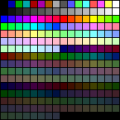 VGA 調色盤
 -
 VGA 調色盤整理


另請參閱
- M Sargent:MAPView : 這是一個獨立的程式,它顯示任何選定 MAP 檔案的顏色光譜。
- M Sargent:MAP 檔案集 - Fractint 256 色 MAP 檔案(顏色調色盤)。它們是包含 RGB 三元組的文字檔案,易於建立或編輯。此 ZIP 檔案包含一個小集合。網路上提供了數百甚至數千個這樣的檔案。這些程式允許您從其 GUI 選單中選擇 MAP 檔案,並且通常會顯示其顏色光譜的預覽。
- Fractal-Zoomer 顏色地圖(與 Fractint 結構相同)
"Fractint 使用引數檔案[7][8] 來儲存/恢復所有選項和設定,[9] 用於重新建立特定的影像。描述影像所需的引數佔用非常少的磁碟空間,尤其是在與儲存影像本身相比的情況下。" [10]
引數檔案
- 它們是普通的文字檔案
- 可以包含一個檔案或命名引數組的引數,看起來像這樣
    name { ; main comment
         ....
         }

    quickdraw {      ; a set of parameters named quickdraw
       maxiter=150
       float=no
       }
    slowdraw {       ; another set of parameters named slowdraw
       maxiter=2000
       float=yes
       }
這些部分被稱為 **parset** 部分,描述了分形方程、檢視區域、引數和調色盤。[11]
對於引數平面和曼德爾布羅特集的標準檢視
Mandel_Demo        { ; PAR for initialization of Fractint demo
  reset=1900 type=mandel corners=-2.5/1.5/-1.5/1.5 params=0/0 inside=0
  sound=no
  }
或者 :[12]
1_01                  { ; quite good spirals
  reset=2000 type=mandel passes=1
  corners=-0.6014129278/-0.5990935452/0.427747516/0.429487053
  params=0/0 float=y maxiter=1000 inside=0 outside=15
  distest=1/10/320/200
  }

1_02                  { ; stringy one, with dist estimator
  reset=2000 type=mandel passes=1
  corners=-1.9228429644992/-1.9228427944992/-6.3749991620026e-008/6.375000\
  8379971e-008 params=0/0 float=y maxiter=1000 inside=0 outside=15
  distest=1/20/320/200
  }

1_03                  { ; OK, bit dull, not zoomed in far
  reset=2000 type=mandel passes=1
  corners=0.3734922373/0.3820837907/-0.243292645/-0.23684898
  params=0/0 float=y maxiter=1000 inside=0 outside=15
  distest=1/10/320/200
  }

1_04                  { ; a mess, needs dist est
  reset=2000 type=mandel passes=1
  corners=-1.862224008886682/-1.86222400040936/-3.214020831358832e-009/3.1\
  43970347410528e-009 params=0/0 float=y maxiter=1000 inside=0
  outside=15 distest=1/10/320/200
  }

1_05                  { ; A twirly twiddly one
  reset=2000 type=mandel passes=1
  corners=-0.77464016774366/-0.77463987034365/0.12426328506998/0.124263508\
  11999 params=0/0 float=y maxiter=1000 inside=0 outside=15
  distest=1/10/320/200
  }
FractInt 的引數檔案(副檔名為 PAR)
top-mag1500      { ; a really really deep zoom        Wesley Loewer
                   ; highly self similar
                  ; took over 1200 hours at 320x240 on a 486sx/25
                  reset=1920 type=mandel passes=b center-mag=0.0/1.0/1e+1500
                  maxiter=15000  }
Julia 集
test               {
  reset=2004 type=julia center-mag=0/0/0.6666667
  params=-0.49749687108886109/-0.0025041736227045075 float=y inside=0
  colors=@default.map
  }
要使用它
- 將檔案儲存到 fractint 主目錄。
- 執行 fractint。
- 按 2 鍵
- 按 F6 鍵
- 選擇 par 檔案(預設值為 usr/share/xfractint/pars/fractint.par)
一個人可以
- 使用 b 鍵將命令儲存到 par 檔案
- 使用 F7 鍵從角點更改為中心
- 使用 F6 鍵選擇 par 檔案
- 使用 Ctrl-@ 載入 par 檔案
重置會導致 Fractint 將所有與計算相關的引數重置為其預設值。非計算引數(例如“printer=”、“sound=” 和“savename=”)不受影響。[13] 引數檔案中的 reset=1730 顯示它是在 Fractint 的 17.3 版本中建立的。[14]
搜尋程式碼
grep -R "par file"
結果
 miscres.c:   /* just to make par file look nicer */
 miscovl.c:               ranges which can be written as <nn> to compress .par file entry.
 printer.c:            /* user might change gammas with a .par file entry mid-run.     */
引數平面(曼德爾布羅特集外部)上的場線的 256 分解近似[15]
Field              { ; Field lines, Jay R Hill, 1997
  reset=1960 type=mandel center-mag=-0.75/-1.12577e-013/0.8695652
  params=0/0 float=y maxiter=256 bailout=3600 decomp=256
  colors=000www<33>www000www<33>www000w\
  ww<9>www000www<23>www000www<32>www0\
  00www<22>www000www<9>www000www<34>\
  www000www<32>www000000
  savename=field
  }
另請參閱
來自 Fractint 20.04 版本的描述
"passes 選項"(<X> 選項螢幕或“passes=” 引數)選擇以下一項
- 單遍
- 雙遍
- 三遍
- 實心猜測(預設)
- 第 n 遍後的實心猜測
- 邊界追蹤
- Tesseral(網格)
- 同步軌道
- 軌道模式
此選項適用於大多數分形型別。
**單遍** 模式 ("1") 以逐畫素的方式繪製螢幕。**雙遍** ("2") 首先生成一個半解析度螢幕作為預覽,使用 2x2 畫素方塊,然後在第二次遍中生成其餘的點。雙遍不比單遍使用更多時間。**三遍** ("3") 生成實心猜測模式(見下面的 "g")的粗略第一遍,然後切換到 "1"(使用低解析度影片模式)或 "2"(使用更高解析度影片模式)。'3' 相對於 '2' 的優勢在於,當使用高解析度模式時,第一遍的解析度要低得多(大約 160x120),因此比 passes=2 模式的第一遍快得多。但是,使用 '2' 模式,第一遍並不代表浪費的時間。'3' 模式浪費了生成粗略第一屏的努力。
單遍、雙遍和三遍模式都會生成相同的影像。這些模式適用於那些希望獲得最高精度的人。大多數人會希望使用猜測模式,下面會介紹。
**實心猜測** ("g") 是預設模式。它執行兩到四次可見的遍 - 在更高解析度的影片模式下更多。它第一次可見的遍實際上是兩次遍 - 生成每 4x4、8x8 或 16x16 畫素方塊一個畫素,並應用猜測邏輯在下一級(2x2、4x4 或 8x8)填充塊。後續遍將以更精細的解析度填充顯示,跳過被相同顏色包圍的塊。實心猜測可能會猜錯,但它確實猜得很快!
第 n 遍後停止實心猜測 ("g1" 到 "g6") 是猜測模式的一種變體,其中演算法在第 n 遍後停止。此功能用於在低解析度下探索,你更願意看到一個低解析度的影像,其中大塊的畫素填充整個螢幕,而不是一個小的低解析度影像,就像你使用 <v>(檢視視窗)命令得到的影像。請注意,在 <x> 螢幕上,你不能直接輸入 g1 或 g2。反覆按下 g,直到你獲得所需的選項,或者使用左或右游標鍵。
**邊界追蹤** ("b"),它只對不包含顏色“島嶼”的分形型別(如曼德爾布羅特集,而不是牛頓型別)準確起作用,它會找到一個顏色邊界,在螢幕周圍追蹤它,然後“繪製”顏色覆蓋封閉區域。
**Tesseral(網格)** ("t") 是一種“超級實心猜測”選項,它會將影像逐級劃分為子部分,並在邊界為實心的矩形內填充顏色。它實際上比實心猜測演算法慢,但它看起來很不錯,所以我們保留了它。當顏色島嶼出現在矩形內部時,此模式也容易出錯。
**擴散掃描** ("d") 是一種基於抖動技術的繪圖型別。它掃描影像,均勻地傳播點,並且對每個點,它都繪製一個適當大小的正方形,以便影像逐步增強。此方法計算影像中的所有點,是單遍/雙遍/三遍的良好替代方法,即使是最慢的分形,也能快速視覺化。使用 "fillcolor=0"(見下文),正方形不會被繪製,並且點會在影像上散開,直到所有點都被計算出來(有點像“淡入”)。
"fillcolor=" 選項在 <X> 螢幕或命令列中設定一個固定顏色,供邊界追蹤和 Tesseral(網格)計算用於填充定義的區域。這樣做的效果是顯示這兩種方法限定的區域的邊界。
**軌道** ("o") 透過繪製逃逸時間分形的軌道來繪製圖像。此技術使用與其他遍選項相同的座標繪製圖像,設定 "passes=1" 且沒有對稱性,然後繪製每個畫素的軌道。實際上,放大 "passes=o" 影像是在放大 "passes=1" 影像,結果影像可能與預期不同。要找到有趣的地方進行調查,在影像完成之後按下 <O>,並觀察軌道在游標在螢幕上移動時的行為。參見軌道視窗(第 36 頁)。
"outside=summ" 選項會導致軌道每次軌道接觸畫素時遞增畫素的顏色編號;結果顯示是一個二維直方圖。如果 "outside=" 是其他值,則 "inside=" 顏色決定了繪製的軌道的顏色。如果 "inside=0",則在 passes=1 影像的每個畫素的開頭遞增顏色編號。
"orbitdelay=" 選項控制在軌道顯示在螢幕上之前計算多少軌道。這允許軌道穩定下來。"orbitinterval=" 選項會導致軌道繪製每個第 n 個軌道點。非零值的 "periodicity=" 選項會導致軌道不繪製已經達到退出條件或軌道離開影像可見區域的軌道。periodicity 的零值將繪製所有軌道,除了由 orbitdelay 和 orbitinterval 修改的軌道。
**同步軌道** ("s") 是一種實驗模式,使用基於 Michael Ganss 的 Almondbread 實現的“分形魔法”演算法。此演算法透過計算從不同點開始的平行軌道來最佳化深度縮放,並在軌道斷裂形成時進行細分。Michael 的實現必須經過廣泛修改才能與 Fractint 的 DOS 中等記憶體模型環境一起使用。
同步軌道(也稱為 SOI)有一些侷限性。SOI 與 fractint 鬆散耦合,大多數選項不適用於它。只實現了 mandel 和 julia 型別。SOI 僅適用於非常深的縮放,但僅限於雙精度範圍。在這個狹窄的放大範圍內,SOI 可以帶來巨大的加速。如果在命令列中使用“debug=3444”呼叫 fractint,則將使用長雙精度(而不是雙精度)版本,這允許縮放約 1000 倍更深。SOI 真的需要移植到 fractint 的任意精度。這可能只有在 Fractint 被轉移到一個更好的程式設計環境之後才會發生。
-
 c = -1.24
 -
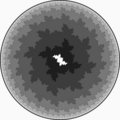 胖的杜瓦迪兔子
 -
 巴西利亞朱利亞集


19.6 版本的新功能包括:新的分形型別 {=HT_ESCHER escher_julia} 和 {=HT_VL volterra-lotka},由 邁克爾·薩金特 提供。
埃舍爾式的朱利亞集
(type=escher_julia)
這些在《分形影像科學》中提出的朱利亞集主題的獨特變體,挑戰我們擴充套件對分形如何迭代的先入為主的概念。我們從一個非常基本的朱利亞公式開始
z(n+1) = z(n)^2 + (0, 0i)
標準演算法將測試每個迭代點以檢視它是否“逃逸到無窮大”。如果它的尺寸或“模量”(它到原點的距離)超過預先選定的逃逸測試(第 100 頁)值,則它位於朱利亞集之外,並且它將被驅逐到彩色等級集的世界,這些等級集以驚人的方式迴圈。但描述逃逸點的另一種方式是說它被“吸引”到無窮大。我們透過計算該點是否落在所有點比逃逸值建立的邊界更靠近無窮大的“目標集”內來做出此決定。這樣,圍繞無窮大的“圓盤”在概念上與圍繞有限吸引子(第 188 頁)的圓盤沒有區別,例如用於牛頓分形的那些。
在上面的公式中,當 c = (0, 0i) 時,這個標準演算法會產生一個相當無趣的圓圈。但是佩特根來了,告訴我們“由於 T [目標集] 本質上可以是任何東西,所以這種方法具有巨大的藝術潛力。例如,T 可以是一個所謂的 p 範數圓盤......或一個縮放的填充的朱利亞集,或者一些手工設計的東西。這種方法開闢了一種簡單 [當他使用這樣的詞時要小心] 和系統的方法來進行埃舍爾式的拼貼。”
所以,我們所做的是迭代上面的公式,縮放每次迭代,並將其代入第二個朱利亞公式。這個公式具有使用者選擇的 c 值。如果該點收斂於這個非圓形目標集
T = [ z: | (z * 15.0)^2 + c | < BAILOUT ]
我們根據總迭代次數為它著色。如果不是,它將被吸引到無窮大,可以用通常的外部著色選項著色。這個公式使用了一個新的 Fractint 程式設計功能,它允許對收斂到目標朱利亞集的點使用自定義著色選項,同時允許其他點由標準分形引擎處理,並使用其所有選項。
使用適當的調色盤和 c 引數,並使用反轉(第 94 頁)選項和來自顏色引數第 130 頁的純色外部顏色,你可以建立一個日食,日冕由從太陽表面輻射的朱利亞形狀的火焰組成。
如果你質疑這些影像與埃舍爾的關聯,請檢視他的《圓形極限》系列(特別是 III 和 IV)。用他自己的話說:“今天是否還存在許多......任何型別的藝術家,他們渴望深入無窮......是有待懷疑的。......只有一種可能的方式......在邏輯邊界線內完全獲得“無窮大”......。最大的......形狀現在位於中心,而無限數量和無限小的極限位於圓周......。沒有一個單一的組成部分能到達邊緣。因為在邊緣之外是“絕對的虛無”。然而,這個圓形世界無法沒有周圍的空虛而存在,不僅僅是因為“內部”預示著“外部”,而且還因為正是外面在“虛無”中,這些形成框架的弧線的中心點以如此幾何的精確度固定著。”
參考文獻
- Ernst, B. M. C. 埃舍爾的魔鏡,巴恩斯與諾布林,1994 年,第 102-11 頁。
- Peitgen, H.-O. 和 Saupe, D. 分形影像科學,施普林格出版社,1988 年;第 185、187 頁。
可以搜尋原始碼使用
grep -nR "escher"
結果
// help2.src
    Escher-like tiling of Julia sets from The Science of Fractal Images
      z(0) = pixel
      z(n+1) = z(n)^2 + (0, 0i)
    The target set is a second, scaled, Julia set:
      T = [ z: | (z * 15.0)^2 + c | < BAILOUT ]
    Two parameters: real and imaginary parts of c
    Iteration count and bailout size apply to both Julia sets.
// fractalp.c
   {
   "escher_julia",
      {realparm, imagparm, ES, ES},
      {0.32, 0.043, 0, 0},
      HT_ESCHER, HF_ESCHER, WINFRAC,
      (float)-1.6, (float)1.6, (float)-1.2, (float)1.2,
      0, NOFRACTAL, NOFRACTAL, NOFRACTAL, ORIGIN,
      EscherfpFractal, juliafp_per_pixel, StandardSetup,
          StandardFractal,
      STDBAILOUT
   },
// fractal19.par
{ ; "Escher-Julia #1"                     t=  0:32:35.06
  ; t=calc time [h:mm:ss.] using 486DX2-66 at 1024x768
  ; (c) 1997 by Les St Clair 101461.2032@compuserve.com
  ; parameters created on Apr 13, 1997
  reset=1960 type=escher_julia passes=1
  center-mag=+0.42798355610118920/+0.29420988317529780/3.4153
  params=0.005/0.641 float=y bailout=100 inside=bof60 logmap=4
  decomp=256
  colors=000H51<39>ywezxfzxf<40>H51G40G40<40>ywezxfzxf<40>H51G40G40<40>ywe\
  zxfzxf<39>I62 cyclerange=0/255
  }
/*

fracint

CALCFRAC.C contains the high level ("engine") code for calculating the
fractal images (well, SOMEBODY had to do it!).
Original author Tim Wegner, but just about ALL the authors have contributed
SOME code to this routine at one time or another, or contributed to one of
the many massive restructurings.
The following modules work very closely with CALCFRAC.C:
  FRACTALS.C    the fractal-specific code for escape-time fractals.
  FRACSUBR.C    assorted subroutines belonging mainly to calcfrac.
  CALCMAND.ASM  fast Mandelbrot/Julia integer implementation
Additional fractal-specific modules are also invoked from CALCFRAC:
  LORENZ.C      engine level and fractal specific code for attractors.
  JB.C          julibrot logic
  PARSER.C      formula fractals
  and more
 -------------------------------------------------------------------- */


/******************* boundary trace method ***************************
Fractint's original btm was written by David Guenther.  There were a few
rare circumstances in which the original btm would not trace or fill
correctly, even on Mandelbrot Sets.  The code below was adapted from
"Mandelbrot Sets by Wesley Loewer" (see calmanfp.asm) which was written
before I was introduced to Fractint.  It should be noted that without
David Guenther's implementation of a btm, I doubt that I would have been
able to implement my own code into Fractint.  There are several things in
the following code that are not original with me but came from David
Guenther's code.  I've noted these places with the initials DG.

                                        Wesley Loewer 3/8/92
*********************************************************************/


#define bkcolor 0  /* I have some ideas for the future with this. -Wes */
#define advance_match()     coming_from = ((going_to = (going_to - 1) & 0x03) - 1) & 0x03
#define advance_no_match()  going_to = (going_to + 1) & 0x03


/***** vars for new btm *****/
enum direction {North,East,South,West};
enum direction going_to;
int trail_row, trail_col;


static
int  bound_trace_main(void)
    {
    enum direction coming_from;
    unsigned int match_found, continue_loop;
    int trail_color, fillcolor_used, last_fillcolor_used = -1;
    int max_putline_length;
    int right, left, length;
    static FCODE btm_cantbeused[]={"Boundary tracing cannot be used with "};
    if (inside == 0 || outside == 0)
        {
        static FCODE inside_outside[] = {"inside=0 or outside=0"};
        char msg[MSGLEN];
        far_strcpy(msg,btm_cantbeused);
        far_strcat(msg,inside_outside);
        stopmsg(0,msg);
        return(-1);
        }
    if (colors < 16)
        {
        char msg[MSGLEN];
        static FCODE lessthansixteen[] = {"< 16 colors"};
        far_strcpy(msg,btm_cantbeused);
        far_strcat(msg,lessthansixteen);
        stopmsg(0,msg);
        return(-1);
        }

    got_status = 2;
    max_putline_length = 0; /* reset max_putline_length */
    for (currow = iystart; currow <= iystop; currow++)
        {
        reset_periodicity = 1; /* reset for a new row */
        color = bkcolor;
        for (curcol = ixstart; curcol <= ixstop; curcol++)
            {
            if (getcolor(curcol, currow) != bkcolor)
                continue;

            trail_color = color;
            row = currow;
            col = curcol;
            if ((*calctype)()== -1) /* color, row, col are global */
                {
                if (showdot != bkcolor) /* remove showdot pixel */
                   (*plot)(col,row,bkcolor);
                if (iystop != yystop)  /* DG */
                   iystop = yystop - (currow - yystart); /* allow for sym */
                add_worklist(xxstart,xxstop,curcol,currow,iystop,currow,0,worksym);
                return -1;
                }
            reset_periodicity = 0; /* normal periodicity checking */

            /*
            This next line may cause a few more pixels to be calculated,
            but at the savings of quite a bit of overhead
            */
            if (color != trail_color)  /* DG */
                continue;

            /* sweep clockwise to trace outline */
            trail_row = currow;
            trail_col = curcol;
            trail_color = color;
            fillcolor_used = fillcolor > 0 ? fillcolor : trail_color;
            coming_from = West;
            going_to = East;
            match_found = 0;
            continue_loop = TRUE;
            do
                {
                step_col_row();
                if (row >= currow
                        && col >= ixstart
                        && col <= ixstop
                        && row <= iystop)
                    {
                    /* the order of operations in this next line is critical */
                    if ((color = getcolor(col, row)) == bkcolor && (*calctype)()== -1)
                                /* color, row, col are global for (*calctype)() */
                        {
                        if (showdot != bkcolor) /* remove showdot pixel */
                           (*plot)(col,row,bkcolor);
                        if (iystop != yystop)  /* DG */
                           iystop = yystop - (currow - yystart); /* allow for sym */
                        add_worklist(xxstart,xxstop,curcol,currow,iystop,currow,0,worksym);
                        return -1;
                        }
                    else if (color == trail_color)
                        {
                        if (match_found < 4) /* to keep it from overflowing */
                                match_found++;
                        trail_row = row;
                        trail_col = col;
                        advance_match();
                        }
                    else
                        {
                        advance_no_match();
                        continue_loop = going_to != coming_from || match_found;
                        }
                    }
                else
                    {
                    advance_no_match();
                    continue_loop = going_to != coming_from || match_found;
                    }
                } while (continue_loop && (col != curcol || row != currow));

            if (match_found <= 3)  /* DG */
                { /* no hole */
                color = bkcolor;
                reset_periodicity = 1;
                continue;
                }

/*
Fill in region by looping around again, filling lines to the left
whenever going_to is South or West
*/
            trail_row = currow;
            trail_col = curcol;
            coming_from = West;
            going_to = East;
            do
                {
                match_found = FALSE;
                do
                    {
                    step_col_row();
                    if (row >= currow
                            && col >= ixstart
                            && col <= ixstop
                            && row <= iystop
                            && getcolor(col,row) == trail_color)
                              /* getcolor() must be last */
                        {
                        if (going_to == South
                                || (going_to == West && coming_from != East))
                            { /* fill a row, but only once */
                            right = col;
                            while (--right >= ixstart && (color = getcolor(right,row)) == trail_color)
                                ; /* do nothing */
                            if (color == bkcolor) /* check last color */
                                {
                                left = right;
                                while (getcolor(--left,row) == bkcolor)
                                      /* Should NOT be possible for left < ixstart */
                                    ; /* do nothing */
                                left++; /* one pixel too far */
                                if (right == left) /* only one hole */
                                    (*plot)(left,row,fillcolor_used);
                                else
                                    { /* fill the line to the left */
                                    length=right-left+1;
                                    if (fillcolor_used != last_fillcolor_used || length > max_putline_length)
                                        { /* only reset dstack if necessary */
                                        memset(dstack,fillcolor_used,length);
                                        last_fillcolor_used = fillcolor_used;
                                        max_putline_length = length;
                                        }
                                    sym_fill_line(row, left, right, dstack);
                                    }
                                } /* end of fill line */

#if 0 /* don't interrupt with a check_key() during fill */
                            if(--kbdcount<=0)
                                {
                                if(check_key())
                                    {
                                    if (iystop != yystop)
                                       iystop = yystop - (currow - yystart); /* allow for sym */
                                    add_worklist(xxstart,xxstop,curcol,currow,iystop,currow,0,worksym);
                                    return(-1);
                                    }
                                kbdcount=max_kbdcount;
                                }
#endif
                            }
                        trail_row = row;
                        trail_col = col;
                        advance_match();
                        match_found = TRUE;
                        }
                    else
                        advance_no_match();
                    } while (!match_found && going_to != coming_from);

                if (!match_found)
                    { /* next one has to be a match */
                    step_col_row();
                    trail_row = row;
                    trail_col = col;
                    advance_match();
                    }
                } while (trail_col != curcol || trail_row != currow);
            reset_periodicity = 1; /* reset after a trace/fill */
            color = bkcolor;
            }
        }
    return 0;
    }

/*******************************************************************/
/* take one step in the direction of going_to */
static void step_col_row()
    {
    switch (going_to)
        {
        case North:
            col = trail_col;
            row = trail_row - 1;
            break;
        case East:
            col = trail_col + 1;
            row = trail_row;
            break;
        case South:
            col = trail_col;
            row = trail_row + 1;
            break;
        case West:
            col = trail_col - 1;
            row = trail_row;
            break;
        }
    }

/******************* end of boundary trace method *******************/
- ubuntu : xfractint
- windows-7 with dosbox
- 迭代動力學 是一個基於 DOS fractint 程式的開源分形生成器。 文件
來自 sci.fractals 常見問題解答[21] 的答案,由邁克爾·C·泰勒和讓-皮埃爾·盧瓦特撰寫,以及其他人的大量貢獻。
Fractint 的速度(如它所是)歸因於以下因素的組合
- 透過週期性檢查和猜測實心區域(尤其是“湖泊”區域)來減少計算。
- 在許多地方使用手工編碼的彙編器。
- 儘可能使用定點數學而不是浮點數學(對於非協處理器機器來說是巨大的改進,對於 486 來說是小的,對於奔騰處理器來說是無關緊要的)。
- 利用分形的對稱性。
- 檢測幾乎重複的軌道,避免無用的迭代(例如,重複迭代 02+0 等等)。
- 從一個 387 數學協處理器指令中獲得正弦和餘弦。
- 在 256 色模式下使用良好的直接記憶體圖形寫入。
前三個可能是最重要的。其中一些會引入誤差,通常是相當可以接受的。
- ↑ fractint 影像計算引數
- ↑ Fractaal 論壇 : FractInt > Mag
- ↑ 在 FractInt 和 Fractal eXtreme 調色盤之間轉換
- ↑ 弗雷德·席姆爾的 KAM 地圖
- ↑ retrocomputing SE 問題:為什麼選擇這些顏色作為 256 色 VGA 的預設調色盤?
- ↑ fountainware : vga 顏色調色盤
- ↑ Laurent Chabin 對 PAR 檔案的簡要介紹
- ↑ julian haight : filmer 指令
- ↑ Fractint 文件索引
- ↑ Rupert Russell 的 Fractint par 檔案
- ↑ Laurent Chabin 的 FRACTINT 影片
- ↑ Fractint .par 檔案頁面
- ↑ fractint 影像計算引數
- ↑ [Fractint] FOTD 27-07-11 (Bad Moon on the Rise [無評分])
- ↑ Richard A Thomson 渲染曼德爾布羅特集的場線
- ↑ Fractint 深度縮放
- ↑ /spanky/pub/fractals/params 的索引
- ↑ nehee par 集合
- ↑ fracton 連結
- ↑ Hopy 的 Fractint .par 檔案頁面
- ↑ faqs.org : sci/fractals-faq