


分形/計算機圖形技術/2D/平面
2D平面直接連結

影像幾何質量
- 良好(無失真)
- 不良(失真)
- 網格
- 水平集
- 棋盤(棋盤)
視窗是計算機圖形學中的多邊形檢視區域。[3]
2D平面的矩形部分可以透過 來描述
- 角點(4個實數或2個複數 = 2D點)
- 中心和
- 寬度(3個實數)
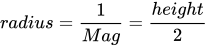
- 放大倍數
- 半徑
"人們以多種方式指定分形座標。有些人使用可見點左上角和右下角的座標,將座標指定為四個數字 x1、y1、x2、y2。要在 XaoS 中設定相同的視點,將中心的實部設定為 (x1+x2)/2,中心的虛部設定為 (y1+y2)/2,半徑設定為 x2-x1 和 y2-y1 中較大的一個。"(來自XaoS 文件[4])
Fractint、Ultra Fractal、ChaosPro 和 Fractal Explorer 中的標準描述是角點。例如,曼德博集合的初始平面為
 Corners:                X                     Y
 Top-l          -2.5000000000000000    1.5000000000000000
 Bot-r           1.5000000000000000   -1.5000000000000000
 Ctr -0.5000000000000000   0.0000000000000000  Mag 6.66666667e-01
 X-Mag-Factor     1.0000   Rotation    0.000   Skew    0.000
引數平面的顯示視窗具有
- 4 的水平寬度(實部)
- 3 的垂直寬度(高度)(虛部)
- 4/3 的縱橫比(比例)(同樣在畫素中為 640/480,因此沒有失真)
- 中心 z=-0.5
參見演示 par 檔案
Mandel_Demo        { ; PAR for initialization of Fractint demo
  reset=1900 type=mandel corners=-2.5/1.5/-1.5/1.5 params=0/0 inside=0
  sound=no
  }
對於朱利亞集/動態平面,有
Corners:                X                     Y
Top-l          -2.0000000000000000    1.5000000000000000
Bot-r           2.0000000000000000   -1.5000000000000000
Ctr  0.0000000000000000   0.0000000000000000  Mag 6.66666667e-01
X-Mag-Factor     1.0000   Rotation    0.000   Skew    0.000
Fractint 文件中的描述
CORNERS=[xmin/xmax/ymin/ymax[/x3rd/y3rd]]
示例:corners=-0.739/-0.736/0.288/0.291
以這些座標作為 x 和 y 座標的範圍開始,而不是預設值(對於 type=mandel) -2.0/2.0/-1.5/1.5。當您指定四個值(通常的情況)時,這定義了一個矩形:x 座標對映到螢幕,從左到右,從 xmin 到 xmax,y 座標對映到螢幕,從下到上,從 ymin 到 ymax。六個引數可用於描述任何旋轉或拉伸的平行四邊形:(xmin,ymax)用於螢幕左上角的座標,(xmax,ymin)用於右下角的座標,(x3rd,y3rd)用於左下角的座標。僅輸入“CORNERS=”會告訴 Fractint 使用此形式(預設模式),而不是 CENTER-MAG(見下文)在使用 [B] 命令儲存引數時。
int SetPlaneFromCorners(double CxMin , double CxMax, double CyMin , double CyMax){


  Radius = fabs(CyMax-CyMin)/2.0;
  Magnification = 1.0/Radius;

  // http://www.purplemath.com/modules/midpoint.htm
  Center = (CxMax+CxMin)/2.0 + I*(CyMax+CyMin)/2.0;


  return 0;


}
"If you use the center, you can change the zoom level and the plot zooms in/out smoothly on the same center point. " Duncan C).
Fractint 使用 Mag(與 Xmagfactor 相比)
CENTER-MAG=[Xctr/Yctr/Mag[/Xmagfactor/Rotation/Skew]]
這是一種將角點作為中心點和放大倍數輸入的替代方法,在一些分形程式和出版物中很受歡迎。僅輸入 "CENTER-MAG=" 會告訴 Fractint 使用此形式,而不是 CORNERS(見上文)在使用 [B] 命令儲存引數時。[TAB] 狀態顯示顯示了兩種形式的“角點”。當您指定三個值(通常的情況)時,這定義了一個矩形:(Xctr,Yctr)指定影像中心的座標。
Mag 指示要使用的放大倍數。初始值(無縮放)為 6.66666667e-01。
六個引數可用於描述任何旋轉或拉伸的平行四邊形:Xmagfactor 指示 x 放大倍數比 y 放大倍數大多少倍,
Rotation 指示影像旋轉了多少度。
Skew 指示影像傾斜了多少度。正角度將逆時針旋轉和傾斜影像。
引數可以儲存到稱為 fractint.par 的parmfile 中
Wolf Jung 在Mandel 中使用中心和寬度
/*
   from mndlbrot.cpp  by Wolf Jung (C) 201
   These classes are part of Mandel 5.7, which is free software; you can
   redistribute and / or modify them under the terms of the GNU General
   Public License as published by the Free Software Foundation; either
   version 3, or (at your option) any later version. In short: there is
   no warranty of any kind; you must redistribute the source code as well
*/
void mndlbrot::startPlane(int sg, double &xmid, double &rewidth) const
{  if (sg > 0)
     { xmid = -0.5; rewidth = 1.6; } // parameter plane
     else { xmid = 0; rewidth = 2.0; } // dynamic plane
用於描述平面(檢視)XaoS 使用
- 指令碼中的 4 個數字
- 選單中的 3 個數字
XaoS 使用“半徑”來稱呼它,但它是這樣定義的: (x2-x1 = 寬度) 和 y2-y1 = 高度中較大的那個。
這對於縮放非常有用:固定中心,只改變半徑。
Claude Heiland-Allen[5] 使用中心和半徑 來表示復二次多項式的引數平面
半徑定義為
- 適合影像實際框架內的圓的半徑
- "中心和軸對齊的檢視矩形頂部之間的虛座標差”。
- "px_radius 是影像寬度的一半(以實座標表示)" [6]
view="-0.75 0 1.5" # standard view of parameter plane : center_re, center_im, radius
  // modified code using center and radius to scan the plane
  int height = 720;
  int width = 1280;
  double dWidth;
  double dRadius = 1.5;
  double complex center= -0.75*I;
  double complex c;
  int i,j;

  double width2; // = width/2.0
  double height2; // = height/2.0

  width2 = width /2.0;
  height2 = height/2.0;

complex double coordinate(int i, int j, int width, int height, complex double center, double radius) {
  double x = (i - width /2.0) / (height/2.0);
  double y = (j - height/2.0) / (height/2.0);
  complex double c = center + radius * (x - I * y);
  return c;
}

for ( j = 0; j < height; ++j) {
    for ( i = 0; i < width; ++i) {
      c = coordinate(i, j, width, height, center, dRadius);
      // do smth
       }
     }
另一個版本
int main()
{
  int aa = 4;
  int w = 800 * aa;
  int h = 800 * aa;

  #pragma omp parallel for schedule(static, 1)
  for (int j = 0; j < h; ++j)
  {
    double y = (h/2 - (j + 0.5)) / (h/2) * r;
    for (int i = 0; i < w; ++i)
    {
      double x = (i + 0.5 - w/2) / (h/2) * r;
      double _Complex c = x + I * y;
      // proceed
    }
  }

  return 0;
}
vec2 GiveCoordinate(vec2 center, float radius, vec2 fragCoord, vec3 iResolution)
{

  // from pixel to world coordinate
  // now point (0,0) is left bottom
  // point (iResolution.x, iResolution.y) is right top
  float x = (fragCoord.x -  iResolution.x/2.0)/ (iResolution.y/2.0);
  float y = (fragCoord.y -  iResolution.y/2.0)/ (iResolution.y/2.0);
  vec2 c = vec2(center.x + radius*x, center.y + radius*y) ;
  return c ;
}
根據半徑、中心和縱橫比設定平面角
int SetPlane(complex double center, double radius, double a_ratio){

	ZxMin = creal(center) - radius*a_ratio;
	ZxMax = creal(center) + radius*a_ratio;	//0.75;
	ZyMin = cimag(center) - radius;	// inv
	ZyMax = cimag(center) + radius;	//0.7;
    double PixelWidth = (ZxMax-ZxMin)/iWidth;
    double PixelHeight = (ZyMax-ZyMin)/iHeight; // pixel_size = PixelWidth = PixelHeight
	return 0;

}
在標準的數學約定和一些 CS 圖形程式設計系統之間存在主要的不相容性
- 數學課中教授的標準數學約定 = 標準座標系 (y 軸向上)
- 一些 CS 圖形程式設計系統 (但並非所有系統) = y 軸向下
透過標記笛卡爾平面的一象限來檢查**平面的方向**
if (x>0 && y>0) Color=MaxColor-Color;
它應該位於右上角。
OpenGL is right handed in object space and world space. But in window space (aka screen space) we are suddenly left handed.[7]
另見
- 圖片
- 顯示
圖片的縱橫比是其寬度與其高度的比率,用冒號分隔的兩個數字表示,例如 16:9,十六比九。對於 x:y 縱橫比,圖片的寬度為 x 個單位,高度為 y 個單位。常見的縱橫比包括電影中的 1.85:1 和 2.39:1,電視攝影中的 4:3 和 16:9,以及靜止攝影中的 3:2。
縱橫比,更確切地說,**顯示縱橫比 (DAR)**[8] - 圖片顯示時的縱橫比。對於電視
- 對於電視,DAR 傳統上是 4:3 (即全屏)
- 現在是 16:9 (即寬屏),現在是高畫質電視的標準。
- “遞迴演算法將影像分割成塊,並測試每個塊是否位於“黑色區域”中。”,由 Michael Hogg 提出[9]
- 用於縮放動畫的龐加萊上半平面度量
- 陳維尹、楊佑升和梁昆茂提出的分形動畫的簡單最佳化
- Claude Heiland-Allen 對縮放動畫的最佳化[10]
- reenigne 部落格:遞迴細分
- Xaos - 演算法描述
- 新的快速方法!
- Albert Lobo Cusidó 的縮放
- 渲染曼德勃羅集 - 透過 JavaScript 實現示例,作者:Christian Stigen Larsen
- 擾動
- ↑ 維基百科上的歐幾里得空間
- ↑ 非歐幾里得幾何,作者:Malin Christersson (2018)
- ↑ 維基百科上的視窗
- ↑ Xaos - 檢視
- ↑ Claude Heiland-Allen 的部落格
- ↑ 指數對映,作者:Robert P. Munafo,2010 年 12 月 5 日。來自曼德勃羅集詞彙表和百科全書,作者:Robert Munafo,版權所有 © 1987-2020。
- ↑ stackoverflow 問題:is-opengl-coordinate-system-left-handed-or-right-handed
- ↑ 維基百科:縱橫比 (影像)
- ↑ michael hogg:fractalnet
- ↑ Claude Heiland-Allen 對縮放動畫的最佳化