


顏色理論/顏色漸變
 |
一位華夏公益教科書作者認為此頁面應該拆分為具有更窄子主題的更小頁面。 你可以透過將這個大頁面拆分為更小的頁面來提供幫助。請確保遵循 命名策略。將書籍分成更小的部分可以提供更多關注,並允許每個部分做好一件事,這對每個人都有益。 |

- Lisa Charlotte Rost 編寫的關於資料視覺化中顏色的友好指南
- rockraikar 編寫的玩轉漸變
- gimp 概念 : 漸變
- Janet Parke 編寫的超分形漸變提示
- 維基百科上的影像漸變
- 維基百科上的顏色漸變
- w3schools : css3 漸變
- Alan Gibson 編寫的漸變
- 域著色
- Emilia Petrisor 編寫的域著色
- dynamicmath : 域著色
- dctools 由 Juan Carlos Ponce Campuzano 編寫的
- domain_coloring (gnuplot)
顏色漸變可以根據以下方面命名
- 維度
- 顏色位深
- 顏色模型: hsv[1]
- 漸變段數
- 用於建立漸變的函式
- 特殊輸入值 (NAN,無資料,高或低超出範圍的值)[2][3]
- 顏色數量
- 數字型別、範圍和精度
- 感知一致性[4]
- 單調
- 色調單調
- 飽和度單調
- 亮度單調
這裡畫素的顏色與 1D 變數成比例。例如,在 2D 空間(複數平面,其中點 z = x+y*i)
返回介於兩個給定顏色之間的顏色的函式示例
colorA = [0, 0, 255] # blue
colorB = [255, 0, 0] # red
function get_gradient_color(val):
# 'val' must be between 0 and 1
for i in [1,2,3]:
color[i] = colorA[i] + val * (colorB[i] - colorA[i])
return color
-
 顏色與 x 成比例的 1D 漸變
 -
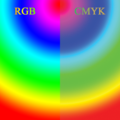 顏色與半徑成比例的 1D 漸變
 -
 顏色與角度成比例的 1D 漸變
 -
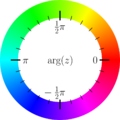 用於複數函式圖的色調圓


程式碼


ƒ(x) =(x2 − 1)(x − 2 − i)2/(x2 + 2 + 2i)。色調代表函式引數,而飽和度代表幅度。
因為顏色可以被視為超過1D的值,所以它被用來表示超過一個(實數或1D)變數。例如
- Robert Munafo 使用了 HSV 顏色模型中的 2 個值 [7][8][9]
- John J. G. Savard 使用了自己的函式 [10][11]
- 域著色 是一種用於視覺化複變函式的技術。
- 矩陣實驗室 : MAtlab 中的 rgb 影像
- 來自 d3js.org 的動畫輪廓
- Paul Derbyshire 為 Mandelbrot 開發的多波著色
- Gerrit 的 2D 色圖 [12]
- 最終迭代的角度最自然地對映到色調,色調具有與圓形匹配的拓撲結構。
- 迭代次數對映到飽和度和明度(顏色空間是 3D,至少對於大多數人來說是這樣)。
' panomand/src/dll/fbmandel.bas
' https://www.unilim.fr/pages_perso/jean.debord/panoramic/mandel/panoramic_mandel.htm
' PANOMAND is an open source software for plotting Mandelbrot and Julia sets. It is written in two BASIC dialects: PANORAMIC and FreeBASIC
' by Jean Debord
' a simplified version of R Munafo's algorithm
' Color is defined in HSV space, according to Robert Munafo
' (http://mrob.com/pub/muency/color.html): the value V is
' computed from the distance estimator, while the hue H and
' saturation S are computed from the iteration number.

function MdbCol(byval Iter as integer, _
                byval mz   as double, _
                byref dz   as Complex) as integer
' Computes the color of a point
' Iter = iteration count
' mz   = modulus of z at iteration Iter
' dz   = derivative at iteration Iter

  if Iter = Max_Iter then return &HFFFFFF

  dim as double  lmz, mdz, Dist, Dwell, DScale, Angle, Radius, Q, H, S, V
  dim as integer R, G, B

  lmz = log(mz)
  mdz = CAbs(dz)

  ' Determine Value (luminosity) from Distance Estimator

  V = 1

  if mdz > 0 then
    Dist = pp * mz * lmz / mdz
    DScale = log(Dist / ScaleFact) / Lnp + Dist_Fact
    if DScale < -8 then
      V = 0
    elseif DScale < 0 then
      V = 1 + DScale / 8
    end if
  end if

  ' Determine Hue and Saturation from Continuous Dwell

  Dwell = Iter - log(lmz) / Lnp + LLE
  Q = log(abs(Dwell)) * AbsColor

  if Q < 0.5 then
    Q = 1 - 1.5 * Q
    Angle = 1 - Q
  else
    Q = 1.5 * Q - 0.5
    Angle = Q
  end if

  Radius = sqr(Q)

  if (Iter mod 2 = 1) and (Color_Fact > 0) then
    V = 0.85 * V
    Radius = 0.667 * Radius
  end if

  H = frac(Angle * 10)
  S = frac(Radius)

  HSVtoRGB H * 360, S, V, R, G, B
  return rgb(R, G, B)

end function
- Hans Lundmark 頁面 [13]
16 位線性 RGB 的質量與 12 位 sRGB(= 非線性 RGB)大致相同,因為線性顏色會導致靠近白色區域的樣本過多,而靠近黑色區域的樣本過少。
-
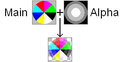 RGB 和 RGBA 影像

型別
- RGB = "線性" 顏色空間
- sRGB
- sRGB = 標準 RGB。SRGBColorSpace (“srgb”) 指的是由 Rec. 709 主色、D65 白點和非線性 sRGB 傳輸函式定義的顏色空間。
- sRGB 線性空間與 sRGB 相同,只是傳輸函式為線性光(沒有伽馬編碼)
#include <stdio.h>
#include <stdlib.h>
#include <math.h>
#include <complex.h> // http://pubs.opengroup.org/onlinepubs/009604499/basedefs/complex.h.html

/*
based on
c++ program from :
http://commons.wikimedia.org/wiki/File:Color_complex_plot.jpg
by  	Claudio Rocchini

gcc d.c -lm -Wall

http://en.wikipedia.org/wiki/Domain_coloring

*/

const double PI = 3.1415926535897932384626433832795;
const double E  = 2.7182818284590452353602874713527;

/*

complex domain coloring
Given a complex number z=re^{ i \theta},

hue represents the argument ( phase, theta ),

sat and value represents the modulus

*/
int GiveHSV( double complex z, double HSVcolor[3] )
{
 //The HSV, or HSB, model describes colors in terms of hue, saturation, and value (brightness).

 // hue = f(argument(z))
 //hue values range from .. to ..
 double a = carg(z); //
 while(a<0) a += 2*PI; a /= 2*PI;

 // radius of z
 double m = cabs(z); //
 double ranges = 0;
 double rangee = 1;
 while(m>rangee){
   ranges = rangee;
   rangee *= E;
      }
 double k = (m-ranges)/(rangee-ranges);

 // saturation = g(abs(z))
 double sat = k<0.5 ? k*2: 1 - (k-0.5)*2;
 sat = 1 - pow( (1-sat), 3);
 sat = 0.4 + sat*0.6;

 // value = h(abs(z))
 double val = k<0.5 ? k*2: 1 - (k-0.5)*2;
   val = 1 - val;
   val = 1 - pow( (1-val), 3);
   val = 0.6 + val*0.4;

 HSVcolor[0]= a;
 HSVcolor[1]= sat;
 HSVcolor[2]= val;
return 0;
}


int GiveRGBfromHSV( double HSVcolor[3], unsigned char RGBcolor[3] ) {
        double r,g,b;
        double h; double s; double v;
        h=HSVcolor[0]; // hue
        s=HSVcolor[1]; //  saturation;
        v = HSVcolor[2]; // = value;

        if(s==0)
                r = g = b = v;
        else {
                if(h==1) h = 0;
                double z = floor(h*6);
                int i = (int)z;
                double f = (h*6 - z);
                double p = v*(1-s);
                double q = v*(1-s*f);
                double t = v*(1-s*(1-f));
                switch(i){
                        case 0: r=v; g=t; b=p; break;
                        case 1: r=q; g=v; b=p; break;
                        case 2: r=p; g=v; b=t; break;
                        case 3: r=p; g=q; b=v; break;
                        case 4: r=t; g=p; b=v; break;
                        case 5: r=v; g=p; b=q; break;
                }
        }
        int c;
        c = (int)(256*r); if(c>255) c = 255; RGBcolor[0] = c;
        c = (int)(256*g); if(c>255) c = 255; RGBcolor[1] = c;
        c = (int)(256*b); if(c>255) c = 255; RGBcolor[2] = c;
  return 0;
}

int GiveRGBColor( double complex z, unsigned char RGBcolor[3])
{
  static double HSVcolor[3];
  GiveHSV( z, HSVcolor );
  GiveRGBfromHSV(HSVcolor,RGBcolor);
  return 0;
}

//
double complex fun(double complex c ){
  return (cpow(c,2)-1)*cpow(c-2.0- I,2)/(cpow(c,2)+2+2*I);} //

int main(){
        // screen (integer ) coordinate
        const int dimx = 800; const int dimy = 800;
        // world ( double) coordinate
        const double reMin = -2; const double reMax =  2;
        const double imMin = -2; const double imMax =  2;
        //
        double stepX=(imMax-imMin)/(dimy-1);
        double stepY=(reMax-reMin)/(dimx-1);

        static unsigned char RGBcolor[3];
        FILE * fp;
        char *filename ="complex.ppm";
        fp = fopen(filename,"wb");
        fprintf(fp,"P6\n%d %d\n255\n",dimx,dimy);

        int i,j;
        for(j=0;j<dimy;++j){
                double im = imMax - j*stepX;
                for(i=0;i<dimx;++i){
                        double re = reMax - i*stepY;
                        double complex z= re + im*I; //
                        double complex v = fun(z); //
                        GiveRGBColor( v, RGBcolor);

                        fwrite(RGBcolor,1,3,fp);
                }
        }
        fclose(fp);
        printf("OK - file %s saved\n", filename);

        return 0;
}
在 Basic 中
' /panomand/src/dll/hsvtorgb.bas
' https://www.unilim.fr/pages_perso/jean.debord/panoramic/mandel/panoramic_mandel.htm
' PANOMAND is an open source software for plotting Mandelbrot and Julia sets. It is written in two BASIC dialects: PANORAMIC and FreeBASIC
' by Jean Debord
sub HSVtoRGB(byref H as double,  _
             byref S as double,  _
             byref V as double,  _
             byref R as integer, _
             byref G as integer, _
             byref B as integer)

' Convert RGB to HSV
' Adapted from http://www.cs.rit.edu/~ncs/color/t_convert.html
' R, G, B values are from 0 to 255
' H = [0..360], S = [0..1], V = [0..1]
' if S = 0, then H = -1 (undefined)

  if S = 0 then  ' achromatic (grey)
    R = V * 255
    G = R
    B = R
    exit sub
  end if

  dim as integer I
  dim as double  Z, F, P, Q, T
  dim as double  RR, GG, BB

  Z = H / 60     ' sector 0 to 5
  I = int(Z)
  F = frac(Z)
  P = V * (1 - S)
  Q = V * (1 - S * F)
  T = V * (1 - S * (1 - F))

  select case I
    case 0
      RR = V
      GG = T
      BB = P
    case 1
      RR = Q
      GG = V
      BB = P
    case 2
      RR = P
      GG = V
      BB = T
    case 3
      RR = P
      GG = Q
      BB = V
    case 4
      RR = T
      GG = P
      BB = V
    case 5
      RR = V
      GG = P
      BB = Q
  end select

  R = RR * 255
  G = GG * 255
  B = BB * 255
end sub
- 可以在梯度的每個段中使用任何函式。
- 函式的輸出被縮放到顏色分量的範圍。
- 插值 顏色之間可以是
Aras Pranckevičius 編寫的 Oklab 評估函式程式碼的尾部
// to-Linear -> to-Oklab -> lerp -> to-Linear -> to-sRGB
float3 ca = pix_to_float(m_Keys[idx]);
float3 cb = pix_to_float(m_Keys[idx+1]);
ca = sRGB_to_Linear(ca);
cb = sRGB_to_Linear(cb);
ca = Linear_sRGB_to_OkLab_Ref(ca);
cb = Linear_sRGB_to_OkLab_Ref(cb);
float3 c = lerp(ca, cb, a);
c = OkLab_to_Linear_sRGB_Ref(c);
c = Linear_to_sRGB(c);
return float_to_pix(c);
在 CSS 中,兩個顏色值之間的插值 是透過執行以下步驟完成的:[17]
- (如果需要)將它們轉換為給定的顏色空間,在下文中稱為插值顏色空間。
- (如果需要)在轉換後的顏色中重新插入已傳遞的值。
- (如果需要)根據所選的 <hue-interpolation-method> 調整色調。
- 顏色分量的預乘。
- 對顏色計算值的每個分量進行線性插值。
- 撤銷預乘。
示例 36。要插值:[18]
- 在 Lab 顏色空間中
- 兩種顏色:rgb(76% 62% 03%/0.4) 和 color(display-p3 0.84 0.19 0.72/0.6)
- 它們首先轉換為 lab:lab(66.927% 4.873 68.622/0.4) lab(53.503% 82.672 -33.901/0.6)
- 預乘:然後在插值之前對 L、a 和 b 座標進行預乘:[26.771% 1.949 27.449] 和 [32.102% 49.603 -20.341]。
- 插值:對這些進行線性插值的中間點將是 [29.4365% 25.776 3.554],
- 撤銷預乘:具有 0.5 的 alpha 值,得到 lab(58.873% 51.552 7.108) / 0.5)。
顏色的數量由 顏色深度 決定:從 2 種顏色到 1600 萬種顏色。
-
 6 位 RGB 統一調色盤,帶有黑色邊框
 -
 影像:6 位 RGB 統一調色盤
 -
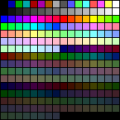 256 色 VGA 顏色漸變


另請參閱
- Nic Newdigate 在 c 中定義的 16 位(rgb-565)顏色名稱
- 關於 RGB565 以及如何將其轉換為 RGB565,2018 年 11 月 14 日,由 Thomas Barth 撰寫
直接重複
顏色與顏色在顏色漸變中的位置 <0;1> 成正比。如果位置 > 1,則會有顏色重複。這可能很有用
映象重複
"colorCycleMirror - 這將反映顏色漸變,使其平滑迴圈" [19]
偏移

建立漸變的方法
"Lookup tables (LUTs) are an excellent technique for optimizing the evaluation of functions that are expensive to compute and inexpensive to cache. ... For data requests that fall between the table's samples, an interpolation algorithm can generate reasonable approximations by averaging nearby samples."[26]
convert input.pgm -level 0,65532 clut.ppm -interpolate integer -clut -depth 8 output.png
# http://jtauber.com/blog/2008/05/18/creating_gradients_programmatically_in_python/
# Creating Gradients Programmatically in Python by James Tauber

import sys

def write_png(filename, width, height, rgb_func):

    import zlib
    import struct
    import array

    def output_chunk(out, chunk_type, data):
        out.write(struct.pack("!I", len(data)))
        out.write(chunk_type)
        out.write(data)
        checksum = zlib.crc32(data, zlib.crc32(chunk_type))
        out.write(struct.pack("!I", checksum))

    def get_data(width, height, rgb_func):
        fw = float(width)
        fh = float(height)
        compressor = zlib.compressobj()
        data = array.array("B")
        for y in range(height):
            data.append(0)
            fy = float(y)
            for x in range(width):
                fx = float(x)
                data.extend([int(v * 255) for v in rgb_func(fx / fw, fy / fh)])
        compressed = compressor.compress(data.tostring())
        flushed = compressor.flush()
        return compressed + flushed

    out = open(filename, "w")
    out.write(struct.pack("8B", 137, 80, 78, 71, 13, 10, 26, 10))
    output_chunk(out, "IHDR", struct.pack("!2I5B", width, height, 8, 2, 0, 0, 0))
    output_chunk(out, "IDAT", get_data(width, height, rgb_func))
    output_chunk(out, "IEND", "")
    out.close()

def linear_gradient(start_value, stop_value, start_offset=0.0, stop_offset=1.0):
    return lambda offset: (start_value + ((offset - start_offset) / (stop_offset - start_offset) * (stop_value - start_value))) / 255.0

def gradient(DATA):
    def gradient_function(x, y):
        initial_offset = 0.0
        for offset, start, end in DATA:
            if y < offset:
                r = linear_gradient(start[0], end[0], initial_offset, offset)(y)
                g = linear_gradient(start[1], end[1], initial_offset, offset)(y)
                b = linear_gradient(start[2], end[2], initial_offset, offset)(y)
                return r, g, b
            initial_offset = offset
    return gradient_function

## EXAMPLES

# normally you would make these with width=1 but below I've made them 50
# so you can more easily see the result

# body background from jtauber.com and quisition.com
write_png("test1.png", 50, 143, gradient([
    (1.0, (0xA1, 0xA1, 0xA1), (0xDF, 0xDF, 0xDF)),
]))

# header background similar to that on jtauber.com
write_png("test2.png", 50, 90, gradient([
    (0.43, (0xBF, 0x94, 0xC0), (0x4C, 0x26, 0x4C)), # top
    (0.85, (0x4C, 0x26, 0x4C), (0x27, 0x13, 0x27)), # bottom
    (1.0,  (0x66, 0x66, 0x66), (0xFF, 0xFF, 0xFF)), # shadow
]))

# header background from pinax
write_png("test3.png", 50, 80, gradient([
    (0.72, (0x00, 0x26, 0x4D), (0x00, 0x40, 0x80)),
    (1.0,  (0x00, 0x40, 0x80), (0x00, 0x6C, 0xCF)), # glow
]))

# form input background from pinax
write_png("test4.png", 50, 25, gradient([
    (0.33, (0xDD, 0xDD, 0xDD), (0xF3, 0xF3, 0xF3)), # top-shadow
    (1.0,  (0xF3, 0xF3, 0xF3), (0xF3, 0xF3, 0xF3)),
]))
# Perl code
# http://www.angelfire.com/d20/roll_d3_for_this/mandel-highorder/mandel-high.pl
# from perl High-order Mandelbrot program.
# Written by Christopher Thomas.
# Picture palette info.

my ($palsize);
my (@palette);

if(0)
{
# Light/dark colour banded palette.
# NOTE: This looks ugly, probably because the dark colours look muddy.
$palsize = 16;
@palette =
  ( "  255   0   0", "    0 112 112", "  255 128   0", "    0   0 128",
    "  224 224   0", "   64   0  96", "    0 255   0", "   96   0  64",
    "    0 224 224", "  128   0   0", "    0   0 255", "  128  64   0",
    "  128   0 192", "  112 112   0", "  192   0 128", "    0 128   0" );
}
else
{
# 8-colour rainbow palette.
$palsize = 8;
@palette =
  ( "  255   0   0", "  255 128   0",
    "  224 224   0", "    0 255   0",
    "    0 224 224", "    0   0 255",
    "  128   0 192", "  192   0 128" );
}
轉換
- 在 FractInt 和 Fractal eXtreme 調色盤之間 [29]
列表
名稱
- 著色函式
型別

示例
- 在使用 mandel.js[35] 的 JS 中,作者為 Christopher Williams[36]
- 使用 jQuery[37] 的 Javascript
- Richel Bilderbeek[38] 編寫的 C++ 函式
- 用於 Mandelbrot 的多波長著色[39]
- 直方圖著色 [40]
- Dave Green 的 `cubehelix' 顏色方案
- css 漸變
- stackoverflow 問題:如何在 python 中建立顏色漸變
- complex_plot 來自 Arb 庫和 說明
// https://www.shadertoy.com/view/lsd3zN
// sRGB demo by Tom Forsyth
// https://medium.com/@tomforsyth/the-srgb-learning-curve-773b7f68cf7a
//////////////////////////////////////////////////////////
//
// Illustration of the precision distribution of linear
// and sRGB formats.
//
// A ramp of 64 shades of each colour is shown to
// emphasise the distribution of banding in each format.
// Real formats of course have 256 shades.
//
// The leftmost bar of each colour is a linear format
// As you can see, although this format is linear in
// "photons per second", the difference in shades between
// the darker bands is far more obvious to the eye than
// the difference between the brighter bands. Thus,
// although linear space is a good place to do maths,
// when stored in a buffer the distribution of precision
// is poorly matched to the eye's preception of brightness.
//
// The middle bar of each colour is an sRGB format.
// While this is a strange non-linear format, and doing
// maths in it is not a good idea, it is an excellent
// format for storing "picturelike" data. You can see
// that the change in perceived brightness between adjacent
// bands is very uniform across the entire range of
// brightnesses, meaning that it has a distribution of
// precision that matches the eye's perception very well.
//
// The rightmost bar of each colour is a gamma 2.2 bar.
// This is not directly supported by hardware, and is there
// to illustrate that although it is quite similar to sRGB,
// there are significant differences between them, and
// care must be taken if trying to approximate one with
// the other. In general, it's not worth the very small
// performance difference.
//
//////////////////////////////////////////////////////////


// Taken from D3DX_DXGIFormatConvert.inl
float D3DX_FLOAT_to_SRGB ( float val )
{
	if( val < 0.0031308 )
		val *= 12.92;
	else
		val = 1.055 * pow(val,1.0/2.4) - 0.055;
	return val;
}

// Taken from D3DX_DXGIFormatConvert.inl
// Technically this is not bit-exact - that requires a look-up table,
// but it's accurate enough for our purposes here.
float D3DX_SRGB_to_FLOAT(float val)
{
    if( val < 0.04045 )
        val /= 12.92;
    else
        val = pow((val + 0.055)/1.055,2.4);
    return val;
}

void mainImage( out vec4 fragColor, in vec2 fragCoord )
{
	vec2 uv = fragCoord.xy / iResolution.xy;

    float yShade = uv.y;

    int colCol = int(floor(uv.x*4.0));
	float fraction = uv.x*4.0 - float(colCol);
    int colRamp = int(floor(fraction * 3.1));

    // Make the basic colour.
    vec3 baseCol;
    if ( colCol == 0 )
    {
        baseCol = vec3(yShade,yShade,yShade); // white
    }
    else if ( colCol == 1 )
    {
        baseCol = vec3(yShade*0.6,yShade,0.0); // light green
    }
    else if ( colCol == 2 )
    {
        baseCol = vec3(yShade,yShade*0.5,yShade*0.2); // bronzeish
    }
    else
    {
        baseCol = vec3(yShade*0.5,0.0,yShade); // purple
    }


    // Artificially quantise to emphasise precision distribution
    float shadeSteps = 64.0;
    baseCol = (1.0/shadeSteps) * floor ( baseCol * shadeSteps );

    // Now interpret that value as if it was a value stored in a texture of various formats.

    vec3 linearCol;
    if ( colRamp == 0 )
    {
        // Linear texture
        linearCol = baseCol;
    }
    else if ( colRamp == 1 )
    {
        // sRGB texture
        linearCol.x = D3DX_SRGB_to_FLOAT ( baseCol.x );
        linearCol.y = D3DX_SRGB_to_FLOAT ( baseCol.y );
        linearCol.z = D3DX_SRGB_to_FLOAT ( baseCol.z );
    }
    else if ( colRamp == 2 )
    {
        // 2.2 gamma for illustration
        linearCol.x = pow ( baseCol.x, 2.2 );
        linearCol.y = pow ( baseCol.y, 2.2 );
        linearCol.z = pow ( baseCol.z, 2.2 );
    }
    else
    {
        // Separator.
        linearCol = vec3(0.0,0.0,0.0);
    }


    // But then assume the display we're outputting to is gamma 2.2
    float displayGamma = 2.2;
    fragColor.x = pow ( linearCol.x, 1.0/displayGamma );
    fragColor.y = pow ( linearCol.y, 1.0/displayGamma );
    fragColor.z = pow ( linearCol.z, 1.0/displayGamma );
    fragColor.w = 1.0;
}
- 彩虹漸變
-
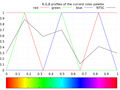 2D RGB 配置檔案
 -
 2D HSV 配置檔案
 -
 3D RGB 配置檔案


彩虹漸變
這裡的漸變由 6 個片段組成。在每個片段中,僅使用線性函式更改顏色的一個 RGB 分量。
// Delphi version by Witold J.Janik with help Andrzeja Wąsika from [pl.comp.lang.delphi]
//  [i] changes from [iMin] to [iMax]

function GiveRainbowColor(iMin, iMax, i: Integer): TColor;
var
  m: Double;
  r, g, b, mt: Byte;
begin
  m := (i - iMin)/(iMax - iMin + 1) * 6;
  mt := (round(frac(m)*$FF));
  case Trunc(m) of
  0: begin
      R := $FF;
      G := mt;
      B := 0;
    end;
  1: begin
      R := $FF - mt;
      G := $FF;
      B := 0;
    end;
  2: begin
      R := 0;
      G := $FF;
      B := mt;
    end;
  3: begin
      R := 0;
      G := $FF - mt;
      B := $FF;
    end;
  4: begin
      R := mt;
      G := 0;
      B := $FF;
    end;
  5: begin
      R := $FF;
      G := 0;
      B := $FF - mt;
    end;
end; // case

  Result := rgb(R,G,B);
end;
/////
函式的輸入是 2 個變數
- 漸變中顏色的位置,(0.0 到 1.0 之間的歸一化浮點數)
- 顏色作為 RGB 分量的陣列(無符號整數,從 0 到 255)
此函式不使用直接輸出(void),而是更改輸入變數顏色。可以用這種方式使用它
GiveRainbowColor(0.25,color);
/* based on Delphi function by Witold J.Janik */
void GiveRainbowColor(double position,unsigned char c[])
{
  /* if position > 1 then we have repetition of colors it maybe useful    */

  if (position>1.0){if (position-(int)position==0.0)position=1.0; else position=position-(int)position;}


  unsigned char nmax=6; /* number of color segments */
  double m=nmax* position;

  int n=(int)m; // integer of m

  double f=m-n;  // fraction of m
  unsigned char t=(int)(f*255);


switch( n){
   case 0: {
      c[0] = 255;
      c[1] = t;
      c[2] = 0;
       break;
    };
   case 1: {
      c[0] = 255 - t;
      c[1] = 255;
      c[2] = 0;
       break;
    };
   case 2: {
      c[0] = 0;
      c[1] = 255;
      c[2] = t;
       break;
    };
   case 3: {
      c[0] = 0;
      c[1] = 255 - t;
      c[2] = 255;
       break;
    };
   case 4: {
      c[0] = t;
      c[1] = 0;
      c[2] = 255;
       break;
    };
   case 5: {
      c[0] = 255;
      c[1] = 0;
      c[2] = 255 - t;
       break;
    };
    default: {
      c[0] = 255;
      c[1] = 0;
      c[2] = 0;
       break;
    };

}; // case
}
// C++ version
// here are some my modification but the main code is the same
// as in Witold J.Janik code
//

Uint32 GiveRainbowColor(double position)

// this function gives 1D linear RGB color gradient
// color is proportional to position
// position  <0;1>
// position means position of color in color gradient

{
  if (position>1)position=position-int(position);
  // if position > 1 then we have repetition of colors
  // it maybe useful
  Uint8 R, G, B;// byte
  int nmax=6;// number of color bars
  double m=nmax* position;
  int n=int(m); // integer of m
  double f=m-n;  // fraction of m
  Uint8 t=int(f*255);


switch( n){
   case 0: {
      R = 255;
      G = t;
      B = 0;
       break;
    };
   case 1: {
      R = 255 - t;
      G = 255;
      B = 0;
       break;
    };
   case 2: {
      R = 0;
      G = 255;
      B = t;
       break;
    };
   case 3: {
      R = 0;
      G = 255 - t;
      B = 255;
       break;
    };
   case 4: {
      R = t;
      G = 0;
      B = 255;
       break;
    };
   case 5: {
      R = 255;
      G = 0;
      B = 255 - t;
       break;
    };

}; // case

  return (R << 16) | (G << 8) | B;
}
"想法是根據正弦波改變顏色。這會產生一種不錯的平滑漸變效果(雖然它不是線性的,但這並非要求)。透過更改 RGB 分量的頻率(理論上我們可以使用其他顏色空間,例如 HSV),我們可以獲得各種漸變。此外,我們還可以玩轉每個顏色分量的相位,從而產生“移位”效果。這種漸變的基本實現可以這樣實現:"
/*
http://blogs.microsoft.co.il/pavely/2013/11/12/color-gradient-generator/


*/
public Color[] GenerateColors(int number) {
    var colors = new List<Color>(number);
    double step = MaxAngle / number;
    for(int i = 0; i < number; ++i) {
        var r = (Math.Sin(FreqRed * i * step + PhaseRed) + 1) * .5;
        var g = (Math.Sin(FreqGreen * i * step + PhaseGreen) + 1) * .5;
        var b = (Math.Sin(FreqBlue * i * step + PhaseBlue) + 1) * .5;
        colors.Add(Color.FromRgb((byte)(r * 255), (byte)(g * 255), (byte)(b * 255)));
    }
    return colors.ToArray();
}
"其中
- Freq* 是各個 RGB 顏色的頻率
- Phase* 是相移值。
請注意,所有計算都是使用浮點數(範圍為 0.0 到 1.0)完成的,最後轉換為 WPF 顏色結構(在本例中)。這僅僅是因為方便,因為我們使用的是三角函式,它喜歡浮點數而不是整數。結果被歸一化為 0 到 1 的範圍,因為正弦函式產生的結果從 –1 到 1,因此我們加 1 以獲得 0 到 2 的範圍,最後除以 2 以獲得所需的範圍。"[44]
- Cubehelix 漸變
-
 2D RGB 配置檔案
 -
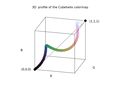 3D RGB 配置檔案


cubehelix 漸變
/*
 GNUPLOT - stdfn.h
 Copyright 1986 - 1993, 1998, 2004   Thomas Williams, Colin Kelley
*/
#ifndef clip_to_01
#define clip_to_01(val)	\
    ((val) < 0 ? 0 : (val) > 1 ? 1 : (val))
#endif

/*
 input : position
 output : c array ( rgb color)

the colour scheme spirals (as a squashed helix) around the diagonal of the RGB colour cube

https://arxiv.org/abs/1108.5083
A colour scheme for the display of astronomical intensity images by D. A. Green
*/
void GiveCubehelixColor(double position, unsigned char c[]){


	/* GNUPLOT - color.h
	 * Petr Mikulik, December 1998 -- June 1999
	 * Copyright: open source as much as possible
	*/

	// t_sm_palette
  	/* gamma for gray scale and cubehelix palettes only */
  	double gamma = 1.5;

  	/* control parameters for the cubehelix palette scheme */
  	//set palette cubehelix start 0.5 cycles -1.5 saturation 1
	//set palette gamma 1.5
  	double cubehelix_start = 0.5;	/* offset (radians) from colorwheel 0 */
  	double cubehelix_cycles = -1.5;	/* number of times round the colorwheel */
  	double cubehelix_saturation = 1.0;	/* color saturation */
	double r,g,b;
	double gray = position;


	/*
 	 Petr Mikulik, December 1998 -- June 1999
 	* Copyright: open source as much as possible
 	*/
	// /* Map gray in [0,1] to color components according to colorMode */
	// function color_components_from_gray
	// from gnuplot/src/getcolor.c
	double phi, a;

	phi = 2. * M_PI * (cubehelix_start/3. +  gray * cubehelix_cycles);

	// gamma correction
	if (gamma != 1.0)    gray = pow(gray, 1./gamma);


	a = cubehelix_saturation * gray * (1.-gray) / 2.;

	// compute
	r = gray + a * (-0.14861 * cos(phi) + 1.78277 * sin(phi));
	g = gray + a * (-0.29227 * cos(phi) - 0.90649 * sin(phi));
	b = gray + a * ( 1.97294 * cos(phi));

	// normalize to [9,1] range
	r = clip_to_01(r);
	g = clip_to_01(g);
	b = clip_to_01(b);

	// change range to [0,255]
  	c[0] = (unsigned char) 255*r; //R
  	c[1] = (unsigned char) 255*g; // G
  	c[2] = (unsigned char) 255*b; // B

}
- 顏色查詢表 (CLUT)
- GIMP 使用副檔名為 .ggr 的檔案[47]
- Fractint 使用 .map 檔案 [48]
- UltraFractal 使用 .ugr - 這些檔案可以包含多個漸變
- ual - 舊的 Ultra Fractal 漸變檔案
- rgb, pal, gpf - gnuplot 檔案
- Matplotlib[49] 顏色對映[50] 是一個查詢表[51]
- csv 檔案
- Paul Bourke 編寫的 WHIP 格式 (Autodesk) 地圖
- Gnofract4D 僅在圖形檔案內部儲存漸變,而不是作為單獨檔案。[52]
- MatLab
- Python
- R
- GMT
- QGIS
- Ncview
- Ferret
- Plotly
- Paraview
- VisIt
- Mathematica
- Surfer
- d3
- SKUA-GOCAD
- Petrel
- Fledermaus
- Qimera
- ImageJ
- Fiji
- Inkscape
- XML
- 文字
- SASS 樣式表
- LESS - https://less.lang.tw 樣式表
- CSS - 層疊樣式表
Kenneth Moreland 編寫的包含 33 個值的表格(儲存在 csv 檔案中)[53]
Scalar	R	G	B
0	59	76	192
0.03125	68	90	204
0.0625	77	104	215
0.09375	87	117	225
0.125	98	130	234
0.15625	108	142	241
0.1875	119	154	247
0.21875	130	165	251
0.25	141	176	254
0.28125	152	185	255
0.3125	163	194	255
0.34375	174	201	253
0.375	184	208	249
0.40625	194	213	244
0.4375	204	217	238
0.46875	213	219	230
0.5	221	221	221
0.53125	229	216	209
0.5625	236	211	197
0.59375	241	204	185
0.625	245	196	173
0.65625	247	187	160
0.6875	247	177	148
0.71875	247	166	135
0.75	244	154	123
0.78125	241	141	111
0.8125	236	127	99
0.84375	229	112	88
0.875	222	96	77
0.90625	213	80	66
0.9375	203	62	56
0.96875	192	40	47
1	180	4	38
CSS 中混合(和漸變)的預設顏色空間是 oklab
顏色漸變[56]
| Css 程式碼 | 描述 | 預覽影像 |
|---|---|---|
linear-gradient(in lab to right, white, #01E)
|
CIE Lab 漸變,它避免了過暗的中點,但具有明顯的紫色色調; | |
linear-gradient(in srgb to right, white, #01E)
|
gamma 編碼的 sRGB 漸變,在中點過暗,有點不飽和,並帶有一點紫色色調 | |
linear-gradient(in Oklab to right, white, #01E)
|
Oklab 漸變,提供更感知均勻的結果,完全沒有紫色色調 | |
linear-gradient(to right, #a8c0ff, #3f2b96);
|
海景 | |
linear-gradient(in Oklab to right, #44C, #795)
|
Oklab 漸變,感知上均勻的結果,完全沒有紫色色調 | |
linear-gradient(in Oklab to right, black, #01E)
|
Oklab 漸變,感知上均勻的結果 | |
linear-gradient(cyan, yellow);
|
||
linear-gradient(to left, violet, indigo, blue, green, yellow, orange, red);
|
VIBGYOR 彩虹 | |
linear-gradient(90deg, rgba(2,0,36,1) 0%, rgba(9,9,121,1) 35%, rgba(0,212,255,1) 100%);
|
每個空間中的黑色到白色漸變[57]
| 描述 | 預覽影像 |
|---|---|
| Oklab,感知上均勻的結果 | |
| oklch | |
| lab | |
| lch | |
| srgb | |
| srgb-linear | |
| hsl | |
| hwb | |
| xyz | |
| xyz-d50 | |
| xyz-d65 |
重複
[edit | edit source]| 程式碼 | 預覽 |
|---|---|
.gradient5 {
  background-image: repeating-linear-gradient(cyan 0%, yellow 50%);
}
|
|
.gradient6 {
  background-image: repeating-linear-gradient(to right, blue 0%, magenta 10%);
}
|
|
.gradient7 {
  background-image: repeating-linear-gradient(60deg, cyan 0%, teal 23%, lime 31%);
}
|
圓錐形
[edit | edit source]/* 色相環 */ background: conic-gradient(red, yellow, lime, aqua, blue, magenta, red); border-radius: 50%
| Css 程式碼 | 描述 | 預覽影像 |
|---|---|---|
conic-gradient(red, yellow, lime, aqua, blue, magenta, red); border-radius: 50%
|
色相環 |
Fractint 地圖檔案
[edit | edit source]顏色對映檔案的預設檔案型別副檔名為“.MAP”。這些是 ASCII 文字檔案。由一系列 RGB 三元組值組成(每行一個三元組,編碼為顏色的紅色、綠色和藍色 [RGB] 分量)。顏色對映(或調色盤)用作顏色查詢表[58] 預設顏色對映位於 Default.map 檔案中
0 0 0            The default VGA color map
0 0 168
0 168 0
0 168 168
168 0 0
168 0 168
168 84 0
168 168 168
84 84 84
84 84 252
84 252 84
84 252 252
252 84 84
252 84 252
252 252 84
252 252 252
0 0 0
20 20 20
32 32 32
44 44 44
56 56 56
68 68 68
80 80 80
96 96 96
112 112 112
128 128 128
144 144 144
160 160 160
180 180 180
200 200 200
224 224 224
252 252 252
0 0 252
64 0 252
124 0 252
188 0 252
252 0 252
252 0 188
252 0 124
252 0 64
252 0 0
252 64 0
252 124 0
252 188 0
252 252 0
188 252 0
124 252 0
64 252 0
0 252 0
0 252 64
0 252 124
0 252 188
0 252 252
0 188 252
0 124 252
0 64 252
124 124 252
156 124 252
188 124 252
220 124 252
252 124 252
252 124 220
252 124 188
252 124 156
252 124 124
252 156 124
252 188 124
252 220 124
252 252 124
220 252 124
188 252 124
156 252 124
124 252 124
124 252 156
124 252 188
124 252 220
124 252 252
124 220 252
124 188 252
124 156 252
180 180 252
196 180 252
216 180 252
232 180 252
252 180 252
252 180 232
252 180 216
252 180 196
252 180 180
252 196 180
252 216 180
252 232 180
252 252 180
232 252 180
216 252 180
196 252 180
180 252 180
180 252 196
180 252 216
180 252 232
180 252 252
180 232 252
180 216 252
180 196 252
0 0 112
28 0 112
56 0 112
84 0 112
112 0 112
112 0 84
112 0 56
112 0 28
112 0 0
112 28 0
112 56 0
112 84 0
112 112 0
84 112 0
56 112 0
28 112 0
0 112 0
0 112 28
0 112 56
0 112 84
0 112 112
0 84 112
0 56 112
0 28 112
56 56 112
68 56 112
84 56 112
96 56 112
112 56 112
112 56 96
112 56 84
112 56 68
112 56 56
112 68 56
112 84 56
112 96 56
112 112 56
96 112 56
84 112 56
68 112 56
56 112 56
56 112 68
56 112 84
56 112 96
56 112 112
56 96 112
56 84 112
56 68 112
80 80 112
88 80 112
96 80 112
104 80 112
112 80 112
112 80 104
112 80 96
112 80 88
112 80 80
112 88 80
112 96 80
112 104 80
112 112 80
104 112 80
96 112 80
88 112 80
80 112 80
80 112 88
80 112 96
80 112 104
80 112 112
80 104 112
80 96 112
80 88 112
0 0 64
16 0 64
32 0 64
48 0 64
64 0 64
64 0 48
64 0 32
64 0 16
64 0 0
64 16 0
64 32 0
64 48 0
64 64 0
48 64 0
32 64 0
16 64 0
0 64 0
0 64 16
0 64 32
0 64 48
0 64 64
0 48 64
0 32 64
0 16 64
32 32 64
40 32 64
48 32 64
56 32 64
64 32 64
64 32 56
64 32 48
64 32 40
64 32 32
64 40 32
64 48 32
64 56 32
64 64 32
56 64 32
48 64 32
40 64 32
32 64 32
32 64 40
32 64 48
32 64 56
32 64 64
32 56 64
32 48 64
32 40 64
44 44 64
48 44 64
52 44 64
60 44 64
64 44 64
64 44 60
64 44 52
64 44 48
64 44 44
64 48 44
64 52 44
64 60 44
64 64 44
60 64 44
52 64 44
48 64 44
44 64 44
44 64 48
44 64 52
44 64 60
44 64 64
44 60 64
44 52 64
44 48 64
0 0 0
0 0 0
0 0 0
0 0 0
0 0 0
0 0 0
0 0 0
0 0 0
Gimp/Inscape gpl 檔案
[edit | edit source]使用於:Gimp、Inscape、Aseprite、Drawpile、Krita、MyPaint[59]
語法
- ASCII 檔案(文字檔案)[60]
- 註釋必須以 # 開頭。在非空行中,如果行首不是 #,則前三個標記將被解析為數字
- 不支援 alpha
- GIMP 調色盤 - 它必須是檔案的第一行[61]
- Name: <name> - 設定顏色調色盤的名稱。
- Columns: <number> - 只是一個在 GIMP 內部顯示調色盤的指示。
- # <comment> - 註釋必須以 # 開頭。所有註釋都被 GIMP 忽略。
- 0 0 0 Black - 顏色的 RGB 值,後面是顏色名稱
載入器函式的原始碼 [62]
GIMP 調色盤使用特殊的檔案格式儲存,儲存在副檔名為 .gpl 的檔案中。
目錄
- ~/.config/GIMP/x.y/palettes/ 目錄(其中 x.y 是 GIMP 版本號)
- ~/.config/inkscape/palettes/
GIMP Palette
Name: Material Design
Columns: 14
#
255 248 225		amber 50
255 236 179		amber 100
255 224 130		amber 200
255 213  79		amber 300
255 202  40		amber 400
255 193   7		amber 500
255 179   0		amber 600
255 160   0		amber 700
255 143   0		amber 800
255 111   0		amber 900
255 229 127		amber a100
255 215  64		amber a200
255 196   0		amber a400
255 171   0		amber a700
227 242 253		blue 50
187 222 251		blue 100
144 202 249		blue 200
100 181 246		blue 300
 66 165 245		blue 400
 33 150 243		blue 500
 30 136 229		blue 600
 25 118 210		blue 700
 21 101 192		blue 800
 13  71 161		blue 900
130 177 255		blue a100
 68 138 255		blue a200
 41 121 255		blue a400
 41  98 255		blue a700
224 247 250		cyan 50
178 235 242		cyan 100
128 222 234		cyan 200
 77 208 225		cyan 300
 38 198 218		cyan 400
  0 188 212		cyan 500
  0 172 193		cyan 600
  0 151 167		cyan 700
  0 131 143		cyan 800
  0  96 100		cyan 900
132 255 255		cyan a100
 24 255 255		cyan a200
  0 229 255		cyan a400
  0 184 212		cyan a700
251 233 231		deep-orange 50
255 204 188		deep-orange 100
255 171 145		deep-orange 200
255 138 101		deep-orange 300
255 112  67		deep-orange 400
255  87  34		deep-orange 500
244  81  30		deep-orange 600
230  74  25		deep-orange 700
216  67  21		deep-orange 800
191  54  12		deep-orange 900
255 158 128		deep-orange a100
255 110  64		deep-orange a200
255  61   0		deep-orange a400
221  44   0		deep-orange a700
237 231 246		deep-purple 50
209 196 233		deep-purple 100
179 157 219		deep-purple 200
149 117 205		deep-purple 300
126  87 194		deep-purple 400
103  58 183		deep-purple 500
 94  53 177		deep-purple 600
 81  45 168		deep-purple 700
 69  39 160		deep-purple 800
 49  27 146		deep-purple 900
179 136 255		deep-purple a100
124  77 255		deep-purple a200
101  31 255		deep-purple a400
 98   0 234		deep-purple a700
232 245 233		green 50
200 230 201		green 100
165 214 167		green 200
129 199 132		green 300
102 187 106		green 400
 76 175  80		green 500
 67 160  71		green 600
 56 142  60		green 700
 46 125  50		green 800
 27  94  32		green 900
185 246 202		green a100
105 240 174		green a200
  0 230 118		green a400
  0 200  83		green a700
232 234 246		indigo 50
197 202 233		indigo 100
159 168 218		indigo 200
121 134 203		indigo 300
 92 107 192		indigo 400
 63  81 181		indigo 500
 57  73 171		indigo 600
 48  63 159		indigo 700
 40  53 147		indigo 800
 26  35 126		indigo 900
140 158 255		indigo a100
 83 109 254		indigo a200
 61  90 254		indigo a400
 48  79 254		indigo a700
225 245 254		light-blue 50
179 229 252		light-blue 100
129 212 250		light-blue 200
 79 195 247		light-blue 300
 41 182 246		light-blue 400
  3 169 244		light-blue 500
  3 155 229		light-blue 600
  2 136 209		light-blue 700
  2 119 189		light-blue 800
  1  87 155		light-blue 900
128 216 255		light-blue a100
 64 196 255		light-blue a200
  0 176 255		light-blue a400
  0 145 234		light-blue a700
241 248 233		light-green 50
220 237 200		light-green 100
197 225 165		light-green 200
174 213 129		light-green 300
156 204 101		light-green 400
139 195  74		light-green 500
124 179  66		light-green 600
104 159  56		light-green 700
 85 139  47		light-green 800
 51 105  30		light-green 900
204 255 144		light-green a100
178 255  89		light-green a200
118 255   3		light-green a400
100 221  23		light-green a700
249 251 231		lime 50
240 244 195		lime 100
230 238 156		lime 200
220 231 117		lime 300
212 225  87		lime 400
205 220  57		lime 500
192 202  51		lime 600
175 180  43		lime 700
158 157  36		lime 800
130 119  23		lime 900
244 255 129		lime a100
238 255  65		lime a200
198 255   0		lime a400
174 234   0		lime a700
255 243 224		orange 50
255 224 178		orange 100
255 204 128		orange 200
255 183  77		orange 300
255 167  38		orange 400
255 152   0		orange 500
251 140   0		orange 600
245 124   0		orange 700
239 108   0		orange 800
230  81   0		orange 900
255 209 128		orange a100
255 171  64		orange a200
255 145   0		orange a400
255 109   0		orange a700
252 228 236		pink 50
248 187 208		pink 100
244 143 177		pink 200
240  98 146		pink 300
236  64 122		pink 400
233  30  99		pink 500
216  27  96		pink 600
194  24  91		pink 700
173  20  87		pink 800
136  14  79		pink 900
255 128 171		pink a100
255  64 129		pink a200
245   0  87		pink a400
197  17  98		pink a700
243 229 245		purple 50
225 190 231		purple 100
206 147 216		purple 200
186 104 200		purple 300
171  71 188		purple 400
156  39 176		purple 500
142  36 170		purple 600
123  31 162		purple 700
106  27 154		purple 800
 74  20 140		purple 900
234 128 252		purple a100
224  64 251		purple a200
213   0 249		purple a400
170   0 255		purple a700
255 235 238		red 50
255 205 210		red 100
239 154 154		red 200
229 115 115		red 300
239  83  80		red 400
244  67  54		red 500
229  57  53		red 600
211  47  47		red 700
198  40  40		red 800
183  28  28		red 900
255 138 128		red a100
255  82  82		red a200
255  23  68		red a400
213   0   0		red a700
224 242 241		teal 50
178 223 219		teal 100
128 203 196		teal 200
 77 182 172		teal 300
 38 166 154		teal 400
  0 150 136		teal 500
  0 137 123		teal 600
  0 121 107		teal 700
  0 105  92		teal 800
  0  77  64		teal 900
167 255 235		teal a100
100 255 218		teal a200
 29 233 182		teal a400
  0 191 165		teal a700
255 253 231		yellow 50
255 249 196		yellow 100
255 245 157		yellow 200
255 241 118		yellow 300
255 238  88		yellow 400
255 235  59		yellow 500
253 216  53		yellow 600
251 192  45		yellow 700
249 168  37		yellow 800
245 127  23		yellow 900
255 255 141		yellow a100
255 255   0		yellow a200
255 234   0		yellow a400
255 214   0		yellow a700
236 239 241		blue-grey 50
207 216 220		blue-grey 100
176 190 197		blue-grey 200
144 164 174		blue-grey 300
120 144 156		blue-grey 400
 96 125 139		blue-grey 500
 84 110 122		blue-grey 600
 69  90 100		blue-grey 700
 55  71  79		blue-grey 800
 38  50  56		blue-grey 900
239 235 233		brown 50
215 204 200		brown 100
188 170 164		brown 200
161 136 127		brown 300
141 110  99		brown 400
121  85  72		brown 500
109  76  65		brown 600
 93  64  55		brown 700
 78  52  46		brown 800
 62  39  35		brown 900
250 250 250		grey 50
245 245 245		grey 100
238 238 238		grey 200
224 224 224		grey 300
189 189 189		grey 400
158 158 158		grey 500
117 117 117		grey 600
 97  97  97		grey 700
 66  66  66		grey 800
 33  33  33		grey 900
  0   0   0	   	black
255 255 255	white
Gimp ggr 檔案
[edit | edit source]“與 GIMP 一起提供的漸變儲存在系統漸變資料夾中。預設情況下,您建立的漸變儲存在個人 GIMP 目錄中的一個名為 gradients 的資料夾中。在這些資料夾中找到的任何漸變檔案(以 .ggr 副檔名結尾)將在您啟動 GIMP 時自動載入”(來自 gimp 文件) 預設漸變位於 /usr/share/gimp/2.0/gradients 目錄中(在視窗中檢查:編輯/首選項/目錄)
Git 倉庫
Gimp 漸變可以透過以下方式建立
- GUI [63]
- 在文字編輯器中手動(使用預定義的漸變作為基礎)
- 在自己的程式中
Gimp 漸變檔案格式在以下文件中描述
- GIMP 應用程式參考手冊 [64]
- 原始檔
- app/gradient.c 和 app/gradient_header.h 用於 GIMP 1.3 版本。[65]
- gimp-2.6.0/app/core/gimpgradient.c
Gimp 漸變段格式
typedef struct {
  gdouble                  left, middle, right;

  GimpGradientColor        left_color_type;
  GimpRGB                  left_color;
  GimpGradientColor        right_color_type;
  GimpRGB                  right_color;

  GimpGradientSegmentType  type;          /*  Segment's blending function  */
  GimpGradientSegmentColor color;         /*  Segment's coloring type      */

  GimpGradientSegment     *prev;
  GimpGradientSegment     *next;
} GimpGradientSegment;
以 GimpConfig 樣式格式:[66]
<proposal>
# GIMP Gradient file

(GimpGradient "Abstract 1"
        (segment 0.000000 0.286311 0.572621
                (left-color (gimp-rgba 0.269543 0.259267 1.000000 1.000000))
                (right-color (gimp-rgba 0.215635 0.407414 0.984953 1.000000))
                (blending-function linear)
                (coloring-type rgb))
        (segment ...)
        ...
        (segment ...))
</proposal>
GIMP Gradient
Name: GMT_hot
3
0.000000 0.187500 0.375000 0.000000 0.000000 0.000000 1.000000 1.000000 0.000000 0.000000 1.000000 0 0
0.375000 0.562500 0.750000 1.000000 0.000000 0.000000 1.000000 1.000000 1.000000 0.000000 1.000000 0 0
0.750000 0.875000 1.000000 1.000000 1.000000 0.000000 1.000000 1.000000 1.000000 1.000000 1.000000 0 0
第一行表明它是一個 gimp 漸變檔案。
第二行是漸變的名稱。
第三行告訴漸變中的段數。
以下每一行定義每個段的屬性,順序如下:“[68]
- 左停止點的位置
- 中間點的位置
- 右停止點的位置
- 左停止點的 R
- 左停止點的 G
- 左停止點的 B
- 左停止點的 A
- 右停止點的 R
- 右停止點的 G
- 右停止點的 B
- 右停止點的 A
- 混合函式常數
- 著色型別常數
每行末尾只有兩個常數
- 段的混合函式常數(顯然 0=線性,1=曲線,2=正弦,3=球形(遞增),4=球形(遞減))
- 段的著色型別常數(可能是 0=RGB,1=HSV(逆時針色相),2=HSV(順時針色相)[69]
json
[edit | edit source]連結
[edit | edit source]- Patrick Ross 編寫的 cpp 程式碼
- Ned Batchelder 編寫的在 python 中讀取 gimp ggr 檔案
- 用於讀取 GIMP 漸變檔案的 Python Pil 庫函式(位於 GimpGradientFile.py 檔案中)
- Jeff Trefftzs 編寫的將 gimp-1.2.x 調色盤和漸變轉換為 1.3 格式的 perl 指令碼
- Gimp Python 外掛:Giuseppe Conte 編寫的 make-gradient.py
- gimp 漸變檔案 - Yannick Gingras 編寫的 Polypen 中的 lisp 程式碼
- 來自 GIMP pdb 的 Perl 函式 - gradient.pdb
- stackoverflow:javascript-color-gradient
- Christopher Williams 編寫的 c 虛擬碼和 js 程式碼
- Lode 的計算機圖形學教程:光和顏色
- bruce lindbloom:顏色方程
漸變/顏色對映集合
[edit | edit source]- gradcentral
- Cpt-city
- gimp 漸變(ggr 檔案)位於以下目錄中:/usr/share/gimp/2.0/gradients/
- COLOURlovers 網站託管了數百萬個以多種格式存在的 5 色調色盤
- thi.ng
- SciVisColor
- Fabio Crameri:提供的以所有主要格式存在的科學顏色對映
程式
[edit | edit source]- [1] 用於設計系統的顏色工具
- gnuplot
- mdigi tools color:按字母順序列出的用於 Web 的顏色工具
- CCC-Tool[70] 是一款通用工具,用於建立、分析和測試顏色對映,旨在最大限度地減少所需的互動元件。
- image magic[71]
- OpenCV 庫
- python
- colorAide 用於輔助使用顏色的庫
- coloria 用於顏色研究的工具
- colour-science: Colour 是一款開源 Python 包,提供了用於顏色科學的全面演算法和資料集。
- colour = Valentin Lab 編寫的顏色表示操作庫(RGB、HSL、web 等)
- njsmith: colorspacious:一個功能強大、準確且易於使用的 Python 庫,用於進行顏色空間轉換
- Colour 是一款開源 Python 包,提供了用於顏色科學的全面演算法和資料集。它根據 New BSD License 條款免費提供。Colour 是 NumFOCUS(一家位於美國的 501(c)(3) 非營利組織)的附屬專案。
- matplotlib
- matplotlib: viscm 是一款使用 colorspacious 和 matplotlib 視覺化和設計顏色對映的工具
- math3d:球形顏色對映
- learn ui design 編寫的 VIVID GRADIENT GENERATOR TOOL
- paletton - 顏色方案設計器和生成器
- Image Magic
顏色轉換
[edit | edit source]- qConv.com - 快速轉換器和顏色管理器。設計師和代理商的強大色彩資料庫。
- hextoral 顏色轉換器
- colormine 顏色轉換器
- java 庫
- Michael Horvath 為 POV-Ray 製作的 ColorMine
- C# 作者:hvaldi
- ColorSpace:用於在顏色空間之間進行轉換和比較顏色的 C++ 庫,作者:Nicolae Berendea
- farver:R 中的高效能顏色空間操作。原始碼為 C++。它提供了一個與修改版的 ColorSpace C++ 庫的介面。
split your hexadecimal color code into 3 values, that could be treated as RGB vectors (RGB decimals) ( from hextoral)
測試你的
- 顯示器(色域)
- 顯示卡
- 印表機
- 自己
- Herman Tulleken 於 2012 年 7 月 29 日撰寫的《如何以程式方式選擇顏色(演算法)》
- Matt DesLauriers 於 2021 年 1 月 25 日撰寫的《感知平滑的多色線性漸變》
- Young Hyun 撰寫的《用於互動式探索的非線性顏色尺度》
- gencolormap
- Kenneth Moreland 撰寫的《科學視覺化的色彩對映》
- Peter Karpov 撰寫的《尋找完美的色彩對映》
- Peter Kovesi 撰寫的《良好的色彩對映:如何設計它們》
- Steve Eddins,MathWorks 撰寫的《彩虹色彩對映批判:概述和註釋文獻》
- scivis 教程
- Matteo Niccoli
- bids:色彩對映推薦
在 python 中視覺化 matplotlib 內建色彩對映
python -m viscm view jet
視覺化其中一個 viscm 色彩對映
python -m viscm view path/to/colormap_script.py
在 gnuplot 中使用 test 命令
set palette rgbformulae 21,22,23
set terminal gif
set output 'p.gif'
test palette
結果:每個顏色通道的二維輪廓


也可以在 RGB 顏色空間中繪製曲線

![diverging[73]](/wiki/File:3D_RGB_profile_of_the_Smooth_Cool_Warm_diverging_color_gradient_by_Kenneth_Moreland.png)
R 程式碼
# Install the released version from CRAN:
install.packages("pals")
# Loading required package: pals
require(pals)
# The palette is converted to RGB or LUV coordinates and plotted in a three-dimensional scatterplot. The LUV space is probably better, but it is easier to tweak colors by hand in RGB space.
pal.cube(cubehelix)
pal.cube(coolwarm)
提示
- 一個好的離散調色盤具有不同的顏色
- 一個好的連續色彩對映沒有顯示顏色之間的邊界
另請參閱
- SEG 關於如何評估和比較色彩對映
- pals: R 程式語言 用於評估色彩對映的包
- colorcet 測試影像
- matplotlib 色彩對映操作
- Kenneth Moreland:color-advice
- David Johnstone:lch-lab-colour-gradient-picker
- ccc 工具
- scivis color : color moves app
- color brewer colomaps
- 如何使用 CAM16UCS 顏色模型生成感知均勻的漸變?
- stackoverflow 問題:more-perceptually-uniform-colormaps
- CMasher:科學的、感知均勻的色彩對映
- colorcet : Peter Kovesi 撰寫的感知均勻的色彩對映
- matplotlib cmocean : 海洋學中美麗的色彩對映。大多數色彩對映從 matplotlib 色彩對映開始,但現在已使用 viscm 工具調整為感知均勻。
- stackoverflow 問題:colormap-with-maximum-distinguishable-colours
- Colorgorical 用於生成具有 n 個色彩的調色盤,
假設你線上性 RGB 中執行平均,那麼對 RGB 進行平均應該是正確的。如果你的影像採用 sRGB,可以透過對 R、G 和 B 元件執行類似以下操作來去除伽馬校正
   float sRGBToLinear(UInt8 component)
   {
       float tempComponent = (float)component / 255.0;
       if (tempComponent <= 0.04045)
       {
           tempComponent = tempComponent / 12.92;
       }
       else
       {
           tempComponent = pow((tempComponent + 0.055) / (1.055), 2.4);
       }
       return tempComponent;
   }
然後,你可以對經過上述轉換後的影像中的所有紅色值、所有綠色值和所有藍色值進行平均。然後,你可以執行相反的轉換以返回 sRGB
   UInt8 linearRGBTosRGB(float component)
   {
       float tempComponent =  0.0;
       if (component <= 0.00318308)
       {
           tempComponent = 12.92 * component;
       }
       else
       {
           tempComponent = 1.055 * pow(component, 1.0 / 2.4) - 0.055;
       }
       return (UInt8)(tempComponent * 255.0);
   }
請注意,alpha 會使事情變得稍微複雜。如果你使用的是預乘 alpha,則可以簡單地應用上述計算來獲得平均值。如果你使用的是直接 alpha,則需要在進行平均之前將 R、G 和 B 元件分別乘以 alpha。[74]
- ginifab 撰寫的《從影像中選取顏色》
- nakome 撰寫的《使用 canvas 和 JavaScript 從影像中選取顏色》
- developer mozilla:getting_the_pixel_data_for_a_context
- ourcodeworld 撰寫的《如何使用 JavaScript 從 canvas 上的點選或滑鼠事件獲取畫素顏色》
- 線上
- color.adobe 工具
- color-loom/ Colorloom 是 Sculpting Vis Collaborative 開發的工具,靈感來自於藝術中的調色盤建立。該工具從影像中提取一系列色調,並允許使用者透過將這些提取的色調拖動到所需的順序中來建立連續的色彩對映,所有這些都可以在同一個介面中完成。這些色彩對映可以以多種格式匯出,以便在主要的視覺化軟體中使用。
- Colores.py—從你最喜歡的影像中提取調色盤[75]
- 顏色方案提取[76]
- 使用 Image Magic [77]
- 使用 Gimp [78]
- "在 fractalshades 中有一個小工具,它可以從你在影像上繪製的線條中互動式地獲取顏色對映,編輯器看起來像附帶的圖片。並不完美,但我發現它很有用(在“工具”部分)。然後可以在程式中使用cmap或將其匯出以供日後使用(目前,只匯出到該程式特有的txt格式)。" Geoffroy Billotey (GBillotey)[79]
如何從影像檔案提取ICC配置檔案?
[edit | edit source]使用 Image Magic:[80]
convert photo.jpg profile.icc
如何檢視ICC配置檔案?
exiftool a.icc
示例輸出
ExifTool Version Number         : 12.40
File Name                       : vw1.icc
Directory                       : .
File Size                       : 548 bytes
File Modification Date/Time     : 2023:11:12 20:48:16+01:00
File Access Date/Time           : 2023:11:12 20:48:47+01:00
File Inode Change Date/Time     : 2023:11:12 20:48:16+01:00
File Permissions                : -rw-rw-r--
File Type                       : ICC
File Type Extension             : icc
MIME Type                       : application/vnd.iccprofile
Profile CMM Type                : Apple Computer Inc.
Profile Version                 : 4.0.0
Profile Class                   : Display Device Profile
Color Space Data                : RGB
Profile Connection Space        : XYZ
Profile Date Time               : 2018:06:24 13:22:32
Profile File Signature          : acsp
Primary Platform                : Apple Computer Inc.
CMM Flags                       : Not Embedded, Independent
Device Manufacturer             : Unknown (OPPO)
Device Model                    :
Device Attributes               : Reflective, Glossy, Positive, Color
Rendering Intent                : Perceptual
Connection Space Illuminant     : 0.9642 1 0.82491
Profile Creator                 : Apple Computer Inc.
Profile ID                      : 0
Profile Description             : Display P3
Profile Copyright               : Copyright Apple Inc., 2017
Media White Point               : 0.95045 1 1.08905
Red Matrix Column               : 0.51512 0.2412 -0.00105
Green Matrix Column             : 0.29198 0.69225 0.04189
Blue Matrix Column              : 0.1571 0.06657 0.78407
Red Tone Reproduction Curve     : (Binary data 32 bytes, use -b option to extract)
Chromatic Adaptation            : 1.04788 0.02292 -0.0502 0.02959 0.99048 -0.01706 -0.00923 0.01508 0.75168
Blue Tone Reproduction Curve    : (Binary data 32 bytes, use -b option to extract)
Green Tone Reproduction Curve   : (Binary data 32 bytes, use -b option to extract)
如何根據任何初始顏色找到更亮和更暗的顏色?
[edit | edit source]- 0to255 a color tool by Shaun Chapman 使用 HSL 中的亮度 (L) 比例
- stackoverflow:formula-to-determine-brightness-of-rgb-color
- stackoverflow:programmatically-lighten-or-darken-a-hex-color-or-rgb-and-blend-colors
- learnwebgl: model_color by C. Wayne Brown: 要更改顏色 (r,g,b) 以使其更亮,請將其移近 (1,1,1)。 要更改顏色 (r,g,b) 以使其更暗,請將其移近 (0,0,0)。
  // darker by C. Wayne Brown
  newR = R + (0-R)*t;  // where t varies between 0 and 1
  newG = G + (0-G)*t;  // where t varies between 0 and 1
  newB = B + (0-B)*t;  // where t varies between 0 and 1


  // lighter C. Wayne Brown
  newR = R + (1-R)*t;  // where t varies between 0 and 1
  newG = G + (1-G)*t;  // where t varies between 0 and 1
  newB = B + (1-B)*t;  // where t varies between 0 and 1
如何去除漸變色帶?
[edit | edit source]
如何生成和最佳化最佳不同顏色的調色盤
[edit | edit source]如何模擬天空的顏色?
[edit | edit source]如何製作高質量影像?
[edit | edit source]漸變輪廓
[edit | edit source]- 由 Alan Gibson 描述。[81]
美麗的漸變示例
[edit | edit source]- Mandelbrot 109 - Mandelflake by olbaid-st
- 顏色漸變中輕微的運動
另請參閱
[edit | edit source]- 顏色校準
- 顏色校正
- 顏色術語
- 色卡 = 數字術語中的調色盤,不同顏色的材料碎片的集合,紙質色卡,羊毛色卡
- 影像噪聲
- Commons Category:Color in computer graphics
- stackoverflow 上標有 gradient 的問題
- github 主題
- scratchapixel: simulating-sky
- Color by Bruce MacEvoy
- X-Rite 色彩挑戰和色調測試
- colour lovers: 顏色/圖案/調色盤/愛好者或統計資料
- 伽馬校正
- 著色演算法
- 感知一致的顏色空間
- bruce lindbloom
- gradient maps by bjango: Photoshop 中的漸變對映使用亮度來分配從您選擇的漸變中獲取的對應顏色
參考文獻
[edit | edit source]- ↑ dsp.stackexchange question: why-do-we-use-the-hsv-colour-space-so-often-in-vision-and-image-processing
- ↑ stackoverflow question:how-can-i-plot-nan-values-as-a-special-color-with-imshow
- ↑ matplotlib: Colormap set_bad
- ↑ Completely Painless Programmer's Guide to XYZ, RGB, ICC, xyY, and TRCs by Elle Stone
- ↑ fractalforums.org: smooth-1d-coloring
- ↑ observablehq mjbo: perceptually-uniform-color-models
- ↑ R2.1/2.C(1/2) by Robert Munafo
- ↑ Color by Robert Munafo
- ↑ Mandelbrot and Julia sets with PANORAMIC and FreeBASIC By jdebord
- ↑ The Mandelbrot Function by John J. G. Savard
- ↑ The Mandelbrot Function 2 by John J. G. Savard
- ↑ fractalforums.org/: 2d-coloring
- ↑ Visualizing complex analytic functions using domain coloring by Hans Lundmark
- ↑ w3docs color-hwb
- ↑ New gradient interpolation options ( Last updated on May 24, 2023) from Adobe
- ↑ Optimizing Oklab gradients by Aras Pranckevičius.
- ↑ drafts csswg org: css-color-4
- ↑ drafts csswg.org: css-color-4
- ↑ Tom Beddard 的分形瀏覽器 Pixel Bender 濾鏡
- ↑ Delphi TColor 格式是什麼?在 ACASystems 上
- ↑ Delhi TColor 在 efg2.com 上
- ↑ 維基百科:顏色查詢表
- ↑ fractalforums : 使用貝塞爾插值建立好的調色盤
- ↑ FracTest : 調色盤
- ↑ stefanbion : 分形生成器和顏色對映/
- ↑ nvidia gpu gems2 : 使用查詢表加速顏色
- ↑ Paul Tol 的筆記
- ↑ gmic : 顏色預設
- ↑ 分形論壇 > 分形軟體 > 分形程式 > Windows 分形軟體 > Fractal eXtreme > 在 FractInt 和 Fractal eXtreme 調色盤之間轉換
- ↑ stackoverflow 問題 : 曼德爾布羅集渲染的平滑光譜
- ↑ 查理·勞埃德的彩虹
- ↑ Stefan Bion : 顏色對映
- ↑ stackoverflow 問題 : 維基百科中使用哪種顏色漸變來給曼德爾布羅集上色
- ↑ 在 JavaScript 中製作煩人的彩虹 Jim Bumgardner 的教程
- ↑ 克里斯托弗·威廉姆斯的 mandel.js
- ↑ 克里斯托弗·威廉姆斯的自定義調色盤
- ↑ David Wees 釋出的 Gradient jQuery 外掛
- ↑ Richel Bilderbeek 的 C++ 函式
- ↑ 曼德爾布羅集的多波浪著色
- ↑ 直方圖著色實際上是拉伸(不是真正的直方圖)
- ↑ 羅伯特·穆納福的色彩
- ↑ 使用 PANORAMIC 和 FreeBASIC 的曼德爾布羅集和朱利亞集 讓-德博德
- ↑ 柯蒂斯·T·麥克穆倫的 c 程式
- ↑ 帕維爾的顏色漸變生成器
- ↑ 顏色漸變檔案格式說明
- ↑ 29 種顏色圖格式... 彼得·科維西
- ↑ GIMP 附加元件:型別、安裝、管理 亞歷山大·普羅庫丁
- ↑ Fractint 調色盤對映和對映檔案
- ↑ matplotlib: 顏色圖操作
- ↑ matplotlib 顏色圖
- ↑ 維基百科:查詢表
- ↑ gnofract4d 手冊
- ↑ 肯尼斯·莫蘭德:顏色圖
- ↑ w3.org 文件 : 漸變
- ↑ stackoverflow 問題 : 如何計算 CSS 漸變路徑 ?
- ↑ CSS 顏色中的新函式、漸變和色調(級別 4)史密斯 2023 年 5 月 3 日
- ↑ 開發人員 chrome 文章:css-color-mix
- ↑ w:顏色查詢表
- ↑ 關於 GIMP 和 Inkscape 的 RGB 調色盤集合(還有 Aseprite、Drawpile、Krita 和 MyPaint)Dezmerean Robert
- ↑ stackoverflow 問題:gimp-palette-file-gpl-format-語法
- ↑ 將自定義調色盤新增到 GIMP 和 Inkscape Dezmerean Robert
- ↑ gimp 載入調色盤函式的原始碼
- ↑ gimp-gradient-editor-dialog 文件
- ↑ GimpGradient 文件在 GIMP 應用程式參考手冊中
- ↑ [Gimp-developer] GIMP 漸變檔案的格式
- ↑ [Gimp-developer] GIMP 漸變檔案的格式
- ↑ [Gimp-developer] GIMP 漸變檔案的格式
- ↑ Vinay S Raikar 的 gpr 格式說明
- ↑ 在 JavaFx 中模擬 ggr/GIMP 漸變
- ↑ CCC-Tool
- ↑ imagemagick : 漸變
- ↑ 戴夫·格林的 'cubehelix' 色彩方案
- ↑ 科學視覺化的分歧顏色圖 - 肯尼斯·莫蘭德
- ↑ 計算機圖形學 SE 問題:計算影像的平均顏色
- ↑ 從您最喜歡的影像中提取調色盤,作者:John Mangual
- ↑ algorithmia : 從您最喜歡的網站建立自定義配色方案
- ↑ ImageMagick v6 示例 -- 顏色量化和抖動
- ↑ 從影像中提取調色盤/顏色表的工具
- ↑ fractalforums.org : 優美有效的分形著色
- ↑ rawpedia: 如何提取和檢查 ICC 配置檔案?
- ↑ 梯度輪廓,作者:Alan Gibson