


分形/fractalzoomer
分形縮放器是 一個分形程式,由 hrkalona (Kalonakis Christos ) 開發。
- 超過 150 種 分形函式
- 平面變換
- 顏色選項
- 影像濾鏡
- 朱利亞集和朱利亞圖
- 軌道追蹤
- 3D 高度圖
- 使用 邊界追蹤演算法 進行更快的計算
- 使用者公式
- 使用者可編譯函式
- 域著色
- 極座標投影
- 跨平臺(基於 Java)
Windows
- 下載 exe 檔案
- 確保你已安裝 JRE 1.8。
- 以管理員身份執行(為了複製一些 lib 檔案)
Linux
- 下載 jar 檔案
- 確保你已安裝 openjdk-jre。
- 如果你想使用編輯/編譯程式碼功能,你需要安裝 openjdk-jdk。
- 要執行,在終端中使用:java -jar [JarFileName.jar]
java -jar ./FractalZoomer.jar
為了建立影像,我們首先需要將畫素座標轉換為複數。
為了我們的目的,假設影像在每個維度上具有相同的大小。
然後我們需要迭代複數,並根據最終結果,必須為畫素分配顏色。
void createImage(double xCenter, double yCenter, double size, int image_size, int maxIterations)
{
   double dx = size / image_size;
   double dy = size / image_size;

   double xCenterOffset = xCenter - size * 0.5;
   double yCenterOffset = yCenter + size * 0.5;

   for(int y = 0; y < image_size; y++) {
       for(int x = 0; x < image_size; x++) {
           double result = Iterate(new Complex(xCenterOffset + dx * x, yCenterOffset - dy * y), maxIterations);
           imageIterations[y][x] = result; //save the iteration data for later use
           Color color = getColor(result, maxIterations);
           //set the color to the image at (y,x)
       }
   }
}
double Iterate(Complex value, int maxIterations)
{
   Complex z = value;

   for(int iterations = 0; iterations < maxIterations; iterations++)
   {
      if(triggeredCriterion(z) == true) // either escaped or converged
      {
          return outcoloring_algorithm.getResult(); //add the required arguments
      }

      z = function(z); // update the value based on the fractal type e.g. z = z^2 + c
   }

   return incoloring_algorithm.getResult(); //add the required arguments
}
例如,這是逃逸型別分形的通用程式碼。
double calculateFractal(Complex pixel) {

   return calculateFractalWithPeriodicity(plane.transform(rotation.rotate(pixel))); // apply plane transformation and rotation

}
double calculateFractalWithoutPeriodicity(Complex pixel) {

        int iterations = 0;

        Complex tempz = new Complex(pertur_val.getValue(init_val.getValue(pixel))); // initial value and perturbation

        Complex[] complex = new Complex[2];
        complex[0] = tempz;//z
        complex[1] = new Complex(pixel);//c

        Complex zold = new Complex(); // zold = 0, will store z(n-1)
        Complex zold2 = new Complex(); // zold2 = 0, will store z(n-2)
        Complex start = new Complex(complex[0]);

        Complex[] vars = createGlobalVars();

        for(; iterations < max_iterations; iterations++) {

            if(bailout_algorithm.escaped(complex[0], zold, zold2, iterations, complex[1], start, vars)) { // check if escaped
                Object[] object = {iterations, complex[0], zold, zold2, complex[1], start, vars};
                return out_color_algorithm.getResult(object);
            }
            zold2.assign(zold); // zold2 = zold
            zold.assign(complex[0]); // zold = z
            function(complex); // z = ...., for example z^2 + c

        }

        Object[] object = {complex[0], zold, zold2, complex[1], start, vars};
        return in_color_algorithm.getResult(object);
}
這是收斂型別分形的通用程式碼。
double calculateFractalWithoutPeriodicity(Complex pixel) {
       int iterations = 0;
       double temp = 0;

        Complex[] complex = new Complex[1];
        complex[0] = new Complex(pixel);//z

        Complex zold = new Complex(); // zold = 0, will store z(n-1)
        Complex zold2 = new Complex(); // zold2 = 0, will store z(n-2)
        Complex start = new Complex(complex[0]);

        Complex[] vars = createGlobalVars();

        for (; iterations < max_iterations; iterations++) {
            if((temp = complex[0].distance_squared(zold)) <= convergent_bailout) { // check if converged
                Object[] object = {iterations, complex[0], temp, zold, zold2, pixel, start, vars};
                return out_color_algorithm.getResult(object);
            }
            zold2.assign(zold); // zold2 = zold
            zold.assign(complex[0]); // zold = z
            function(complex); // z = ...., for example z - (z^3-1)/(3*z^2)

        }

        Object[] object = {complex[0], zold, zold2, pixel, start, vars};
        return in_color_algorithm.getResult(object);

}
該演算法基於 Jos Leys 的論文中描述的演算法[1] 該程式碼可以在 Kleinian.java 類中找到[2]
檢查是否超過某個預定義邊界的分形通常使用此逃逸檢查標準 .
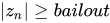
boolean escaped(Complex z, double bailout)
{
  if(z.norm() >= bailout)
  {
    return true;
  }

  return false;
}
在大多數情況下,使用歐幾里得範數(2),但你也可以使用任何其他範數。
通常,收斂到複數的判斷,使用以下收斂標準 .

boolean converged(Complex z, Complex z_old, double error)
{
  if(z.sub(z_old).norm() <= error)
  {
    return true;
  }

  return false;
}
收斂標準用於求根方法,用於確定是否找到根。
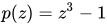
下面介紹了一些求根方法的例子。所有示例影像都使用 作為它們的函式。

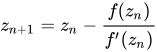





![{\displaystyle z_{n+1}=z_{n}-{\frac {f(z_{n})[2f'(z_{n})^{2}+f(z_{n})f''(z_{n})]}{2f'(z_{n})^{3}}}}](https://wikimedia.org/api/rest_v1/media/math/render/svg/211b51934c108e275960da10c61712591fe4fec4)








為了選擇分母的符號,您應該檢查 和 ,以確定具有較大範數的那個。




為了選擇分母的符號,您應該檢查兩個 和 ,以確定哪個具有較大的範數。




其中 deg 是度數,可以是任何複數。
為了選擇分母的符號,您應該檢查兩個 和 ,以確定哪個具有較大的範數。


逃逸條件 定義為停止迭代的標準。第二個停止迭代標準是當迭代次數超過最大迭代次數時。
在軟體的當前實現中,它只能更改逃逸型別分形,但概括顯然適用於任何迭代方法。
如果您想為收斂型別分形設定逃逸條件,例如牛頓法用於 ,您需要將使用者公式設定為 z - (z^3-1) / 3*z^2,並將演算法設定為逃逸型別。
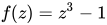
此時,您可以使用首選的停止條件設定使用者逃逸演算法。
boolean circleCriterion(Complex z, bouble bailout)
{
  if(z.norm() >= bailout)
  {
    return true;
  }

  return false;
}

boolean squareCriterion(Complex z, bouble bailout)
{
  if(Math.max(z.getAbsRe(), z.getAbsIm()) >= bailout)
  {
    return true;
  }

  return false;
}

boolean rhombusCriterion(Complex z, bouble bailout)
{
  if(z.getAbsRe() + z.getAbsIm() >= bailout)
  {
    return true;
  }

  return false;
}

boolean nNormCriterion(Complex z, bouble bailout, double n_norm)
{
  if(Math.pow(Math.pow(z.getAbsRe(), n_norm) + Math.pow(z.getAbsIm(), n_norm), 1 / n_norm) >= bailout)
  {
    return true;
  }

  return false;
}
boolean stripCriterion(Complex z, bouble bailout)
{
  if(z.getAbsRe() >= bailout)
  {
    return true;
  }

  return false;
}
boolean halfplaneCriterion(Complex z, bouble bailout)
{
  if(z.getRe() >= bailout)
  {
    return true;
  }

  return false;
}
boolean fieldLinesCriterion(Complex z, Complex zold, bouble bailout)
{
  if(z.getRe() / zold.getRe() >= bailout&& z.getIm() / zold.getIm() >= bailout)
  {
    return true;
  }

  return false;
}
其中 zold 是 z 的前一個值。
旋轉在技術上類似於平面變換。在我們從畫素座標獲得複數後,我們可以使用旋轉函式對複數進行變換。
使用尤拉公式
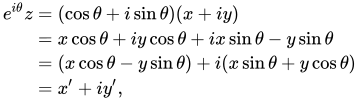
我們也可以圍繞任意點旋轉。在這種情況下,旋轉定義為
Complex rotate(Complex value, double angle, Complex rotationCenter) {

    Complex temp = value.sub(rotationCenter); // subtract the rotation center
    Complex rotation = new Complex(Math.cos(angle), Math.sin(angle));
    return temp.times(rotation).plus(center); // multiply by the rotation and re-add the rotation center

}


Fractal Zoomer 的極座標投影是使用 pfract 的實現 實現的。它是一個 指數對映 的例子,它將複平面對映到半徑和角度。
void createPolarProjectionImage(double xCenter, double yCenter, double size, int image_size, int maxIterations)
{
    double center = Math.log(size);
    double dy = (2 * Math.PI) / image_size;
    double dx = dy;
    double start = center - dx * image_size * 0.5;

   for(int y = 0; y < image_size; y++) {
       for(int x = 0; x < image_size; x++) {
           double sf = Math.sin(y * dy);
           double cf = Math.cos(y * dy);
           double r = Math.exp(x * dx + start);

           double result = Iterate(new Complex(xCenter + r * cf, yCenter + r * sf), maxIterations);
           imageIterations[y][x] = result; //save the iteration data for later use
           Color color = getColor(result, maxIterations);
           //set the color to the image at (y,x)
       }
   }
}
如果你想在 Fractal Zoomer 中看到這個大影像的一部分,將實座標設定為 -1.786440255563638。如果你開始縮放,你會發現縮放類似於 https://commons.wikimedia.org/wiki/File:Mandelbrot_set_exponential_mapping_c%3D-1.7864402555636389.png
為了獲得另一個影像,你需要將旋轉設定為 180,並將旋轉中心設定為當前中心。
為了渲染大型極座標影像(墨卡托地圖),你需要使用影像擴充套件器,並設定要拼接在一起的方形影像數量。
- 顏色對映檔案 = 副檔名為 map 的檔案,與 fractint 對映檔案 格式相同
- 描述 (顏色) 調色盤的陣列 Color[]
調色盤 被定義為一組顏色。它通常儲存在一個數組中。
Color[] palette = new Color[N];
其中 N 是調色盤中的顏色數量。
外著色或內著色演算法將生成一個數字作為其結果,該數字將被轉換為調色盤索引,然後轉換為顏色。
如果我們不關心連續顏色(平滑),簡單的轉換方法是將結果強制轉換為整數,然後將其用作索引。
出於我們的目的,假設方法 Iterate 負責根據所選的內著色和外著色方法建立其結果。
如果 Iterate 返回最大迭代次數作為結果,我們可以選擇指定的顏色,例如黑色。
Complex number = new Complex(2, 3);
double result = Iterate(number);
Color color = getColor(result, maxIterations);
Color getColor(double result, int maxIterations)
{
  if(result == maxIterations)
  {
     return Color.BLACK;
  }

  Color color = palette[((int)result) % N];
  return color;
}
如果我們想要連續顏色(平滑),Iterate 方法必須建立一個結果,該結果包含一個分數部分(例如 100.73)。
我們需要根據結果的整數部分獲取兩個連續的顏色,然後使用小數部分對這些顏色進行插值。
簡單的插值方法是線性插值,但也可以使用其他方法,例如餘弦插值等。
Complex number = new Complex(2, 3);
double result = Iterate(number);
Color color = getColor(result, maxIterations);
Color getColor(double result, int maxIterations)
{
  if(result == maxIterations)
  {
     return Color.BLACK;
  }

  Color color1 = palette[((int)result) % N];
  Color color1 = palette[((int)result + 1) % N];

  double fractional = result - (int)result;

  Color finalColor = new Color((int)(color1.getRed() + (color2.getRed() - color1.getRed()) * fractional + 0.5),
                             (int)(color1.getGreen() + (color2.getGreen() - color1.getGreen()) * fractional + 0.5),
                             (int)(color1.getBlue() + (color2.getBlue() - color1.getBlue()) * fractional + 0.5));
  return finalColor;
}
不逃逸預定義邊界或不收斂的複數屬於集合(集合內),因此使用“內著色”這個術語。
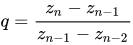
在大多數介紹的演算法中,使用複數的最後一個值,在某些特殊情況下,使用倒數第二個和第三個最後一個值。
如果使用使用者內著色演算法,可以進一步自定義演算法。
double maximumIterations(int maxIterations)
{
   return maxIterations; //max iterations
}
double normZ(Complex z, int maxIterations)
{
   return z.norm_squared() * (maxIterations / 3.0);
}
double decompositionLike(Complex z)
{
   return Math.abs((z.arg() / 2 * Math.PI + 0.75) * 59 * Math.PI);
}
所使用的常數,如 **0.75** 或 **59π** 完全是任意的。
double ReDivideIm(Complex z)
{
   return Math.abs(z.getRe() / z.getIm()) * 8;
}
double CosNormZ(Complex z)
{
   if((int)(z.norm_squared() * 10) % 2 == 1)
   {
      return Math.abs(Math.cos(z.getRe() * z.getIm() * z.getAbsRe() * z.getAbsIm()) * 400 + 50;
   }

   return Math.abs(Math.sin(z.getRe() * z.getIm() * z.getAbsRe() * z.getAbsIm())) * 400;
}
double NormZCosReSquared(Complex z)
{
   return z.norm_squared() * Math.abs(Math.cos(z.getRe() * z.getRe())) * 400;
}
double SinReSquaredMinusImSquared(Complex z)
{
   return Math.abs(Math.sin(z.getRe() * z.getRe() - z.getIm() * z.getIm())) * 400;
}
double AtanReTimesImTimesAbsReTimesAbsIm(Complex z)
{
   return Math.abs(Math.atan(z.getRe() * z.getIm() * z.getAbsRe() * z.getAbsIm())) * 400;
}
double Squares(Complex z)
{
   if(((Math.abs((int)(z.getRe() * 40)) % 2) ^ (Math.abs((int)(z.getIm() * 40)) % 2)) == 1)
   {
      return Math.abs((Math.atan2(z.getIm(), z.getRe()) / (Math.PI * 2)  + 0.75) * Math.PI * 59);
   }

   return Math.abs((Math.atan2(z.getRe(), z.getIm() / (Math.PI * 2)  + 0.75) * Math.PI * 59);
}
所使用的常數,如 **0.75** 或 **59π** 完全是任意的。
double Squares2(Complex z)
{
   double x = z.getRe() * 16;
   double y = z.getIm() * 16;

   double dx = Math.abs(x - Math.floor(x));
   double dy = Math.abs(y - Math.floor(y));

   if((dx < 0.5 && dy < 0.5) || (dx > 0.5 && dy > 0.5))
   {
       return 50; // a palette offset
   }

   return 0;
}
逃逸預定義邊界或收斂的複數不屬於集合(集合外),因此使用“外著色”這個術語。
在大多數介紹的演算法中,使用複數的最後一個值,在某些特殊情況下,使用倒數第二個和第三個最後一個值。
如果使用使用者外著色演算法,可以進一步自定義演算法。
逃逸時間演算法 計算分形逃逸預定義邊界條件(逃逸)或收斂到某個值(閾值很小)所花費的迭代次數。
如果未啟用連續顏色(平滑),我們只需要返回迭代次數,它將是整數。
double escapeTime(int n)
{
  return n; //iterations
}
如果啟用 continuous colors(平滑),我們需要生成一個結果,該結果將包含迭代次數加上一個小數部分。
計算逃逸型別分形的連續迭代次數
- 方法 1

請記住,所有範數都被平方,這樣我們就可以避免計算平方根,範數定義為
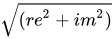
- 方法 2
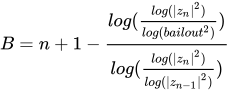
增加逃逸值將產生更平滑的影像。
計算收斂型別分形的連續迭代次數
- 方法 1


- 方法 2
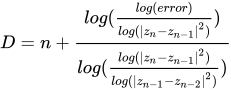
以上 escapeTime 函式應調整為包含所需引數。如您所見,它必須始終返回浮點數作為結果。
為了便於參考,在以下一些外著色方法中,我們將使用 **A**、**B**、**C** 和 **D** 這些名稱。
在特殊情況下,例如使用逃逸和收斂方法的磁鐵函式,我們必須使用相應的平滑方法。
如果最終的複數值逃逸,請使用逃逸平滑方法。如果最終的複數值收斂,請使用收斂平滑方法。
如果您知道確切的根或某個點可以收斂到,您可以更改平滑方法以合併此根,以獲得更好的結果。
例如,在磁鐵函式中,根位於 .

- 方法 1

- 方法 2
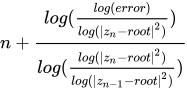
二進位制分解 基於最終的複數,我們可以向迭代次數新增偏移量。
連續迭代次數也可以用於此演算法。
double BinaryDecomposition(int n, Complex z)
{
   if(z.getIm() < 0)
   {
     return n + 50; //You can add A or B or C or D to include Continuous Iteration Count
   }

   return n; //You can add A or B or C or D to include Continuous Iteration Count
}
基於最終的複數,我們可以向迭代次數新增偏移量。
連續迭代次數也可以用於此演算法。
double BinaryDecomposition2(int n, Complex z)
{
   if(z.getRe() < 0)
   {
     return n + 50; //You can add A or B or C or D to include Continuous Iteration Count
   }

   return n; //You can add A or B or C or D to include Continuous Iteration Count
}
double EscapeTimePlusRe(int n, Complex z)
{
  return n + z.getRe();
}
double EscapeTimePlusIm(int n, Complex z)
{
  return n + z.getIm();
}
double EscapeTimePlusReDivideIm(int n, Complex z)
{
  return n + z.getRe() / z.getIm();
}
double EscapeTimePlusRePlusImPlusReDivideIm(int n, Complex z)
{
  return n + z.getRe() + z.getIm() + z.getRe() / z.getIm();
}
基於最終的複數,我們可以向迭代次數新增偏移量。
連續迭代次數也可以用於此演算法。
double Biomorph(int n, Complex z, double bailout)
{
   if(z.getRe() > -bailout && z.getRe() < bailout
   || z.getIm() > -bailout && z.getIm() < bailout)
   {
      return n; //You can add A or B to include Continuous Iteration Count
   }

   return n + 50; //You can add A or B to include Continuous Iteration Count
}
double ColorDecomposition(int n, Complex z)
{
  return Math.abs((z.arg() / 2 * Math.PI + 0.75) * 59 * Math.PI);
}
所使用的常數,如 **0.75** 或 **59π** 完全是任意的。
此演算法針對收斂型分形稍作修改,以便不同的根可以有不同的顏色。顯然,所使用的方法無法將複數對映到實數,但結果可用。
double ColorDecomposition(int n, Complex z)
{
  double re = Math.floor(1000 * (z.getRe() + 0.5) / 1000; // rounding
  double im = Math.floor(1000 * (z.getRe() + 0.5) / 1000; // rounding

  return Math.abs((Math.atan2(im, re) / Math.PI * 2  + 0.75) * Math.PI * 59  + (re * re + im * im) * 2.5);
}
所使用的常數,如 **0.75** 或 **59π** 完全是任意的。
double EscapeTimeColorDecomposition(int n, Complex z)
{
  return n + Math.abs((z.arg() / 2 * Math.PI + 0.75) * 59 * Math.PI);
}
所使用的常數,如 **0.75** 或 **59π** 完全是任意的。
此演算法針對收斂型分形稍作修改,以便不同的根可以有不同的顏色。顯然,所使用的方法無法將複數對映到實數,但結果可用。
連續迭代次數也可以用於此演算法。
double EscapeTimeColorDecomposition(int n, Complex z)
{
  double re = Math.floor(1000 * (z.getRe() + 0.5) / 1000; // rounding
  double im = Math.floor(1000 * (z.getRe() + 0.5) / 1000; // rounding

  return n + Math.abs((Math.atan2(im, re) / Math.PI * 2  + 0.75) * Math.PI * 59  + (re * re + im * im) * 2.5); //You can add C or D to include Continuous Iteration Count
}
所使用的常數,如 **0.75** 或 **59π** 完全是任意的。
double EscapeTimeGaussianInteger(int n, Complex z)
{
  return n + z.sub(z.gaussian_integer()).norm_squared() * 90;
}
可以使用此函式獲得高斯整數
Complex gaussian_integer()
{
  return new Complex((int)(re < 0 ? re - 0.5 : re + 0.5), (int)(im < 0 ? im - 0.5 : im + 0.5));
}
double EscapeTimeGaussianInteger2(int n, Complex z)
{
  Complex temp = z.sub(z.gaussian_integer());
  return n + Math.abs(Math.atan(temp.getIm() / temp.getRe())) * 5;
}
double EscapeTimeGaussianInteger3(int n, Complex z)
{
  Complex temp = z.sub(z.gaussian_integer());
  return Math.abs(n + temp.getRe());
}
double EscapeTimeGaussianInteger4(int n, Complex z)
{
  Complex temp = z.sub(z.gaussian_integer());
  return Math.abs(n +  temp.getRe() + temp.getIm());
}
double EscapeTimeGaussianInteger5(int n, Complex z)
{
  Complex temp = z.sub(z.gaussian_integer());
  return Math.abs(n +  temp.getRe() + temp.getIm() + temp.getRe() / temp.getIm());
}
double EscapeTimePlusAlgorithm(int n, Complex z, Complex z_old)
{
  Complex temp = z.sub(z_old);
  return n + Math.abs(Math.atan(temp.getIm() / temp.getRe())) * 4;
}
double EscapeTimePlusAlgorithm2(int n, Complex z)
{
  Complex temp = z.sub(z.sin());
  return n + Math.abs(Math.atan(temp.getIm() / temp.getRe())) * 8;
}
double EscapeTimeEscapeRadius(int n, Complex z, double bailout)
{
  double zabs = Math.log(z.norm_squared()) / Math.log(bailout * bailout) - 1.0;
  double zarg = (z.arg() / (2 * Math.PI) + 1.0) % 1.0;
  return n + zabs + zarg;
}
double EscapeTimeGrid(int n, Complex z, double bailout)
{
  double zabs = Math.log(z.norm_squared()) / Math.log(bailout * bailout) - 1.0;
  double zarg = (z.arg() / (2 * Math.PI) + 1.0) % 1.0;

  if(0.05 < zabs && zabs < 0.95 && 0.05 < zarg && zarg < 0.95)
  {
    return n; //You can add A or B to include Continuous Iteration Count
  }

  return n + 50; //You can add A or B to include Continuous Iteration Count
}
為了使網格線更平滑,可以使用以下版本。
double EscapeTimeGrid(int n, Complex z, double bailout)
{
  double zabs = Math.log(z.norm_squared()) / Math.log(bailout * bailout) - 1.0;
  double zarg = (z.arg() / (2 * Math.PI) + 1.0) % 1.0;

  double k = Math.pow(0.5, 0.5 - zabs);
  double grid_weight = 0.05;

  if(grid_weight < zabs && zabs < (1.0 - grid_weight) && (grid_weight * k) < zarg && zarg < (1.0 - grid_weight * k))
  {
    return n; //You can add A or B to include Continuous Iteration Count
  }

  return n + 50; //You can add A or B to include Continuous Iteration Count
}
double Banded(int n, Complex z)
{
  return n + Math.abs((Math.log(Math.log(z.norm_squared())) / Math.log(2)) * 2.4);
}
double EscapeTimeFieldLines(int n, Complex z, double bailout)
{
  double lineWidth = 0.008;
  double fx = (z.arg() / (2 * Math.PI);  // angle within cell
  double fy = Math.log(z.norm_squared()) / Math.log(bailout * bailout);
  double fz = Math.pow(0.5, -fy);

  if(Math.abs(fx) > lineWidth * fz)
  {
    return n; //You can add A or B to include Continuous Iteration Count
  }

  return n + 50; //You can add A or B to include Continuous Iteration Count
}
double EscapeTimeFieldLines2(int n, Complex z, double bailout)
{
  double lineWidth = 0.07;
  double fx = (z.arg() / 2) * Math.PI;
  double fy = Math.log(z.norm_squared()) / Math.log(bailout * bailout);
  double fz = Math.pow(0.5, -fy);

  if(Math.abs(fx) < (1.0 - lineWidth) * fz && lineWidth * fz < Math.abs(fx))
  {
    return n; //You can add A or B to include Continuous Iteration Count
  }

  return n + 50; //You can add A or B to include Continuous Iteration Count
}
"透過計算區域性熵來渲染 M 集。對於每個點,我計算了該點周圍 2n+1×2n+1 網格上歸一化迭代次數的熵,在下面的示例中,n=2。正如預期的那樣,它的行為有點像距離估計,靠近邊界的點更加無序。但除此之外,它還顯示了有趣的“太陽耀斑”,它們來自迭代次數的歸一化,即它們捕獲了關於逃逸的資訊。"[3]
由於每個畫素的著色完全獨立於彼此,因此我們可以透過將影像分成多個片段併為每個片段分配不同的執行緒來加快處理速度。
有很多不同的方法來分割影像,例如水平、垂直、網格等。
假設影像被分割成一個網格。(1x1, 2x2, 3x3, ...)
每個執行緒將分配不同的 gridI 和 gridJ。gridSize 將是 1 或 2 或 3...
void createImage(int gridI, int gridJ, int gridSize, double xCenter, double yCenter, double size, int image_size, int maxIterations)
{
   double dx = size / image_size;
   double dy = size / image_size;

   double xCenterOffset = xCenter - size * 0.5;
   double yCenterOffset = yCenter + size * 0.5;

   int fromY = gridI * image_size / gridSize;
   int toY = (gridI + 1) * image_size / gridSize;

   int fromX = gridJ * image_size / gridSize;
   int toX = (gridJ + 1) * image_size / gridSize;

   for(int y = fromY; y < toY; y++) {
       for(int x = fromX; x < toX; x++) {
           double result = Iterate(new Complex(xCenterOffset + dx * x, yCenterOffset - dy * y), maxIterations);
           imageIterations[y][x] = result; //save the iteration data for later use
           Color color = getColor(result, maxIterations);
           //set the color to the image at (y,x)
       }
   }
}
以下是使用執行緒最佳化後的極座標投影程式碼
void createPolarProjectionImage(int gridI, int gridJ, int gridSize, double xCenter, double yCenter, double size, int image_size, int maxIterations)
{
    double center = Math.log(size);
    double dy = (2 * Math.PI) / image_size;
    double dx = dy;
    double start = center - dx * image_size * 0.5;

    int fromY = gridI * image_size / gridSize;
    int toY = (gridI + 1) * image_size / gridSize;

    int fromX = gridJ * image_size / gridSize;
    int toX = (gridJ + 1) * image_size / gridSize;

   for(int y = fromY; y < toY; y++) {
       for(int x = fromX; x < toX; x++) {
           double sf = Math.sin(y * dy);
           double cf = Math.cos(y * dy);
           double r = Math.exp(x * dx + start);

           double result = Iterate(new Complex(xCenter + r * cf, yCenter + r * sf), maxIterations);
           imageIterations[y][x] = result; //save the iteration data for later use
           Color color = getColor(result, maxIterations);
           //set the color to the image at (y,x)
       }
   }
}
這些型別的演算法試圖透過跳過某些區域的所有畫素來減少計算的畫素。該區域必須與相同顏色的邊界相鄰。
這些演算法可以顯著加快繪製過程,但它們可能會引入錯誤。
-
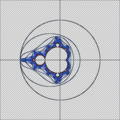 邊界追蹤
邊界追蹤 -
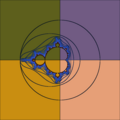 邊界追蹤,多執行緒


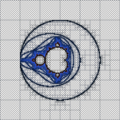
此演算法遵循單色邊界,然後使用泛洪填充演算法來繪製該邊界中包含的所有畫素。
-
-
 迭代
迭代 -
 多執行緒
多執行緒


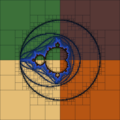
透過將影像迭代地細分為四個部分(使用十字),此演算法檢查矩形邊界以跳過整個區域。
此演算法也稱為Mariani/Silver 演算法。
為了避免對集合中的點進行大量迭代,可以執行週期性檢查。檢查迭代畫素時是否之前已經到達過某個點。如果是,則該畫素不可能發散,並且一定在集合中。
如果週期性檢查成功,可以安全地假設我們將達到最大迭代次數,因此可以停止迭代。
Complex period = new Complex(); // period = 0
int check = 3;
int check_counter = 0;

int update = 10;
int update_counter = 0;

boolean periodicityCheck(Complex z) {

        //Check for period
        if(z.distance_squared(period) < 1e-13) { // |z-period|^2
            return true;
        }

        //Update history
        if(check == check_counter) {
            check_counter = 0;

            //Double the value of check
            if(update == update_counter) {
                update_counter = 0;
                check <<= 1;
            }
            update_counter++;

            period.assign(z); // period = z
        } //End of update history

        check_counter++;

        return false;
}
超取樣[4] 是一種空間抗鋸齒方法,即用於消除影像中鋸齒(鋸齒狀和畫素化邊緣,俗稱“鋸齒”)的方法。
基本上,我們建立一個包含更多細節的更大的影像,然後可以將其縮放到更小的尺寸。縮小是透過平均顏色來實現的。這樣,包含大量噪聲的區域就會變得平滑。
下面介紹的方法不儲存更大影像的資料,以節省空間。
對於原始影像的每個畫素,它還透過使用更小的步長來計算一些附近的點。

此方法還包括執行緒最佳化。
void createImageSuperSampling(int gridI, int gridJ, int gridSize, double xCenter, double yCenter, double size, int image_size, int maxIterations, int samples)
{
   double dx = size / image_size;
   double dy = size / image_size;

   double xCenterOffset = xCenter - size * 0.5;
   double yCenterOffset = yCenter + size * 0.5;

   int fromY = gridI * image_size / gridSize;
   int toY = (gridI + 1) * image_size / gridSize;

   int fromX = gridJ * image_size / gridSize;
   int toX = (gridJ + 1) * image_size / gridSize;

   double a = size * 0.25;

   double totalSamples = samples + 1;

   double x[] = {-a, a, a, -a,
            -a, a, 0, 0,
            -2*a, -2*a, -2*a, 0, 0, 2*a, 2*a, 2*a,
            -2*a, -2*a, -a, -a, a, a, 2*a, 2*a};
   double y[] = {-a, -a, a, a,
            0, 0, -a, a,
            -2*a, 0, 2*a, -2*a, 2*a, -2*a, 0, 2*a,
            -a, a, -2*a, 2*a, -2*a, 2*a, -a, a};

   for(int y = fromY; y < toY; y++) {
       for(int x = fromX; x < toX; x++) {
           double x0 = xCenterOffset + dx * x;
           double y0 = yCenterOffset - dy * y;
           double result = Iterate(new Complex(x0, y0), maxIterations); //calculate for the center value
           imageIterations[y][x] = result; //save the iteration data for later use
           Color color = getColor(result, maxIterations);

           int red = color.getRed();
           int green = color.getGreen();
           int blue = color.getBlue();

           for(int i = 0; i < samples; i++)
           {
               result = Iterate(new Complex(x0 + x[i], y0 + y[i]), maxIterations); //calculate for the extra samples around center
               color = getColor(result, maxIterations);

               /* Sum all the samples */
               red += color.getRed();
               green += color.getGreen();
               blue += color.getBlue();
           }

           Color finalColor = new Color((int)(red / totalSamples + 0.5),
                                        (int)(green / totalSamples + 0.5),
                                        (int)(blue / totalSamples + 0.5)); //average the color

           //set the final color to the image at (y,x)
       }
   }
}
下面介紹使用超取樣和執行緒最佳化的極座標投影程式碼。
void createPolarProjectionImageSuperSampling(int gridI, int gridJ, int gridSize, double xCenter, double yCenter, double size, int image_size, int maxIterations, int samples)
{
    double center = Math.log(size);
    double dy = (2 * Math.PI) / image_size;
    double dx = dy;
    double start = center - dx * image_size * 0.5;

    int fromY = gridI * image_size / gridSize;
    int toY = (gridI + 1) * image_size / gridSize;

    int fromX = gridJ * image_size / gridSize;
    int toX = (gridJ + 1) * image_size / gridSize;

    double a = dy * 0.25;

    double totalSamples = samples + 1;

    double x[] = {-a, a, a, -a,
            -a, a, 0, 0,
            -2*a, -2*a, -2*a, 0, 0, 2*a, 2*a, 2*a,
            -2*a, -2*a, -a, -a, a, a, 2*a, 2*a};
    double y[] = {-a, -a, a, a,
            0, 0, -a, a,
            -2*a, 0, 2*a, -2*a, 2*a, -2*a, 0, 2*a,
            -a, a, -2*a, 2*a, -2*a, 2*a, -a, a};

    for(int y = fromY; y < toY; y++) {
       for(int x = fromX; x < toX; x++) {
           double sf = Math.sin(y * dy);
           double cf = Math.cos(y * dy);
           double r = Math.exp(x * dx + start);

           double result = Iterate(new Complex(xCenter + r * cf, yCenter + r * sf), maxIterations);
           imageIterations[y][x] = result; //save the iteration data for later use
           Color color = getColor(result, maxIterations);

           int red = color.getRed();
           int green = color.getGreen();
           int blue = color.getBlue();

           for(int i = 0; i < samples; i++)
           {
               sf = Math.sin(y * dy + y[i]);
               cf = Math.cos(y * dy + y[i]);
               r = Math.exp(x * dx + start + x[i]);

               result = Iterate(new Complex(xCenter + r * cf, yCenter + r * sf), maxIterations); //calculate for the extra samples around center
               color = getColor(result, maxIterations);

               /* Sum all the samples */
               red += color.getRed();
               green += color.getGreen();
               blue += color.getBlue();
           }

           Color finalColor = new Color((int)(red / totalSamples + 0.5),
                                        (int)(green / totalSamples + 0.5),
                                        (int)(blue / totalSamples + 0.5)); //average the color
           //set the color to the image at (y,x)
       }
    }
}
如果你想在超取樣時儘量減少對三角函式和指數函式的使用,你可以使用一些函式的恆等式。
對於指數函式
我們將使用以下恆等式


所以


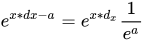
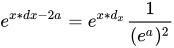
你必須預先計算一次 ,然後使用這些恆等式將其替換到所有表示式中。

對於三角函式
我們將使用以下恆等式




所以








您必須預先計算 , 一次,並使用這些恆等式將它們替換到所有表示式中。


檔案型別
資源庫