


LaTeX/簡歷
< LaTeX

一份簡歷或履歷有一個普遍的要求:它的格式必須完美無缺。這是 LaTeX 強大功能發揮作用的絕佳案例。憑藉其強大的排版功能,LaTeX 無疑是編寫簡歷的首選文件處理器。
當然,你可以手工設計自己的簡歷。否則,你可能希望使用專門為此任務設計的類。這樣,用 LaTeX 編寫簡歷就像填寫表格一樣簡單,而且你就完成了。需要說明的是,類或包不僅定義了要填寫的表格的語法,還定義了佈局。雖然填寫表格非常容易,但更改本應固定的佈局卻極其困難。從頭開始編寫簡歷,使用列表環境和表格,可以獲得最佳效果。
- ⇒ 請注意,
res.cls仍然被一些人使用。這是一個非常古老的類,幾乎不可能自定義。只有非常有經驗的使用者應該使用res.cls。 ⇐
可在CTAN上找到完整的簡歷包列表。
\documentclass[utf8, a4paper, 10pt, helvetica, narrow, flagWB, booktabs, totpages, english]{europecv}
\usepackage{graphicx}                        % Required to draw the flag
\usepackage[a4paper, left=3cm, right=2cm, top=2cm, bottom=2cm]{geometry}
\usepackage{babel}

% Commands europecv

\ecvLogoWidth{12mm}		             % Size logo europass
%\ecvLeftColumnWidth{4cm}		     % Size of column and vertical line (different from standard)
%\ecvfootnote{footnote}	             % Foot notes
\ecvname{\textsc{Surname}, First Name}

% Personal picture

\ecvbeforepicture{\raggedleft}
\ecvpicture[height=1in]{namefile_pic}   % File picture without extension
\ecvafterpicture{\ecvspace{-2.5cm} }

% Address

\ecvaddress{Address first line\\& Address second line\\& City, State}

% Telephone

\ecvtelephone{+44 (0) 123 4567}
%\ecvfax{+39 01234567}

\ecvemail{john@someserver}

% Other personal info

\ecvnationality{Nationality}
\ecvdateofbirth{01/01/1900}
\ecvgender{Male}

\begin{document}

% Begin europecv environment

\begin{europecv}

\ecvpersonalinfo		% Print personal info in preamble

\ecvitem{}{}		% 1 free line - \ecvitem{}{} adds elements to a section
%\ecvsection{}		% \ecvsection{} adds sections

\ecvitem{\large\textbf{Desired employment / Occupational field} }{\Large\textbf{Dream job} }  % desired job

% Sections

% School

\ecvsection{Education and training}

\ecvitem{Dates}{From September 1900 to August 1905}\\
\ecvitem{Title of qualification awarded}{Name of the\\& degree}\\
\ecvitem{Principal subjects/occupational skills covered}{Learned skills}\\
\ecvitem{Name and type of organisation providing education and training}{My University\\&
Address\\&
City\\& Nation\\&
Post code\\&
Tel. +44 (0) 123 45678 23}\\
\ecvitem{Level in national or international classification}{Level of degree}\\

%\pagebreak{}

% Single course

\ecvitem{Dates}{August 2013}
\ecvitem{Title of qualification awarded}{Name of certification}
\ecvitem{Principal subjects/occupational skills covered}{Skills of certification}
\ecvitem{Name and type of organisation providing education and training}{Institution}\\

% Last working experience

\ecvsection{Work Experience}
\ecvitem{Dates}{From June 1957 to February 1987}\\
\ecvitem{Occupation or position held}{Name of the job}\\
\ecvitem{Main activities and responsibilities}{Activities during \\& this job}
\ecvitem{Name and address of employer}{Name of employer\\&
Employer address\\&
Second line\\& City\\& Nation\\&
Tel. +39 (0) 1234 5678}\\
\ecvitem{Type of business or sector}{Business}\\

% Volunteer experiences

\ecvsection{Volunteer Experience}

\ecvitem{Dates}{From August 2000 to present}\\
\ecvitem{Occupation or position held}{First Aider}\\
\ecvitem{Main activities and responsibilities}{Activities}
\ecvitem{Name and address of employer}{Name\\&
Address\\&
City\\& Post code\\&
Nation\\&
Tel. +44 (0) 1234 7654}\\
\ecvitem{Type of business or sector}{Business}\\

% Personal competences

\ecvsection{Personal skills and competences}

% Languages

% Mothertongue

\ecvmothertongue[10pt]{Italian}\\		% 10pt leave a one-char line space before the text

% Table for common language evaluation

\ecvlanguageheader{(*)}
\ecvlanguage{English}{\ecvCOne}{\ecvCOne}{\ecvCOne}{\ecvCOne}{\ecvCOne}	         % second language and levels
      % Language levels A1 - A2 - B1 - B2 - C1 - C2 from basic to advanced.
      % in this package are \ecv + A, B or C and the sub-level in letters (One or Two)
\ecvlanguage{French}{\ecvBTwo}{\ecvBTwo}{\ecvBTwo}{\ecvBTwo}{\ecvBTwo}       % third
\ecvlastlanguage{Russian}{\ecvAOne}{\ecvATwo}{\ecvBOne}{\ecvCTwo}{\ecvBTwo} 	% last language

\ecvlanguagefooter{(*)}\\

% Social skills

\ecvitem{Social skills and competences}{- First social skill;\\& - Second social skill}\\

% Technical skills

\ecvitem{Technical skills and competences}{- First technical skill;\\& - Second technical skill}\\

% Computer skills

\ecvitem{Computer skills and competences}{- First skill;\\& - Second}\\

% Other skills

\ecvitem{Other skills and competences}{- First otherskill}\\

% Driving Licence

\ecvitem{Driving licence(s)}{Category and Type}\\

% Annexes

\ecvsection{Annexes}
\ecvitem{}{On request:}
\ecvitem{}{Birth certificate}
\ecvitem{}{Passport}
\ecvitem{}{Driving licence}
\ecvitem{}{Criminal record certificate}
\ecvitem{}{University study plan}
\ecvitem{}{}

% Disclaimer

\ecvsection{Disclaimer}
\ecvitem{}{This informations may be used for all purposes permitted by law and under the Data Protection Act 1998.\\&
Autorizzo l'utilizzo dei dati personali contenuti nel presente curriculum ai sensi del D.Lgs. 196/2003 e s.m.i. (Codice in materia di protezione dei dati personali)}

\end{europecv}
\end{document}
|
來自CTAN
Moderncv提供了一個文件類,用於排版現代簡歷,既有經典風格,也有休閒風格。它非常可自定義,允許您透過更改顏色、字型等來定義自己的風格。
官方包提供了一些經過良好註釋的模板,這些模板可能是一個好的開始。您可以在您的發行版中找到這些模板(如果文件與包一起安裝),或者最終在CTAN上找到。
我們不會在此重複模板,因此我們將只提供一個速成課程。您應該真正檢視模板以瞭解更多詳細資訊。
大多數命令是不言自明的。
\documentclass[11pt,a4paper,sans]{moderncv}

%% ModernCV themes
\moderncvstyle{casual}
\moderncvcolor{blue}
\renewcommand{\familydefault}{\sfdefault}
\nopagenumbers{}

%% Character encoding
\usepackage[utf8]{inputenc}

%% Adjust the page margins
\usepackage[scale=0.75]{geometry}

%% Personal data
\firstname{Mandla}
\familyname{Kubheka}
\title{Resumé title (optional)}
\address{Mdakane Thokoza}{Alberton Ward52}
\mobile{063~408~4217}
\phone{06}
\fax{+3~(456)~789~012}
\email{mandlakubheka@gmail.com}
\homepage{www.mandlakubheka.com}
\extrainfo{additional information}
\photo[64pt][0.4pt]{picture}
\quote{Some quote (optional)}

%%------------------------------------------------------------------------------
%% Content
%%------------------------------------------------------------------------------
\begin{document}
\makecvtitle

\section{Lethukuthula.Secondary.School}
\cventry{year--year}{None}{None}{Katlehong}{ \textit{Grade11} }{Description}  % arguments 3 to 6 can be left empty
\cvitem{title}{ \emph{Title} }
\cvitemwithcomment{Language 3}{Skill level}{Creative thinking, Dedicated and Hardworking}
\cvdoubleitem{category X}{XXX, YYY, ZZZ}{category Y}{XXX, YYY, ZZZ}
\cvlistitem{Item 1}
\cvlistdoubleitem{Item 2}{Item 3}
%% ...

%% A publications list
\nocite{*}
\bibliographystyle{plain}
\bibliography{publications} % a bibtex file containing the list of publications

\end{document}
|
- 主題
-
 銀行黑色主題
 -
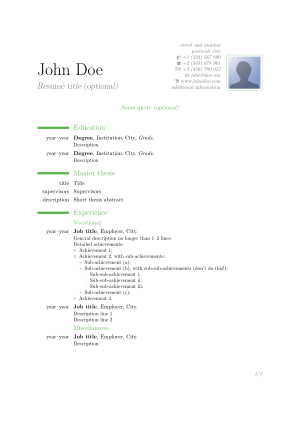 經典綠色主題


沒有必要使用複雜的模板,它具有給定的佈局,而且難以更改。您可以像使用簡單的article類編寫簡歷一樣。您可以自由決定資訊的量、資訊的佈局以及您想要顯示資訊的順序。您是設計師,不受任何語法限制。
\documentclass{article}
\usepackage{geometry}
\geometry{margin=1in}
\setcounter{secnumdepth}{0}
\setlength{\parindent}{0pt}
\begin{document}
\begin{center}
\begin{tabular}{rl}
\huge\textbf{John} &\huge\textbf{Birdwatch}\\
+44 1234 9876 &johnbirdwatch@watchingbirds.org\\
Sunny Lane 15 &Duckbourgh\end{tabular}
\end{center}
\section{Computer Skills}
\LaTeX, PERL, Windows, Linux
\section{Education}
\textbf{Master of Arts in 2015}
for \textsc{Pigeons love doves}\par
\textbf{Bachelor of Arts in 2013}
for \textsc{Pigeons in Cities}
\section{Publications}
John Birdwatch, \textsc{Pigeons love doves},
Master Thesis, Columbidae University, 2015\par
Laura Lion, John Birdwatch and Paul Platypus,
{\itshape Journal of excessive Bird Watchers}:
``Observations made in the Duck Pond", 2016\par
\end{document}
|
|

上面的示例有一個簡單的居中標題,包括姓名和個人資訊。出版物部分是完全手工完成的。如果您有許多出版物,您應該考慮使用參考文獻管理包,請參見Biblatex。另一個使用biblatex包的小示例。
\begin{filecontents}{\jobname.bib}
@thesis{birdwatch2015,
author      = {John Birdwatch},
title       = {Pigeons love ducks},
type        = {mathesis},
institution = {Columbidae University},
location    = {Duckbourgh},
date        = {2015},
keywords    = {ownpub},
}
@article{birdwatch2016,
author   = {Laura Lion and John Birdwatch and Paul Platypus},
title    = {Observations made in the Duck Pond},
journal  = {Journal of excessive Bird Watchers},
date     = {2016},
keywords = {ownpub},
}
\end{filecontents}
\documentclass{article}
\usepackage{scrextend}
\addtokomafont{labelinglabel}{\bfseries}
\usepackage{enumitem}
\usepackage{geometry}
\geometry{margin=1in}
\usepackage[style=authoryear]{biblatex}
\addbibresource{\jobname.bib}
\nocite{*}
\setcounter{secnumdepth}{0}
\setlength{\parindent}{0pt}
\begin{document}
{\huge\textbf{John Birdwatch}\par}
+44 1234 9876 \par johnbirdwatch@watchingbirds.org\par
Sunny Lane 15 \par Duckbourgh\par
\vspace{1cm}
\begin{labeling}{Longest list item}
\item [Computer Skills] \LaTeX, PERL, Windows, Linux
\item [Education] \parbox[t]{.8\textwidth}{
Master of Arts in 2015 for \textsc{Pigeons love doves}\par
Bachelor of Arts in 2013 for \textsc{Pigeons in Cities}
}
\end{labeling}
\section{Former watches}
\begin{description}[align=left,leftmargin=4cm,style=multiline]
\item[2011 (three months)] Birdwatching in Iceland \\ one month in the capital \\ two months driving around the island
\item[2012 (six weeks), 2017 (8 weeks)] The Canopy Tower in Panama\bigskip
\item[2013 (one week)] Venice, Italy
\end{description}
\printbibliography[title=Publications,heading=subbibliography,keyword=ownpub]
\end{document}
|
|

對於簡歷來說,只用一份文件來輸出多種語言非常方便,因為許多部分在不同版本之間是共享的(個人資料、結構等)。
LaTeX 以及相應的宏提供了管理它的便捷方法。請參見國際化.